Mailing Lists Management

Benefit-First Mailing Lists Management

Win More Repeat Work with Smarter Customer and Staff Communication

Turn Customer Data into Targeted Email, SMS and WhatsApp Campaigns

Reach the right customers, staff and fieldworkers with more relevant messages at the right time. OctopusPro connects mailing lists, segmentation, templates, automation, bulk SMS, WhatsApp, Mailchimp sync, consent controls and reporting with the same service data your team already uses.

Target customer and staff lists using real service dataSend through email, SMS, WhatsApp and MailchimpProtect list quality with permission controlsMeasure activity, performance and engagement

Built for service-business communication

Use one connected workflow for campaigns, service updates, staff messages, customer follow-up and list-quality controls.

Better audiencesUse CRM, labels, service history, custom fields and lead sources.
Less manual workUse templates, automations, personalisation and sync options.
Cleaner communicationUse opt-outs, bounce handling, logs, analytics and reporting.
Why connected mailing lists matter

Recover More Opportunities by Connecting Mailing Lists to Service Data

Improve targeting, reduce manual exports and follow up at the right moment using mailing lists that understand real customer activity.

Before: disconnected lists create missed follow-up

  • Customer lists are exported manually from different systems.
  • Marketing tools do not always reflect current booking, quote or payment activity.
  • Staff spend time cleaning lists, checking duplicates and chasing outdated records.
  • Follow-up is slower because teams cannot easily see the full customer context.

After: connected lists make communication more relevant

  • Create useful customer and staff mailing lists from one connected service management platform.
  • Segment audiences using enquiries, quotes, bookings, invoices, payments and issues.
  • Use templates, scheduling, autoresponders, personalisation and integrations to communicate consistently.
  • Use logs, reports, opt-outs and list-quality controls to keep campaigns easier to manage.

Ready to replace scattered spreadsheets with smarter mailing lists?

Start building targeted lists from customer, booking, quote and service data already managed in OctopusPro.

What this feature helps you do

Communicate More Clearly with Customers, Staff and Fieldworkers from One Platform

Keep communication consistent across customer marketing, service updates and internal team messages. OctopusPro gives you one place to organise audiences, manage communication channels and keep list building connected to real service data.

Instead of relying on disconnected spreadsheets, your team can build mailing lists from customer records, enquiry details, quote activity, booking history, invoices, payments, complaints and internal discussions, then use those audiences for more relevant communication.

Customer mailing listsStaff and fieldworker listsMailchimp syncBulk SMS and WhatsAppTemplates and reportingMobile optimisation

What you can organise from one connected workflow

Reach customers with more relevant messagesUse customer mailing lists built from records, enquiries, quotes, bookings, invoices, payments, complaints and communication history.
Keep internal communication organisedCreate mailing lists for admin users, staff, fieldworkers, teams or operational groups without mixing internal updates with customer campaigns.
Support multiple communication channelsCombine segmentation with templates, automation, Mailchimp sync, bulk SMS, WhatsApp messaging, permissions and reporting.
Business outcomes first

What Better Mailing List Management Helps You Improve

Start with the result you want, then use the OctopusPro tools that support that result: segmentation, templates, automation, opt-outs, Mailchimp, SMS, WhatsApp and reporting.

RetentionIncrease repeat workReach existing customers with relevant service reminders, maintenance campaigns and re-engagement messages.
TargetingImprove audience relevanceBuild lists from customer type, service history, labels, lead source, date ranges, custom fields and booking activity.
EfficiencyReduce admin workUse templates, scheduled automation, autoresponders, placeholders and synced marketing tools to reduce manual follow-up.
QualityProtect campaign performanceUse unsubscribe options, preference centres, bounce handling, deduplication, deliverability monitoring and reporting.
Who benefits

Support Every Team Involved in Customer Communication

Mailing lists are not only for marketing. They also help admin, operations, fieldworkers and business owners communicate with the right audience faster.

OwnersImprove customer retentionUse targeted communication and campaign reporting to support repeat work and better marketing decisions.
Admin teamsReduce manual list workUse CRM data, templates and automation instead of constantly exporting, cleaning and updating spreadsheets.
OperationsKeep service updates consistentSupport booking, quote, invoice, reminder and customer follow-up workflows from one platform.
FieldworkersReceive clearer internal updatesUse staff and fieldworker communication lists for process updates, training notes and operational announcements.
Why OctopusPro is different

Move from Disconnected Email Lists to Operationally Aware Mailing Lists

Generic email tools can send campaigns, but they often depend on exported spreadsheets and manual updates. OctopusPro gives service businesses a better foundation by connecting mailing lists to the records already used to run daily operations.

Disconnected toolsLists become outdated quicklyExported spreadsheets are separated from booking history, quote status, invoices, customer issues and communication activity.
Connected workflowLists reflect real service activityPlan audiences around customer history, staff groups, custom fields, subscriber preferences, automation rules and integrations such as Mailchimp.
Audience data sources

Build More Useful Lists from the Data Already in OctopusPro

Targeting works best when your lists are built from real service activity, not disconnected spreadsheets. OctopusPro helps turn customer, staff and operational data into more useful audiences.

CRM dataCustomer records and communication historyUse customer type, contact details, labels, properties, communication history and service notes to plan relevant lists.
Sales activityEnquiries, quotes and lead sourcesFollow up prospects based on enquiry source, quote status, sales stage, labels and follow-up requirements.
Service activityBookings, invoices and paymentsCreate audiences based on completed work, upcoming bookings, lapsed customers, invoice status, repeat service needs and customer value.
Segmentation controlsCustom fields, tags and preferencesUse custom fields, labels, consent and preferences to keep lists more specific and respectful.
Internal teamsStaff, fieldworkers and user groupsSeparate internal announcements, operational updates and fieldworker communication from customer campaigns.
Campaign toolsMailchimp, SMS and WhatsApp workflowsUse internal data to plan better campaigns, then send or sync through the channel that best fits the audience.
Practical use cases

Use One Audience System Across Marketing, Service Updates and Internal Communication

Increase repeat bookings, reduce missed follow-up and keep teams informed using customer lists, staff lists, segmentation, templates, automation and channel-specific messaging.

MarketingPromotions and seasonal campaignsSend targeted offers to customers most likely to need a specific service again.
EducationCustomer educationShare aftercare instructions, service preparation tips, maintenance advice or product updates.
Lead recoveryLead nurturing and re-engagementFollow up inactive customers, unconverted enquiries or customers who have not booked recently.
OperationsOperational announcementsNotify customers about service changes, availability updates or important business notices.
Internal teamsStaff and fieldworker updatesSend internal announcements, process updates, training notes or team-specific communication.
IntegrationExternal marketing workflowsExport or sync lists with tools such as Mailchimp when a dedicated email platform is preferred.
Lifecycle campaign examples

Keep Customers Engaged Before, During and After Each Booking

Reduce drop-off, improve preparedness and encourage repeat work by communicating across the full service lifecycle.

1

Before booking

Recover leads and quotes with educational content, quote reminders, seasonal offers and service-specific follow-up.

2

During booking

Share preparation instructions, service updates, reminders and changes that help customers know what to expect.

3

After service

Reach past customers with maintenance reminders, feedback requests, referral campaigns and repeat-booking offers.

A

Internal teams

Send operational updates, policy changes, training information or team notices to the right group.

B

Marketing

Build campaign audiences around customer type, service history, location, preferences and quote status.

C

List health

Use bounce handling, unsubscribe options, deliverability monitoring and reporting to improve each campaign.

Smarter segmentation examples

Improve Response Rates by Segmenting Before You Send

Make every message more useful by narrowing the audience before the campaign goes out.
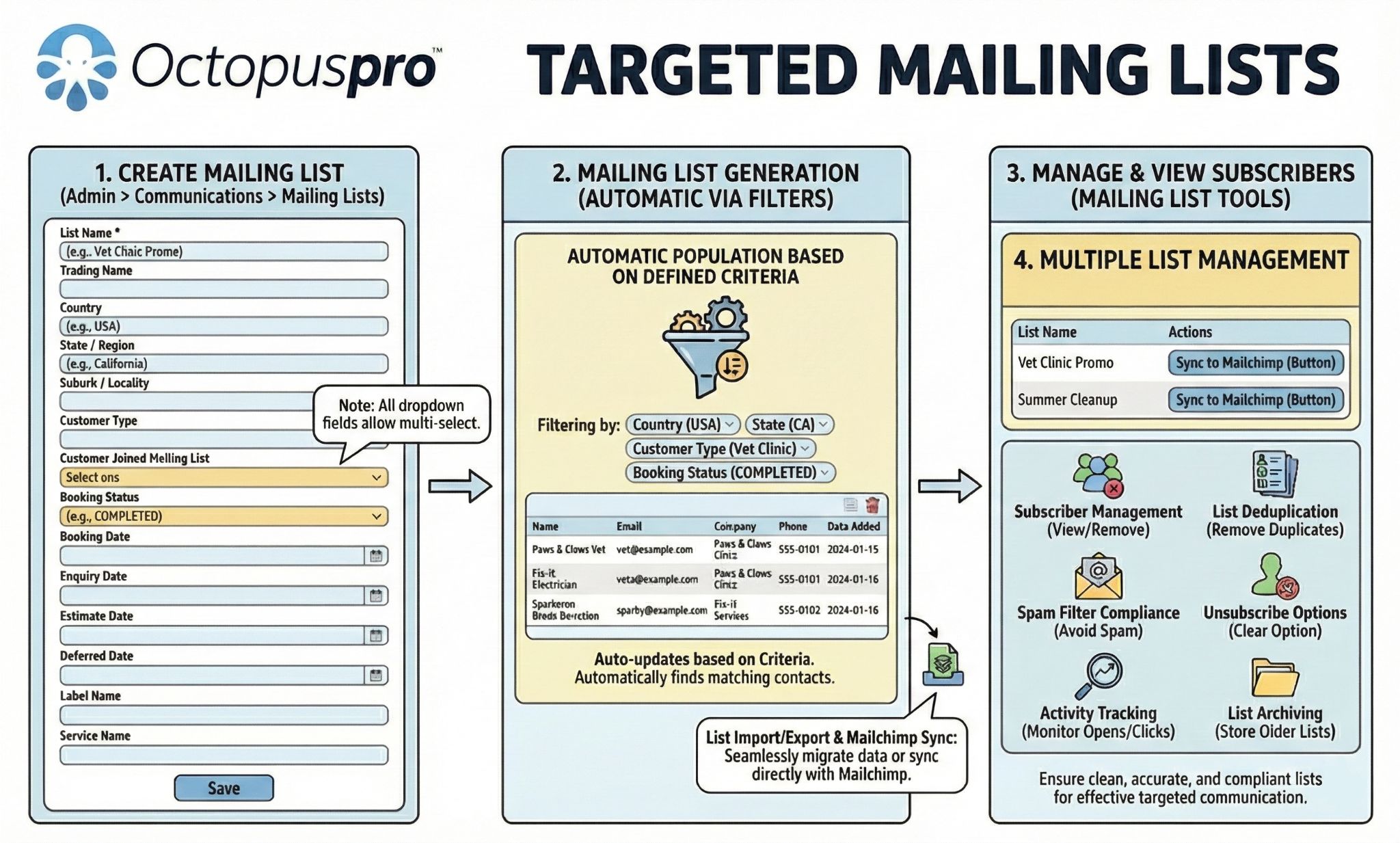
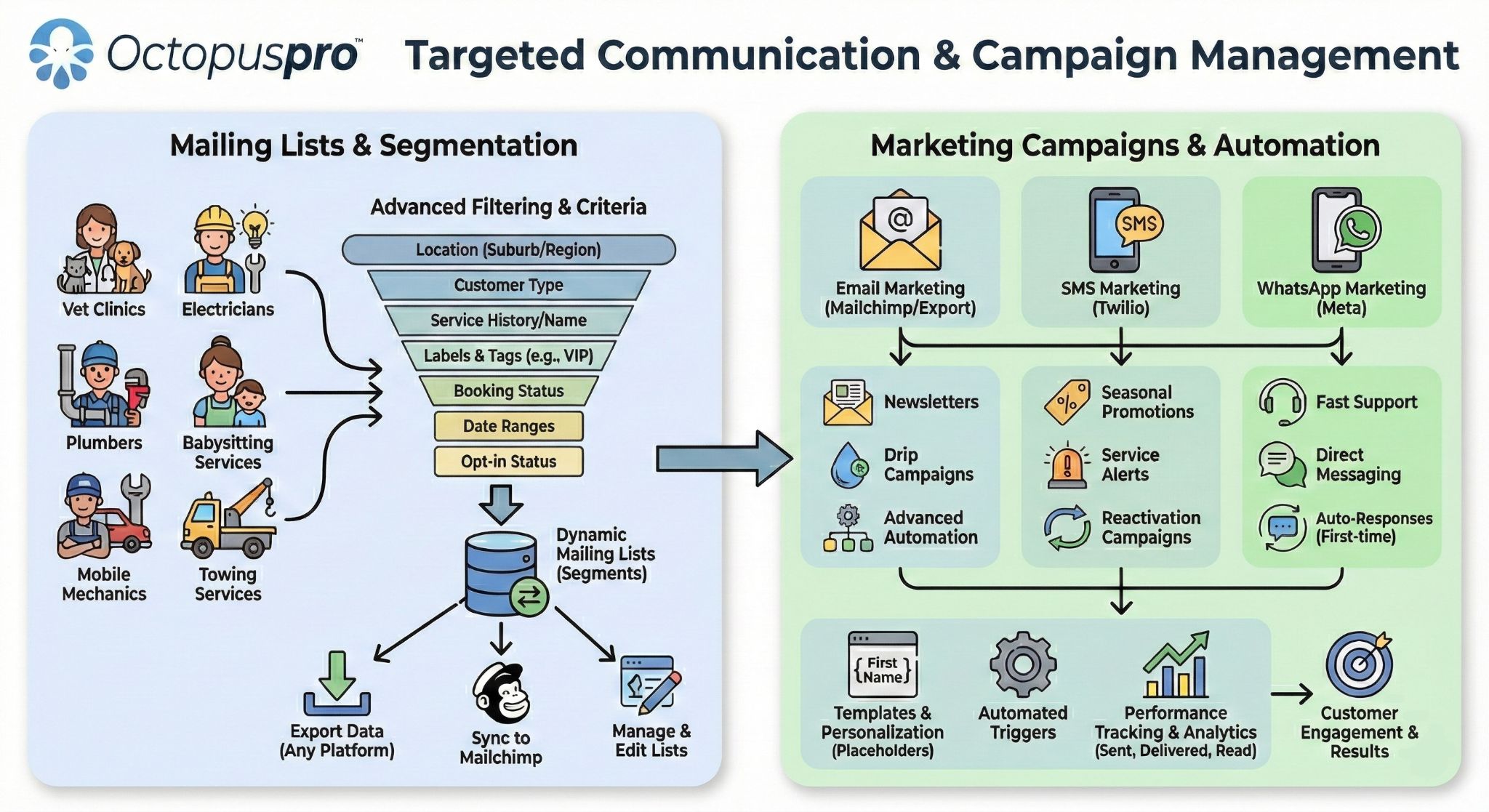
New enquiries and unconverted leadsFollow up prospects who have contacted the business but have not yet booked or accepted a quote.
Accepted, declined or expired quotesSend reminders, education, seasonal offers or follow-up messages based on quote status and service interest.
Past customers by service typePromote repeat services, maintenance work, add-ons or upgrades to customers with relevant booking history.
Customers due for another serviceSupport next-service reminders, recurring service campaigns and re-engagement messages.
High-value or priority customersCreate lists for VIP customers, commercial clients, property managers or customers with specific service requirements.
Staff, teams and fieldworkersSend process updates, training notes, operational announcements or team-specific communication to the right internal audience.

Targeted Mailing Lists

Targeted Mailing ListsThis diagram supports the segmentation examples by showing how customer and service data can be grouped into more useful campaign audiences.
Campaign planning matrix

Match Each Audience with the Right Message, Timing and Outcome

Plan campaigns around real service-business scenarios, including marketing, operations, customer service, internal communication and list quality.

Lead recoveryLead follow-up campaignsTarget new enquiries, open quotes and unbooked prospects after enquiry, quote view or quote expiry.
Service readinessBooking and service updatesReach booked customers and recurring customers before appointments, after service or when a repeat visit is due.
Customer educationService-specific educationGroup customers by service type, property type or purchase history to send useful maintenance and care content.
RetentionRe-engagement and win-backBring inactive customers, old leads and lapsed accounts back into the booking pipeline.
Team alignmentInternal staff communicationSend training updates, process changes and operational announcements to staff, fieldworkers and teams.
List qualityPreference and list health updatesProtect deliverability by managing bounced emails, inactive contacts and changed communication preferences.

Mailing Lists Management and Communication

Mailing Lists Management and CommunicationThis visual supports the campaign planning matrix by showing how Email, SMS, WhatsApp, Mailchimp, staff communication and reporting work together.
How the workflow fits together

Move from Everyday Service Data to Targeted Communication

Save time and improve relevance by turning day-to-day service activity into targeted communication. OctopusPro connects customer records, staff records, bookings, quotes, invoices, payments, issues, segmentation, templates, automations and reporting into one practical workflow.

1Collect useful audience dataStore customer, staff, booking, quote, invoice, payment and issue-related information so lists can be built from real activity.
2Make each message more relevantGroup subscribers by customer type, activity, custom fields, preferences or operational history.
3Reach people at the right timeUse templates, Personalisation, scheduling, Autoresponders and Scheduled automation to support timely communication.
4Improve the next campaignTrack activity, improve Deliverability monitoring, clean lists and re-engage inactive contacts.

Automate follow-up without losing control

Use templates, placeholders, automation logs and communication history to keep customer messaging consistent.

Campaign playbook

Recover Revenue and Improve Follow-Up with Practical List Examples

Start with the business result you want, then build the list that supports it.

Unconverted quote follow-upAudience: sent, declined or expired quotes

Goal: Recover missed revenue opportunities.

Message type: Helpful reminders, service benefits, limited-time follow-up or alternative booking options.

Repeat-service campaignsAudience: past bookings by service type

Goal: Encourage repeat work and maintenance bookings.

Message type: Next-service reminders, seasonal offers, care tips or package promotions.

Staff communication listsAudience: admin users, fieldworkers or service teams

Goal: Keep internal updates organised.

Message type: Training notices, process changes, safety updates, new-service announcements or team reminders.

Setup support

Want Help Choosing the Right Mailing Lists?

Map customers, leads, staff and fieldworkers into practical audiences for email, SMS, WhatsApp and Mailchimp campaigns.

Connected customer journeys

Make Mailing Lists Part of the Customer Journey

For service businesses, list management works best when it connects marketing, operations and customer history. OctopusPro helps teams decide who to contact, what to send, when to send it and how to keep list quality under control.

RelevanceAudience relevanceCustomers and staff receive communication based on actual service data, not disconnected spreadsheet exports.
TimingOperational timingMessages can support enquiries, quotes, bookings, payments, issues and repeat-service opportunities.
QualityLong-term qualityOpt-outs, bounce handling, authentication and analytics help protect list health and future deliverability.
Workflow visual

How Mailing List Communication Moves Through OctopusPro

A cleaner visual path showing how operational data becomes targeted communication and measurable campaign improvement.

1CaptureEnquiries, customers, bookings and staff data
2SegmentLists, labels, custom fields and source data
3PersonaliseTemplates, placeholders and branded messages
4SendEmail, SMS, WhatsApp and Mailchimp workflows
5ImproveLogs, reports, opt-outs and list quality controls
Campaign creation

Send More Consistent, Professional Messages with Less Manual Work

Improve consistency, save admin time and keep messages on-brand with responsive Email templates, Mobile optimisation, scheduled automation, Welcome emails, Autoresponders, Personalisation, template placeholders, attachments and Mailchimp integration.
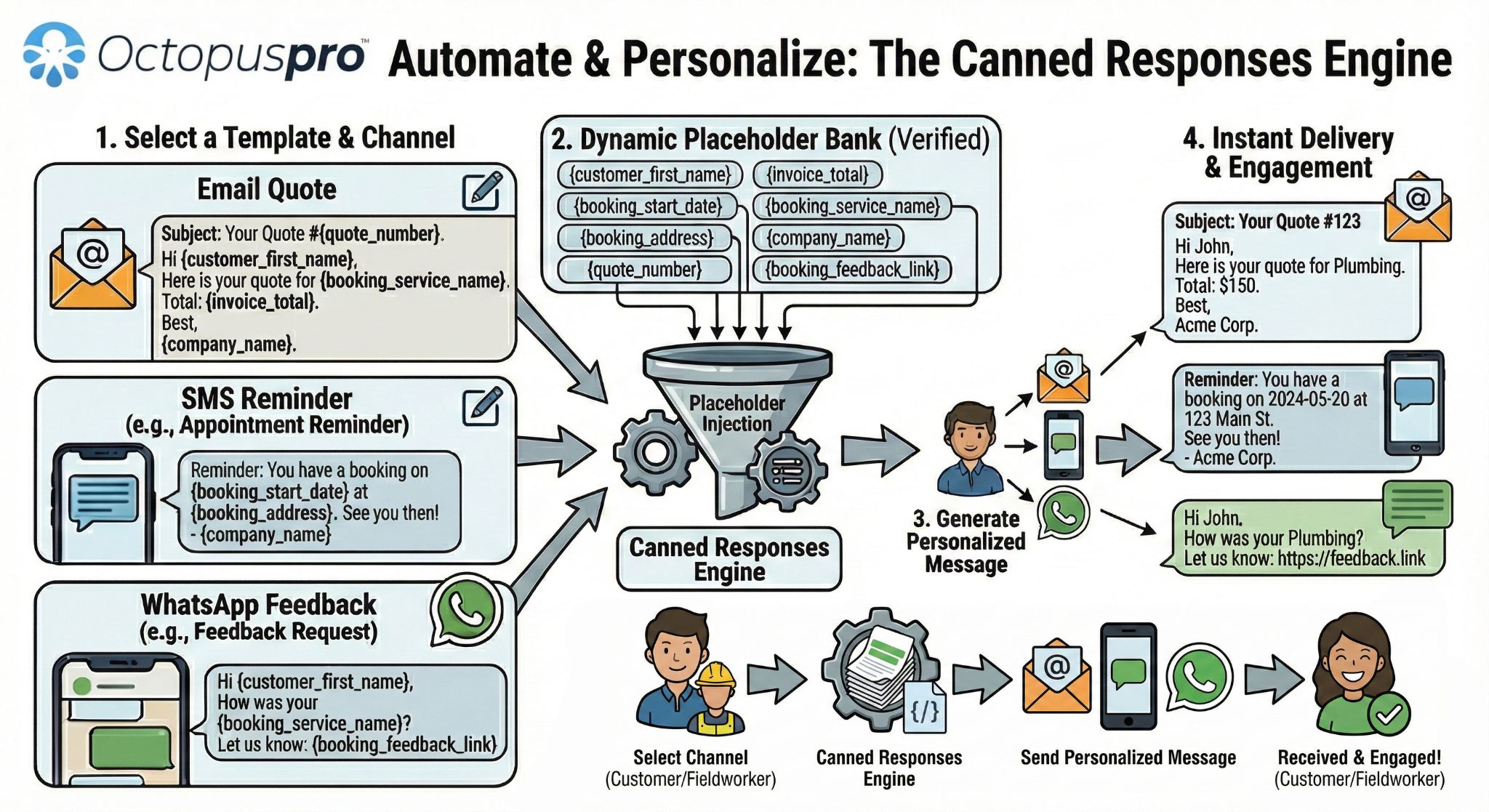
Create professional branded messagesUse responsive email templates to keep customer communication consistent, recognisable and easier to manage.
Communicate across devicesSupport mobile-friendly messaging and templates so teams and customers can read communication clearly across screen sizes.
Save admin time with automationUse welcome emails, autoresponders, scheduled automation, placeholders and attachments to reduce repeated manual follow-up.

Canned Responses and Templates Engine

Canned Responses and Templates EngineThis visual belongs with campaign creation because it explains reusable message templates across Email, SMS and WhatsApp.
Template Placeholders Summary

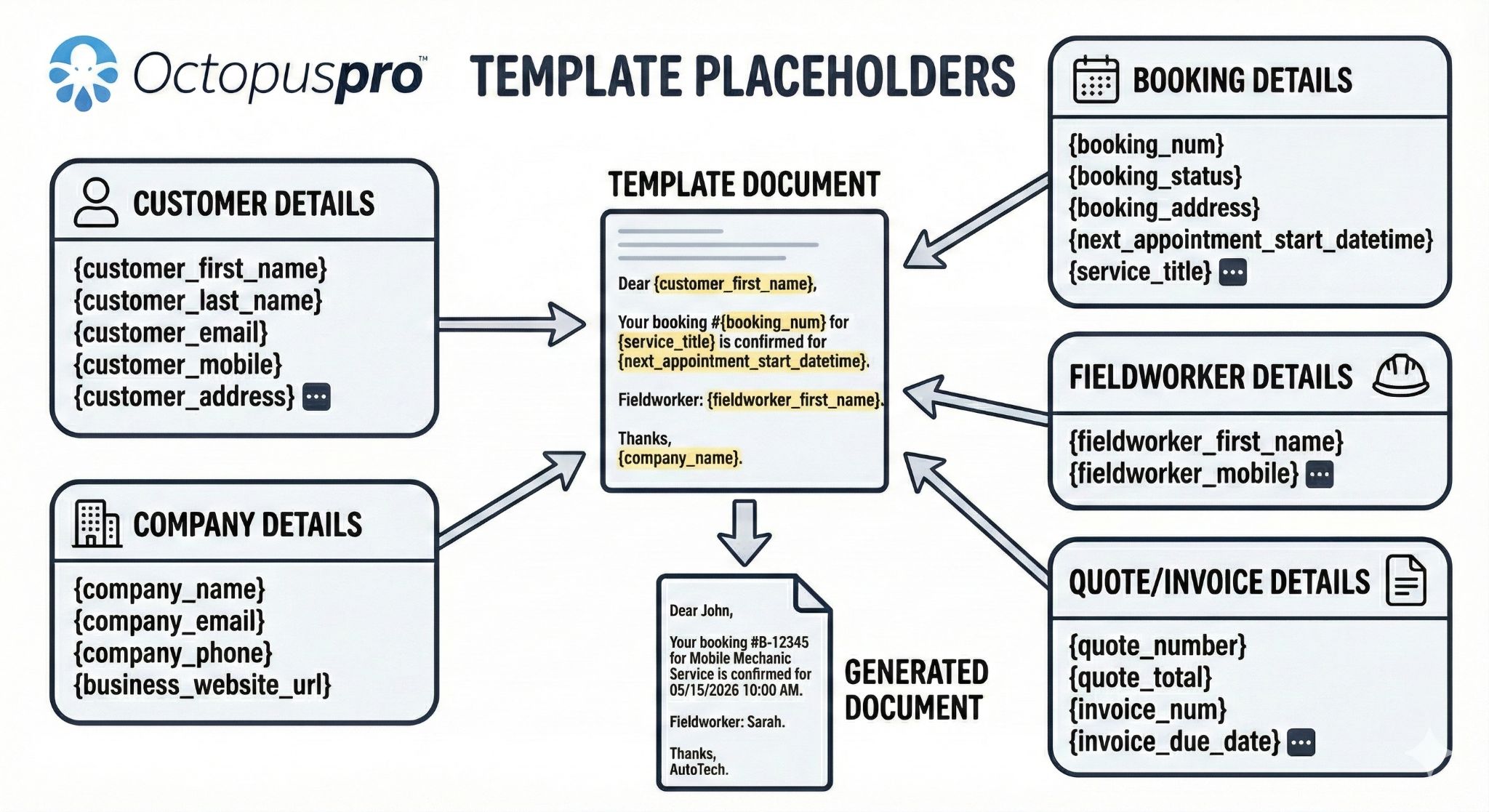
Template Placeholders SummaryThis visual supports the personalisation section by showing how placeholders and merge fields make messages more relevant.
Connected data and external tools

Use Customer Data Inside OctopusPro, Then Export or Sync When Needed

Keep list building close to your operational data while still supporting external marketing platforms and campaign workflows. Build richer audiences in OctopusPro first, then sync or export when your campaign needs another tool.
Boost Sales with Integrated DataUse connected customer data to build smarter campaignsCentralised customer data, including inquiry details, estimates, bookings, invoices, payments, complaints and discussions, makes it easier to create custom mailing lists for more effective campaigns.
Effortless Import and Export of ListsExport or sync list data when an external workflow needs itExport customer lists for external marketing, social media or other business use, or sync them to connected platforms so your data remains organised.

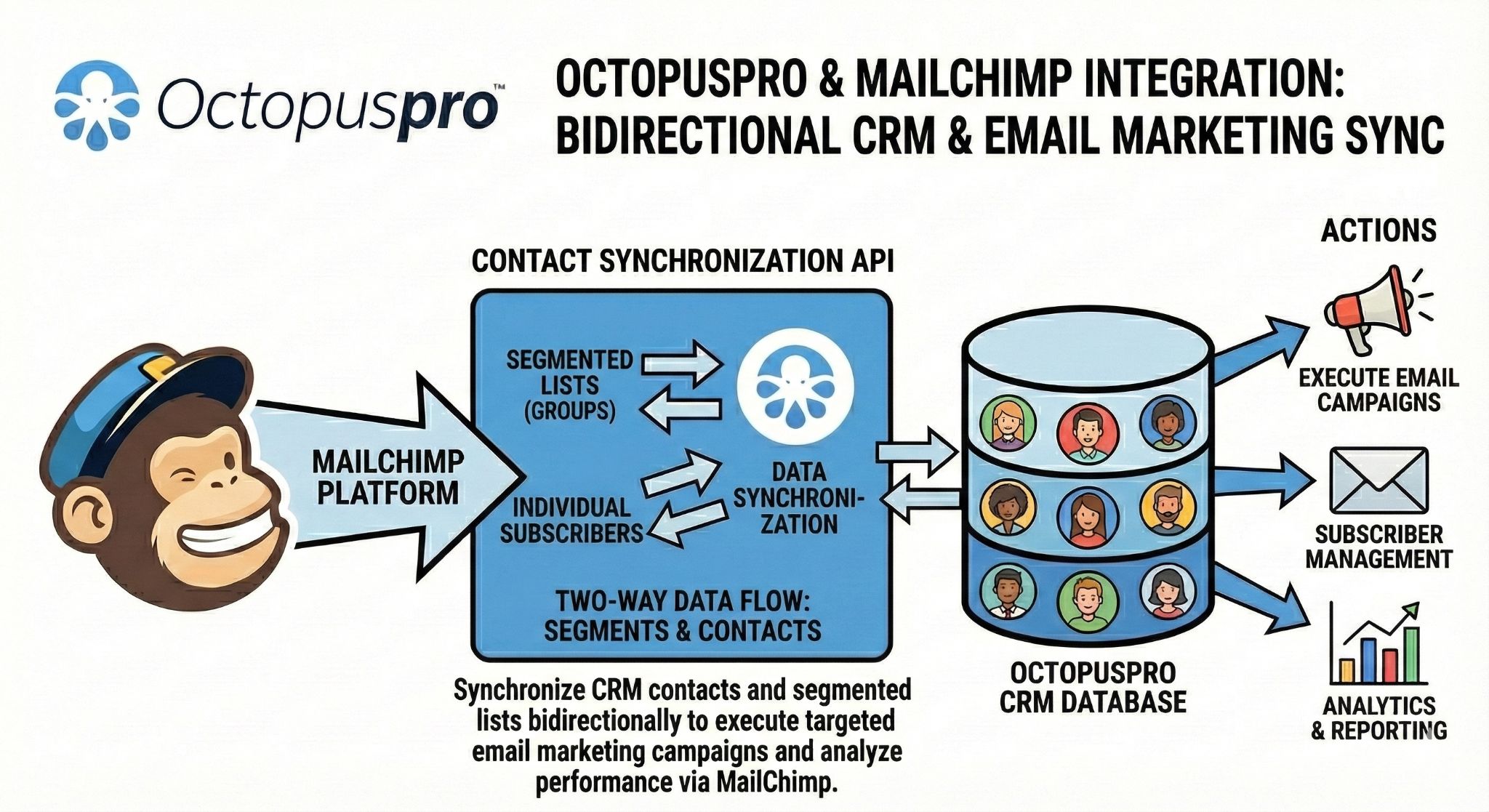
Mailchimp Integration

Mailchimp IntegrationThis image supports the external tools section by showing how OctopusPro mailing lists can sync with dedicated email marketing workflows.
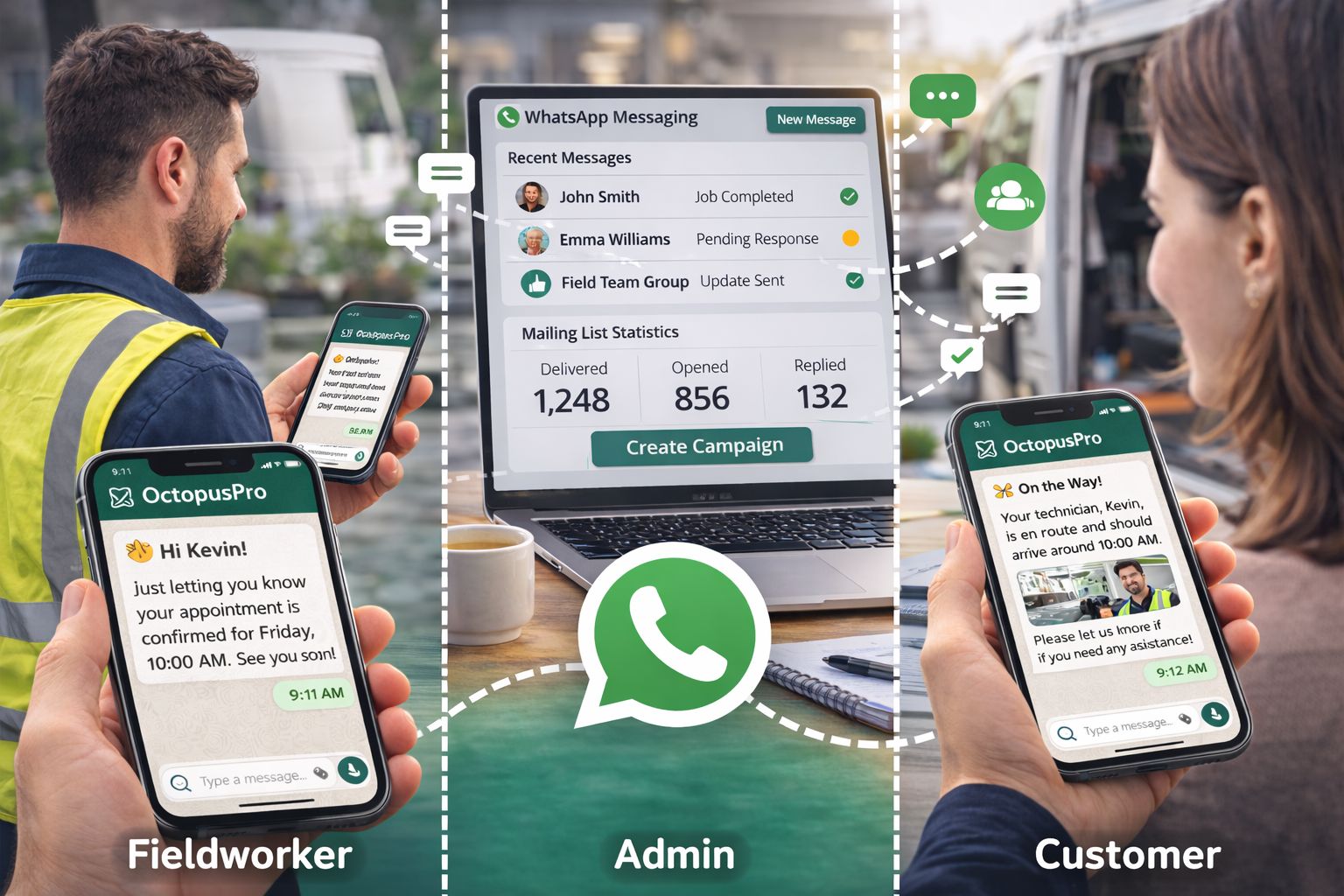
WhatsApp Business Communication

WhatsApp Business CommunicationThis visual supports the communication channel section by showing WhatsApp as part of the wider customer messaging workflow.
Brand, reporting and integration

Strengthen Brand Consistency, Reporting and External Marketing Workflows

Make campaigns look professional, measure what works and keep your existing marketing stack connected.

Keep campaigns flexible for brands of all sizesUse adaptable templates that match your communication style, service categories and business requirements.
Make better campaign decisions with Advanced AnalyticsUse customer reports and performance insights to improve campaign targeting and support long-term business growth.
Use Mailchimp campaigns with OctopusPro customer dataConnect operational customer data with your existing marketing platform through Mailchimp sync and import/export workflows.
Decision guide

Check Whether This Feature Fits Your Communication Workflow

Use these questions to decide how OctopusPro can reduce manual exports, disconnected lists and inconsistent communication.

Do you need to contact different customer groups?Use segmentation, custom fields, activity tracking and subscriber management to create lists for leads, customers, service categories, repeat buyers, inactive customers or preferred groups.
Do you need staff and fieldworker communication lists?Use staff lists, user roles and permissions to keep internal communication separate from customer campaigns while managing it from the same platform.
Do you already use Mailchimp or another marketing tool?Use import/export and Mailchimp integration to support existing marketing workflows while keeping OctopusPro data useful for audience planning.
Do you need cleaner data and better deliverability?Use unsubscribe options, permission-based marketing, bounce handling, deduplication, deliverability monitoring and preference centres to maintain healthier lists.
Deliverability and list health

Protect Campaign Performance After Every Send

Improve future campaigns by keeping lists accurate, permission-aware and measurable after each send. OctopusPro supports this with preference centres, unsubscribe options, permission-based marketing, bounce handling, deduplication, blacklist/whitelist controls, analytics, activity tracking, deliverability monitoring and A/B testing.

Protect customer trustUse preference centres, Unsubscribe options and Permission-based marketing to respect subscriber choice and reduce complaints.
Keep lists accurateUse Bounce handling, List deduplication, Blacklist/whitelist controls and List archiving to keep mailing data cleaner.
Make better decisions next timeUse Performance analytics, Activity tracking, Deliverability monitoring and A/B testing to improve future campaigns.
Continuous improvement loop

Use Every Campaign to Improve the Next One

A strong mailing list process should get cleaner and more useful over time. OctopusPro supports the cycle from list building to sending, tracking, cleaning and re-engaging.
1BuildCreate lists from customers, staff, custom fields and service activity.
2SendUse templates, scheduling, autoresponders, personalisation and mobile-friendly designs.
3MeasureReview performance analytics, activity tracking, A/B testing and deliverability monitoring.
4ImproveClean bounced emails, remove duplicates, respect preferences and re-engage inactive contacts.

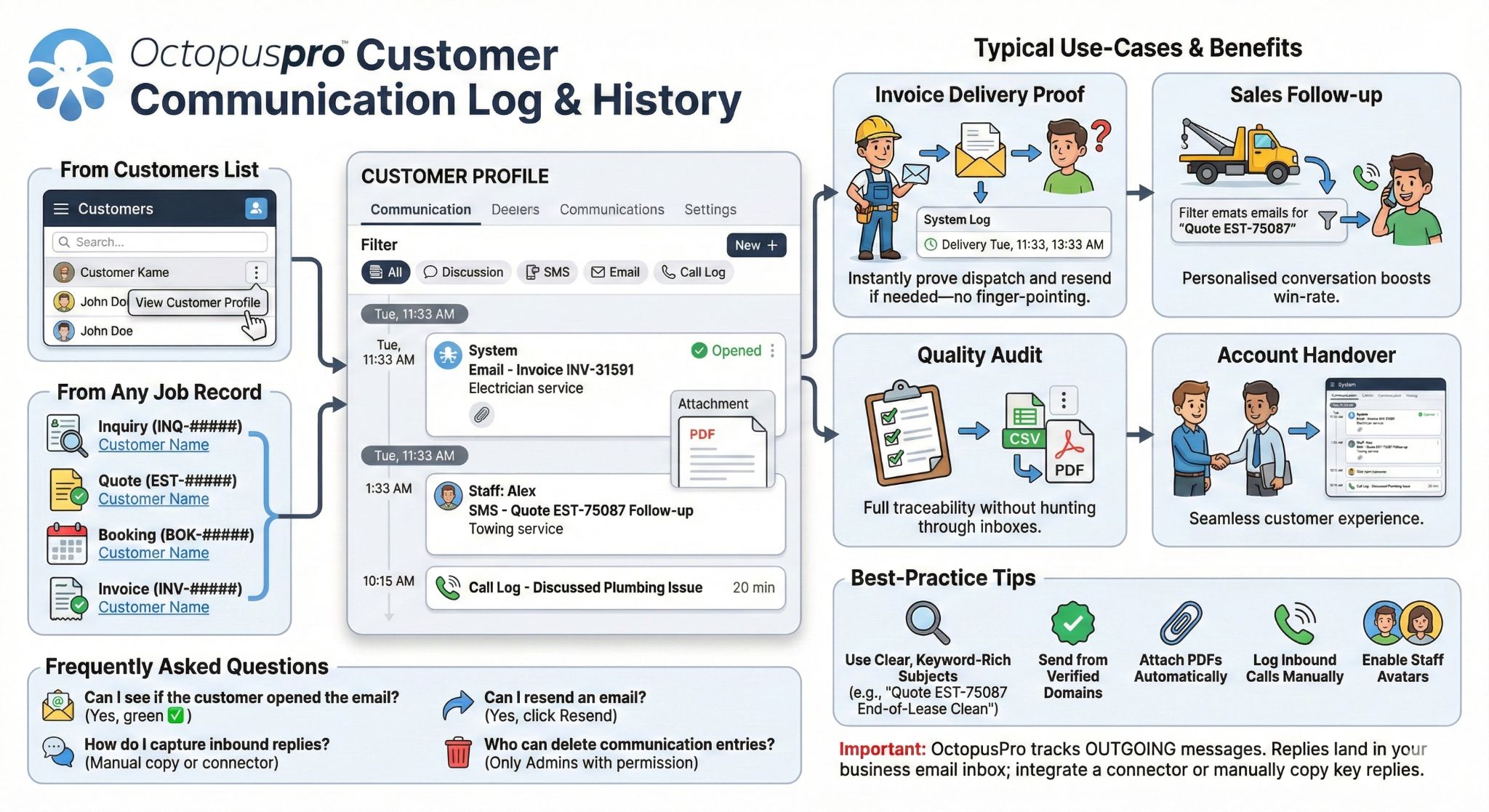
Customer Communication Log and History

Customer Communication Log and HistoryThis visual belongs with reporting, list quality and communication history content because it shows the audit trail behind customer messages.
Designed for field and mobile service businesses

Improve Communication Across Many Service Industries

Support repeat work, seasonal promotions, staff updates and customer education across different service industries.

Cleaning
Gardening
Locksmiths
Pool care
Plumbing
Real estate
Builders
Maintenance
Mobile services
Field services
Connected communication

Keep Mailing Lists Connected to Your Service Management Workflow

OctopusPro brings customer communication, staff updates, campaign lists, automations and reporting into the same workflow used to manage enquiries, quotes, bookings, invoices, payments, complaints and customer history.

TargetingTarget better audiencesUse CRM, service history, Custom fields, labels and lead sources to build more useful lists.
ChannelsSend through the right channelSupport Email templates, SMS, WhatsApp, Mailchimp and internal team communication workflows.
QualityProtect list qualityUse opt-outs, authentication, Bounce handling, deduplication, roles and communication logs.
ReportingImprove over timeReview reporting, activity history and campaign performance to refine future campaigns.
Complete related feature directory

All Mailing List Management Features and Setup Guides

A complete reference of related mailing list, campaign, automation, communication, compliance and reporting capabilities. Every item is listed once and linked to the most relevant setup guide or product page.

Compact feature directory: Every related Mailing Lists Management capability is still included once, including List segmentation, with a direct link to the most relevant setup guide or product page.

List building

Customer and staff mailing listsBuild more accurate audiences so messages reach the people most likely to respond.Dynamic customer segmentationBuild more accurate audiences so messages reach the people most likely to respond.Location-based audience targetingBuild more accurate audiences so messages reach the people most likely to respond.Customer type targetingBuild more accurate audiences so messages reach the people most likely to respond.Service history targetingBuild more accurate audiences so messages reach the people most likely to respond.Booking status targetingBuild more accurate audiences so messages reach the people most likely to respond.Date-range segmentationBuild more accurate audiences so messages reach the people most likely to respond.Labels and tags segmentationBuild more accurate audiences so messages reach the people most likely to respond.Lead source segmentationBuild more accurate audiences so messages reach the people most likely to respond.Communication preference targetingBuild more accurate audiences so messages reach the people most likely to respond.Marketing opt-in filteringBuild more accurate audiences so messages reach the people most likely to respond.Custom field targetingBuild more accurate audiences so messages reach the people most likely to respond.Subscriber managementBuild more accurate audiences so messages reach the people most likely to respond.List editing and refinementBuild more accurate audiences so messages reach the people most likely to respond.List import/exportBuild more accurate audiences so messages reach the people most likely to respond.Download mailing dataBuild more accurate audiences so messages reach the people most likely to respond.

Templates & automation

SMS templatesReduce manual follow-up while keeping communication timely and consistent.Canned responsesReduce manual follow-up while keeping communication timely and consistent.Template placeholders / merge fieldsReduce manual follow-up while keeping communication timely and consistent.Automated reminders and confirmationsReduce manual follow-up while keeping communication timely and consistent.Inquiry follow-up remindersReduce manual follow-up while keeping communication timely and consistent.Quote follow-up remindersReduce manual follow-up while keeping communication timely and consistent.Abandoned cart follow-upReduce manual follow-up while keeping communication timely and consistent.Re-engagement campaignsReduce manual follow-up while keeping communication timely and consistent.Service-due reminder campaignsReduce manual follow-up while keeping communication timely and consistent.Seasonal campaignsReduce manual follow-up while keeping communication timely and consistent.VIP/high-value customer campaignsReduce manual follow-up while keeping communication timely and consistent.Payment reminder campaignsReduce manual follow-up while keeping communication timely and consistent.Staff and fieldworker communication listsReduce manual follow-up while keeping communication timely and consistent.Booking confirmations by email, SMS and WhatsAppReduce manual follow-up while keeping communication timely and consistent.Pause/resume automated notificationsReduce manual follow-up while keeping communication timely and consistent.Automation frequency and Run Now testingReduce manual follow-up while keeping communication timely and consistent.Automation channel selectionReduce manual follow-up while keeping communication timely and consistent.Internal process automationsReduce manual follow-up while keeping communication timely and consistent.

Controls, compliance & deliverability

Role-based permissions for communication managementMaintain customer trust, sender reputation and internal control as communication volume grows.Communication history and logsMaintain customer trust, sender reputation and internal control as communication volume grows.Automation run logsMaintain customer trust, sender reputation and internal control as communication volume grows.Business email authenticationMaintain customer trust, sender reputation and internal control as communication volume grows.Domain/email verificationMaintain customer trust, sender reputation and internal control as communication volume grows.Spam filter complianceMaintain customer trust, sender reputation and internal control as communication volume grows.Permission-based marketingMaintain customer trust, sender reputation and internal control as communication volume grows.Unsubscribe optionsMaintain customer trust, sender reputation and internal control as communication volume grows.Unsubscribe reasons and feedbackMaintain customer trust, sender reputation and internal control as communication volume grows.Bounce handlingMaintain customer trust, sender reputation and internal control as communication volume grows.Deliverability monitoringMaintain customer trust, sender reputation and internal control as communication volume grows.List deduplicationMaintain customer trust, sender reputation and internal control as communication volume grows.Blacklist/whitelist controlsMaintain customer trust, sender reputation and internal control as communication volume grows.Preference centresMaintain customer trust, sender reputation and internal control as communication volume grows.Email throttlingMaintain customer trust, sender reputation and internal control as communication volume grows.List archivingMaintain customer trust, sender reputation and internal control as communication volume grows.SPF, DKIM and DMARC alignmentMaintain customer trust, sender reputation and internal control as communication volume grows.Outbound email logMaintain customer trust, sender reputation and internal control as communication volume grows.Verified sender requirementMaintain customer trust, sender reputation and internal control as communication volume grows.

Communication controls, logs and follow-up workflows

Push and in-app team alertsMaintain customer trust, sender reputation and internal control as communication volume grows.Fieldworker prompts and compliance remindersMaintain customer trust, sender reputation and internal control as communication volume grows.Send quotes to customersMaintain customer trust, sender reputation and internal control as communication volume grows.Send invoices by email or SMSMaintain customer trust, sender reputation and internal control as communication volume grows.Automated review request campaignsMaintain customer trust, sender reputation and internal control as communication volume grows.Booking-linked customer and fieldworker communicationMaintain customer trust, sender reputation and internal control as communication volume grows.Contact fieldworkers from bookings and quotesMaintain customer trust, sender reputation and internal control as communication volume grows.Fieldworker-to-customer communication restrictionsMaintain customer trust, sender reputation and internal control as communication volume grows.Customer portal Contact Us inquiry captureMaintain customer trust, sender reputation and internal control as communication volume grows.Inquiry communication historyMaintain customer trust, sender reputation and internal control as communication volume grows.Call history log and recordingsMaintain customer trust, sender reputation and internal control as communication volume grows.Fieldworker SMS logMaintain customer trust, sender reputation and internal control as communication volume grows.Fieldworker email logMaintain customer trust, sender reputation and internal control as communication volume grows.Booking discussion board notificationsMaintain customer trust, sender reputation and internal control as communication volume grows.Customer contact visibility permissionsMaintain customer trust, sender reputation and internal control as communication volume grows.

Need help deciding which features to enable first?

Start with your highest-value audience, then enable the templates, automation, consent and reporting tools that support that campaign.

Campaign operating model

One Communication Workflow Across Marketing, Operations and Support

Use one connected approach for campaign lists, customer follow-up, internal team communication, reminders, re-engagement and reporting.

MarketingCampaignsPromotions, education, reactivation and seasonal campaigns.
OperationsService updatesBooking confirmations, reminders, service updates and payment follow-up.
Internal teamsStaff communicationFieldworker notices, training updates and process changes.
ReportingContinuous improvementActivity history, campaign performance, list quality and lead source insights.
Mailing Lists FAQ

Common Questions About OctopusPro Mailing Lists Management

Quick answers for service businesses managing customer lists, staff communication, Mailchimp, list exports, consent controls and campaign quality.

Can I manage both customer and staff mailing lists?
Yes. OctopusPro supports mailing lists for customer communication as well as staff, team and fieldworker communication.
Can I use my existing mailing list provider?
Yes. OctopusPro can work with mailing list tools such as Mailchimp so operational customer data and campaign workflows can work together.
Can I export customer lists?
Yes. List import/export helps with migration, external marketing, social media campaigns and other workflows outside OctopusPro.
How does OctopusPro help with list quality?
Subscriber management, list deduplication, bounce handling, unsubscribe options, preference centres, blacklist/whitelist controls and activity tracking help maintain cleaner mailing lists.
Recommended setup path

Start with the Audience, Then Add the Communication Workflow

The best setup starts with the people you need to reach, then connects those lists to templates, consent rules, automations and reporting.

Customer lists
Staff lists
Email / SMS / WhatsApp
Mailchimp
Consent controls

Why this order works better

Audience-first planning keeps campaigns focused, reduces unnecessary sends and makes each message easier to measure.

1

Choose the audience

Start with customers, leads, staff, fieldworkers, VIPs, lapsed customers or service-specific groups so every message has a clear purpose.

2

Match the message

Choose the right format for the audience, including email, SMS, WhatsApp, Mailchimp, internal updates or recurring follow-up templates.

3

Protect quality

Use opt-outs, permissions, authentication, logs and reporting so communication stays reliable and list quality improves over time.

Ready to improve your communication?

Improve Email Marketing Results with OctopusPro Mailing Lists Management

Turn customer and staff communication into a more organised, measurable and repeatable process using relevant mailing lists, automation, templates, Mailchimp integration, SMS, WhatsApp, reporting and list-quality controls.

Customer and staff mailing lists
Email, SMS, WhatsApp and Mailchimp
Automation, templates and placeholders
Consent, reporting and list-quality controls
Get help with your setup

Plan the Right Mailing List Setup for Your Business

Contact support if you want help mapping your goals to customer lists, staff lists, automation, segmentation, analytics, Mailchimp, SMS, WhatsApp, consent controls and import/export workflows.

Scroll to top