
Contractor Scheduling Software for Field Teams & Subcontractors
Job scheduling software for contractors that matches employees, independent contractors, subcontractors and crews by service, skills, territory and live availability. Coordinate contractor dispatch, crew scheduling, technician scheduling and mobile field operations from one connected system.
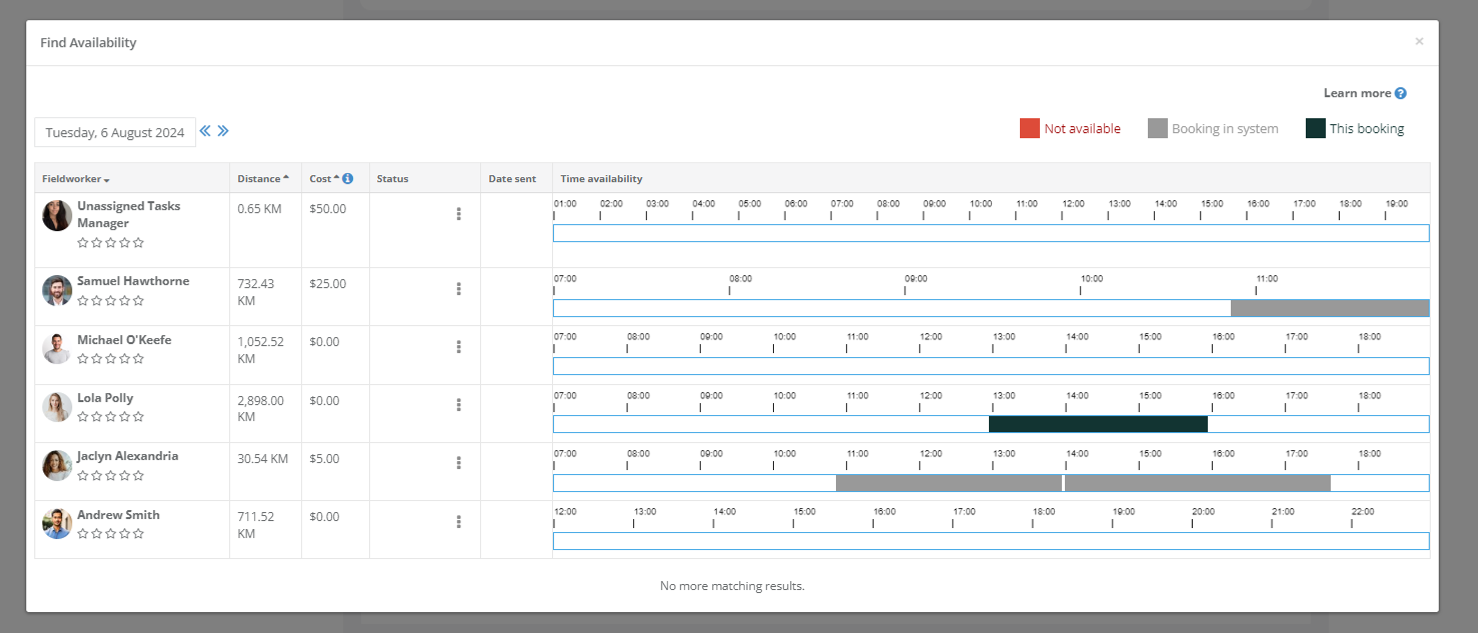
Find faster
Compare suitable contractors without checking calendars one by one.
Avoid clashes
Use working hours, blocked time and connected calendar commitments.
Track responses
See accepted, declined, pending and unanswered job requests.
Recover bookings
Reassign, rebroadcast or reschedule when a contractor cannot attend.
Contractor job scheduling and field service dispatch in one system
Replace separate contractor calendars, crew spreadsheets, dispatch boards and field apps with one connected platform. OctopusPro combines service business scheduling software, home service scheduling software and trade scheduling software for jobs, technicians, subcontractors and mobile teams.
Job scheduling software for contractors
Plan one-off, multi-visit and recurring jobs
Use contractor calendar software and a contractor booking workflow for service calls, installations and inspections. Manage one-off work, recurring job scheduling software needs and multiple specialists across each appointment.
Contractor dispatch software
Assign, broadcast and recover jobs faster
Use contractor dispatch software, field service dispatch software and job dispatch software for manual assignment, automatic first-to-accept requests and urgent calls. Track responses, reassign work or offer another time.
Crew & subcontractor scheduling software
Coordinate employees, crews and subbies together
Use crew scheduling software and crew management software for employed staff, independent contractors, subcontractor panels, lead contractors and subworkers. Coordinate multi-person jobs and multi-site workforce scheduling from one view.
Technician scheduling software
Match the right technician to each service call
Use technician scheduling software, service technician scheduling software, fieldworker scheduling software and workforce scheduling software to match services, skills, licences, equipment, working hours, calendar conflicts, territories and distance.
Work order & maintenance scheduling
Keep scheduled work connected to the job record
Use work order scheduling software and maintenance scheduling software to move enquiries and approved quotes into scheduled jobs, plan preventive maintenance visits and retain notes, forms, photos, statuses, invoices and history. This keeps scheduling connected to contractor CRM and job management records.
Mobile workforce management
Use location-aware dispatch and field updates
Use the contractor scheduling app for mobile workforce management, GPS dispatch software, route scheduling support and proximity-based scheduling through ETA, Nearby Bookings, travel calculations, check-in/out, timesheets and proof of work.
Contractor job scheduling with live availability
Use real-time contractor availability to match each job with workers who fit the service, skills, location, distance, working hours and requested appointment time.

Find suitable contractors by job requirements, location, distance and available time.
Match the right contractor before offering the time
OctopusPro checks the factors that make an appointment workable before the job is assigned or sent as a request.
Ready to test contractor availability with your own team?
Start a free trial and configure services, skills, territories and calendars around the way your contractors actually work.
Contractor dispatch software with flexible office control
Use contractor dispatch software for direct job assignment, first-to-accept job requests, urgent service dispatch or a hybrid process that changes by service, territory and booking type.
1
Match
Shortlist eligible contractors using service, area, availability and permission rules.
2
Request
Send app, email or SMS invitations and record every contractor response.
3
Recover
Reassign, rebroadcast or offer alternative appointment times after a decline.
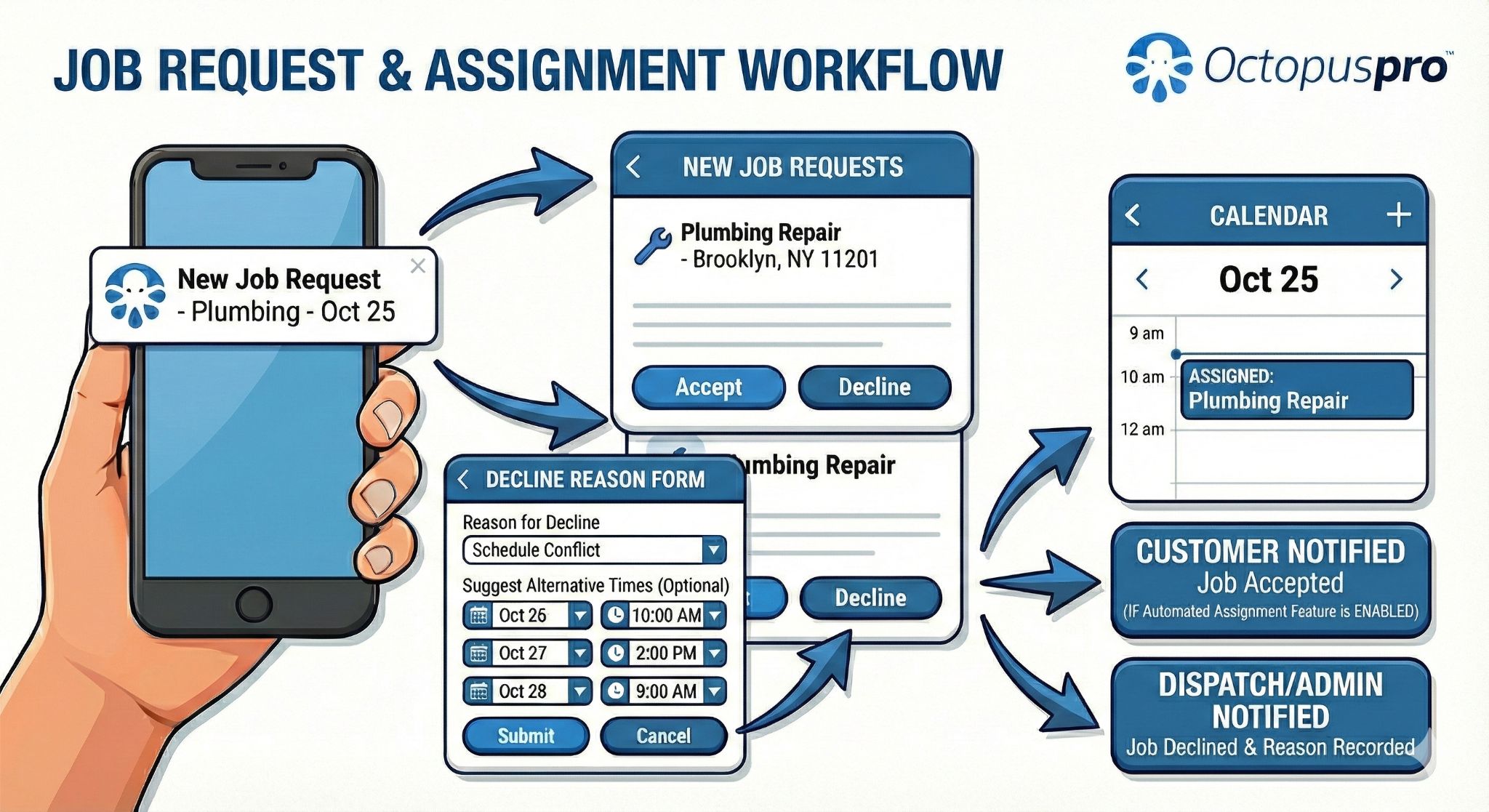
Job requests connect contractor responses, dispatcher recovery actions and customer updates.
Field service scheduling software that uses every availability signal
Field service scheduling software should check more than an empty calendar. OctopusPro connects technician skills, working hours, time off, external calendars, service areas, travel rules and job requirements before work is assigned.
01
Working hours & time off
Set individual rosters, split shifts, leave, meetings, holidays and partial-day blocks. Contractors can update their own hours when permissions allow.
02
Google & Outlook calendar sync
Push OctopusPro bookings to connected calendars and import external busy events as unavailable time to reduce scheduling conflicts.
03
Service areas & territories
Control where each contractor can be booked using travel radius, custom territories, supported branches and location-type rules.

Connected calendars keep external commitments visible without creating duplicate customer jobs.
See the whole day in the view that fits the work
Use Month, Week, Day or List views as a live dispatch board software workflow for capacity planning, technician allocation, daily dispatch and schedule recovery. Contractors can keep familiar external calendars while OctopusPro remains the operational source of truth.
Build one schedule for urgent, recurring and multi-contractor work
Use direct assignment, first-to-accept requests, repeat schedules and multiple fieldworkers without breaking the booking into disconnected tools.
Mobile workforce management for contractors and field technicians
Once a contractor accepts the job, the mobile workforce management workflow gives field technicians their schedule, job information and status controls while the office receives progress, GPS and attendance context.

Time-stamped mobile updates connect field activity, customer visibility and contractor timesheets.
A clear job-status flow for the office and customer
Progress milestones keep dispatchers informed while customers receive the right updates without repeated manual calls.
Need help connecting dispatch, fieldwork and contractor permissions?
Contact OctopusPro support for guidance, or start a free trial and test the workflow with your own services and jobs.
Crew, subcontractor and contractor management features
Combine contractor management software, subcontractor management software, crew scheduling, permissions, recurring work and customer booking rules without separating the schedule from the customer, booking and job history.
01
Schedule complex work
Assign different contractors by appointment or service, or place several fieldworkers on the same booking for installations and large sites.
Create follow-ups and recurring series for maintenance contracts and planned service programs while retaining normal assignment rules.
02
Structure contractor teams safely
Let approved lead contractors manage crew accounts while individual access, activity, timesheets and payment records remain separate.
Control access to full addresses, contact details, prices, customer records, earnings and editing tools.
03
Keep work accountable
Keep calls, email, SMS, booking details and discussions connected to the correct booking or quote.
Use attended hours and completed work with hourly, flat-fee, commission or hybrid compensation rules.
04
Protect capacity when plans change
Show bookable times using company hours and matching contractor availability, or hold requested times for office review.
Capture why a contractor cannot attend and use configured reasons to support alternative-time and rebooking workflows.
Service business scheduling software for contractor-led teams
Use service business scheduling software across customer sites, workshops, branches and mixed service models—from home service and trade scheduling to urgent call-outs, recurring maintenance and multi-contractor networks.
Trades & installations
Plumbing, electrical, HVAC, roofing, painting, solar, fitting and specialist installation teams.
Cleaning & property services
Cleaning crews, maintenance contractors, pest control, landscaping and recurring site services.
Repair & mobile technical teams
Appliance repair, IT support, locksmiths, automotive services and mobile technicians.
Multi-contractor networks
Regional service networks, subcontractor panels, franchise teams and businesses coordinating specialists.
Contractor scheduling and dispatch software FAQs
Common questions about contractor job scheduling, field service dispatch, technician calendars, crew coordination, subcontractor management and mobile workforce operations.
What is contractor scheduling software?
Contractor scheduling software helps service businesses plan jobs, check worker availability, assign employees or contractors, dispatch urgent work and manage schedule changes. OctopusPro connects the schedule with customer records, booking history, mobile job updates, timesheets, invoicing and contractor earnings.
Is OctopusPro job scheduling software for contractors?
Yes. OctopusPro works as job scheduling software for contractors, contractor booking software and recurring job scheduling software for one-off appointments, multi-visit work, maintenance, installations, inspections and urgent service calls. Jobs can be assigned to one contractor, several fieldworkers or different specialists.
Does OctopusPro include contractor dispatch and job assignment software?
Yes. It combines contractor dispatch software, contractor dispatching software, field service scheduling and dispatch software, service dispatch software and job assignment software. Dispatchers can assign jobs directly, send selected requests or broadcast first-to-accept invitations, then manage responses, reassignment and alternative-time recovery.
Can it schedule crews, employees and subcontractors together?
Yes. Employees, independent contractors, subcontractors, lead contractors and subworkers can share crew scheduling software, crew management software and multi-site workforce scheduling while retaining individual services, skills, hours, service areas, permissions, calendars and payment rules.
Is it field service scheduling software for technicians?
Yes. OctopusPro can be used as technician scheduling software, fieldworker scheduling software, workforce scheduling software and field service scheduling software. It matches service calls using skills, licences, equipment, availability, territories, distance and calendar commitments, then sends the assigned technician complete job information through the mobile app.
Can it schedule recurring work orders and maintenance jobs?
Yes. Work order scheduling software and maintenance scheduling software features create repeat visits or recurring series for weekly, fortnightly, monthly, seasonal and custom-date work, including preventive maintenance, service contracts and regular service rounds.
Does it support proximity scheduling, GPS dispatch and route planning?
Yes. Service areas, travel radius, distance calculations, live worker location and Nearby Bookings support GPS dispatch software, route scheduling decisions and proximity-based scheduling. Dispatchers can compare suitable contractors and nearby jobs, while GPS and ETA tracking support the assigned visit after dispatch.
Can customers book against live contractor availability?
Yes. Online booking software for contractors can display appointment times based on business rules and the availability of matching workers. You can offer exact times or scheduling windows, accept booking requests for office review, take deposits and control customer rescheduling or cancellation.
Does it provide mobile workforce management, timesheets and contractor pay?
Yes. The fieldworker app provides schedules, navigation, job details, statuses, forms, photos, signatures, GPS context and check-in/out. Attended hours and completed work can flow into timesheets and hourly, flat-fee, commission or hybrid contractor compensation rules.
Does it include subcontractor management and permission controls?
Yes. Contractor management software and subcontractor management software features include self-registration, profiles, services, skills, service areas, working hours, job invitations, crew accounts, timesheets, earnings and role-based permissions. Access to addresses, customer details, prices and financial records can be restricted.
Schedule contractors with less admin and clearer control
Bring field service management software for contractors, job scheduling, dispatch, crew coordination, mobile workforce management and customer communication into one service operations workflow.