
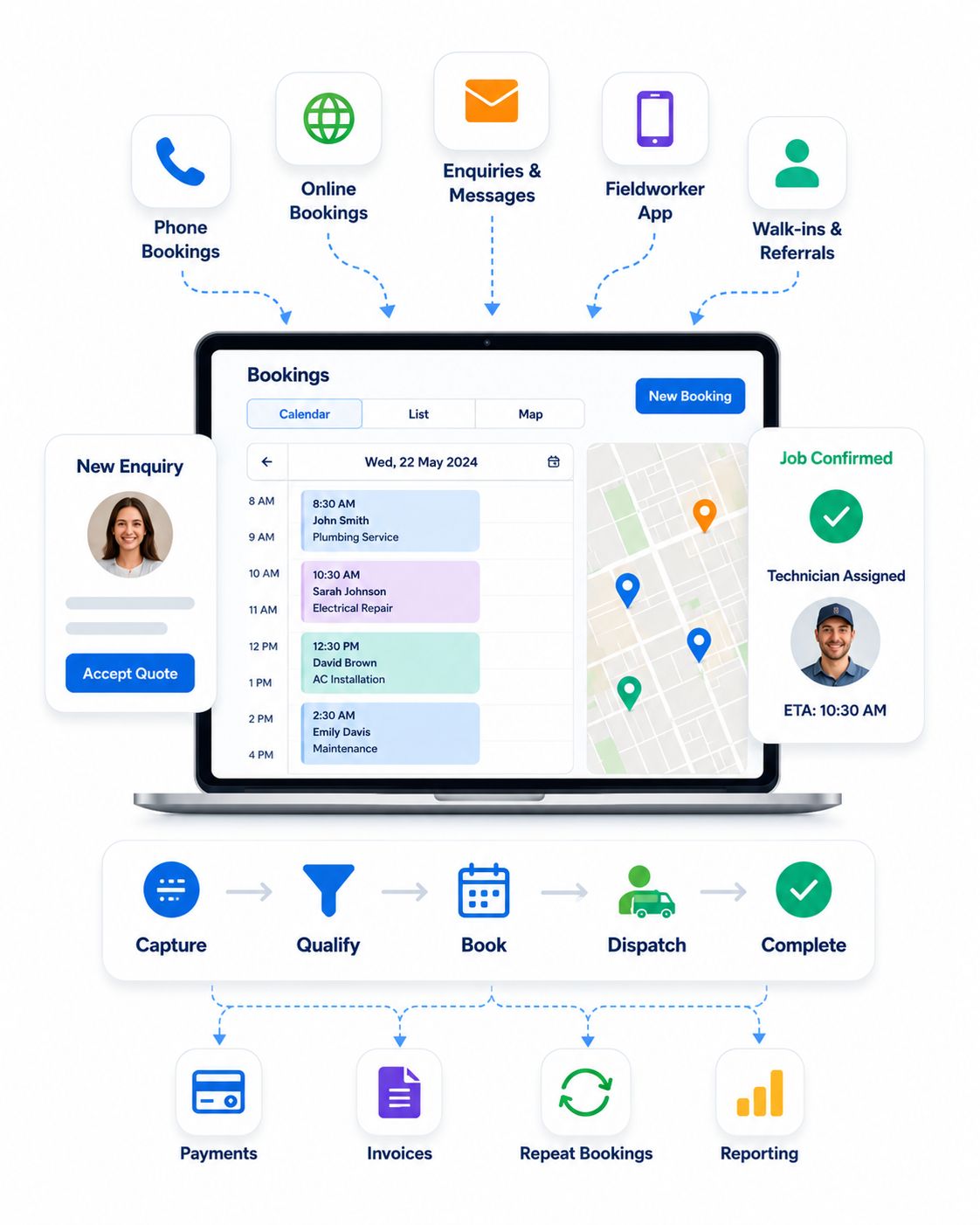
Turn more enquiries into confirmed jobs with less admin, smarter dispatch and clearer customer updates
Give customers a smoother path to book while your team captures enquiries, converts accepted quotes into bookings, confirms appointments, dispatches fieldworkers, collects booking payments and sends booking updates from one cloud-based system.
As booking volume grows, OctopusPro helps you protect service quality, reduce avoidable admin and keep online bookings, phone bookings, fieldworker availability, customer communication, payments, invoices, reporting and repeat bookings aligned.
Your team stays in control of every booking path: assisted phone bookings, online booking requests, instant bookings with or without payment, real-time availability checks, fieldworker assignment and app-based accept or decline workflows.
More about booking workflows
As booking volume grows, OctopusPro helps you protect service quality, reduce avoidable admin and keep online bookings, phone bookings, fieldworker availability, customer communication, payments, invoices, reporting and repeat work aligned.
Your team stays in control of every booking path: assisted phone bookings, online booking requests, instant bookings with or without payment, real-time availability checks, fieldworker assignment and app-based accept or decline workflows.
Confirm with live availability
Dispatch through the fieldworker app
Collect payments & issue invoices
Automate email & SMS updates
Dispatch and updates
Invoices and payment
See how enquiries become confirmed, assigned and paid bookings
Get a faster view of how enquiries, quotes, bookings, fieldworker assignment, confirmations, reminders, invoices, payments and repeat work can stay connected inside OctopusPro.
Confirm appointments
Assign fieldworkers
Keep customers updated
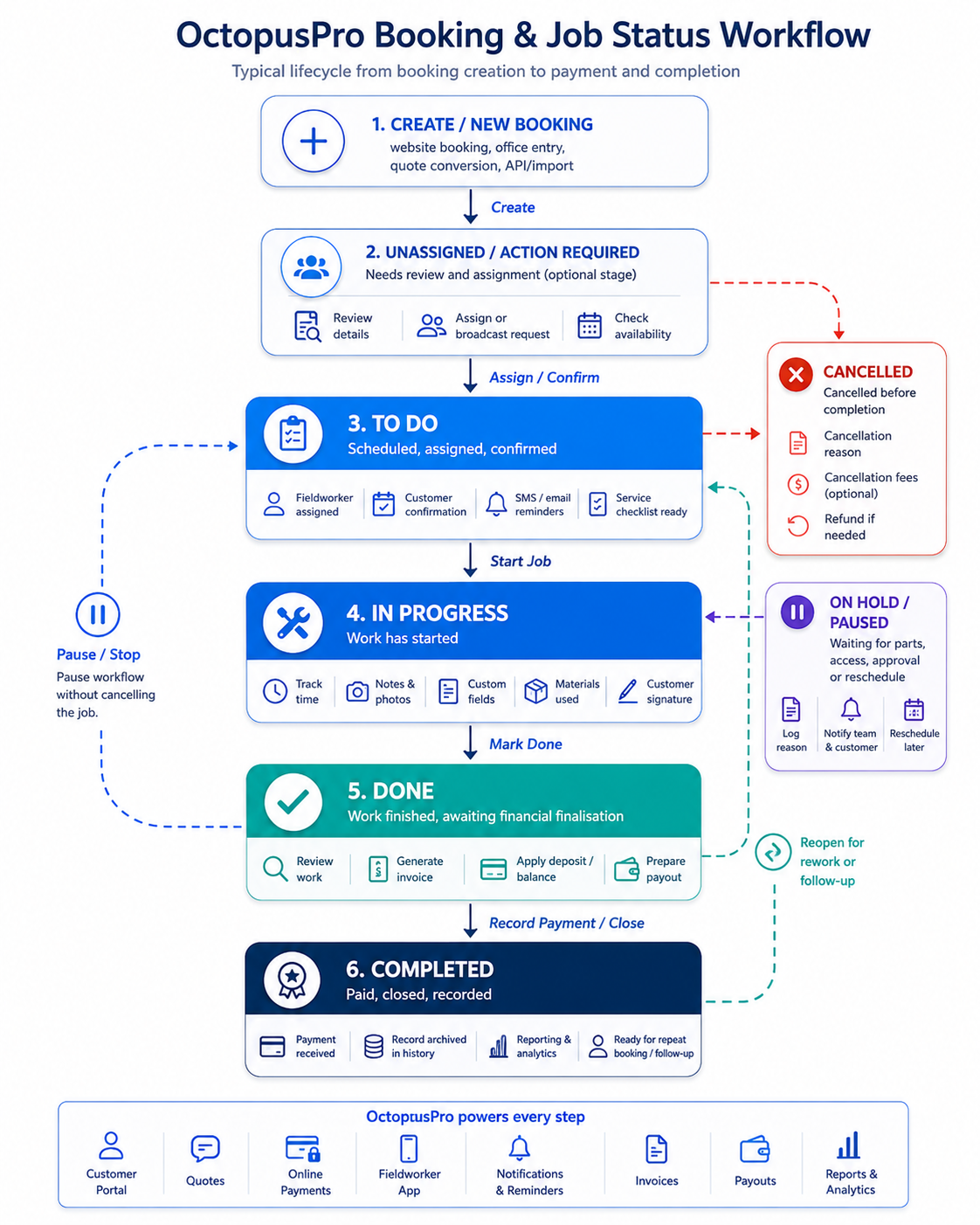
See how every booking moves from request to completed job
Follow the booking path from enquiry to repeat work and see how OctopusPro connects accepted quotes, online bookings, fieldworker assignment, customer updates, payments and ongoing service in one organised workflow.
4-step page guide
Preview the command centreView the workflow areas that help office teams manage booking volume with less manual chasing.Understand the control view
Review operational outcomesSee how connected booking records reduce missed requests, follow-up calls, dispatch confusion and admin gaps.Connect value to results
Compare connected workflowsUnderstand why managing bookings in OctopusPro is clearer than relying on separate forms, calendars, inboxes and spreadsheets.Make the buying decision
See the full path from first enquiry to repeat booking
Get a quick view of how OctopusPro connects the booking workflow across customers, office staff, dispatchers, fieldworkers and payments.
One connected workflow
- Enquiry
- Quote
- Booking
- Assignment
- Confirmation
- Reminder
- Job update
- Invoice
- Repeat booking
Built for businesses that manage more than a simple calendar
Manage booking capture, dispatch, customer communication, repeat work, payments and operational visibility from one connected process.
Phone enquiries, online booking requests and instant bookings
Recurring appointments, repeat visits and maintenance work
Quote-to-booking workflows and paid appointments
Customer confirmations, reminders and booking updates
Invoices, payment tracking, reporting and customer history
See how customers, office teams and fieldworkers stay aligned from one booking record
Customer actions, office coordination, fieldworker updates, payments, communication and operational records stay connected around the same booking workflow.
Online booking, payments, job status, communication and support.
Payments, accounting, CRM, operations and lead management.
Platform support, GPS tracking, accept/decline workflows and field updates.
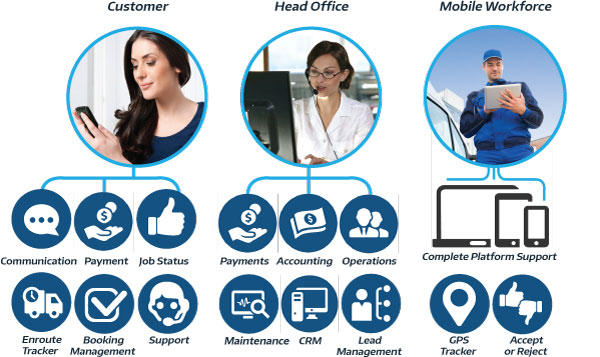
iConnected booking management overview: customer booking options, office actions, fieldworker coordination, updates, invoicing and operational visibility in one workflow.
Preview the booking command centre in one glance
See how enquiry capture, quote conversion, booking confirmation, dispatch, reminders, invoices and repeat work connect in one operational view.
Live booking pipeline
-
New enquiry receivedCustomer request captured from website, phone or customer portal.
Capture
-
Quote acceptedApproved quote moves toward a confirmed booking workflow.
Convert
-
Booking confirmedAppointment time, location, customer and service details stay connected.
Schedule
-
Fieldworker assignedAssignment uses availability, service area, skills and dispatch settings.
Dispatch
-
Reminder sentEmail or SMS updates reduce uncertainty before the appointment.
Update
Want help mapping your booking process into OctopusPro?
Tell us how you currently manage bookings, quotes, dispatch, reminders, payments or recurring work, and we can help you understand which OctopusPro workflow fits your business best.
- Phone bookings and website booking requests
- Quote approvals and booking conversion
- Fieldworker assignment and dispatch rules
- Reminders, invoices, payments and recurring work
Want help mapping your booking workflow?
Tell us how you manage bookings now and we can show you how OctopusPro can fit your process.
Preview the booking tools your team can work from
Review the main booking screens your team may use across calendar management, customer requests, fieldworker assignment, communication, payments and recurring work.
Booking calendar and job details
Show how office teams can review appointment times, job information, customer details, service addresses and booking status from one place.
Customer portal booking request
Help customers choose the right service, share booking details, upload files and request or confirm appointments with less back-and-forth.
Fieldworker assignment and dispatch
Make dispatch decisions easier by checking availability, skills, service areas, workload and assignment workflows before work is sent.
Customer communication log
Keep confirmations, reminders, booking updates, customer replies and internal handover notes linked to the booking history.
Payment summary
Invoice and payment history
Show the commercial side of every booking, including deposits, invoices, payment activity, refunds and reconciliation context.
Recurring booking setup
Position OctopusPro for businesses that manage repeat visits, scheduled maintenance, subscriptions and ongoing service work.
See how booking visibility, self-service and connected records come together
See how confirmed bookings, customer self-service, invoice history and payment activity can stay connected inside one booking workflow.

Prove booking visibility
See how confirmed work, customer details and booking status can be managed from a connected booking workflow instead of scattered notes or calendars.

Prove customer self-service
Show how customers can interact with booking requests, confirmations, updates and self-service workflows from a branded customer-facing experience.

Prove connected records
Show how booking operations can connect with invoices, payments and customer history so the commercial workflow is not separate from scheduling.
Want to see this using your own booking workflow?
Book a walkthrough and compare your current process against OctopusPro workflows for scheduling, dispatch, reminders, invoices and payments.
See how different service businesses can use the same connected booking workflow
Different industries manage different types of work, but the same connected workflow can help organise enquiries, bookings, fieldworkers, reminders, invoices and repeat service.
Cleaning, maintenance and property services
Manage one-off bookings, repeat visits, service reminders, customer confirmations, invoice history and ongoing customer records without relying on spreadsheets or manual reminders.
- Recurring and repeat booking workflows
- Customer reminders and confirmations
- Booking history connected to invoices
Repairs, mobile mechanics, pest control and HVAC
Turn enquiries or accepted quotes into bookings, assign the right fieldworker, send job details, update the customer and keep dispatch activity visible to the office.
- Quote-to-booking conversion
- Fieldworker assignment and dispatch
- On-site status and customer updates
Health, wellness, education and scheduled visits
Support booking requests, customer self-service, confirmation messages, reminders, payments and future appointment scheduling from one connected booking process.
- Online booking requests
- Customer portal and self-service
- Payments, invoices and follow-up bookings
Want examples closer to your industry? Book a demo and we can walk through common workflows for your service type, team structure, booking volume and customer communication needs.
See the main booking tools before the detailed feature list
Quickly confirm whether OctopusPro covers the main booking workflows your team needs before exploring the deeper feature sections.
Online bookings and booking requests
Capture website bookings, booking requests, enquiry-to-booking workflows and customer portal activity without relying only on phone calls.
Quote-to-booking conversion
Move accepted quotes into confirmed bookings with less duplicate entry, clearer customer details and a more consistent handover to scheduling.
Availability and booking rules
Use availability, service rules, booking windows, calendars and business logic to help offer appointment times your team can actually service.
Fieldworker assignment and dispatch
Assign work manually or automatically using fieldworker availability, service skills, service areas, distance and app-based accept or decline workflows.
Customer confirmations and reminders
Keep customers informed with booking confirmations, reminders, updates, SMS messages, emails and customer portal access.
Invoices, payments and booking history
Connect bookings with invoices, deposits, payment activity, customer records, communication logs and reporting so admin stays easier to follow.
Service booking management feature overview
See how OctopusPro connects booking requests, scheduling, staff coordination, customer communication, payments and reporting around one service workflow.
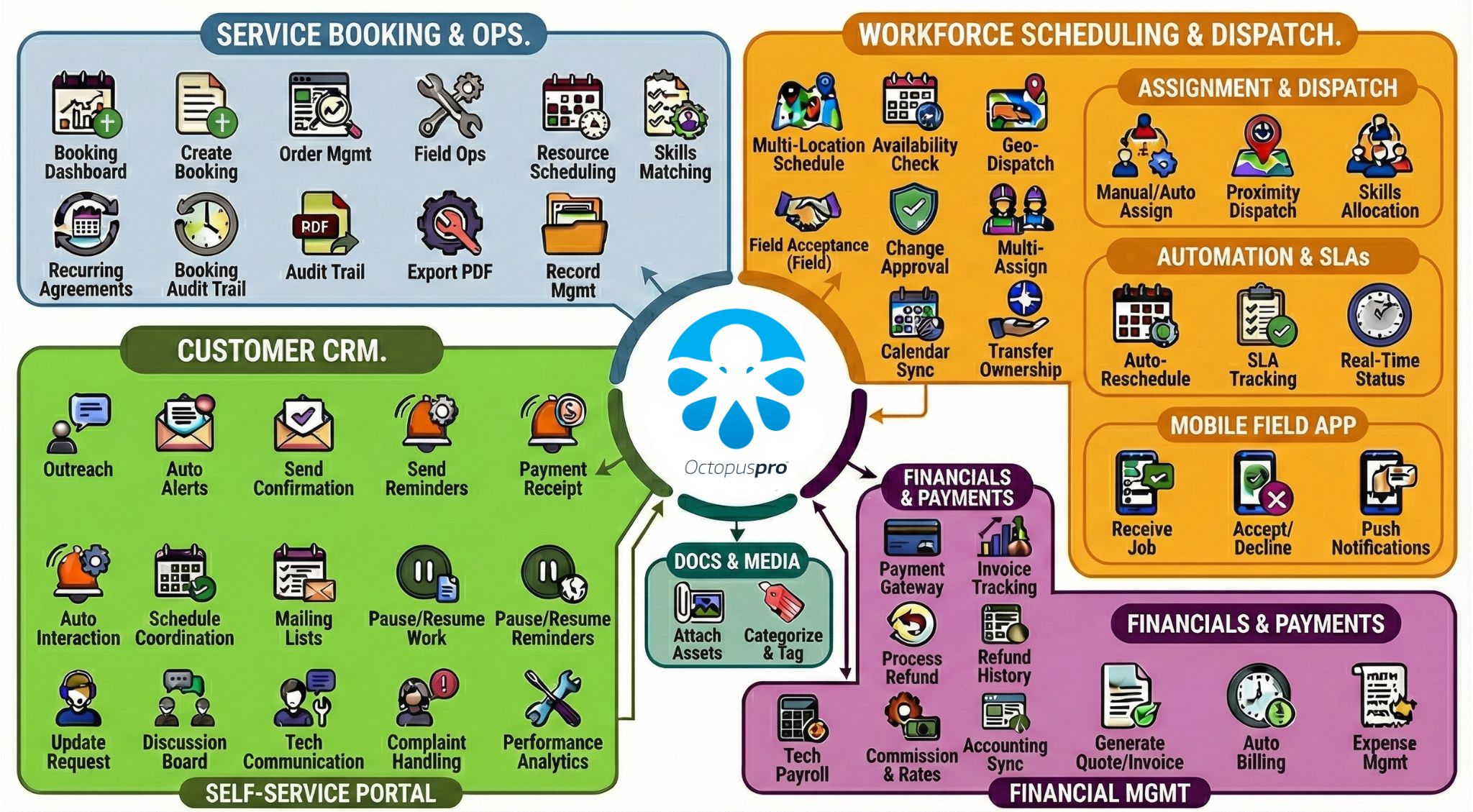
Service booking management feature overview: Service booking management features: online bookings, scheduling, customer records, staff coordination, payments and operational visibility connected around the booking workflow.
Full booking management feature checklist
Scan the booking, scheduling, dispatch, customer communication, payment and reporting capabilities available in OctopusPro. The grouped sections below explain how these capabilities support practical business outcomes.
↻
✉
▥
Show full booking management feature checklist
Expand each group to review the controls that help bookings move from request to completion without scattered admin.
- Online booking and request capture
- Scheduling and live availability
- Fieldworker assignment and dispatch
- Customer confirmations and reminders
- Payments, deposits and invoices
- Reporting, history and repeat work
Scheduling and Availability
Dispatch and Operations
Customer Communication
Payments and Invoicing
Reporting and Insights

See the business value before the detailed feature list
Review outcomes, common problems solved, buyer fit and role-based value for every person in the booking process.
Capture enquiries, booking requests and instant bookings online so customers can take action when they are ready.
Capture more enquiries
Use live availability, booking rules and calendar sync to offer times your team can actually service.
Confirm bookings faster
Match work by availability, skills, service area and location so dispatch decisions are clearer.
Improve dispatch visibility
Use branded emails, SMS messages, reminders and booking updates to keep customers and fieldworkers informed.
Reduce manual follow-up
Confirm bookings faster
Improve dispatch visibility
Reduce manual follow-up
Start managing more bookings without adding more admin
Bring enquiries, scheduling, dispatch, communication, payments and reporting into one workflow before booking volume creates more manual work.
Turn everyday booking problems into cleaner, more controlled workflows
Solve common scheduling, dispatch, communication and payment problems by keeping each booking connected from request to completion.
Availability
Double bookings and scheduling confusion
When staff rely on disconnected calendars and manual checks, conflicts are easier to miss.
OctopusPro fix
Availability, booking rules, service areas and calendar visibility help guide better appointment decisions.
Admin
Too much manual follow-up
Confirmations, reminders, changes and payment questions can create a constant stream of calls.
OctopusPro fix
Automated emails, SMS messages, reminders and customer updates help reduce repetitive admin work.
Dispatch
Unclear fieldworker assignment
Dispatchers need to know who is available, qualified, nearby and able to accept the job.
OctopusPro fix
Fieldworker availability, skills, service areas, location and accept/decline workflows keep assignment decisions clearer.
Conversion
Lost booking requests
Enquiries can fall through the cracks when forms, calls, quotes and follow-ups are handled separately.
OctopusPro fix
Booking requests, quote conversion, CRM records and booking history stay connected in one workflow.
Payments
Disconnected quotes, invoices and payments
Payment chasing becomes harder when booking records and invoice activity are managed separately.
OctopusPro fix
Booking payments, deposits, invoices and payment history can stay connected to the customer and booking record.
History
No clear booking history
Teams lose context when notes, calls, emails, attachments and status changes are scattered.
OctopusPro fix
Booking history, communication logs, documents and customer records help staff understand what happened and what needs to happen next.
Customers
Customers calling for updates
Customers call more often when they cannot see confirmations, reminders, status updates or payment information.
OctopusPro fix
Customer communication, reminders, portal access and booking updates help reduce uncertainty.
Recurring work
Repeat jobs managed manually
Recurring appointments become hard to scale when every repeat visit needs manual setup and follow-up.
OctopusPro fix
Recurring bookings, repeat work, customer history and reminders help keep ongoing service schedules organised.
Want fewer lost requests, scheduling clashes and follow-up calls?
Start with the booking workflow that connects customers, office staff, fieldworkers, invoices and payments.
Check whether OctopusPro fits the way your business manages bookings
OctopusPro is built for businesses that need more than a basic calendar or appointment reminder. Use this comparison to quickly see whether the platform fits your operational needs.
OctopusPro is ideal for businesses that need to
- Manage bookings by phone, online forms, quotes, booking requests or customer portal workflows.
- Assign work to fieldworkers, subcontractors, technicians, mobile teams or service providers.
- Support one-off, recurring, repeat, paid, location-based or multi-step booking workflows.
- Keep customer records, booking history, invoices, payments, documents and communication connected.
- Reduce manual admin while improving dispatch visibility, customer updates and reporting.
It may be more than you need if you only want
- A basic personal calendar with no customer, fieldworker, invoice or payment workflow.
- A simple appointment reminder tool that does not manage booking operations.
- A standalone payment link tool without scheduling, dispatch or customer history.
- A lightweight form that collects requests but does not manage follow-up, assignment or reporting.
- A system for internal meetings rather than service bookings delivered by office and field teams.
Confirm whether OctopusPro fits your booking workflow
If your team needs fewer manual handoffs, better fieldworker coordination, clearer customer updates and stronger visibility across every job, OctopusPro brings online booking, phone bookings, dispatch, customer communication, payments, reporting and operational control together.
Best suited for teams that want
- Businesses that sell services online, over the phone or through repeat customer relationships.
- Teams that accept booking requests, instant bookings, recurring work, group bookings, quotes and enquiries.
- Mobile teams, fieldworker networks and multi-location workforces that need availability, service skills, service areas and assignment controls.
- Businesses that need customer profiles, booking history, communication logs, invoices, payments, documents and reporting working from the same operational view.
Problems it helps reduce
- Too many phone calls, emails, spreadsheets and disconnected calendars used to manage bookings.
- Manual follow-up for confirmations, reminders, booking changes, fieldworker updates and payment questions.
- Unclear fieldworker availability, service coverage, skills, travel rules or assignment status.
- Limited visibility over booking conversion, operational performance, customer history and revenue activity.
Outcomes it helps improve
- Booking conversion, customer response speed and after-hours booking capture.
- First-time assignment accuracy, dispatcher workload and fieldworker accountability.
- Customer confidence, appointment attendance, communication consistency and retention.
- Reporting across demand, availability, dispatch, customer communication, payments and growth.
Not sure which booking setup fits your workflow?
Speak with OctopusPro support to compare online bookings, booking requests, manual scheduling, automatic assignment and customer self-service workflows.
Show each person why connected booking management matters
A strong booking workflow should help everyone involved: office teams, fieldworkers and customers. These outcomes show how each group benefits from clearer records, updates and responsibilities.
For office and admin teams
Manage phone bookings, online requests, customer details, scheduling, reminders, invoices and follow-up from one place instead of switching between disconnected tools.
- Reduce re-entry and manual chasing.
- Keep booking status, notes and customer history visible.
- Respond faster when customers call, change or cancel.
For fieldworkers and mobile teams
Give fieldworkers clearer job details, better schedule visibility and simpler accept/decline workflows so the office can dispatch work with more confidence.
- Receive clearer booking instructions and customer details.
- Support app-based updates and status tracking.
- Reduce avoidable calls between office and field.
For customers
Give customers a smoother journey from enquiry to booking confirmation, reminders, updates, invoice and repeat booking without needing to call for every detail.
- Book, confirm or request work more easily.
- Receive timely reminders and updates.
- Access clearer booking and payment information.
Give every person in the booking workflow a clearer reason to use OctopusPro
Different users care about different outcomes. These role-based benefits help owners, office staff, dispatchers, fieldworkers and customers quickly understand how the booking system improves their daily work.
Business owners
Increase booking capacity, reduce admin dependency and keep conversion, revenue, payments and service performance easier to monitor.
Office staff
Handle calls, booking requests, customer records, reminders, invoices and follow-ups from one shared workflow instead of scattered tools.
Dispatchers
Assign the right fieldworker using availability, location, service area, skills and booking context before the job is confirmed.
Fieldworkers
Receive clearer job details, booking updates, customer information and app-based workflows for accepting, declining and completing work.
Customers
Get a smoother booking experience with online options, confirmations, reminders, updates, payments and self-service access.
What better booking management helps your team achieve
Service businesses need more than a list of features. They need fewer missed requests, clearer dispatch, less back-and-forth and a more professional customer experience. These outcomes show where connected booking management can improve daily operations.
Connect your website, office, calendar and fieldworkers in one booking workflow
A simple calendar can show free time, but it cannot protect the full booking journey from enquiry, quote or request through to dispatch, payment, follow-up and reporting. OctopusPro gives your team a shared operational view of customer records, fieldworker assignment, service area rules, communication, payments, invoices, booking documents, reporting and follow-up around each booking.
Turn demand into paid work faster
Move from lead or booking request to confirmed work with less re-entry by keeping availability checks, fieldworker assignment, customer updates, payment collection and booking history in one shared process.
Keep office and mobile teams aligned
Reduce confusion across phone bookings, instant online bookings, manual dispatch, automatic assignment, app-based accept or decline workflows, service areas and recurring work by keeping everyone working from the same booking record.
Scale service capacity without scaling admin
Support more bookings with automated confirmations, automated reminders, follow-ups, calendar sync, CRM records, invoice management and reporting instead of relying on more manual chasing.
Compare your current process against a more organised booking flow
See where OctopusPro can reduce tool-switching across scheduling, dispatch, customer communication, payment tracking, fieldworker coordination and reporting.
Give customers, staff and fieldworkers more confidence in every booking
Clear records, consistent communication, accurate handovers and useful reporting help each booking move forward with fewer surprises.
Make every booking easier to understand
Keep booking details, customer information, communication, documents, payment activity, reschedule history, change logs and booking history organised in one place.
Reduce customer confusion and follow-up calls
Reduce uncertainty before and after each appointment with confirmations, reminders, follow-ups, emails and SMS messages.
Help fieldworkers arrive prepared
Give mobile teams access to job details, status updates, check-in and check-out workflows, and app-based accept or decline requests.
Make better operational decisions
Track booking activity, conversion, audit history, operational performance and customer history so your team can make better scheduling and growth decisions.
Compare scattered booking admin with one connected workflow
Compare manual handovers, disconnected tools and repeated follow-up with a booking workflow that keeps customer, job, fieldworker and payment context easier to follow.
Before: scattered booking admin
- Bookings sit across phone calls, emails, spreadsheets and disconnected calendars.
- Staff manually check availability, chase fieldworkers and resend customer updates.
- Customers call the office for booking changes, reminders, confirmations and payment questions.
- Reporting, conversion tracking, customer history and operational performance are harder to analyse.
After: one connected booking process
- Customers can book online, submit booking requests, make payments and receive automated updates.
- Office teams manage bookings, calendars, invoices, payments, customer records and reporting from one place.
- Fieldworkers receive job details, app requests, status updates and completion workflows.
- Managers gain visibility over booking demand, availability, dispatch, conversion and revenue activity.
Booking information is scattered
Phone notes, emails, spreadsheets and calendar entries create duplicate work.
Every booking has one operational record
Customer details, booking requirements, communication, assignment, invoice and payment history stay connected.
Availability is checked manually
Staff spend time confirming fieldworkers, service coverage and appointment times.
Availability and dispatch rules guide decisions
Availability, services, service areas and location context help your team assign with more confidence.
Customers chase updates
Manual confirmations, reminders and payment follow-ups create extra calls.
Customers receive clearer communication
Automated confirmations, reminders, status updates, portal access and payment links reduce uncertainty.
Performance is hard to measure
Managers struggle to see conversion, workload, revenue and follow-up activity in one view.
Reporting becomes easier to act on
Booking, customer, fieldworker, invoice, payment and operational data can support better decisions.
Explore how bookings move through the system
Follow the operational workflow from capture and scheduling through assignment, customer updates, payments and reporting.
Move from request to completed work without losing context or control
Protect speed and accuracy by keeping customer details, service requirements, pricing, scheduling, assignment, communication, invoicing, reporting and rebooking visible as a request moves from enquiry or accepted quote to completed work.
Receive enquiries, accepted quotes, booking requests and instant bookings online.
Follow up leads, convert accepted quotes, confirm availability and secure the booking.
Assign work with more confidence by skill, location and availability.
Track booking status, attendance, job progress, invoices and payments.
Use follow-ups, booking history, CRM tools and reporting to improve retention.
Turn your booking workflow into a repeatable system
Give your office team, fieldworkers and customers a clearer path from request to confirmed appointment, completed work and final payment.
See how the full booking journey stays visible
See how OctopusPro connects customer bookings, staff actions, fieldworker updates and business workflows.

End-to-end view of how customer bookings, staff actions, fieldworker updates and business workflows stay visible across the booking journey.
Reduce handover gaps by keeping each step visible
Give your team a clearer operating flow by keeping online booking, scheduling, dispatch, customer communication, fieldworker updates, invoicing, payments and reporting visible as each job progresses.
Capture the request clearly
Give customers a clear way to submit enquiries, make booking requests or book instantly online, with or without payment.
Confirm the right time before committing
Reduce scheduling conflicts by checking real-time availability, service rules, fieldworker calendars, locations and required resources before confirming the job.
Assign work with more confidence
Match the job to suitable fieldworkers and let them accept or decline from the mobile app so dispatch decisions are clearer.
Keep customers and teams informed
Reduce uncertainty by sending confirmations, booking reminders, updates, professional emails and SMS messages throughout the service journey.
See progress while the job is happening
Keep office staff informed by monitoring booking status, fieldworker check-in and check-out, location updates, attendance and job history.
Close the loop after completion
Close the job cleanly with invoices, payments, booking analytics, conversion tracking, customer history and accounting sync.
Service request and resource allocation workflow
Show how service requests can move through qualification, resource checks, assignment decisions and operational follow-up without losing context.
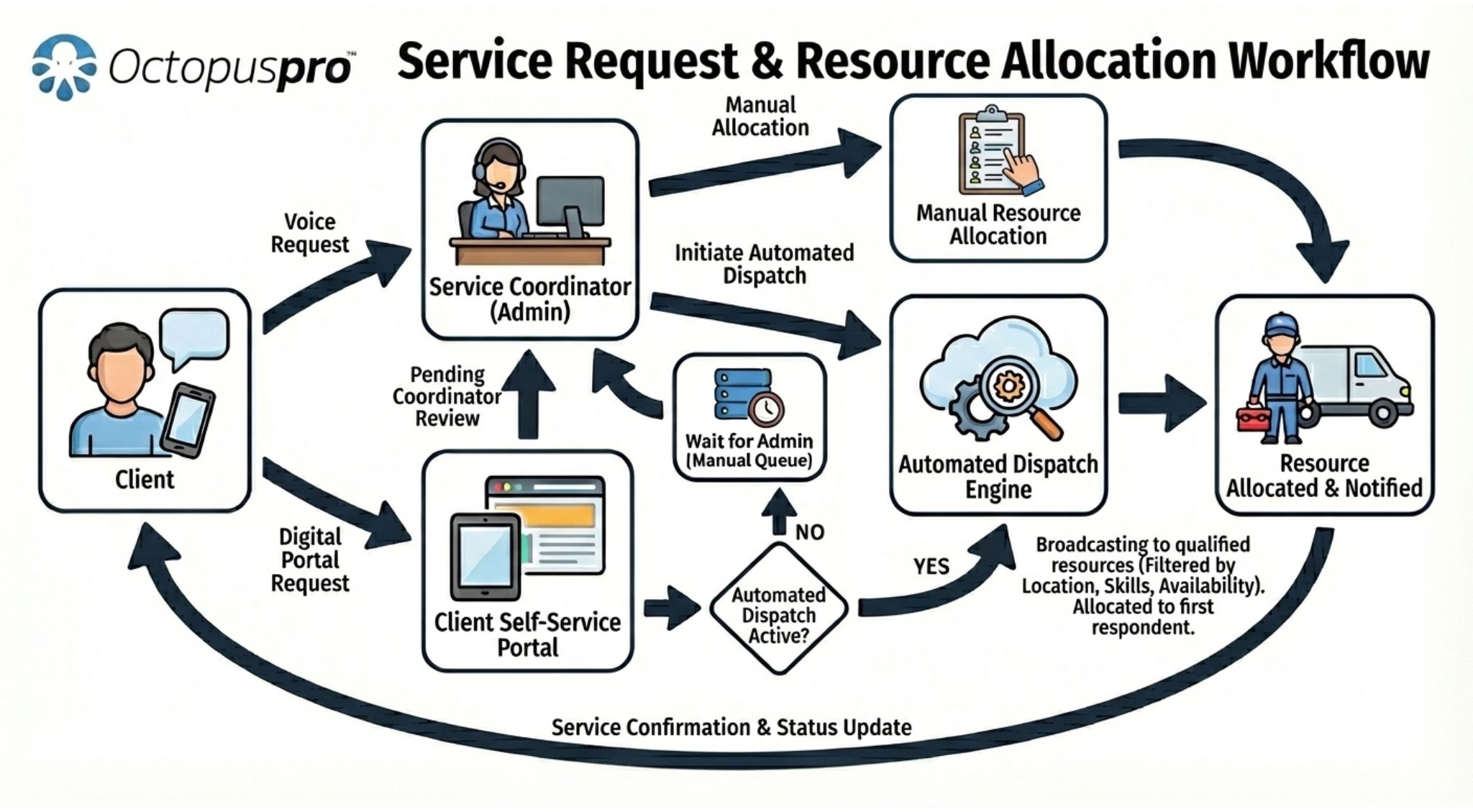
Service request and resource allocation workflow: Service request and resource allocation workflow: customer requests, service requirements, available resources, staff review and assignment decisions connected in one process.
Match every job to the right booking workflow
Different jobs need different booking paths. OctopusPro helps you keep customers moving and your team in control with enquiry-first workflows, quote-to-booking conversion, instant online bookings, dispatcher-managed bookings, multi-visit work, recurring appointments, group bookings and fieldworker approval flows.
Booking location types
Compare mobile, fixed-location, pickup/drop-off and remote booking scenarios before choosing the workflow that fits each service.
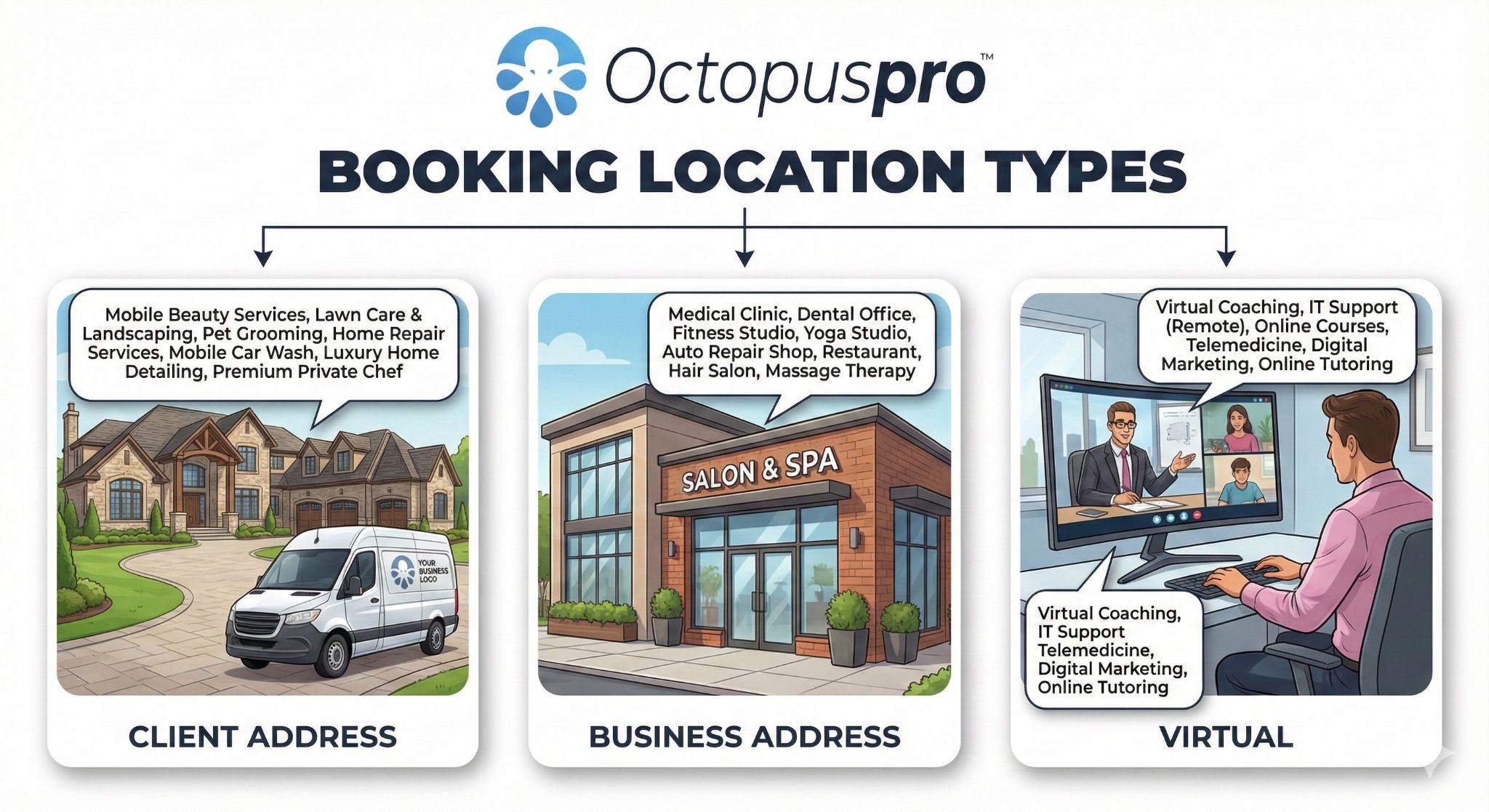
Booking location types: Show how OctopusPro can support mobile/on-site services, business locations, pickup and drop-off workflows and remote or virtual work.
Qualify complex bookings before committing resources
Avoid confirming the wrong work too quickly by reviewing details, checking availability, preparing quotes and speaking with the customer before the appointment is locked in.
- Best suited to complex or variable jobs.
- Useful when pricing depends on location, service type or job size.
- Helps your team qualify enquiries and move approved work into the booking schedule without starting again.
Capture ready-to-book customers instantly
Reduce calls and capture demand outside business hours by letting customers book available time slots online, with optional payment capture, booking rules, automated confirmations and appointment reminders.
- Best suited to standardised services.
- Reduces phone calls and manual admin.
- Helps capture bookings outside business hours.
Help customers faster over the phone
Help customers faster and reduce re-entry by letting office teams check availability, select services, convert enquiries or accepted quotes, assign fieldworkers, update customer records, send confirmations and manage payment or invoice details while helping customers directly.
- Best suited to call-centre and admin-led booking teams.
- Works alongside online bookings.
- Keeps customer records and booking history centralised.
Keep recurring, multi-visit and crew work organised
Keep repeat and complex work organised by managing recurring bookings, multi-visit schedules, follow-up appointments and crew-based bookings when service work needs more than a single simple appointment.
- Improves retention and repeat revenue.
- Reduces repeated manual booking setup.
- Supports multiple services, follow-up visits and more than one assigned fieldworker where required.
- Supports long-term customer relationships.
Manage higher-volume or group scheduling without confusion
Keep group services organised by letting customers book for multiple individuals or groups, making OctopusPro suitable for service events, classes, group appointments or multi-person jobs.
- Useful for training, tutoring, events and group services.
- Keeps group booking records organised.
- Helps manage higher-volume scheduling.
Confirm fieldworker commitment before locking in work
Reduce dispatcher chasing by sending booking requests to fieldworkers so they can review job details and accept or decline from their smartphone or tablet.
- Useful for large or flexible fieldworker teams.
- Helps confirm availability before locking in work.
- Reduces dispatcher follow-up and back-and-forth communication.
Manage pickup, drop-off and multi-step booking workflows without forcing every job into a simple appointment model
Use this workflow when customers drop items off, your team collects them, fieldworkers complete work across more than one address, or a booking needs separate pickup, service and return stages.
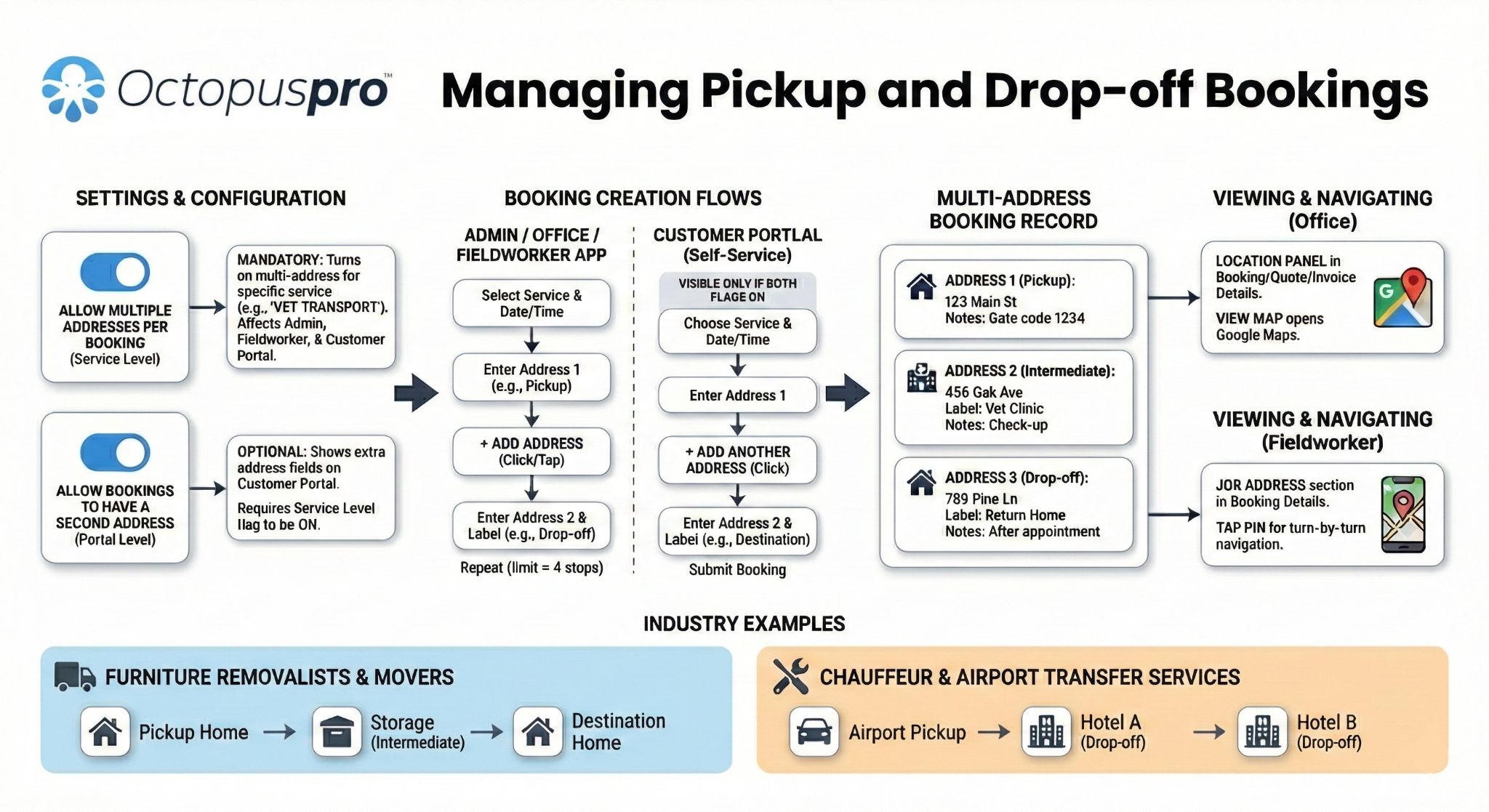
Pickup and drop-off booking workflow: Coordinate pickup stages, service stages, delivery or return steps, customer addresses, office actions and operational handovers inside one booking process.
Move to a connected booking workflow without losing control
Changing booking systems should feel manageable. This setup flow shows how teams can start with the essentials, then expand into more advanced booking, dispatch and automation workflows.
1
Add services, prices and booking rules
Define the services customers can book, the information you need and the rules that control availability and booking behaviour.
2
Set fieldworkers, skills and service areas
Connect booking logic to the people who deliver the work using availability, service skills, areas, locations and assignment settings.
3
Prepare customer communication
Configure the confirmations, reminders, SMS messages, emails and booking updates that keep customers and teams informed.
4
Start accepting bookings and requests
Capture bookings from your website, customer portal, phone enquiries, accepted quotes or office-created bookings.
5
Review bookings, payments and reports
Use connected records to monitor booking status, customer history, invoices, payments, workload and performance.
Want to see how setup would work for your business?
Compare your current booking process against an OctopusPro workflow with services, availability, assignment, reminders and payment tracking connected.
Service types and location management
Configure service rules and location logic around the booking workflows your business actually provides.
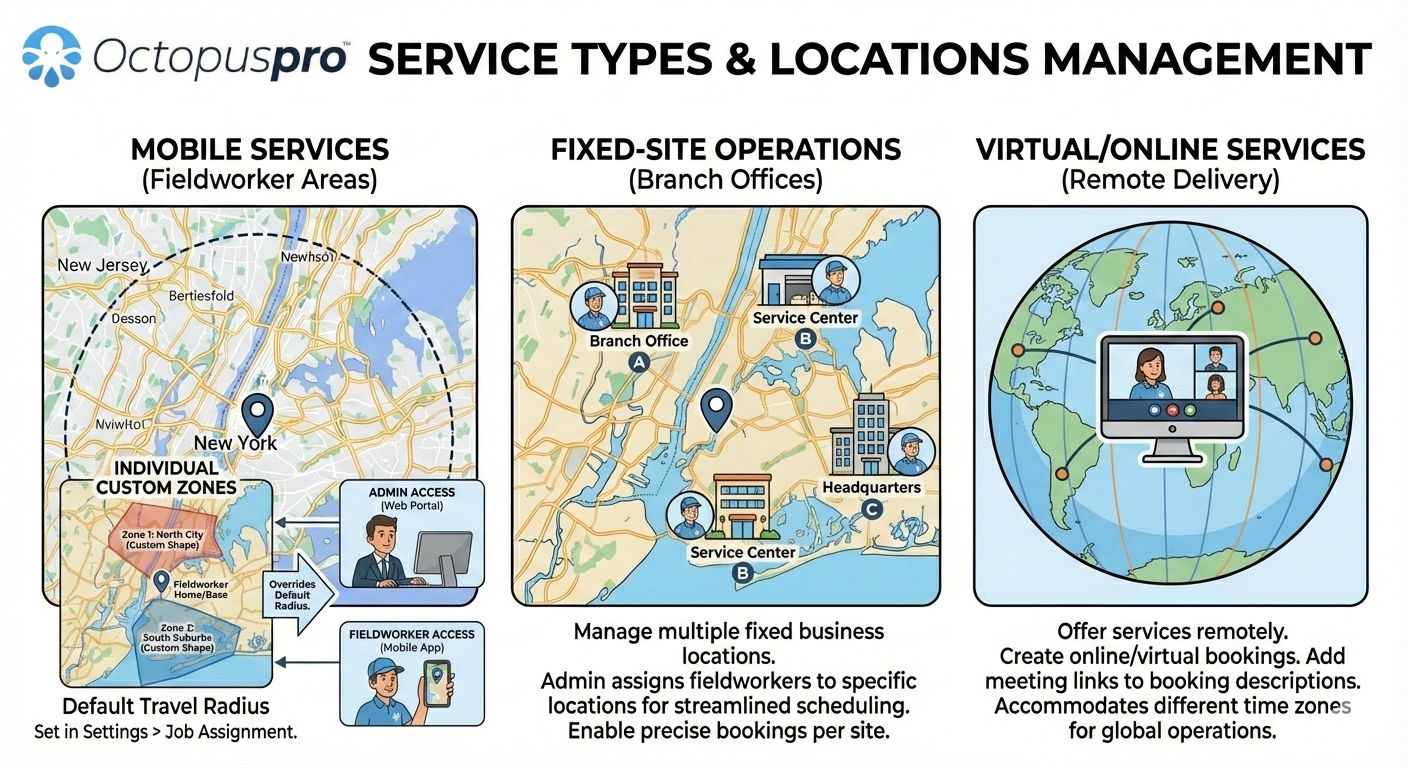
Service types and locations: Explain how different service delivery methods can be configured so the right booking rules apply to each job type.
Configure the rules behind the booking experience
Place this with the setup section because it explains how services, booking rules and workflow settings support the customer-facing and admin booking process.
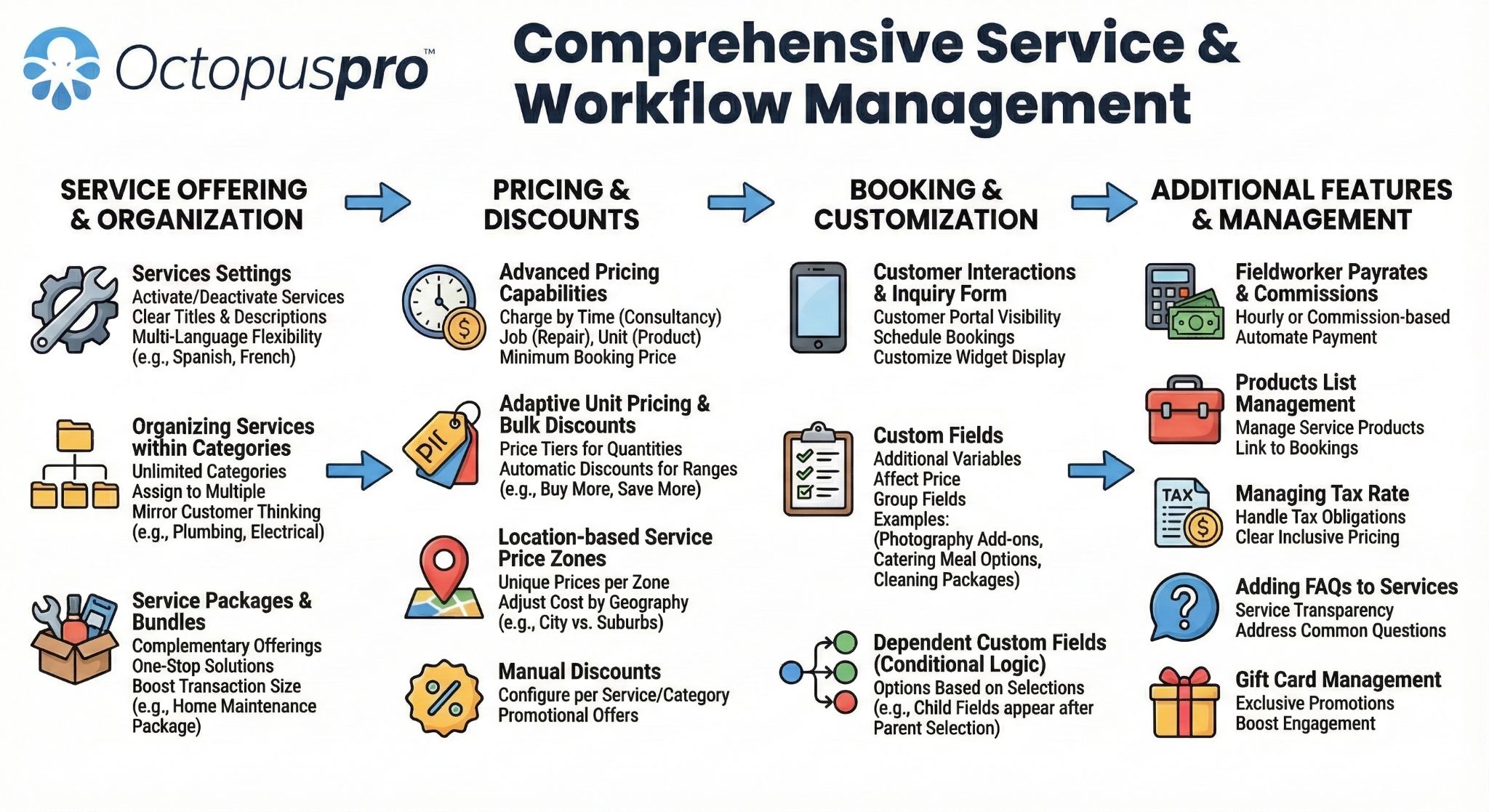
Service and workflow settings management: Show how businesses configure booking rules, services, workflows, pricing logic and operational controls before scaling the booking process.
Move from spreadsheets, shared calendars and disconnected tools without losing control
Move from spreadsheets, shared calendars or disconnected tools in manageable stages instead of changing every workflow at once.
Start with the workflow you already use
Begin with your current booking sources, services, customers, fieldworker structure and payment workflow, then improve the pieces that create the most admin.
- Import or recreate key customer and booking records where required.
- Configure services, prices, booking questions, availability and assignment rules.
- Set up fieldworker profiles, service areas, skills and app workflows.
- Move customer communication into consistent email and SMS templates.
- Expand into online bookings, reminders, payments, reporting and portal workflows over time.
Roll out gradually instead of disrupting the whole business
Use OctopusPro for one team, branch, service category or booking workflow first, then expand once the process is working smoothly.
- Begin with admin-created bookings or quote-to-booking workflows.
- Add online booking requests when your services and rules are ready.
- Introduce fieldworker assignment workflows as the team adapts.
- Connect invoicing, payments, reporting and reminders as the process matures.
Switching from spreadsheets or a basic booking tool?
Our team can help you think through a staged move that protects current operations while reducing manual work over time.
Begin with the booking workflow you already use, then add automation when your team is ready
OctopusPro can support businesses that want to start with booking capture, scheduling and customer confirmations, then gradually expand into fieldworker dispatch, recurring work, invoicing, payments, reporting and more advanced automation.
1Capture and confirm bookings
Start with online bookings, phone bookings, customer details, booking records and appointment confirmations.
2Add dispatch visibility
Set up fieldworker profiles, services, skills, availability and service areas as your team becomes ready.
3Connect communication
Use confirmations, reminders, updates and booking history to reduce manual customer follow-up.
4Expand into payments and reporting
Connect invoices, deposits, payment activity, repeat work and reports when the operational workflow is mature.
Choose manual control, automation or fieldworker approval for each dispatch workflow
Different jobs need different levels of oversight. OctopusPro helps reduce dispatcher workload while still supporting manual assignment and automatic assignment, and fieldworker accept/decline workflows based on your business model, workforce structure and dispatch rules.
Keep control over complex assignments
Protect service quality when jobs need human judgement by using manual assignment for complex bookings, high-value customers, specialised work or sensitive scheduling decisions.
- Admin staff can review customer details, booking notes and service requirements.
- Dispatchers can choose the best fieldworker based on skills, location, availability, service areas and visible schedule commitments.
- Useful when the booking requires special handling before assignment.
Dispatch suitable fieldworkers faster
Reduce manual dispatch time by using automatic assignment based on availability, service capability, service area, territory, travel radius, nearby bookings and other operational rules.
- Reduce manual dispatcher workload.
- Help match bookings to suitable fieldworkers faster using service eligibility, availability rules and proximity-based dispatch logic.
- Support scalable dispatch workflows as booking volume grows.
Confirm availability before the job is locked in
Keep assignments moving by sending job requests through the app so fieldworkers can accept, decline, start, pause, resume, complete or report issues from their smartphone or tablet.
- Useful for mobile teams, flexible fieldworker networks and distributed workforces.
- Helps confirm fieldworker commitment before work is locked in.
- Supports on-the-way, arrived, started, paused, resumed, finished and unable-to-start style field updates where configured.
- Supports faster communication between office staff and fieldworkers.
Make better assignment decisions
Make better assignment decisions with the Availability Finder, matched fieldworker panels, calendars, skills, locations, service areas, distance and customer requirements.
- Reduce double-booking and scheduling conflicts.
- Improve fieldworker utilisation, route planning and nearby booking decisions.
- Give customers a more reliable booking experience.
Need better dispatch visibility?
Use availability, skills, service areas, app responses and assignment rules to dispatch work with fewer manual checks.
Job requests and assignment workflow
Clarify the difference between office-controlled assignment and fieldworker accept or decline workflows for bookings that need confirmation before dispatch.
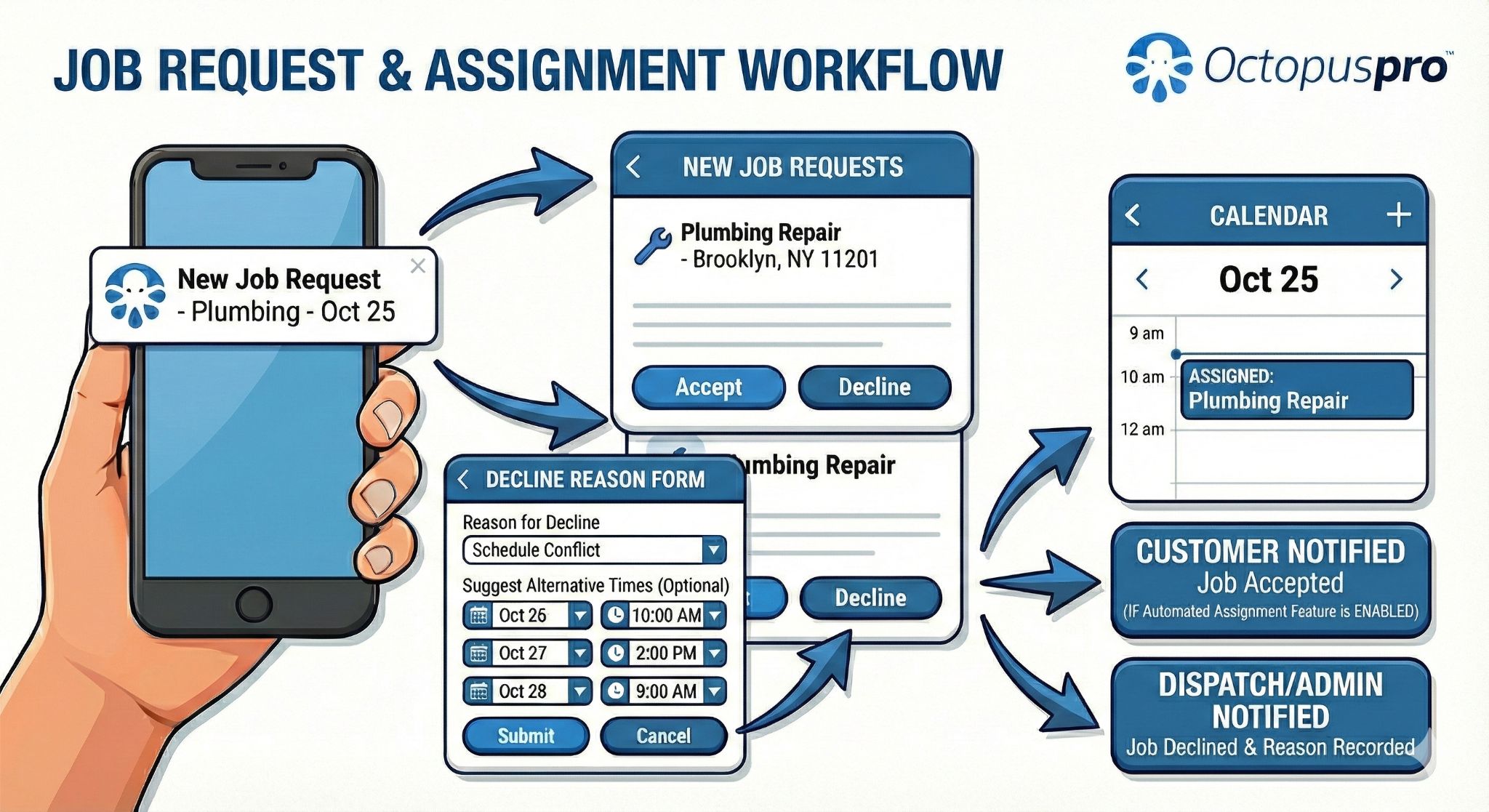
Job requests and assignment workflow: Job requests and assignment workflow: dispatchers can send job requests, fieldworkers can review and respond, and the office can keep assignment decisions visible.
Fieldworker real-time availability
Support the dispatch section with a clearer visual of how availability, booking windows and workforce capacity can be checked before work is assigned.
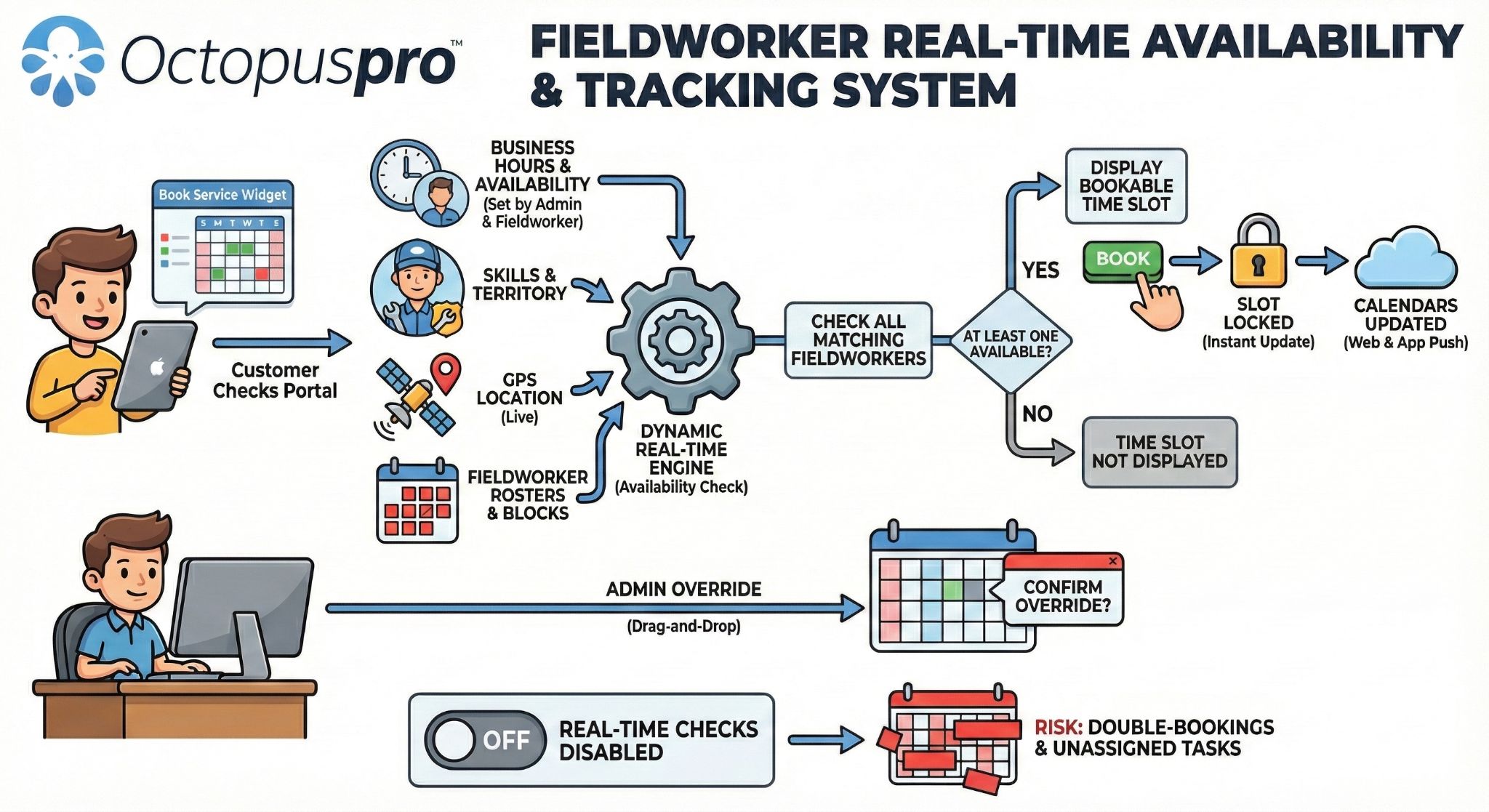
Fieldworker real-time availability: Fieldworker real-time availability: review capacity, working times, existing bookings and team availability before confirming or assigning work.
Fieldworker availability finder
Make the availability and dispatch story more concrete by showing how suitable fieldworkers can be found from scheduling and service rules.
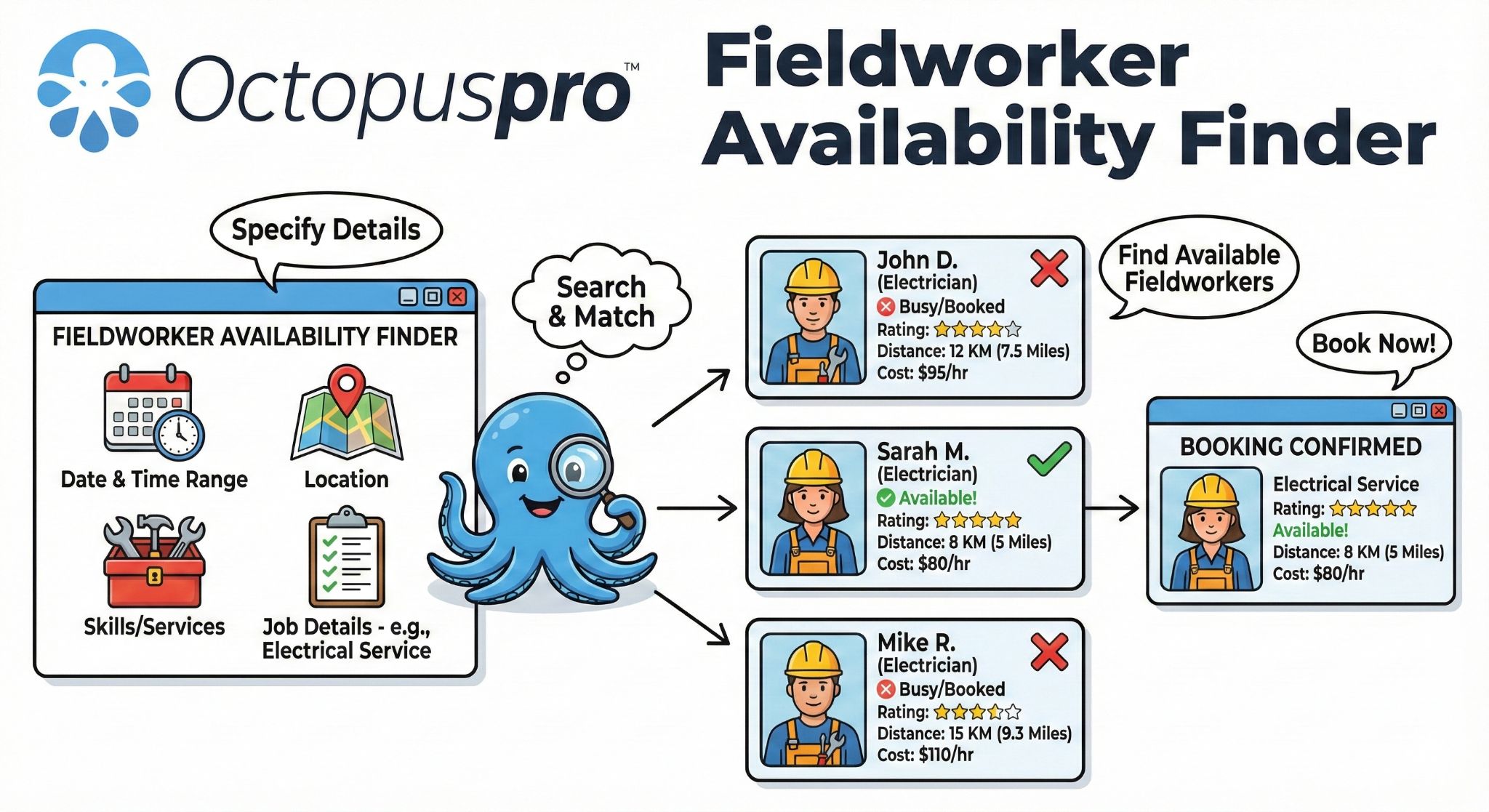
Fieldworker availability finder: Fieldworker availability finder: identify suitable workers by availability, service capability, location and schedule fit before committing the booking.
Proximity-based scheduling for fieldworkers
Show how location and travel context can support better dispatch decisions for mobile teams and reduce unnecessary travel gaps.
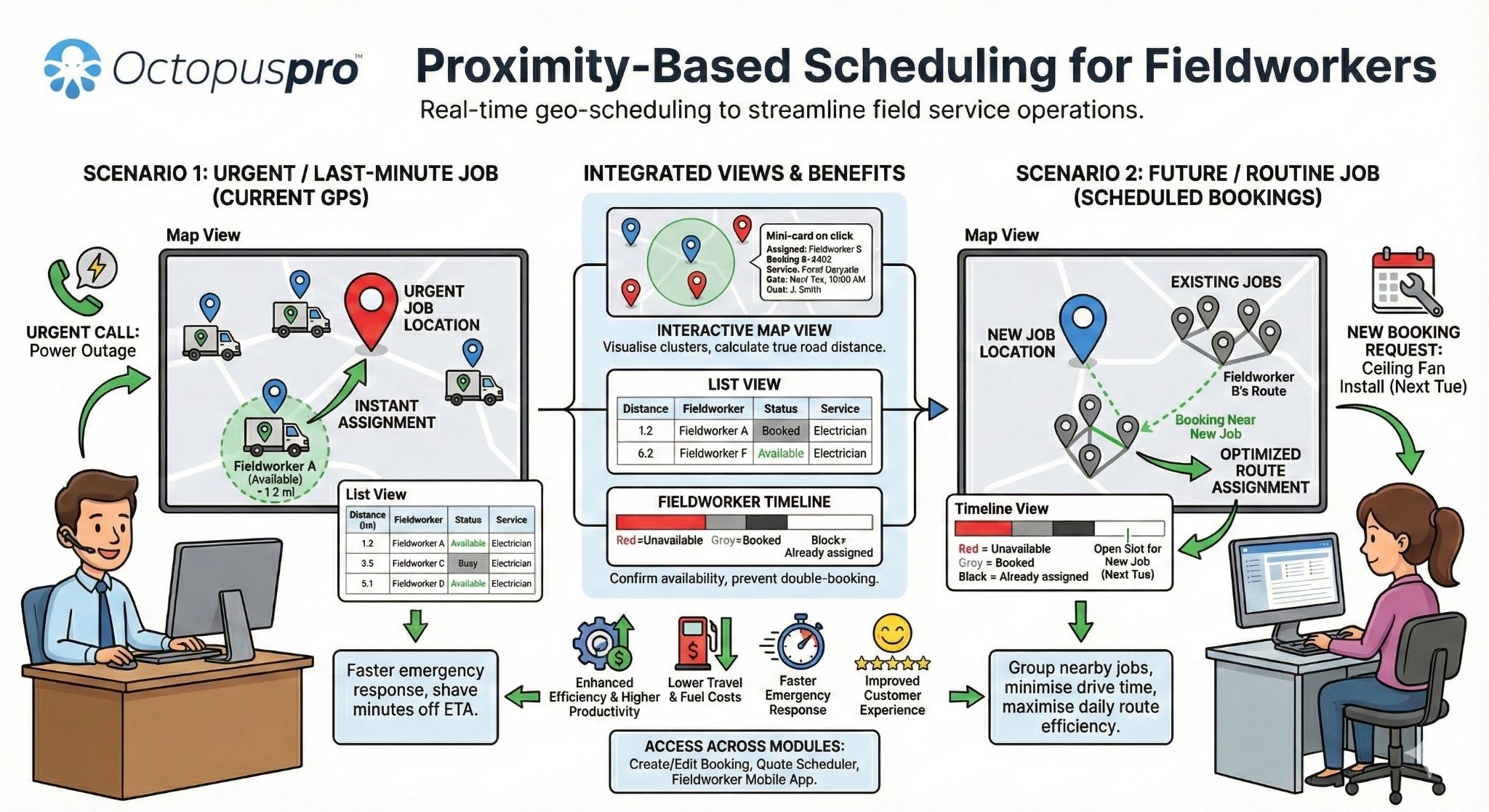
Proximity-based scheduling for fieldworkers: Proximity-based scheduling: use fieldworker location, nearby bookings, service areas and travel context to make smarter assignment decisions.
Coordinate multi-person and multi-appointment jobs
Coordinate larger jobs by splitting work across appointments, fieldworkers, services and scheduled visits.
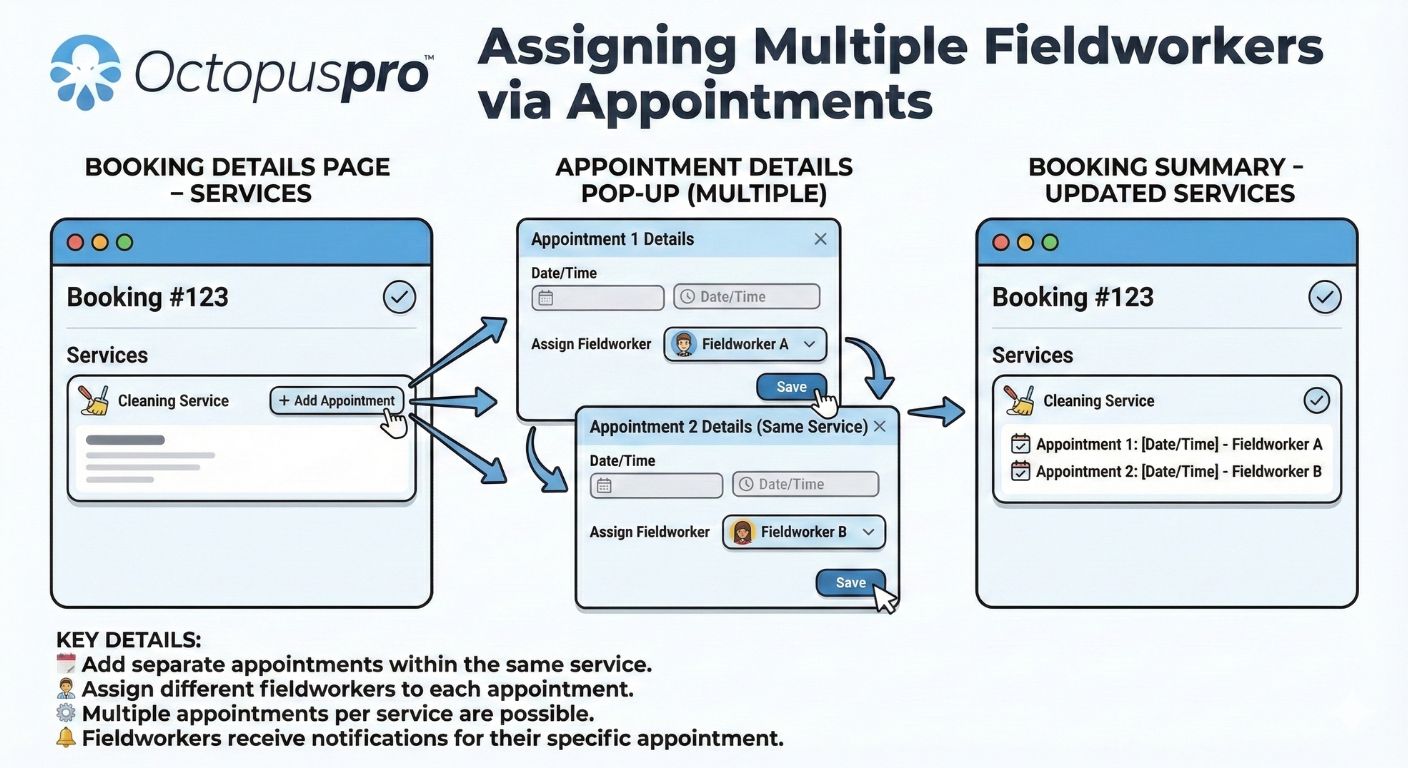
Assigning multiple fieldworkers via appointments: Show how multiple fieldworkers, appointment times and service stages can be coordinated for jobs that require more than one person or visit.
Give your team one place to manage every booking detail
Reduce tool-switching by managing the daily operational pieces of each booking—availability, fieldworkers, customers, communication, invoices, service areas and reporting—from a shared operational view.
Manage enquiries, accepted quotes, booking requests, instant bookings, appointment status, recurring bookings, group bookings, multi-service jobs, follow-up visits, flexible time slots and live calendar availability.
Configure service categories, descriptions, images, FAQs, booking questions, pricing models, deposits, payment method options, disclaimers, eligibility details, Book Now links and customer-facing options so each booking starts with clearer information.
Assign work by availability, skill, service area, proximity and location, review matched fieldworkers, track fieldworker status and job milestones, manage check-in/check-out, GPS-supported accountability where enabled, timesheet review, and app-based accept or decline workflows.
Send confirmations, reminders, branded emails, SMS updates and follow-ups while keeping email, SMS, call, portal chat, booking-specific messages, feedback, ratings and discussion history tied to each booking.
Capture customer details and payments, control checkout payment methods, manage invoices, booking extras, products, materials, stock or consumables, refund requests, refund approvals, payment reconciliation, accounting sync and booking-related documentation.
Use adaptive and seasonal pricing, specials, geo-pricing zones, minimum charge rules, bulk pricing, location property types, area-based calendar filters and location-based service rules.
Track booking history, labels, tags, owner, trading name, lead source, customer assets, dependents or property records where relevant, change logs, status history, issue escalation, complaints, feedback, ratings, reviews, conversion rates, performance, operational trends, customer satisfaction and business analytics.
Booking details overview
Give staff one place to review customer details, booking information, services, appointments, notes, communication and payment context.
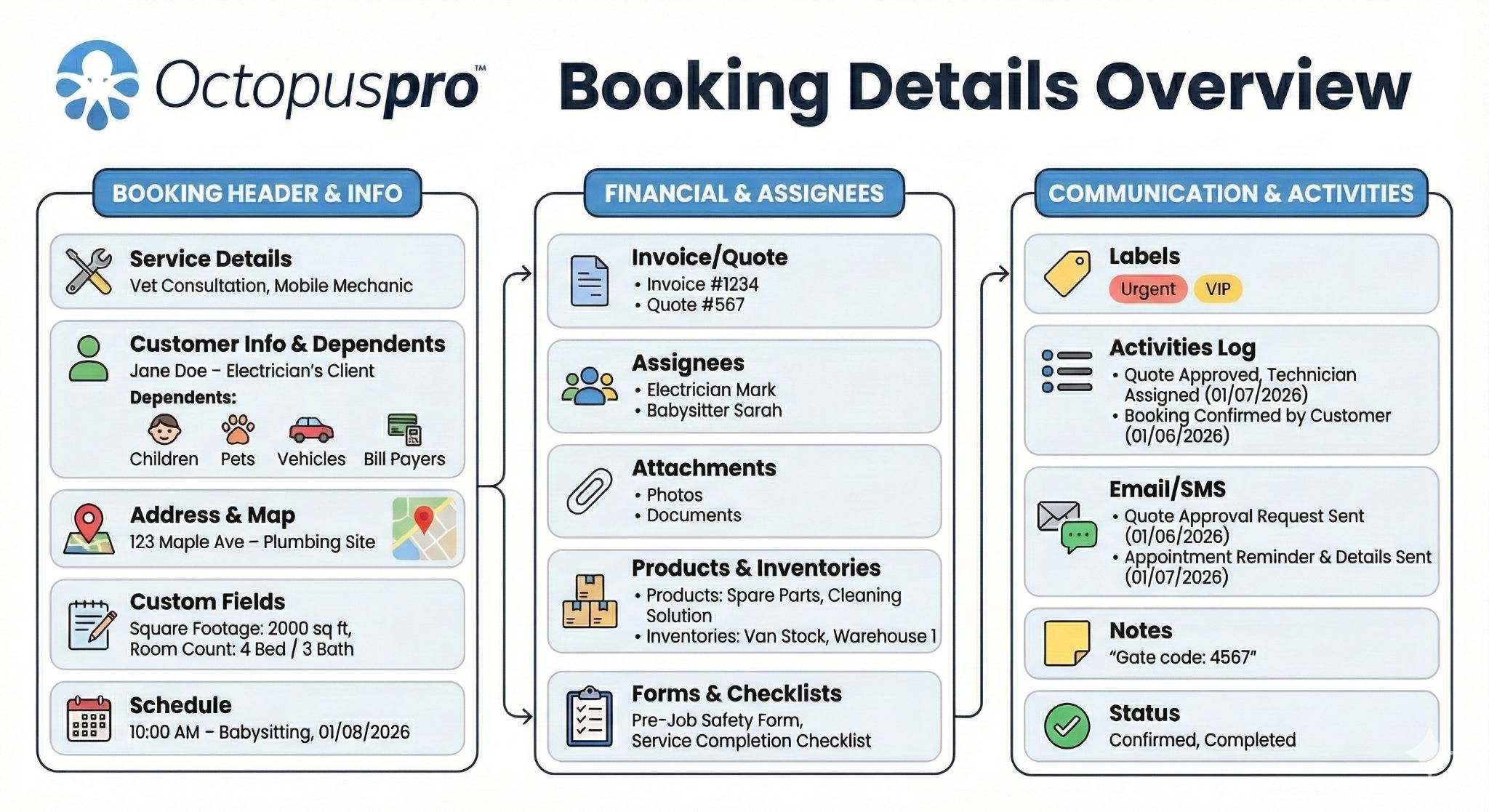
Booking details overview: Show how customer details, services, appointment information, status, notes, communication and linked records come together in one booking view.
Prevent avoidable booking mistakes before they become customer problems
Booking software should help your team prevent scheduling errors, keep communication consistent, make fieldworker handovers clearer and preserve a reliable history—not just capture appointment requests.
Prevent scheduling conflicts
Reduce double-booking and avoid preventable scheduling issues with availability rules, calendar sync, day/week/month views, drag-and-drop rescheduling, unavailable blocks, booking status tracking and conflict controls.
Keep communication consistent
Send confirmations, reminders, follow-ups, branded emails and SMS updates so customers and fieldworkers know what is happening next.
Protect booking context
Keep customer details, booking documents, terms, service notes, uploaded images, PDFs, files, customer asset or property records, payment history, communication records, audit history and change logs available within the booking workflow.
Improve fieldworker accountability
Support app-based accept or decline requests, on-the-way/arrived/started/finished milestones, check-in and check-out, optional GPS accountability, auto check-out, timesheet review, job history, field reports, photos, checklists and mobile access for field teams.
Improve the whole service journey, not just the calendar
Give customers a more reliable experience by keeping booking data, customer communication, fieldworker assignment, pricing, payments and reporting in the same operational view, so your team can respond faster and reduce manual follow-up.
- Office staff can see booking context before confirming or changing appointments.
- Dispatchers can choose fieldworkers with better visibility over availability and skills.
- Customers receive clearer updates before, during and after the appointment.
- Managers can review booking history, audit activity, conversion and operational performance.
Avoid outgrowing a basic booking form by giving your team the operational controls needed to manage bookings, fieldworkers, customer updates and reporting reliably as your business grows.
Booking modification process
Manage booking changes with clearer records, controlled updates and fewer disconnected follow-up tasks.
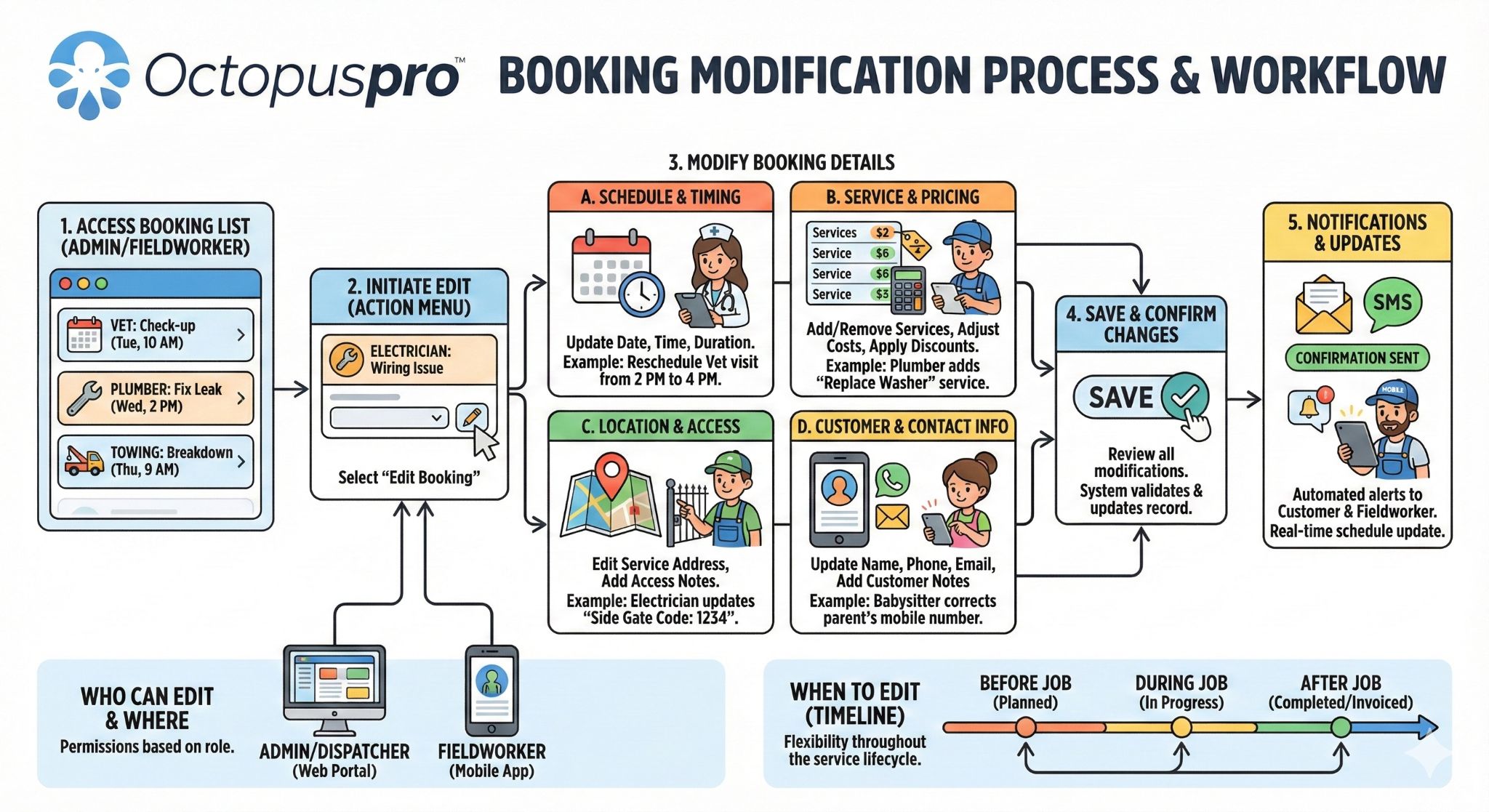
Booking modification process: Show how booking edits, schedule changes and updates can be managed without losing context or accountability.
Booking deletion and restoration process
Protect booking records with deletion controls, restoration options and clearer governance when mistakes or changes occur.
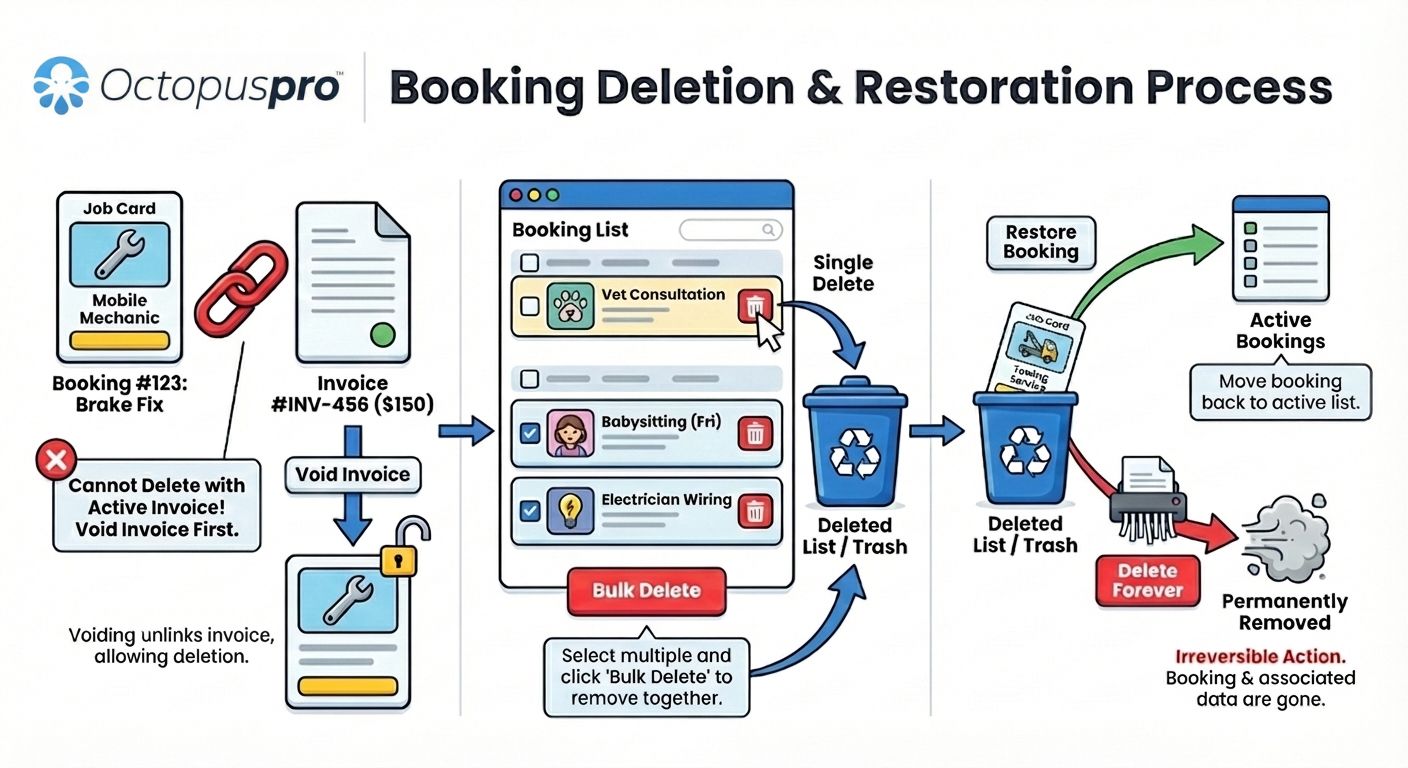
Booking deletion and restoration: Explain how deleted booking records can be controlled, reviewed or restored depending on the business workflow and permissions.
Booking history and audit log
Use booking history and audit logs to improve accountability, track changes and review operational progress.
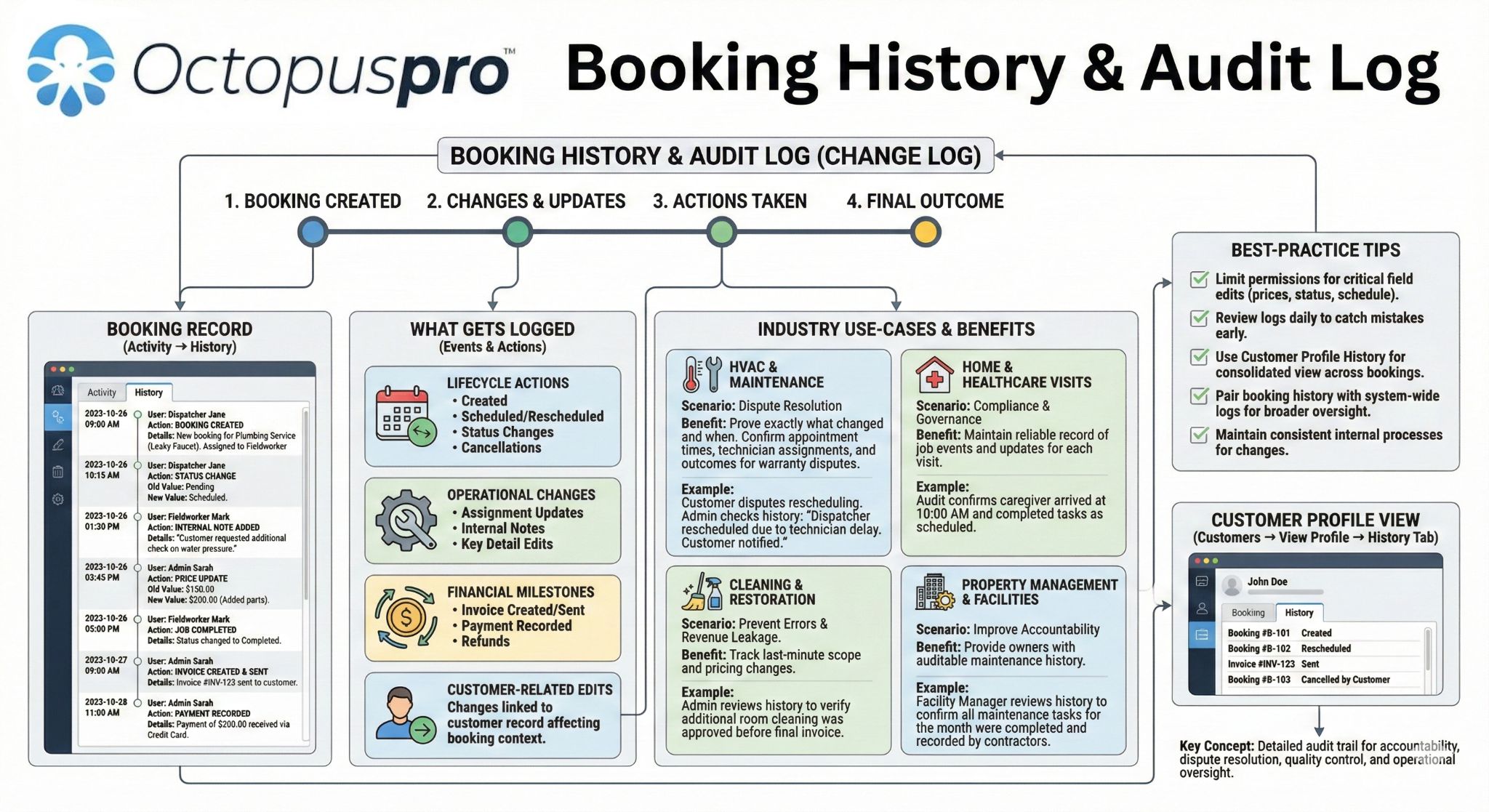
Booking history and audit log: Show how booking changes, updates, communication, status changes and key actions can be recorded for accountability and review.
Booking, invoice and ownership flow
Connect booking records with invoice ownership, payment responsibility and operational accountability.
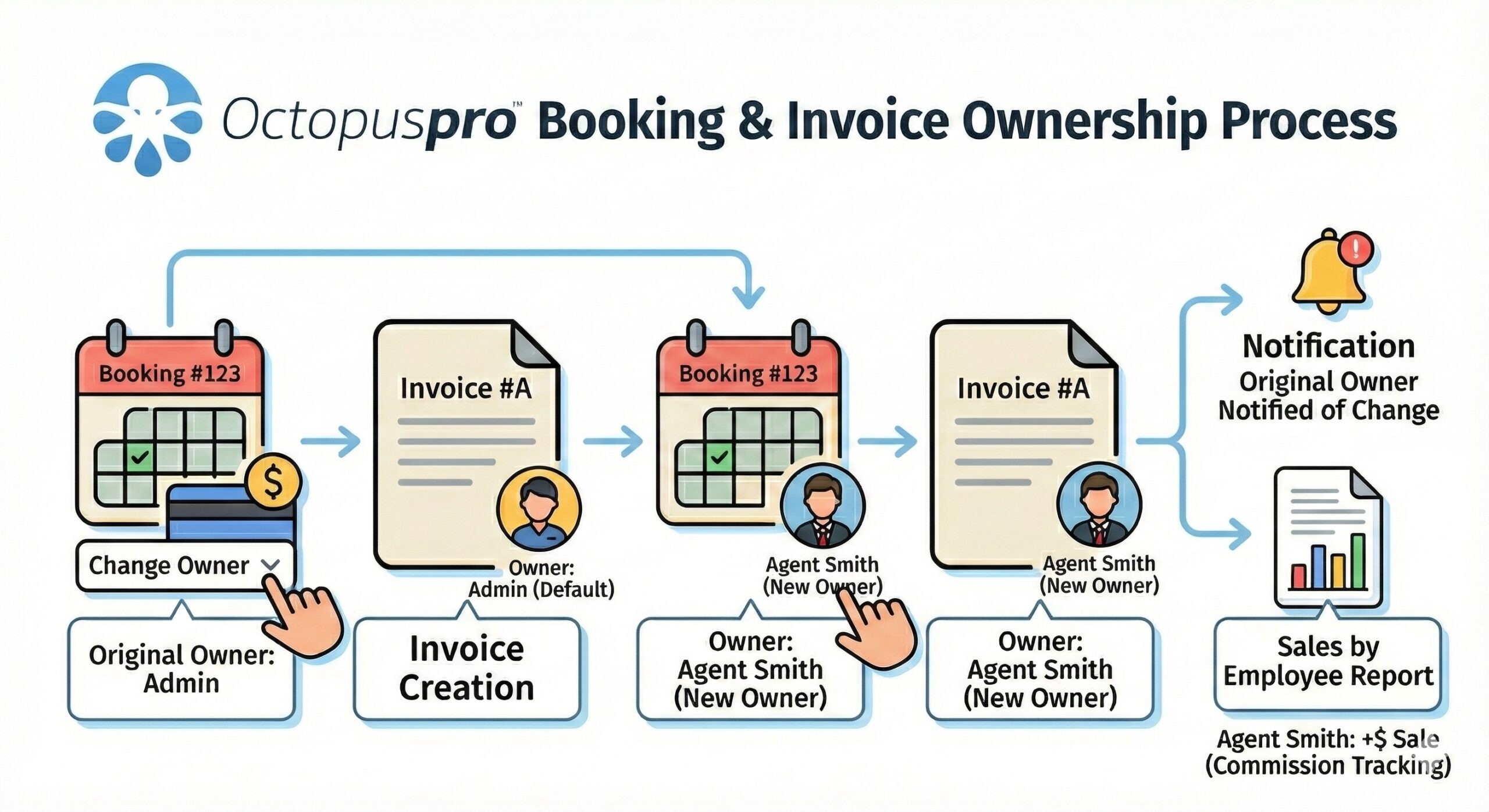
Booking and invoice ownership: Explain how booking records, invoices and operational responsibility stay connected so accountability is easier to track.
Explore the deeper feature set
Review the supporting controls, customer self-service, communication, booking records, payments and reporting tools.
Group capabilities by the outcome you want to improve
Start with the outcome your business wants to improve, then review the OctopusPro capabilities that support it across bookings, dispatch, customer communication, payments, pricing and reporting.
Capture bookings and payments with less friction
- Let customers start bookings online through your booking portal.
- Drive customers into the right flow using service-specific Book Now buttons, direct booking links, gift voucher links, QR codes and campaign links.
- Capture both booking requests and instant bookings depending on how much review each job needs.
- Reduce payment friction with online booking and secure payments.
- Offer the right checkout options with deposits, full payments, pay-on-arrival, bank transfer, cash, cheque or hybrid workflows.
- Keep customer details and payment activity tied to the booking record.
- Keep job cost and payment records complete with products, materials, stock items, refund requests, refund approvals and payment reconciliation linked to bookings.
- Increase revenue opportunities with booking extras, service packages, prepaid offers and gift voucher style workflows where suitable.
- Handle group, event or high-volume scheduling with bulk booking management.
Schedule and dispatch with fewer conflicts
- Schedule appointments in a way that matches your services, availability and fieldworker capacity.
- Dispatch fieldworkers based on availability, skills and location.
- Reduce false availability with real-time availability checks.
- Reduce double-entry with Google and Outlook calendar integration.
- React faster to schedule changes with calendar views, drag-and-drop rescheduling and unavailable blocks.
- Focus dispatcher attention with area, state, region, service territory and location-type calendar filtering.
- Reduce travel waste with nearby bookings and proximity-based dispatch support.
- Manage demand across branches, territories or service areas with multi-location support.
- Filter work faster using booking statuses, labels, tags, owner, trading name and lead source.
Keep fieldworkers prepared and accountable
- Improve attendance visibility with fieldworker check-in and check-out.
- See job progress more clearly with on-the-way, arrived, started, paused, resumed, unable-to-start and finished milestones.
- Support accountability and payroll review with optional GPS-supported status tracking, auto check-out and timesheet reporting.
- Give dispatchers and customers better visibility with real-time fieldworker tracking where enabled.
- Keep work moving in poor connectivity areas with offline app access.
- Make booking information easier to access with mobile access for staff and customers.
- Reduce internal back-and-forth with team collaboration tools.
- Capture proof of work with forms, checklists, photos and field reports.
- Give future jobs better context with booking history.
Build customer trust with consistent communication
- Reduce manual chasing with automated customer communications.
- Make every update feel professional with branded emails and SMS messages.
- Keep messaging consistent with customised and automated emails.
- Build confidence and measure demand with booking system branding, branded portal URL, multilingual settings, SEO metadata and conversion tracking scripts.
- Reduce pre-booking confusion with preparation notes, service FAQs, checkout disclaimers, service conditions and policy guidance.
- Improve accessibility with multilingual support.
- Keep context clear with terms, conditions, booking attachments, portal chat, booking-specific messages and communication history.
Protect margins with smarter pricing controls
- Respond to demand with adaptive and seasonal intelligent pricing.
- Support campaigns with specials and promotions.
- Protect margin by location with dynamic geographical pricing zones.
- Reward larger jobs while preserving control with bulk pricing and discount rules.
- Avoid unprofitable bookings with minimum charge rules.
- Adjust prices for demand spikes with seasonal and emergency rate options.
Improve decisions with clearer reporting and admin control
- Keep schedules and financial records easier to review with calendar and invoice management.
- Understand demand and performance with reporting and conversion tracking.
- Attribute and filter work with booking labels, tags, owner, trading name and lead source reporting.
- Track each job stage with customisable booking status workflows for enquiry, quote, scheduling, assignment, completion, cancellation and follow-up.
- Improve service quality with customer feedback, ratings, reviews and insights.
- Resolve questions faster with audit history, booking change logs, issue/complaint tracking and escalation history.
- Reduce finance admin with Xero and QuickBooks accounting sync.
- Improve planning with business analytics and optimisation.
- Spot bottlenecks with operational performance visibility.
- Improve retention with customer satisfaction insights.
Give customers control while reducing support calls
Improve customer confidence by letting people book, receive updates, review appointment details and manage their service experience without unnecessary back-and-forth.
Book online
Allow customers to submit booking requests or book available services online using your branded booking experience, direct service-specific Book Now links, gift voucher links, QR codes, emails, SMS campaigns, ads or service pages.
Prepare before booking
Show service FAQs, preparation notes, inclusions, pricing factors, access requirements, checkout disclaimers, cancellation rules, safety instructions and policy guidance so customers understand the service before they confirm.
Reschedule or cancel within your rules
Allow customers to reschedule or cancel bookings online when permitted by your cancellation policies, minimum notice rules and business settings.
Manage details
Keep customer profiles, service addresses, booking history, payment details, invoices, portal messages, uploaded files and communication records organised.
Stay informed
Reduce missed appointments, confusion and support calls with confirmations, reminders, automated emails, SMS messages, portal chat and booking updates.
Book through a branded portal
Make the customer-facing booking experience feel trusted and measurable with branded portal settings, service-specific links, SEO metadata and conversion tracking.
Collect signatures, approvals and required documents as part of the customer booking experience
Keep consent forms, terms, approvals, attachments and office records connected to the booking so customers, office users and fieldworkers share the same source of truth.
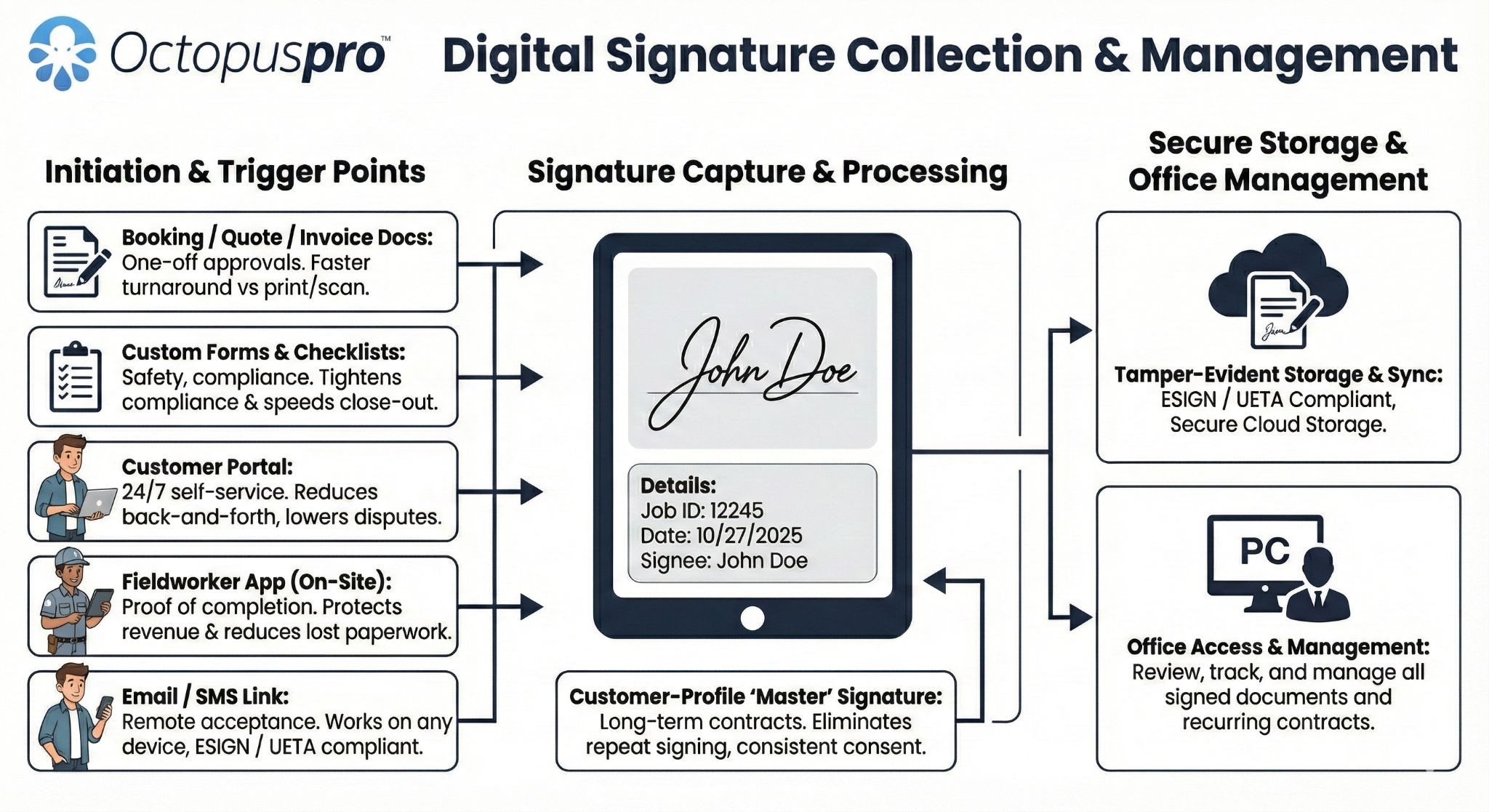
Digital signatures and document control: Collect approvals, signatures, terms, documents and office records as part of the booking experience so customers, office users and fieldworkers share one source of truth.
Give customers self-service options without losing control
Let customers book, pay, receive updates and manage appointments while your team keeps the rules, availability and customer history connected.
Customer self-scheduling and booking options
Give customers clearer booking options, request flows and self-scheduling paths from the customer portal.
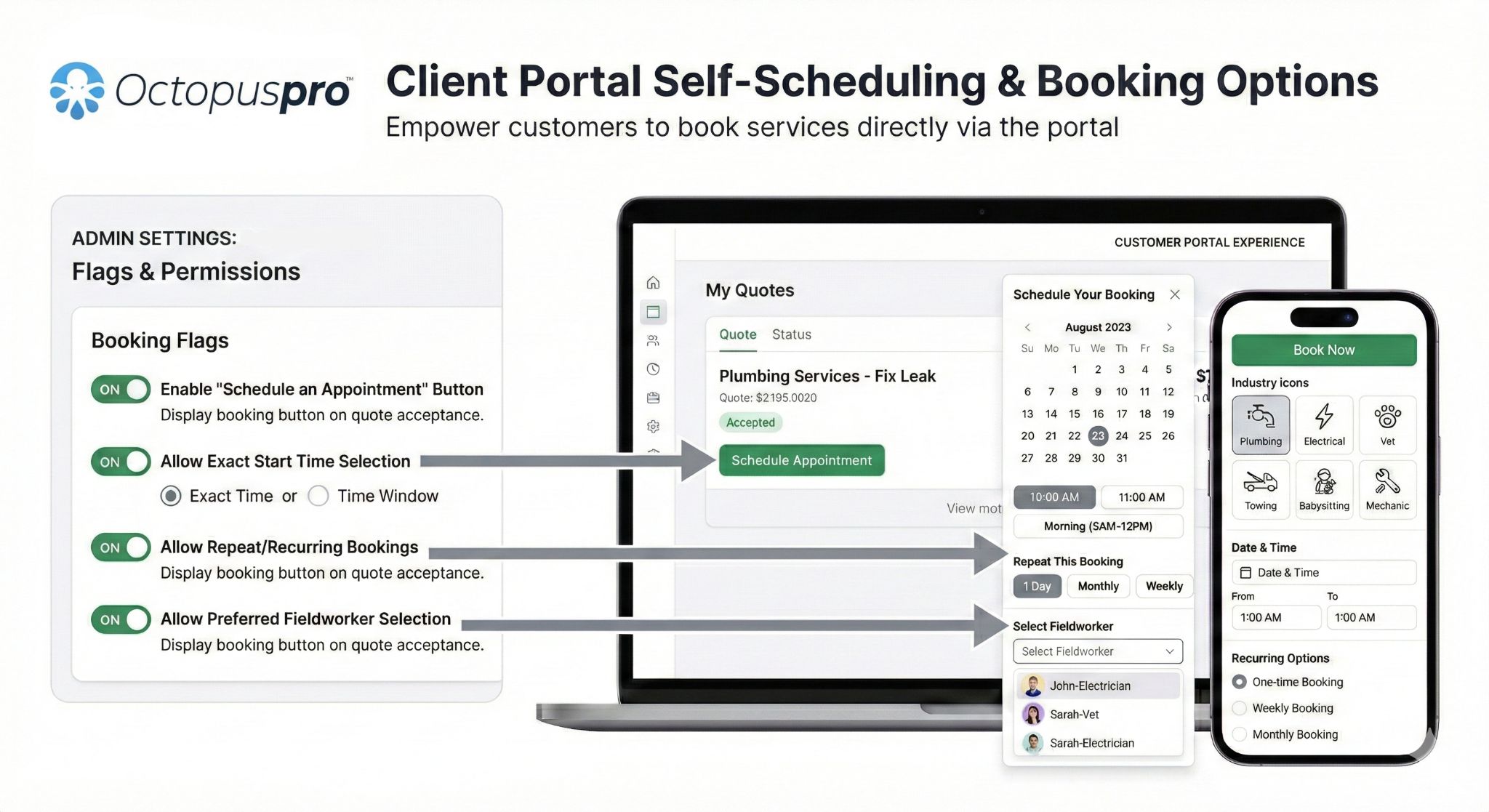
Customer self-scheduling and booking options: Show how customers can choose booking options, request suitable times and manage booking actions through a controlled online workflow.
Customer portal and online service management
Let customers access booking-related information through the portal while your team keeps the workflow controlled.
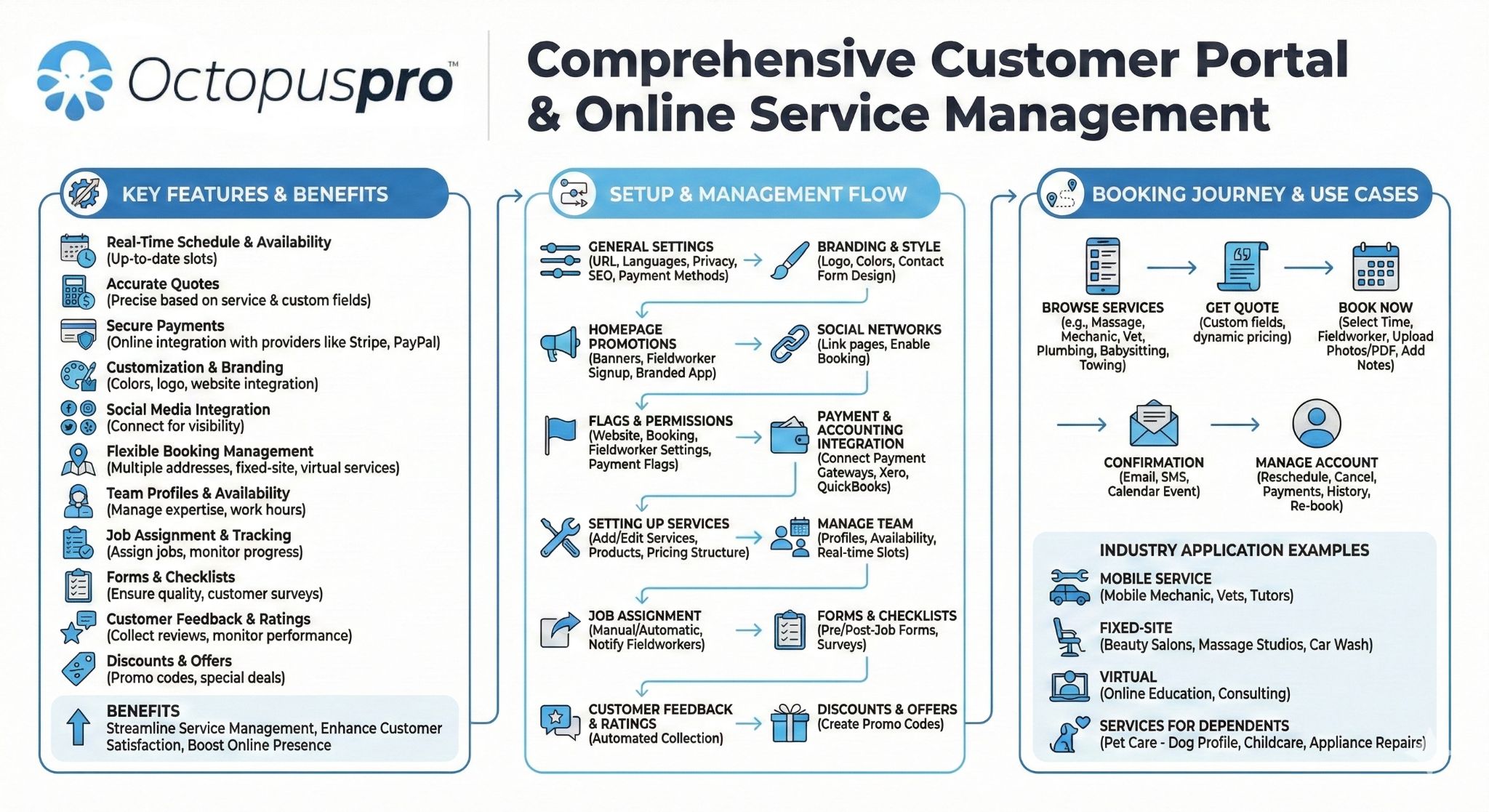
Customer portal and online service management: Show how customers can manage booking details, updates, documents and service interactions through a connected customer-facing experience.
Online booking and self-service workflow
Show how customers can move from service discovery to online booking, self-service updates and clearer communication.
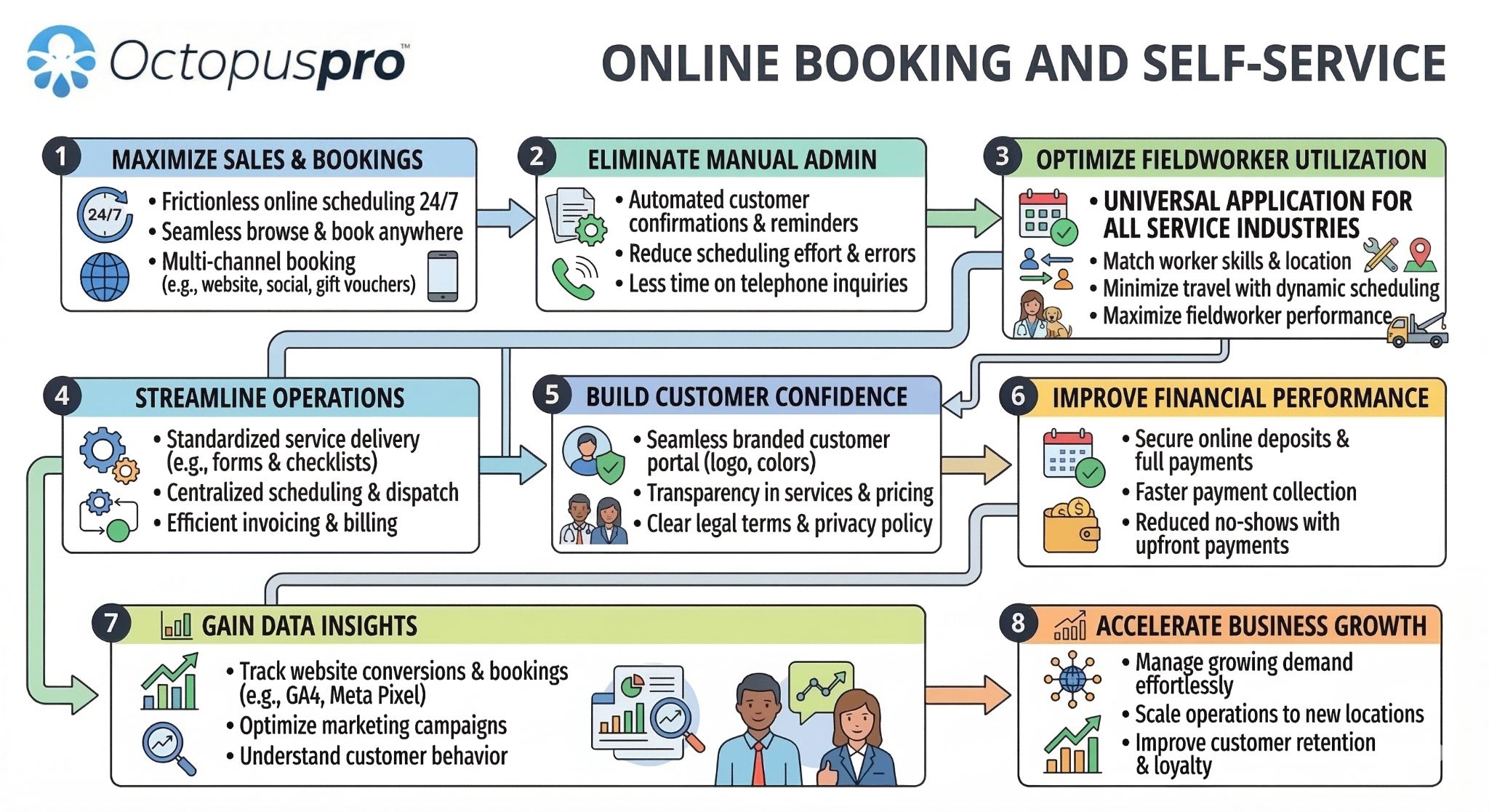
Online booking and customer self-service: Show how customers can request, book, update and manage booking details while the business keeps control of rules and availability.
Website booking integration options
Show how website booking buttons, booking widgets and portal links can connect your public website to OctopusPro.
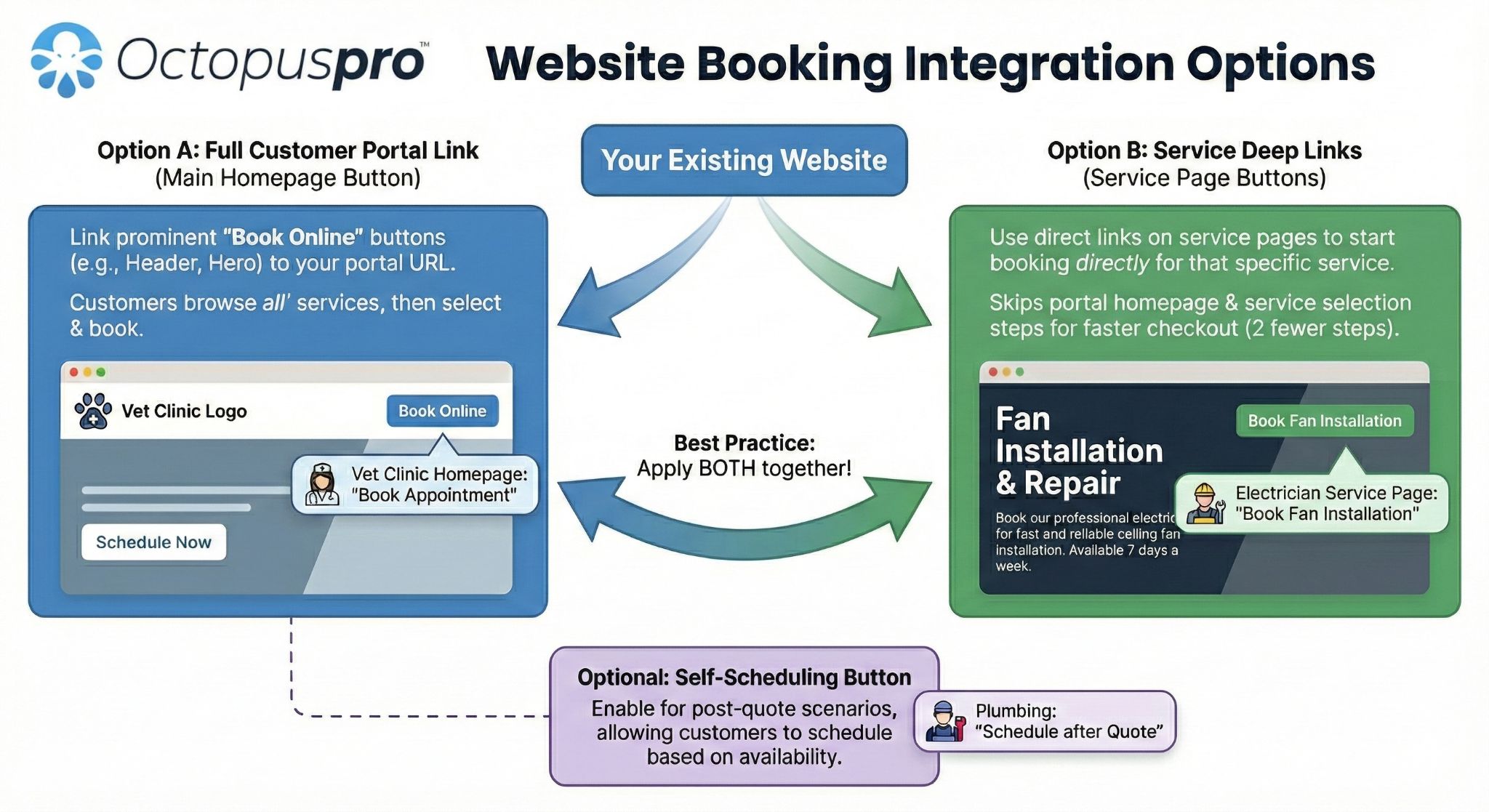
Website booking integration options: Show how customers can start bookings or requests from your website and move into the OctopusPro booking workflow.
Customer portal booking attachments
Keep customer uploads, documents, approvals and supporting files connected to the relevant booking record.
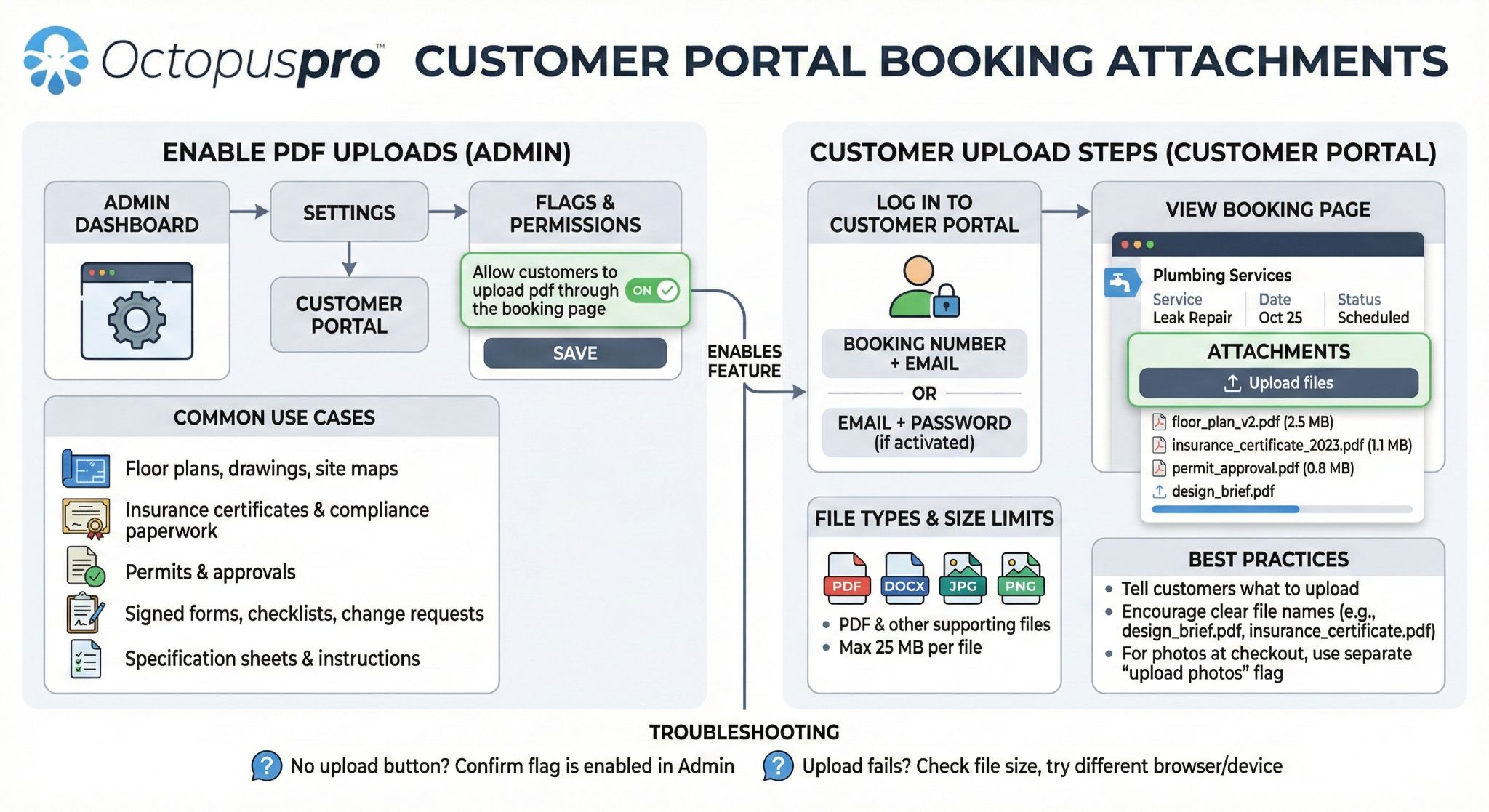
Customer portal booking attachments: Show how customers and staff can attach documents, photos and files so booking requirements are clearer before and after the job.
Photos, files and supporting booking attachments
Keep photos, documents, files and supporting job information connected to the booking record for staff and fieldworkers.
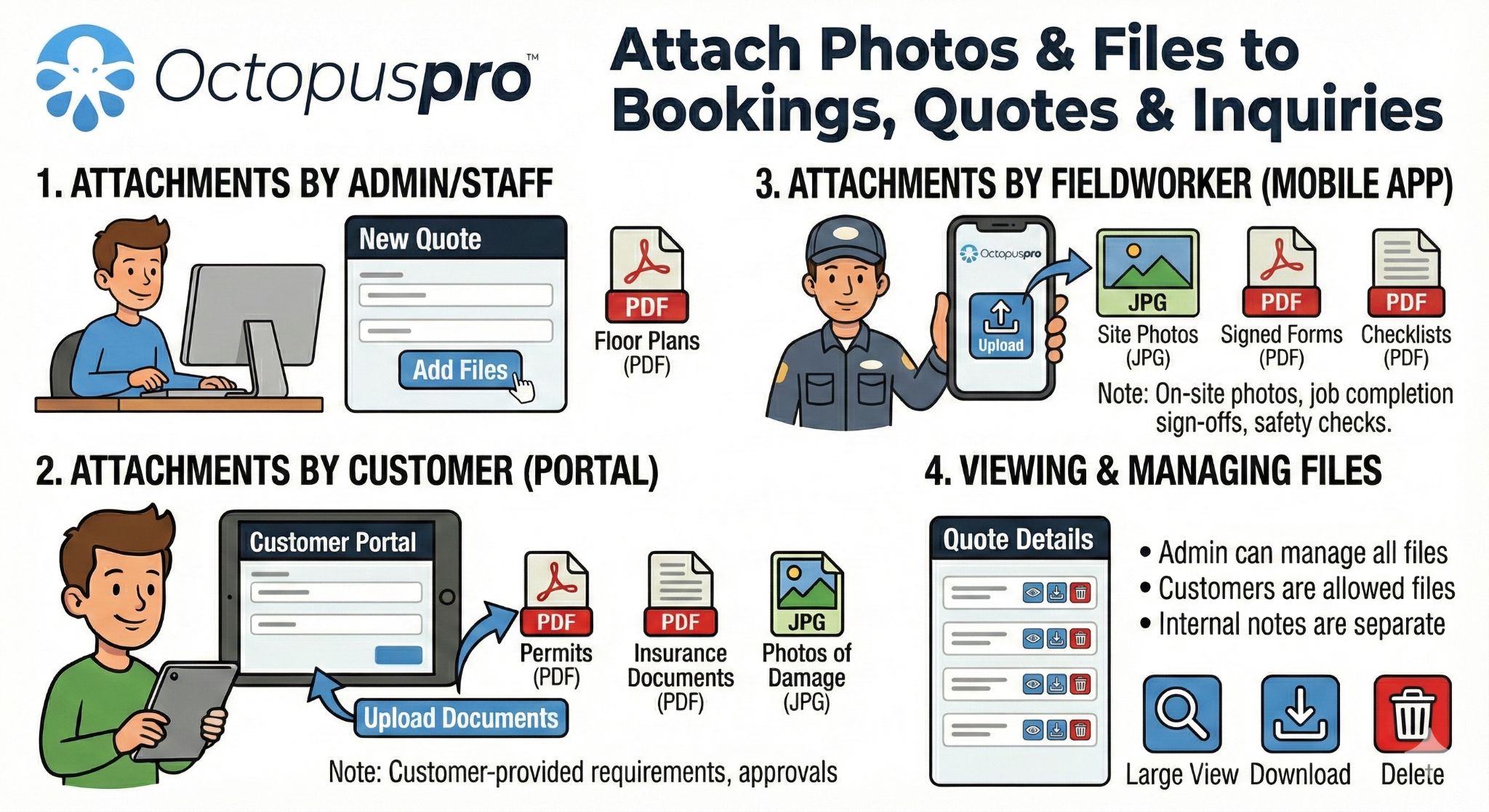
Attach photos and files to bookings, quotes and inquiries: Show how photos, documents and supporting files can stay attached to the relevant booking, quote or inquiry.
Keep customers, office staff and fieldworkers aligned before, during and after each booking
Reduce missed updates by giving every stakeholder access to the information they need, while keeping messages, notes and booking updates linked to the job record.
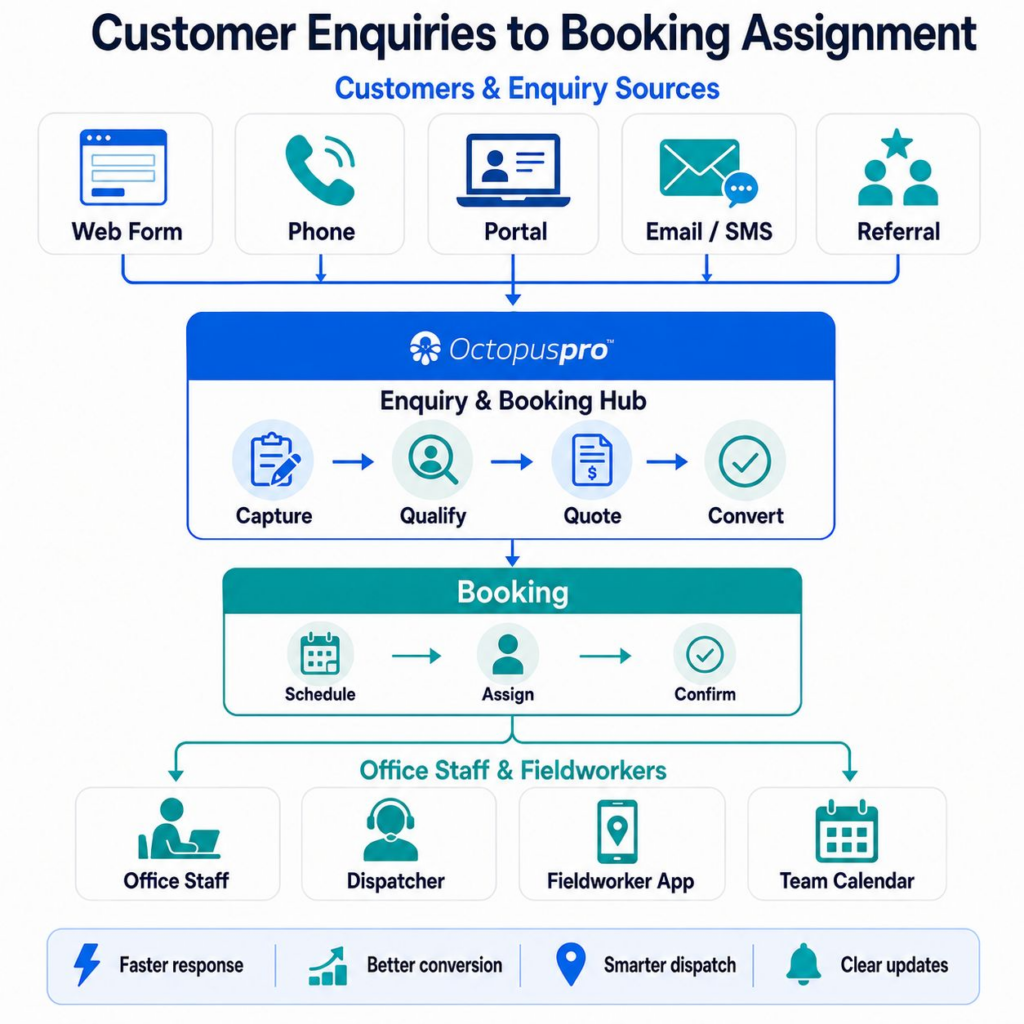
One connected conversation around every job. Enquiries, booking updates, customer replies, staff notes and fieldworker activity stay closer to the booking record instead of scattered across inboxes and separate tools.
Customer communication methods
Make the communication section more inclusive by showing the different ways customers, staff and fieldworkers can stay informed around a booking.
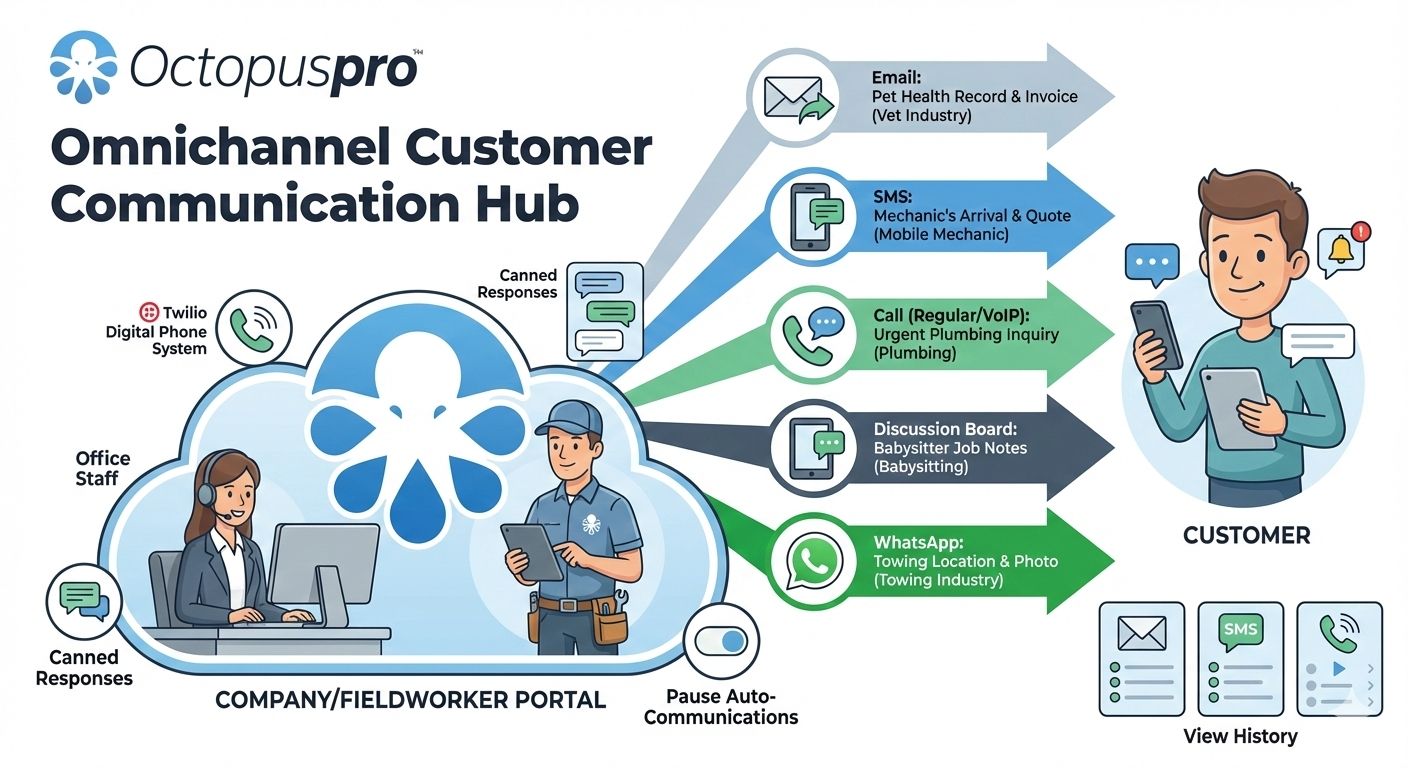
Customer communication methods: Customer communication methods: confirmations, reminders, email, SMS, portal updates and service messages linked to the booking record.
Offer booking times that fit the service
Customise duration and intervals for convenient appointments. Say goodbye to rigid, fixed time slots by tailoring available booking windows to your service requirements. Whether your services need shorter visits, longer appointments or more spaced-out scheduling, this feature gives you control over customer convenience and scheduling efficiency.

Keep booking work moving from anywhere
Access and manage your booking system online with no need to update software manually. Provide mobile access to staff and customers while on the road. The OctopusPro app also works in offline mode, helping fieldworkers access vital job information when internet access is unavailable.
Show times your team can actually service
Display fieldworker availability in real time and manage your mobile workforce using integrated live calendars that can sync directly with external calendars such as Google Calendar.
Recurring booking workflow and management
Manage ongoing appointments, repeat visits and recurring service schedules from the same booking workflow.
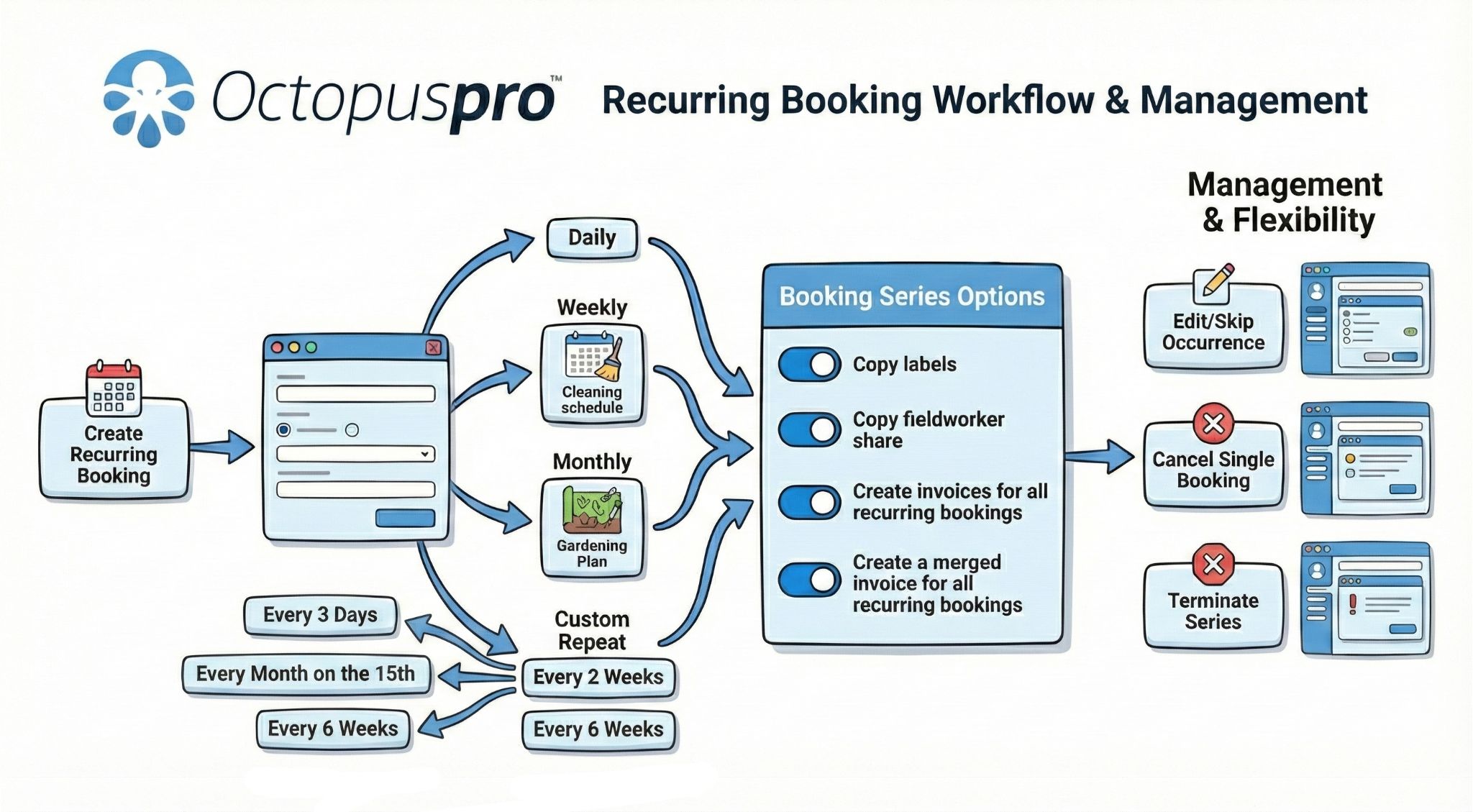
Recurring booking workflow and management: Show how repeat jobs, recurring schedules, customer records and future appointments can be managed without rebuilding every visit manually.
Customer portal recurring bookings
Allow customers to manage recurring booking information through the portal while your team keeps ongoing appointments organised.
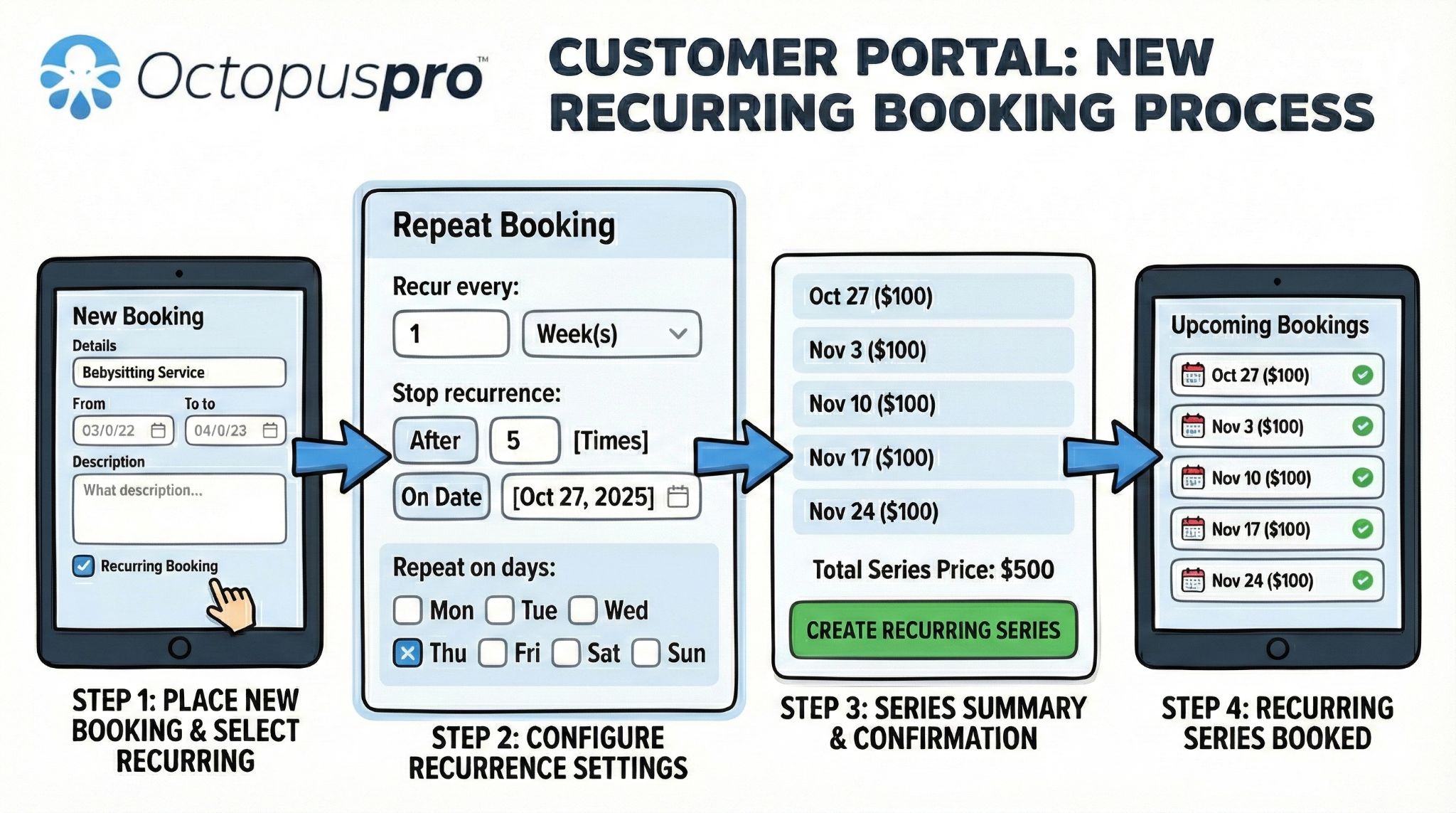
Customer portal recurring bookings: Explain how customers can request or manage recurring work while your team keeps service rules, availability and booking controls in place.
Make schedule changes, repeat work and mobile access easier to manage
Give your team clearer daily control with appointment status tracking, recurring bookings, group bookings, customer mobile access and fieldworker app access across devices.
See where every booking stands
Track each booking through your workflow using statuses such as enquiry, quote, scheduled, assigned, confirmed, in progress, completed, cancelled and follow-up.
Let customers and teams manage bookings on the go
Your customers and mobile workforce can make and manage bookings online directly without contacting your office, using your app or customised website booking links.
Make repeat work easier to manage
Set up repeat appointments from the admin area, customer portal or fieldworker app workflows where enabled, while keeping assignment rules, reminders, payment terms and invoices aligned.

Keep everyone productive on any device
OctopusPro runs on any device, whether it is a desktop PC, Mac, laptop, tablet, smartphone, or any device with internet and a browser. The OctopusPro app is compatible with both iPhone and Android devices.
Simplify group and multi-person scheduling
Allow customers to book appointments for multiple individuals or a group at once, streamlining scheduling for group services or events.

Avoid hosting and update headaches
OctopusPro works from the cloud, so you never need to worry about software updates or data hosting. Your data is hosted securely and encrypted using the same type of technology trusted by major banks.
Ready to reduce booking admin and dispatch work faster?
Use OctopusPro to capture bookings online, automate follow-up, coordinate fieldworker availability, dispatch jobs faster and keep customers informed from enquiry to completed work.
Turn booking control into measurable operational gains
- Win bookings 24/7 with real-time availability.
- Centralise information for staff efficiency.
- Access your system anywhere with internet and a browser.
- Increase productivity and reliability in areas with poor or unstable internet connectivity through offline access for mobile fieldworkers through the app.
- Manage thousands of bookings effortlessly.
- Keep fieldworkers, office staff and mobile teams informed.
- Capture data for business analytics, operational optimisation and marketing.
- Automatically calculate the right price for bookings.
- Maximise bookings while meeting the preferred availability of workers and customers.
- Save time with easy updates for upcoming seasons each year.
See how OctopusPro can reduce admin and improve booking control
Share how your bookings are currently managed and get guidance on the best setup for scheduling, dispatch, payments, reminders, CRM, reporting or accounting integrations.
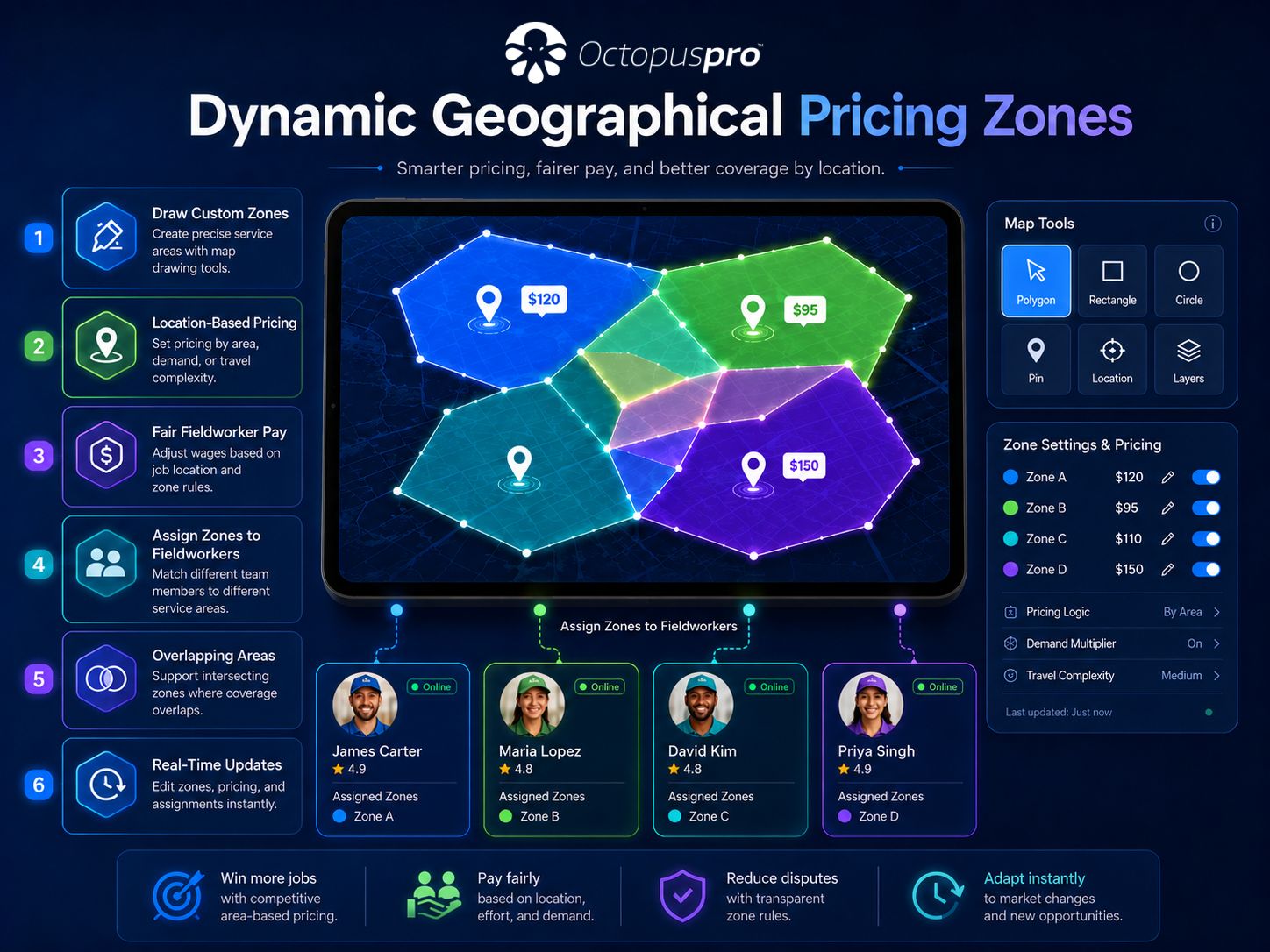
Protect margins when service costs change by location
Keep pricing fair, transparent and profitable by using map drawing tools to design geo-pricing zones that align service costs with customer location, local market conditions, travel requirements and business rules.
- Establish pricing based on service, location or staff member.
- Set dynamic rules for bulk pricing and discounts for larger jobs.
- Implement variable rates for seasonal or emergency tasks.
- Set guidelines for minimum charges per service or appointment.
- Use property type, service area, region or location category details to support clearer pricing and dispatch decisions.
See how location-based booking rules can work for your business
See how OctopusPro can fit your booking, dispatch, payment and customer communication workflow.
Forms and checklists configuration
Configure forms and checklists so booking records, service quality requirements, fieldworker instructions and captured data stay connected.
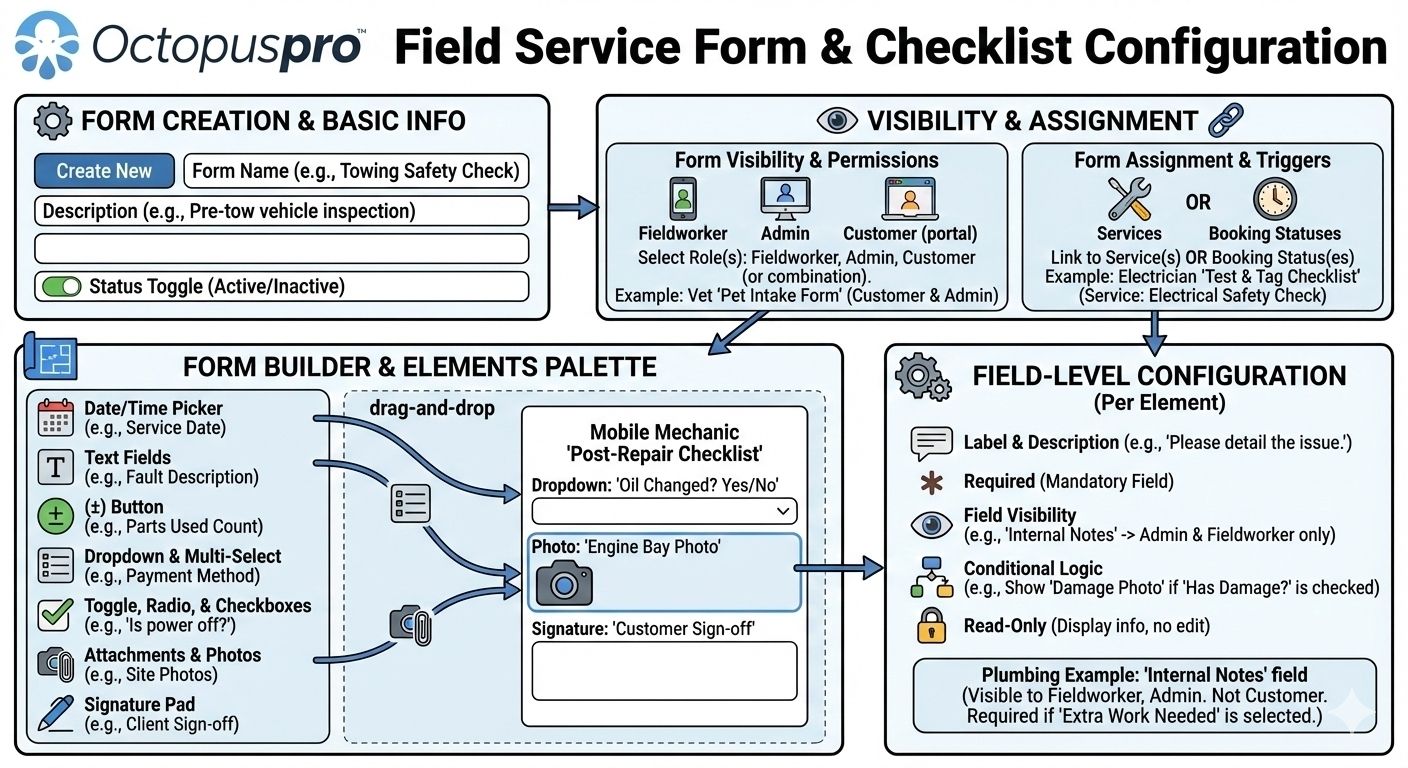
Forms and checklists configuration: Show how businesses can define questions, forms and checklist requirements for different services and booking workflows.
Forms and checklists in the booking workflow
Add a clearer field-data visual beside the existing configuration diagram so forms, checklists, approvals and service requirements feel more practical.
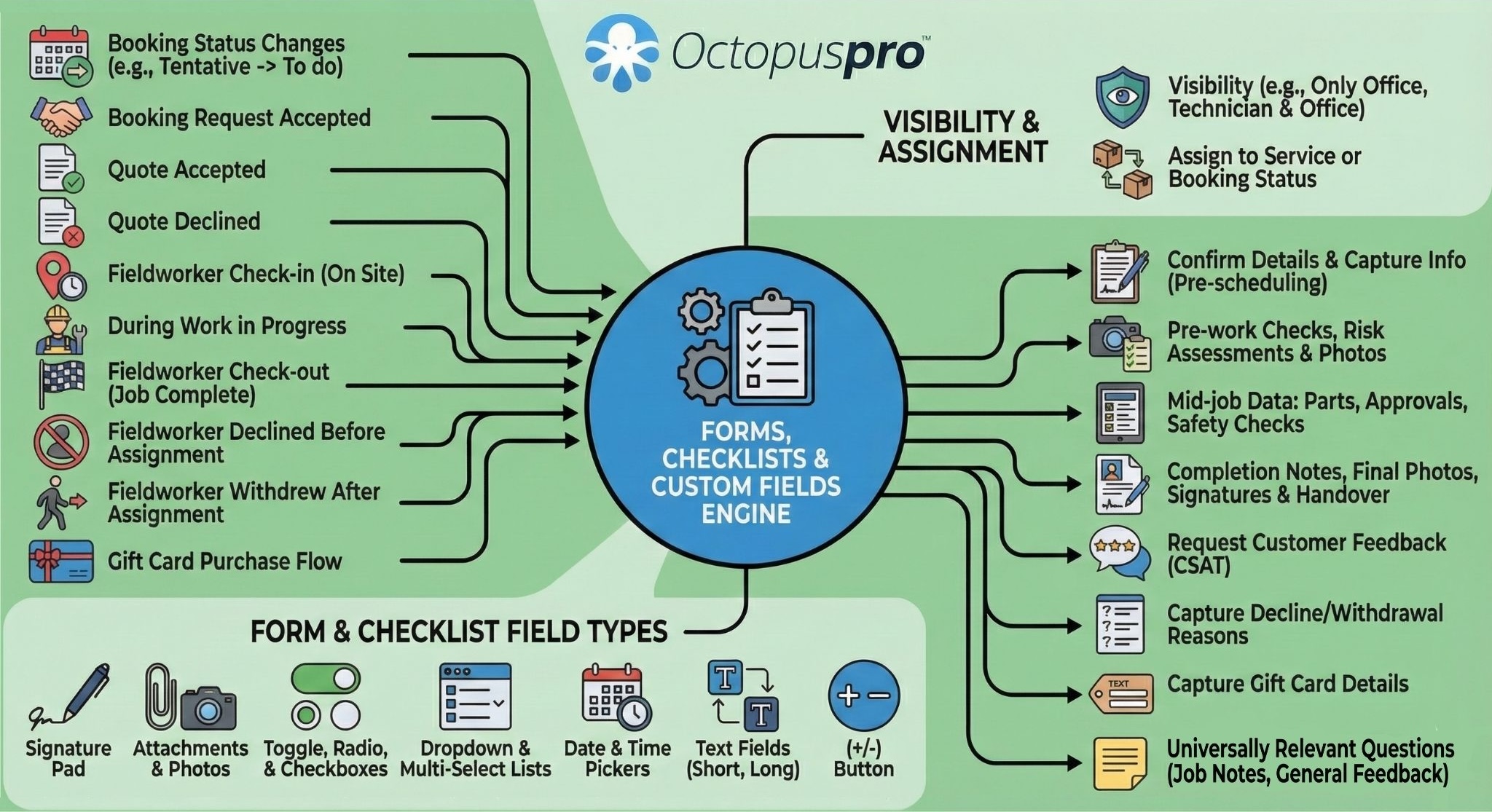
Forms and checklists in the booking workflow: Forms and checklists: collect structured information, required approvals, job notes, photos and service checks as part of the booking workflow.
Forms and checklists data collection
Capture structured job data, completed checklist items, customer details and service notes directly against the booking record during delivery.
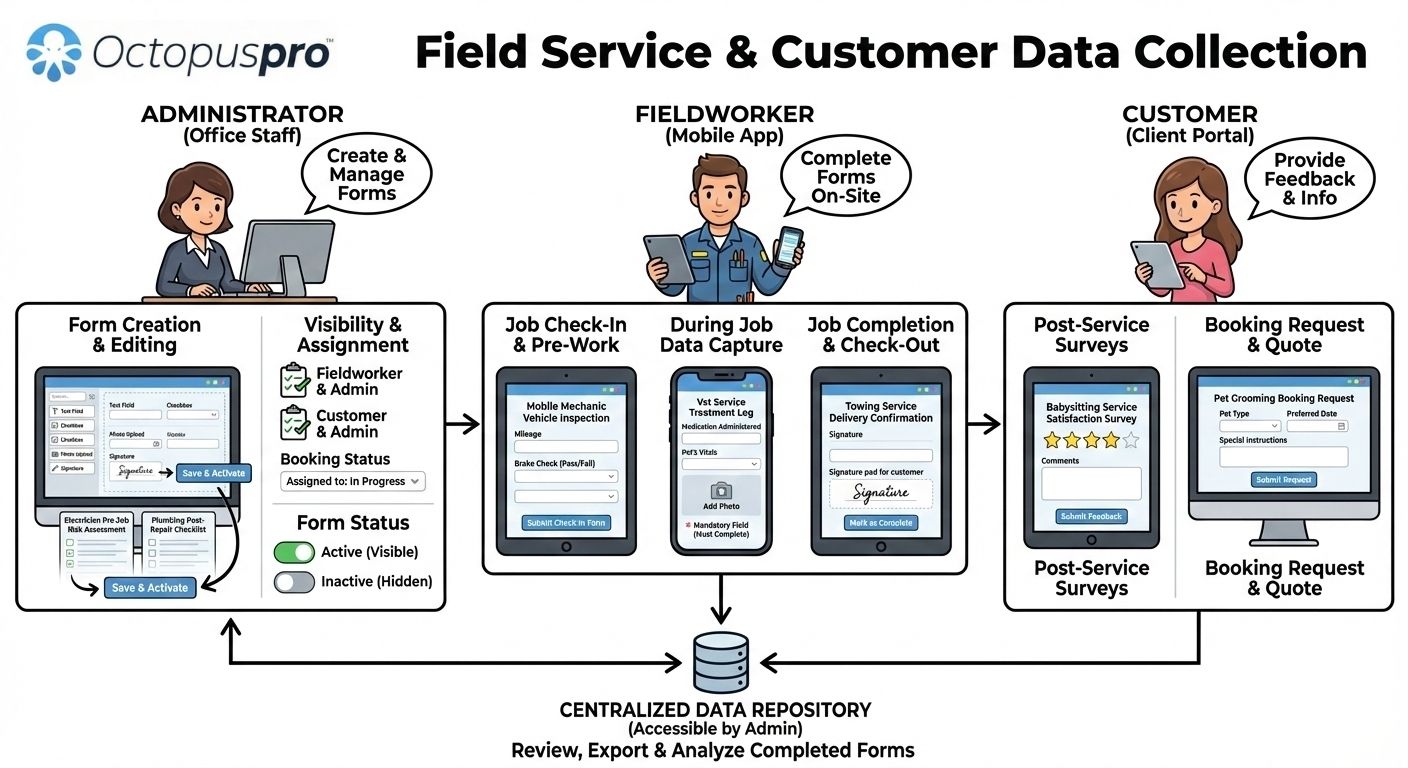
Forms and checklists data collection: Show how fieldworkers and staff can capture structured information during a job so records, compliance and follow-up stay organised.
Visualise the business impact of a better booking process
See how customer requests, scheduling, fieldworker activity, payments, updates and reporting stay aligned from enquiry to completion.
These diagrams make it easier to understand how booking capture, dispatch, customer updates, payments and reporting stay connected across the service lifecycle.
From customer request to completed job
Show the full service journey from enquiry through scheduling, fieldworker assignment, job updates, completion and follow-up, so the value feels connected rather than fragmented.

Customer and fieldworker alignment
See how customers and fieldworkers stay aligned as booking details, schedules and updates change.

Connected service operations
Review how service operations stay organised across bookings, teams, payments and reporting.

Keep every stakeholder connected as the booking progresses
See how customer updates, staff actions, fieldworker activity and reporting stay aligned from request to completion.

Support more service industries without creating booking chaos
OctopusPro mobile workforce booking management system is an integrated online solution for service-based businesses of all sizes, with connectivity and integration with leading CRMs and accounting systems.
OctopusPro is designed as the ideal management tool for mobile or field services, from cleaning, gardening, mowing, locksmiths, pool care, plumbing, antennas, dog washing, babysitting, car detailing, removals, skip bins, private tutoring, security, painting, tiling, heating & cooling, solar system installations, pest control, or whatever service your business offers to clients. OctopusPro is also ideal for real estate agents and builders managing fieldworkers on the properties they manage.
Gardening
Plumbing
Pest control
Tiling
Heating & cooling
Real estate
Builders
Increase capacity without losing service quality, accountability or retention
These outcomes connect industry-specific booking workflows with the control, visibility and consistency growing service businesses usually need.

Scalability and Growth
Grow your business by optimising resource availability, operational costs and marketing potential without compromising efficiency or service quality.

Increased Efficiency
Increase booking capacity, revenue and profitability per staff member by streamlining the booking process and reducing administration.

Profitability
Enjoy the benefits of happier customers and happier staff when you transform your business with OctopusPro.

Stay in Control
Advanced features help you keep control of your mobile workforce, bookings, invoices, payments and accounts.

Increase Conversion
Better lead management helps increase conversion rates, turning more enquiries into sales for your business.

Improve Retention
Cutting-edge CRM tools and features help your business retain customers, which is vital for long-term success.
Detailed capability map for complete booking management planning
Expand each group to review the booking, customer, fieldworker, payment, automation and reporting controls that can support a complete service workflow.
Review the grouped feature map for deeper detail on scheduling rules, customer data capture, automation, payments, operations, reporting and branding requirements.
Service setup
Customer experience
Automation & reminders
Payments & products
Reporting & growth
Avoid scheduling mistakes and manage complex bookings
- Flexible booking time slots – Customise the duration and intervals of available time slots to match your service types and operations.
- Custom booking rules – Set tailored rules for specific services or fieldworkers, such as lead times, maximum bookings per day, or special conditions.
- Booking conflict resolution – Automatically detect and resolve double-bookings or schedule conflicts before they become a problem.
- Reservation hold – Offer temporary reservation holds for clients who need extra time to confirm their booking, without losing the slot.
- Integrated waitlist and cancellation management – Manage waitlists and cancellations from one place to keep your schedule full and organised.
- Status color-coding – Use color-coded appointments based on booking status, such as pending, confirmed, completed and cancelled, for instant visual clarity.
- Booking labels – Organise bookings using custom labels, tags, owner, trading name and lead source for quick filtering, accountability and reporting.
- Advanced booking status workflow – Customise booking statuses to match your process from enquiry or quote through scheduling, assignment, completion, cancellation and follow-up.
- Fieldworker calendar sync – Sync fieldworker calendars with the booking system to show real-time availability and avoid clashes.
- Calendar management – Use day, week, month and list-style scheduling views, drag-and-drop rescheduling, internal notes and unavailable time blocks to manage daily operations.
- Area-based calendar filtering – Filter the booking calendar by state, region, service territory, area or location type so dispatchers can focus on the right jobs and local capacity.
- Automatic time zone conversion – Automatically convert booking times to the client’s local time zone to prevent confusion and missed appointments.
Capture better customer details before the job starts
- Custom booking forms – Build custom booking forms to capture all essential information from clients at the time of booking.
- Pre-booking consultations – Offer optional pre-booking consultations to assess client needs and provide personalised recommendations.
- Client account management – Allow clients to create and manage their own accounts, view bookings, update details and rebook with ease.
- Client consent forms – Incorporate digital consent forms into the booking process so clients can review and agree to required terms before confirming.
- Customisable booking terms and conditions – Create and maintain your own booking terms and conditions so clients clearly understand your policies.
- Customisable booking cancellation reasons – Define the reasons clients can select when cancelling appointments, giving you insights to improve services and reduce cancellations.
- Service description templates – Use customisable templates to create clear, detailed and consistent service descriptions across your catalogue.
- Service catalogue controls – Configure service categories, customer-facing service descriptions, images, pricing models, deposits, display rules, preparation notes, checkout disclaimers, Book Now links and FAQs for clearer online bookings.
- Booking custom fields – Capture service-specific details, apply surcharges, discounts, quantity rules or extra duration, qualify customer requests and collect the information your team needs before assignment.
- Customer self-service rescheduling and cancellation – Let customers change or cancel eligible bookings online while your minimum notice rules, cancellation policies and fees remain in control.
- Customer portal booking links – Add service-specific booking buttons, direct booking links, QR codes, gift voucher links and campaign links to guide customers into the right booking flow.
- Customer portal checkout guidance – Display service conditions, access requirements, safety instructions, cancellation rules and policy disclaimers before customers confirm.
Reduce manual follow-up with automation and communication
- Automated booking confirmations – Send instant booking confirmations as soon as an appointment is scheduled.
- Customisable booking confirmation emails – Design branded confirmation emails that include all essential appointment details and a personalised touch.
- Customisable booking reminders – Set up automated reminders with customisable timing and messaging to reduce no-shows.
- Automated waitlist notifications – Automatically notify clients on the waitlist when a suitable time slot becomes available.
- In-app messaging – Enable secure in-app messaging between clients, fieldworkers and office staff for faster communication and collaboration.
- Customer portal messaging – Keep customer questions, booking-specific conversations, uploaded photos, notes and follow-ups tied to the correct booking record.
- Booking communication history – Keep email, SMS, call and discussion history linked to the booking record so teams can review previous updates before taking action.
- Customisable email templates – Create and reuse email templates for confirmations, reminders, follow-ups, promotions and other scenarios.
- Automated booking follow-ups – Send automated follow-up messages after appointments to request feedback, encourage rebooking or promote additional services.
Protect revenue with payment, policy and promotion controls
- Cancellation policy enforcement – Set and enforce cancellation policies, including fees for late cancellations or no-shows, to protect your revenue.
- Promo codes and coupons – Offer promotional codes or coupons for discounted services to support campaigns and loyalty programs.
- Refund approval workflow – Manage booking and invoice refunds through a structured workflow that records refund reasons, supports review or approval steps, and keeps a clear financial audit trail.
- Refund and reconciliation visibility – Keep payment outcomes, refunds and reconciliation activity aligned with the booking and invoice workflow.
- Checkout payment method controls – Choose which payment options are shown during customer checkout, including deposit, pay-in-full, pay-on-arrival, bank transfer, cash, cheque or hybrid payment workflows.
- Products, materials and inventory items – Add parts, products, consumables, stock items or supplied materials to bookings so invoices and service records reflect what was used or delivered.
- Gift vouchers and prepaid booking offers – Support eligible prepaid offers, packages or voucher-style service purchases for industries where customers buy services for themselves or others.
- Referral tracking – Track referrals from clients or partners, reward successful referrals and encourage word-of-mouth marketing.
Keep fieldwork, resources and service delivery accountable
- Resource management – Assign and manage resources such as rooms, equipment, vehicles and tools required for each service or appointment.
- Task management and delegation – Assign tasks to fieldworkers or team members and monitor their completion as part of the booking workflow.
- Fieldworker milestones and timesheet reporting – Track accepted, on-the-way, arrived, started, paused, resumed, finished and check-in/check-out activity, with optional GPS accountability, auto check-out and timesheet review.
- Unable-to-start and proof-of-work actions – Let fieldworkers report when they cannot start, pause or resume work, upload before-and-after photos and complete structured job steps from the app.
- Fieldworker performance incentives – Configure performance incentives to reward high-performing fieldworkers and encourage productivity.
- Integrated project management – Integrate project management tools to manage and track larger service-related projects linked to your bookings.
- Customer assets, dependents and property records – Link bookings to a specific pet, child, vehicle, appliance, room, property, tenant or managed asset when the service depends on that record.
- Job location property types – Capture whether work is for a house, apartment, office, commercial site, rental property, unit, room or other service location type.
- Complex booking structures – Manage multi-service bookings, multi-visit work, follow-up appointments, crew scheduling and multiple assigned fieldworkers from one booking record.
- Availability Finder and proximity dispatch – Review suitable fieldworkers using availability, services, skills, service areas, distance, nearby bookings and existing schedule commitments.
Improve reporting, CRM visibility and service quality
- Integrated CRM – Connect with Customer Relationship Management systems to centralise client data, streamline interactions and enable targeted marketing.
- Booking analytics – Analyse booking trends, popular services, peak times and other key metrics to inform smarter business decisions.
- Customer feedback, ratings and reviews – Collect post-booking feedback and quality signals to monitor service delivery, fieldworker performance and follow-up opportunities.
- Issues and complaints linked to bookings – Track service concerns, disputes, complaints or recovery actions against the relevant booking, quote, invoice or customer record.
- Issue escalation and resolution tracking – Manage booking-related issues through role-aware discussion, follow-up visits, status history and optional payout hold until the issue is reviewed or resolved.
- Audit history and change logs – Review who changed booking details, schedule times, statuses, payment activity or customer communication, helping improve accountability and dispute handling.
Keep documents, proof and branding attached to each booking
- Attachments & document management – Link related documents and attachments, such as quotes, reports, photos and forms, directly to client or booking records.
- Image, PDF and file uploads – Attach access photos, before-and-after images, customer-supplied files, approvals, reports and supporting documents to bookings, quotes or inquiries.
- Forms, checklists and field reports – Capture structured job information, quality checks, customer feedback, photos and field reports as part of the booking record.
- White-labeled solution – White-label the platform with your own branding, including logo, colours, portal URL, language settings, SEO metadata and tracking scripts to deliver a seamless and measurable booking experience for your clients.
Not sure how OctopusPro would fit your current booking process?
Whether you manage phone bookings, online bookings, recurring jobs, quotes, fieldworker dispatch, customer reminders or payment collection, our team can show you how the workflow can be configured for your business.
Compare options and choose the next step
Use the FAQs, feature details and next-step links to decide whether to start a trial, speak to an expert or review pricing.
Compare OctopusPro with the tools service businesses often outgrow
Many service businesses begin with simple calendars, forms or spreadsheets. See why a connected field service booking system is different from standalone tools.
Shared calendars
Useful for visibility, but limited for service rules, customer records, dispatch, payments and communication history.
- OctopusPro connects schedule, customer, booking and fieldworker context.
Spreadsheets
Flexible at first, but harder to manage as booking volume, staff and follow-up tasks increase.
- OctopusPro gives teams a structured workflow with clearer status and history.
Basic booking forms
Useful for collecting requests, but not enough to manage assignment, reminders, invoices or repeat work.
- OctopusPro helps turn requests into managed jobs.
Standalone schedulers
Often focused on appointments, not the full field service lifecycle after a booking is confirmed.
- OctopusPro supports dispatch, fieldworker workflows, payments and reporting.
Separate CRM and invoice tools
Separate systems can create re-entry, missed updates and disconnected payment records.
- OctopusPro keeps booking activity closer to customer, invoice and communication history.
Replace disconnected booking tools with one field service workflow
Separate tools can be useful individually, but field service teams usually need booking capture, scheduling, dispatch, customer communication, invoices, payments and history to work together.
Booking forms capture requests
OctopusPro helps turn requests into managed bookings with customer, service, schedule and assignment context.
From request to job
Calendars show time
OctopusPro connects time with services, fieldworker eligibility, service areas, booking rules and customer details.
From time slot to dispatch
Reminder tools send messages
OctopusPro links reminders and confirmations to real booking records, customer status and appointment workflows.
From message to workflow
Invoicing tools collect money
OctopusPro keeps invoices, deposits, payments and booking history closer to the service record.
From payment to history
CRMs store contacts
OctopusPro connects customer records to bookings, jobs, service history, communication logs and operational reporting.
From contact to lifecycle
Review the deeper feature groups when you need more detail about configuration, automation, fieldworker workflows, payments, reporting and customer self-service.
Answers that help service teams choose with confidence
See how OctopusPro can reduce admin, improve dispatch reliability, support customers, manage payments and give your team stronger operational visibility before you choose a booking system.
Booking software buyer questions
What is booking management software?
Booking management software helps a service business capture enquiries, create bookings, schedule appointments, assign staff or fieldworkers, send confirmations and reminders, manage booking changes, connect invoices and payments, and keep customer history in one organised workflow.
What is the difference between booking software and appointment scheduling software?
Basic appointment scheduling software usually focuses on selecting a time. Booking management software is broader: it can include enquiry capture, quote-to-booking workflows, customer records, fieldworker assignment, availability rules, communication history, invoices, payments, recurring work and reporting.
Can OctopusPro manage phone bookings and online bookings together?
Yes. OctopusPro can support customers booking online while office staff also create and manage phone, email and assisted bookings inside the same booking management system.
Can accepted quotes be converted into bookings?
Yes. Accepted quotes can be converted into bookings so customer, service, price and job information can move forward without unnecessary re-entry or disconnected admin.
Can bookings be assigned automatically to fieldworkers?
Yes. Depending on your configuration, bookings can be assigned manually or supported by assignment workflows that consider fieldworker availability, services, skills, location, service area and dispatch settings.
Can OctopusPro handle recurring and repeat bookings?
Yes. OctopusPro can support recurring and repeat work, making it suitable for service businesses that manage maintenance visits, regular appointments, scheduled service plans or ongoing customer relationships.
Does OctopusPro send booking reminders and confirmations?
Yes. OctopusPro can support booking confirmations, reminders and customer updates by email and SMS, helping reduce manual follow-up and keeping customers and fieldworkers better informed.
Can invoices and payments be connected to bookings?
Yes. Invoices, deposits, payment activity and booking payment history can remain connected to the booking record, helping office staff review operational and financial context together.
Online bookings and customer self-service
Can customers book online and pay at the same time?
Yes. OctopusPro supports online booking requests and instant bookings, with or without payment, so you can choose the workflow that suits your business.
Can OctopusPro support both online and phone bookings?
Yes. Customers can book online, while office staff can also create and manage bookings manually when customers call, email or require assistance.
Can I use booking requests instead of instant bookings?
Yes. You can use booking requests when your team needs to review details, confirm availability, check pricing or approve the appointment before it is confirmed.
Can OctopusPro manage recurring or repeat appointments?
Yes. OctopusPro supports recurring bookings, making it suitable for businesses that provide regular maintenance, repeat visits or ongoing scheduled services.
Can I add direct Book Now links for specific services?
Yes. Service-specific booking links, Book Now buttons, QR codes, gift voucher links and campaign links can help customers start the right booking flow faster from your website, emails, SMS, ads or service pages.
Can the customer portal be branded and tracked?
Yes. A branded customer portal, portal URL, SEO metadata and tracking scripts can support a more trusted booking experience and help measure booking conversions from ads, email, social and your website.
Can checkout show policies or disclaimers before customers book?
Yes. Booking disclaimers, service conditions, cancellation rules, safety instructions, access requirements and other policy messages can help set expectations before customers confirm.
Can customers message the office about a specific booking?
Yes. Customer portal messaging and booking-specific conversations can keep customer notes, questions, uploaded photos and updates linked to the correct booking record.
Can booking forms capture different details for different services?
Yes. Custom booking forms can collect the information your team needs for different services, helping you qualify jobs and prepare fieldworkers before the appointment.
Can OctopusPro help reduce manual customer follow-up?
Yes. Automated confirmations, reminders, follow-ups and professional email or SMS messages help reduce repetitive admin while keeping customers informed.
Can customers reschedule or cancel bookings online?
Yes. Customer self-service rescheduling and cancellation can be controlled by your business settings, including minimum notice rules, cancellation permissions and policy requirements.
Can customers see preparation notes before booking?
Yes. Service descriptions, FAQs and preparation guidance can help customers understand inclusions, access requirements, pricing factors and policies before confirming a booking.
Can bookings be linked to properties, assets or dependents?
Yes. Where relevant, booking records can be tied to customer assets, dependents or properties such as pets, vehicles, appliances, rooms, tenants or managed sites.
Scheduling, dispatch and fieldworkers
Can fieldworkers accept or decline booking requests?
Yes. Fieldworkers can receive booking requests and accept or decline them from their smartphone or tablet using the app.
Can availability sync with calendars?
Yes. OctopusPro supports real-time availability and calendar integration, including synchronisation with platforms such as Google Calendar.
Can the system support mobile teams with poor internet?
Yes. The OctopusPro app supports offline access, helping fieldworkers access important job information even when internet access is poor or unavailable.
Can office staff still control assignments manually?
Yes. OctopusPro can support dispatcher-managed assignment as well as more automated workflows, giving your team flexibility based on how your business operates.
Can fieldworkers report job milestones from the app?
Yes. Fieldworker workflows can support status milestones such as accepted, on the way, arrived, started, paused, resumed, unable to start and finished, helping office teams see what is happening on site.
Can OctopusPro support multiple service areas or business locations?
Yes. OctopusPro supports multi-location and service-area workflows, helping teams manage availability, pricing, dispatch and booking rules across different operating areas.
Can OctopusPro convert enquiries or accepted quotes into bookings?
Yes. OctopusPro can support workflows where customer enquiries or accepted quotes become scheduled bookings, helping reduce duplicate entry while preserving customer, service, pricing and location context.
Can OctopusPro handle complex bookings with multiple visits or fieldworkers?
Yes. OctopusPro can support multi-service bookings, follow-up appointments, repeat work, group bookings and fieldworker assignment workflows for teams that need more than one simple calendar event.
Payments, pricing and refunds
Can pricing change based on location?
Yes. Dynamic geographical pricing zones can adjust service pricing based on customer location, service area, staff member, job size or minimum charge rules.
Can refunds be reviewed before they are processed?
Yes. Refunds can be managed as part of the booking and invoice workflow, helping teams record refund reasons, review requests, maintain approval visibility and preserve a financial audit trail.
Reporting, quality and customer feedback
Can OctopusPro help with reporting and conversion tracking?
Yes. OctopusPro helps you track booking data, conversion rates, booking history, operational performance and business analytics.
Can OctopusPro help customers receive better appointment updates?
Yes. OctopusPro supports professional customer communication through confirmations, reminders, updates, follow-ups, emails and SMS messages.
Can booking data help with business reporting?
Yes. Booking history, conversion tracking, customer records, operational activity and reporting tools help businesses understand performance and improve decision-making.
Booking setup, data capture and administration
Can bookings capture property or location types?
Yes. Job location property types can help identify whether work is for a house, apartment, office, commercial site, rental property, room, unit or another service location type.
Can feedback, ratings, reviews or complaints be linked to bookings?
Yes. Feedback, ratings, reviews, issues and complaints can be linked to booking and customer records to support quality control, follow-up and service recovery.
Can bookings be tracked by labels, owner, trading name or lead source?
Yes. Booking labels, tags, owner, trading name and lead source tracking help teams filter work, assign accountability, attribute enquiries and report on where bookings are coming from.
Can the booking system be rolled out gradually?
Yes. A business can begin with core booking and dispatch workflows, then expand into online bookings, automated reminders, customer portal access, payments, reporting and integrations.
Can service questions affect price, duration or eligibility?
Yes. Booking custom fields can capture service-specific details, quantities, add-ons and qualification information that helps your team price, schedule and assign the work more accurately.
Can products, parts or materials be added to bookings?
Yes. Products, materials, parts or consumables can be linked to booking records and invoices so job pricing and service history reflect the items used or supplied.
Still comparing booking management systems?
Get help choosing the best setup for your booking volume, fieldworker structure, customer portal needs, pricing rules and growth plans.
Summarise the whole booking workflow before the final decision
Review how each feature group supports the journey from enquiry to repeat booking, from booking capture and scheduling through to communication, payments, reporting and customer history.
Capture
Turn demand into booking opportunities
- Online bookings
- Booking requests
- Phone bookings
- Quote conversion
Schedule
Confirm work with fewer conflicts
- Availability rules
- Calendar sync
- Booking windows
- Recurring work
Assign
Dispatch the right fieldworker
- Manual assignment
- Automatic assignment
- Skills and service areas
- Accept/decline workflows
Communicate
Keep customers and teams informed
- Confirmations
- Reminders
- SMS and email updates
- Customer portal access
Collect
Connect money to the booking record
- Invoices
- Deposits
- Payments
- Booking payment history
Improve
Use visibility to improve performance
- CRM records
- Communication logs
- Booking reports
- Operational insights
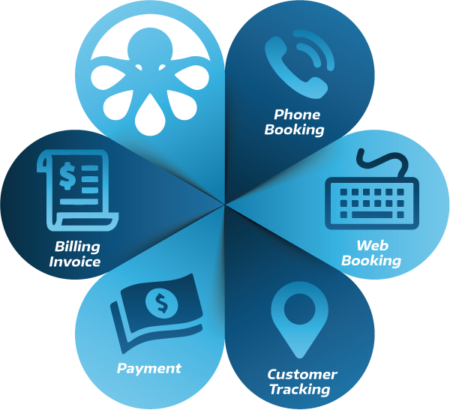
Ready to connect the full booking workflow?
Use OctopusPro to capture, schedule, assign, communicate, collect and improve from one operational system. This feature snapshot keeps the original booking management graphic in a more visible support position.
Ready to connect every booking from enquiry to repeat work?
Use OctopusPro to capture more booking demand, reduce manual admin, assign the right fieldworker, keep customers updated and connect invoices, payments, reporting and repeat work from one cloud-based platform.
Start with your current booking workflow, then expand into customer communication, fieldworker dispatch, invoicing, payments, reporting and automation as your team grows — without forcing every team to change everything on day one.
What gets connected first