
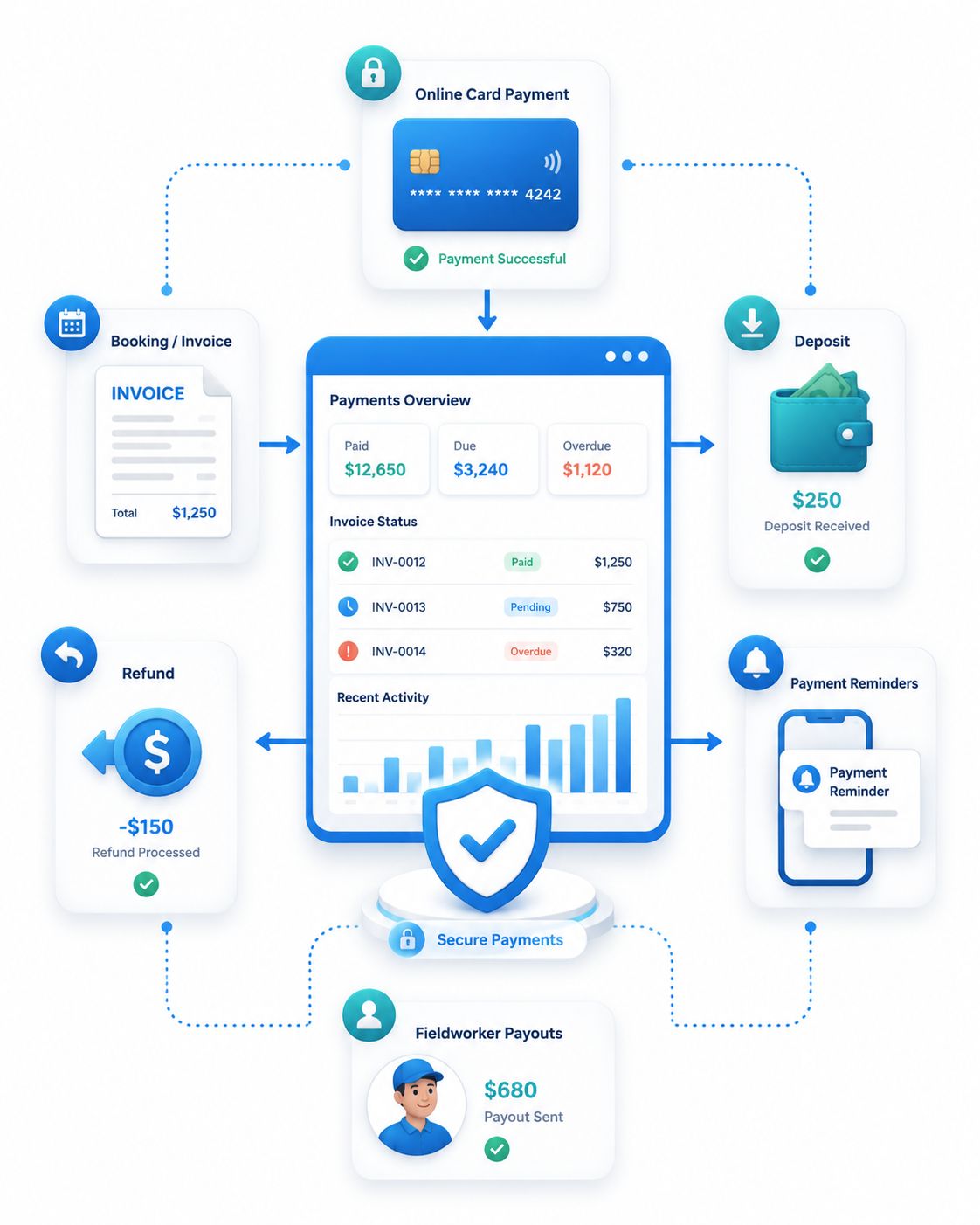
Get paid faster, secure more bookings and keep every payment action connected.
OctopusPro helps service businesses collect secure online payments, request upfront deposits, manage refunds, track every invoice status and keep customer, staff and fieldworker payment records organised from one connected booking workflow.
online payment methods and gateway setup guide →
Give customers confidence to pay while your team keeps every balance under control.
Customers get clearer payment choices, your team gets fewer loose ends to chase, and the controls below show how OctopusPro connects deposits, refunds, reconciliation and fieldworker payouts in one workflow.
- Collect faster Accept online payments from invoices, booking flows, portal checkout and customer-facing payment links.
- Secure bookings earlier Use deposits, full upfront payment, card-on-file, pre-authorisation or pay-later workflows based on the service.
- Reduce manual follow-up Send reminders, confirmations, receipts and payment requests without relying on disconnected spreadsheets.
- Handle exceptions safely Manage refunds, overpayments, duplicate payments, cancellations, no-shows and invoice corrections with clearer controls.
- Reconcile with confidence Keep bank transfers, imported payments, gateway payments, statements and accounting-ready records easier to review.
- Pay teams accurately Connect fieldworker earnings, tips, timesheets, materials, job completion and payout records back to the booking.
Understand the complete money journey before choosing the controls behind it.
Use this workflow to see the benefit first: every step keeps the customer, booking, invoice, payment, refund and payout record connected before your team configures the specific tools behind it.
Quote or service selected
Services, products, discounts, taxes, travel fees and terms shape the expected amount.
Booking confirmed
Customers see payment terms, disclaimers, deposits or checkout options before committing.
Deposit or card captured
Secure the booking with upfront payment, card on file, pre-authorisation or pay-later rules.
Job completed
Fieldworkers can capture materials, signatures, completion proof, tips and invoice actions.
Fieldworker App invoice, payment and completion workflow guide →
Invoice sent
Send branded invoices with payment links, due dates, payment instructions and supporting proof.
Payment tracked
Record card, bank transfer, cash, cheque, gift card, partial payments, installments or credits.
Reconcile or refund
Review approvals, unknown payments, overpayments, refunds, statements and accounting sync.
Report and payout
Use reports, invoice ageing, customer timelines, payroll validation and fieldworker payout records.
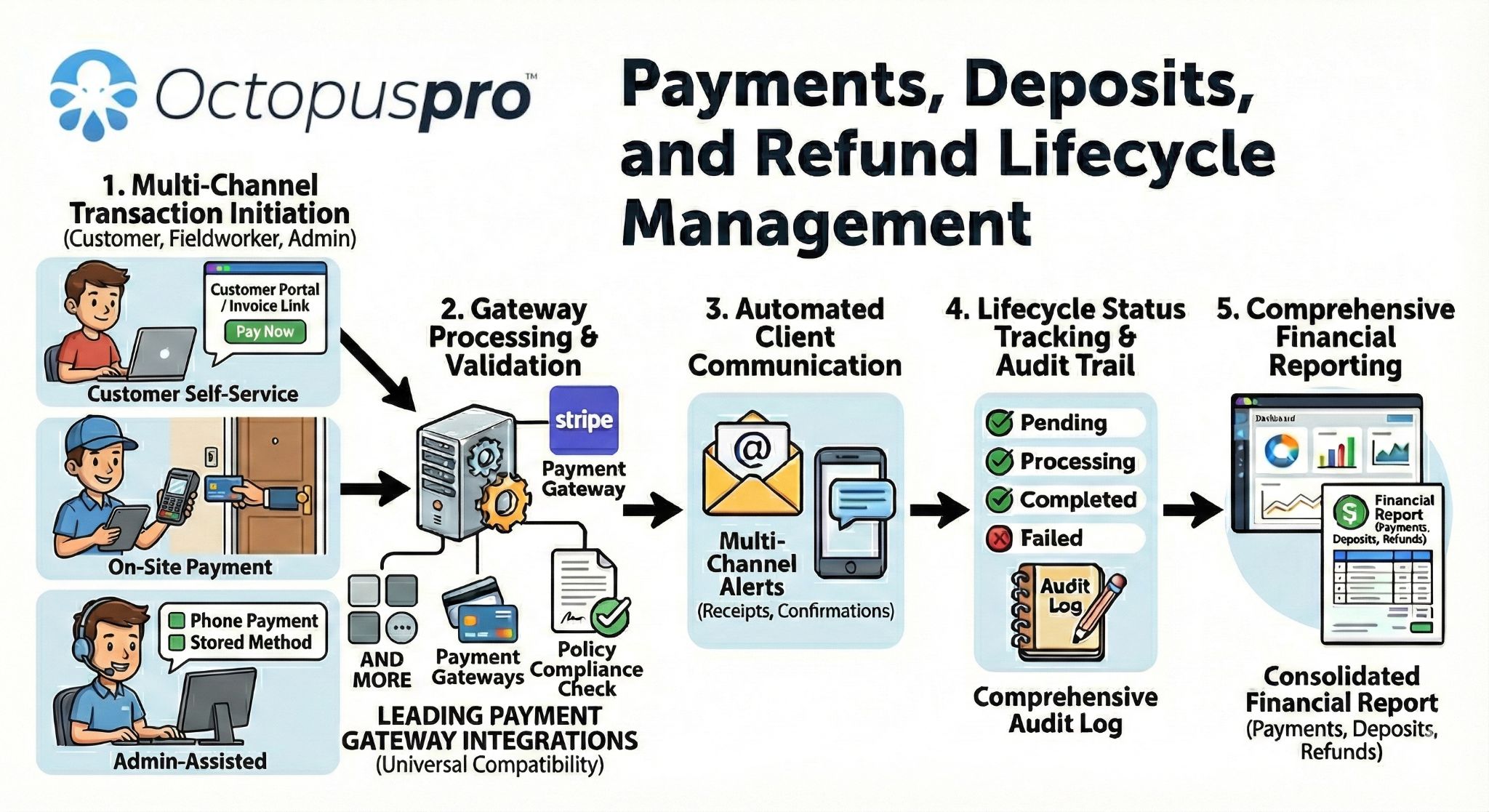
Payments, deposits and refunds lifecycle: a high-level overview showing how customer payment activity, deposits, refunds, status tracking and reporting stay connected.
Give owners, office staff, customers and fieldworkers the payment clarity they need.
Strong payment management improves the experience for customers, office staff, business owners and fieldworkers because everyone can see the same booking, invoice, payment and refund context.
Protect revenue and cash flow
Use deposits, payment terms, reports, account balances, policy fees and reconciliation controls to reduce leakage and understand where money is waiting.
Reduce manual follow-up
Track invoices, receipts, approvals, reminders, statements, customer timelines and exceptions from organised records instead of disconnected spreadsheets.
Pay with less confusion
Show clear payment options, checkout instructions, deposits, payment terms, receipts, billing history, FAQs and secure payment links before and after booking.
Keep on-site billing connected
Support app-based invoice sending, on-site invoice creation, payment status visibility, material usage capture, tips, earnings and payout review where permissions allow.
Fieldworker App on-site payment and invoice workflow guide →
Protect revenue at every handoff between booking, invoicing and payment.
Payment problems usually start before an invoice is overdue. OctopusPro helps your team reduce leakage at each step by making deposits, due dates, payment requests, refunds, duplicate payment alerts, customer balances and payout records easier to manage from the same booking system.
Make it easier for customers to commit while reducing payment risk.
Strong payment workflows do more than collect money. They reduce hesitation before booking, make invoices easier to pay, keep staff informed, and give customers confidence that deposits, surcharges, refunds and confirmations are being handled professionally.
- Before booking: show clear deposit expectations, payment options and customer commitment steps.
- During service: keep staff, fieldworkers and customers aligned around payment status and booking records.
- After completion: send invoices, collect payments, confirm success and follow up unpaid balances.
- When exceptions happen: manage refunds, duplicate payments, partial payments and account history with a clear trail.
Start with the outcome your team needs, then configure the payment controls behind it.
OctopusPro connects the financial workflow from payment collection and deposits through to receipts, reconciliation, refunds, policy controls and fieldworker payouts, so each team can focus on the right action at the right time.
Collect payments from anywhere
Collect or record payments through invoice links, Customer Portal checkout, dashboard workflows and the Fieldworker App where permissions allow.
Set payment terms that fit the risk
Use pay-later, card-on-file, deposits, full payment, pre-authorisation or staged payments depending on the service and customer type.
Secure bookings before work begins
Set company or service-level deposit rules, request deposits by email and make deposit status visible before work begins.
Know what is paid and what is still owing
Keep card, cash, bank transfer, cheque, gift card, partial payment, tip, receipt and customer balance records connected to bookings and invoices.
Match payments with less finance risk
Review imported payments, payment references, approval queues, duplicate risks, accounting sync and unmatched payment records.
Resolve refunds without losing control
Record external refunds, process eligible gateway refunds, use approval steps and keep reasons, notes and references visible.
Apply payment policies consistently
Control due dates, surcharges, cancellation fees, no-show fees, tax rules, disclaimers, reminders and admin approvals.
booking cancellation fees and payment policy controls guide →
Pay fieldworkers accurately
Use earnings records, service rates, tips, timesheets, check-in/out data, payout exports and split payout workflows.
Keep every payment decision connected from booking to final payout.
OctopusPro connects the financial steps around service delivery so your office team can secure deposits, invoice completed work, receive payments, process refunds, reconcile activity and manage fieldworker payments with less manual follow-up.
booking payment tracking guide →
- Securely receive and process customer payments
- Issue and track refunds from the dashboard
- Monitor payment status in real time
- Send automatic reminders for outstanding invoices
- Import and export bulk payment data when required
- Detect and flag potential duplicate payments
- Customize due dates by customer or customer segment
- Give customers a streamlined payment portal experience
Before the job
Request deposits, store payment expectations and reduce booking cancellations.
After the job
Turn completed work into invoices and collect payments through online payment links.
When plans change
Handle partial payments, installments, refunds and account balances with a clear history.
For your team
Track payouts for contractors, subcontractors and fieldworkers with organised payment records.
Let customers pay through trusted gateways while your team keeps records connected.
Use OctopusPro with leading ePayment gateways including Checkout.com, Stripe, Square, Authorize.net, PayPal, Afterpay, Apple Pay, Samsung Pay, Google Wallet, WePay, 2Checkout, BitPay, Telr, eWay and more. Support online card payments, mobile-friendly payment links, multi-currency workflows and secure payment handling without forcing your team to manage payments manually.
payment methods and gateway configuration guide →

Give customers familiar ways to pay online while keeping payment activity connected to their bookings and invoices.
Secure payment links
Send invoices with online payment options so customers can pay quickly from their phone or computer.
Gateway choice
Connect the provider that matches your region, currency, industry and payment preferences.
Cleaner records
Keep payment activity connected to bookings, invoices, customer history and reporting.
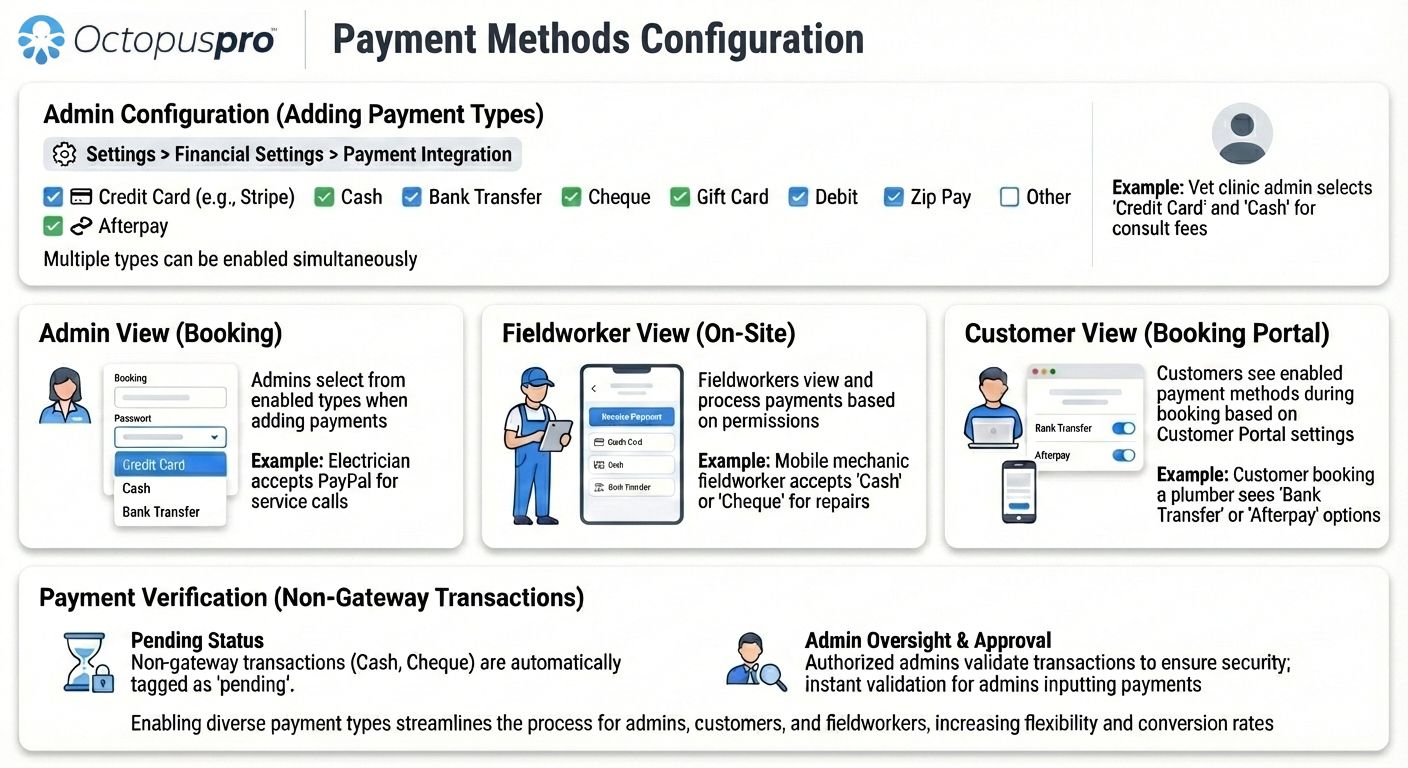
Payment methods configuration: shows how online, offline and hybrid payment methods can be enabled across admin, customer portal and fieldworker payment workflows.
Improve payment confidence with familiar gateway and digital wallet options.
Keep the checkout experience professional by connecting OctopusPro to the gateways and digital payment options that suit your customers and your operating region.














Build trust before payment details are entered, then keep records controlled.
Customers are more likely to pay when the payment path feels secure, familiar and transparent. The controls below explain how connected payment workflows support that trust while keeping staff records easier to manage after payment.
Secure gateway handling
Use established payment providers so sensitive card activity is handled through the appropriate gateway workflow rather than informal manual collection.
PCI-aware payment workflows
Keep payment collection aligned with secure online payment practices, customer-facing payment links and controlled access by role.
Hosted payment checkout
Invoice payment links can direct customers to a secure gateway-backed checkout experience, reducing the need for staff to handle card details manually.
Transparent customer records
Give customers clearer invoices, confirmations, receipts, deposit details, surcharge visibility and refund communication when payment activity changes.
Audit-friendly office control
Keep approvals, notes, references, payment status, refund history and accounting-ready records available for review when questions arise.
Make payments feel simple for customers and controlled for finance.
Payment management is stronger when customers know what to pay, staff can see what happened, and managers can review exceptions before they affect cash flow.
Customer-facing clarity
Show payment options, deposits, totals, terms, disclaimers, receipts, billing history and FAQs before confusion becomes a support request.
Finance-team control
Keep approvals, references, reports, exports, ageing, customer statements, audit history and accounting-ready records organised.
fieldworker timesheet summary and payroll validation guide →
Field-service readiness
Connect on-site invoices, signatures, materials, payment status, tips, timesheets and fieldworker payouts to the job record.
fieldworker timesheet summary and payroll validation guide →
Collect payments from the right place without losing the booking context.
Customers should be able to pay from the channel that suits the booking, while your team still sees one connected record. OctopusPro keeps portal, invoice, dashboard and Fieldworker App payments tied back to the same booking, invoice and customer.
Customer Portal checkout
Show enabled payment methods during online booking checkout, including pay-in-full, deposit, pay-later and offline payment instructions where configured.
Customer Portal payment methods and checkout instructions guide →
Invoice payment links
Email invoices with online payment options so customers can pay outstanding balances from a clear, professional payment request.
Admin and fieldworker collection
Allow office staff or permitted fieldworkers to record or collect payments against the correct booking or invoice, including offline methods and notes.
Ready to connect online payments to every booking?
Start with a setup that helps customers pay clearly while your team keeps invoices, deposits and payment records connected.
Help customers finish checkout with clear payment requirements and instructions.
A strong checkout flow reduces hesitation because customers can see what they are booking, what payment is required, which methods are available and what confirmation they will receive after they complete the step.
Choose the service
The customer selects the service, booking details and any required options before reaching the payment step.
See the payment rule
Checkout explains whether the booking needs a deposit, full payment, card on file, pre-authorisation, offline payment or pay-later arrangement.
Pay or follow instructions
The customer uses an enabled online method or sees clear instructions for bank transfer, cash, cheque, gift card, debit or another approved offline option.
Customer Portal payment methods and offline instructions guide →
Receive confirmation
Payment status, booking context and confirmation messaging reduce uncertainty and give staff a clearer record to work from.
Auto-created invoices
Generate the invoice automatically when a customer completes a portal or embedded booking flow, so the amount due is clear from the start.
automatic invoice creation for Customer Portal bookings guide →
Instant payment context
Connect the new invoice to the booking, customer and payment requirement so office staff do not need to manually create billing records after each online booking.
booking payment tracking and customer payment context guide →
Cleaner customer journey
Give customers a more consistent path from booking confirmation to invoice visibility, payment instructions and follow-up communication.
Bank transfer instructions
Show account details, payment reference guidance and what the customer should include so bank transfers are easier to match later.
Cash on arrival notes
Explain when cash is accepted, who collects it and whether the amount is due before service, on arrival or after completion.
Cheque or gift card details
Add customer-facing notes for cheque payee names, voucher redemption, gift card instructions or other offline payment requirements.
Fewer payment questions
Make offline options feel as clear as online checkout by giving customers practical instructions before they finish the booking.
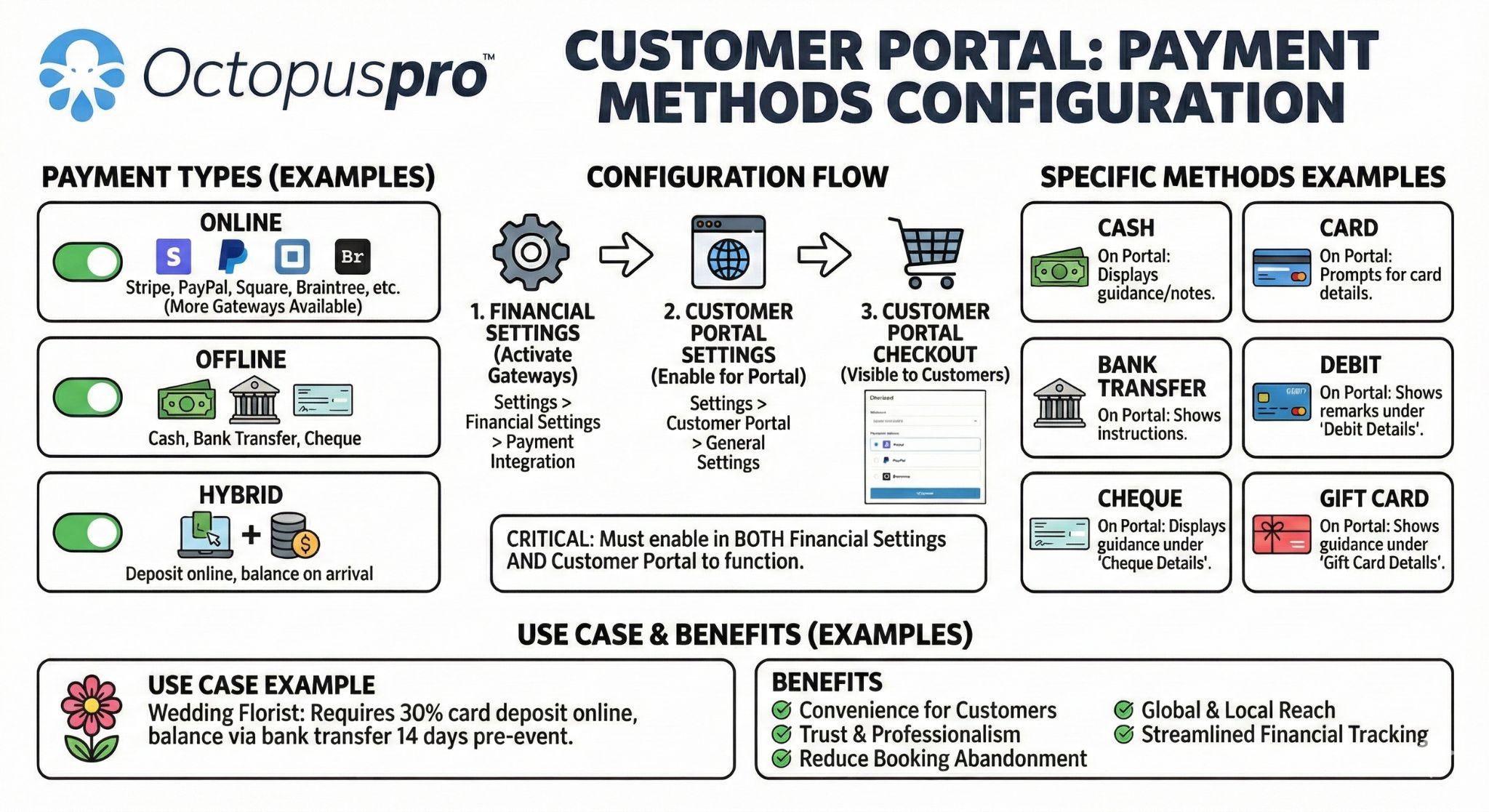
Customer Portal payment methods: shows how checkout payment methods, online options and offline instructions can be presented to customers during booking.
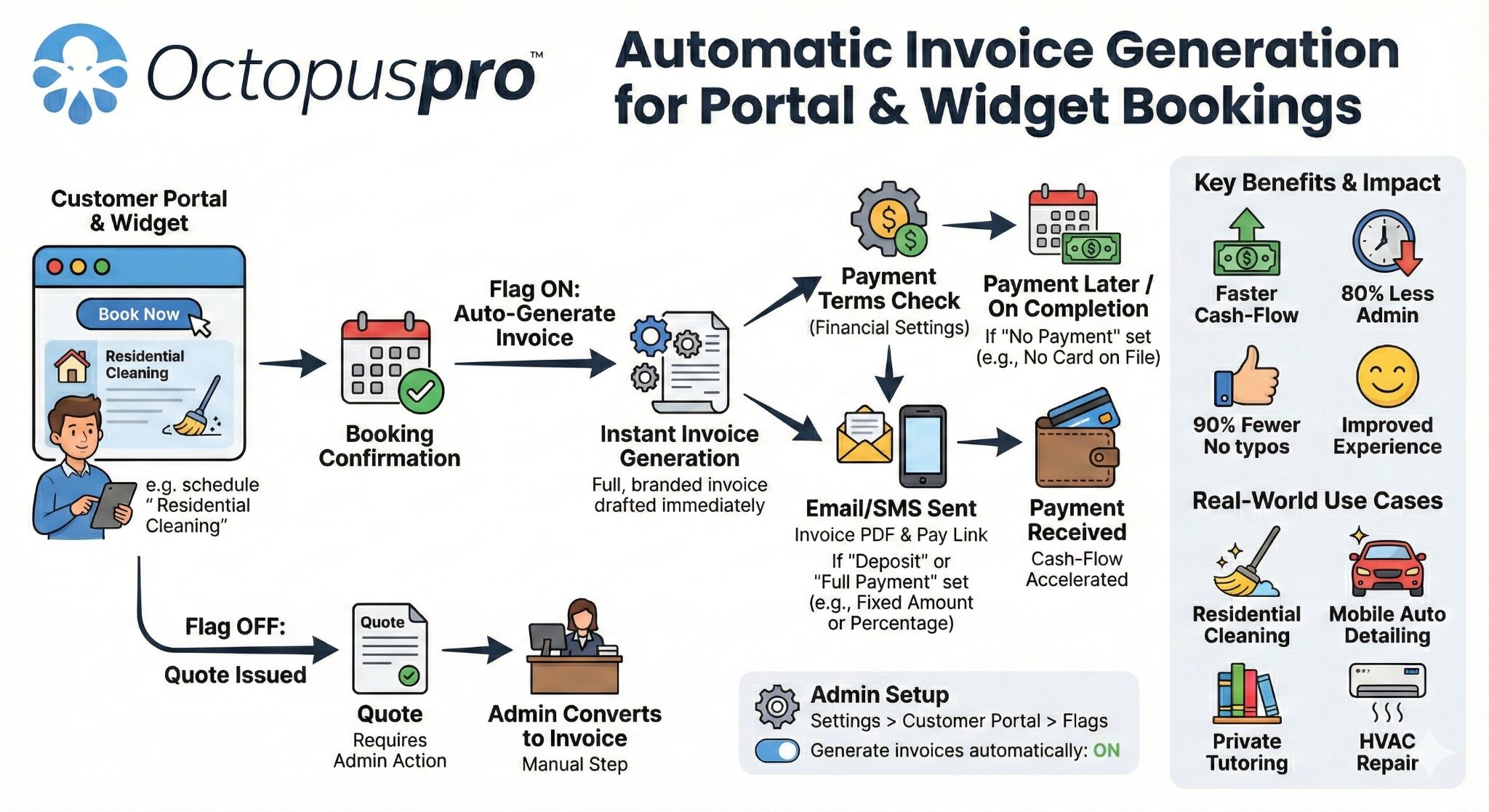
Automatic invoice generation: shows how portal and widget bookings can generate invoices automatically so payment context is ready from the start.
Prevent disputes by showing payment, cancellation and refund terms before confirmation.
Clear disclaimers reduce disputes by setting expectations early. Use this section to explain that checkout can present payment, deposit, cancellation, travel-fee, safety and service terms before the customer commits.
Payment terms acknowledgement
Display terms around deposits, full payment, card-on-file, pay-later options or offline payment requirements before the booking is submitted.
Customer Portal booking disclaimer and payment terms guide →
Terms as text or PDF
Present payment terms and conditions as typed checkout text or an uploaded PDF so customers can review deposit, refund, cancellation and billing rules before they commit.
Cancellation and refund clarity
Set expectations around late cancellations, refund rules, minimum notice windows and non-refundable deposit policies where applicable.
Travel and service conditions
Explain travel charges, access requirements, safety conditions, service limitations or customer responsibilities before the job is booked.
Fewer disputes later
Keep payment policies visible before confirmation so staff have a clearer basis for explaining fees, deposits and cancellation outcomes.
Reduce billing calls by giving customers self-service access to invoices and balances.
Checkout is only the first payment moment. After a booking is made, customers also need a simple way to understand what has been invoiced, paid, refunded or still owing.
View invoices and payment status
Give customers access to invoice records, amounts due, payment instructions and payment status from their portal where enabled.
Pay outstanding balances
Help customers return to unpaid invoices and complete payment without waiting for staff to resend details manually.
Reduce billing questions
Customer-facing billing history can reduce calls about what was paid, what is still due and where to find invoice or receipt information.
Publish payment FAQs
Add customer-facing answers for common payment questions, such as deposit rules, accepted payment methods, refund timing, cancellation fees, billing cycles and how to pay outstanding balances.
Make repeat payments faster while keeping customer control and trust.
For businesses that rely on repeat bookings, account customers or card-on-file workflows, saved payment methods can reduce payment friction while keeping charging rules controlled by your gateway setup and internal permissions.
Faster repeat payments
Customers can return to future bookings or outstanding invoices with less friction when saved payment methods are available through the configured payment workflow.
Card-on-file support
Use stored payment details for approved post-service charging, cancellation fees, add-ons or recurring customer arrangements where your gateway and terms allow.
Customer control and trust
Keep saved payment methods tied to customer records and portal billing visibility so customers understand how they can pay or update their billing details.
Reduce manual reconciliation by giving customers and staff clearer bank payment details.
When customers pay by bank transfer or fieldworkers are paid outside an online gateway, clear bank details reduce manual follow-up and help finance teams prepare payout files with fewer gaps.
Company bank details
Store business bank details so customers can see the correct account information on invoices, payment instructions and checkout flows where bank transfer is enabled.
Payment reference guidance
Tell customers what reference to use when paying by bank transfer, making imported bank transactions easier to match back to invoices later.
Fieldworker bank details
Keep fieldworker payout information available for payroll preparation, batch payment exports and internal finance checks.
Bank-ready payout files
Support cleaner payout administration when exporting payroll or contractor payment data for bank processing.
Keep on-site payment activity connected to the office record.
On-site teams can help turn completed work into collected revenue sooner. Fieldworkers can support payment collection, invoice sending, tips, signatures and refund requests from the app when their role permissions allow it.
Fieldworker App on-site payment and invoice workflow guide →
Collect or record payments
Allow permitted fieldworkers to help collect or record full payments, partial payments or deposits against the correct booking or invoice.
View billing status
Give field teams visibility over what is paid, unpaid, pending, refunded or still owing before they close out the job.
Capture tips and extras
Support gratuities, service extras, adjustments or payment notes when customer-facing payment activity happens after service delivery.
Escalate refund requests
Let fieldworkers request or record refund-related activity where permissions allow, while keeping approval and audit control with the office.
Send invoices by email or SMS
After completing work on-site, permitted fieldworkers can send the invoice to the customer by email or SMS so payment follow-up starts before the job is forgotten.
Create invoices on-site
Where enabled, fieldworkers can generate an invoice from the job’s billing area after work is completed, using the relevant customer, service, product, material, pricing, tax, discount and payment details already connected to the booking.
Status-triggered invoice creation
Reduce missed billing by connecting invoice creation to booking or work-order status changes, such as generating the invoice when a job is marked completed and ready for final payment follow-up.
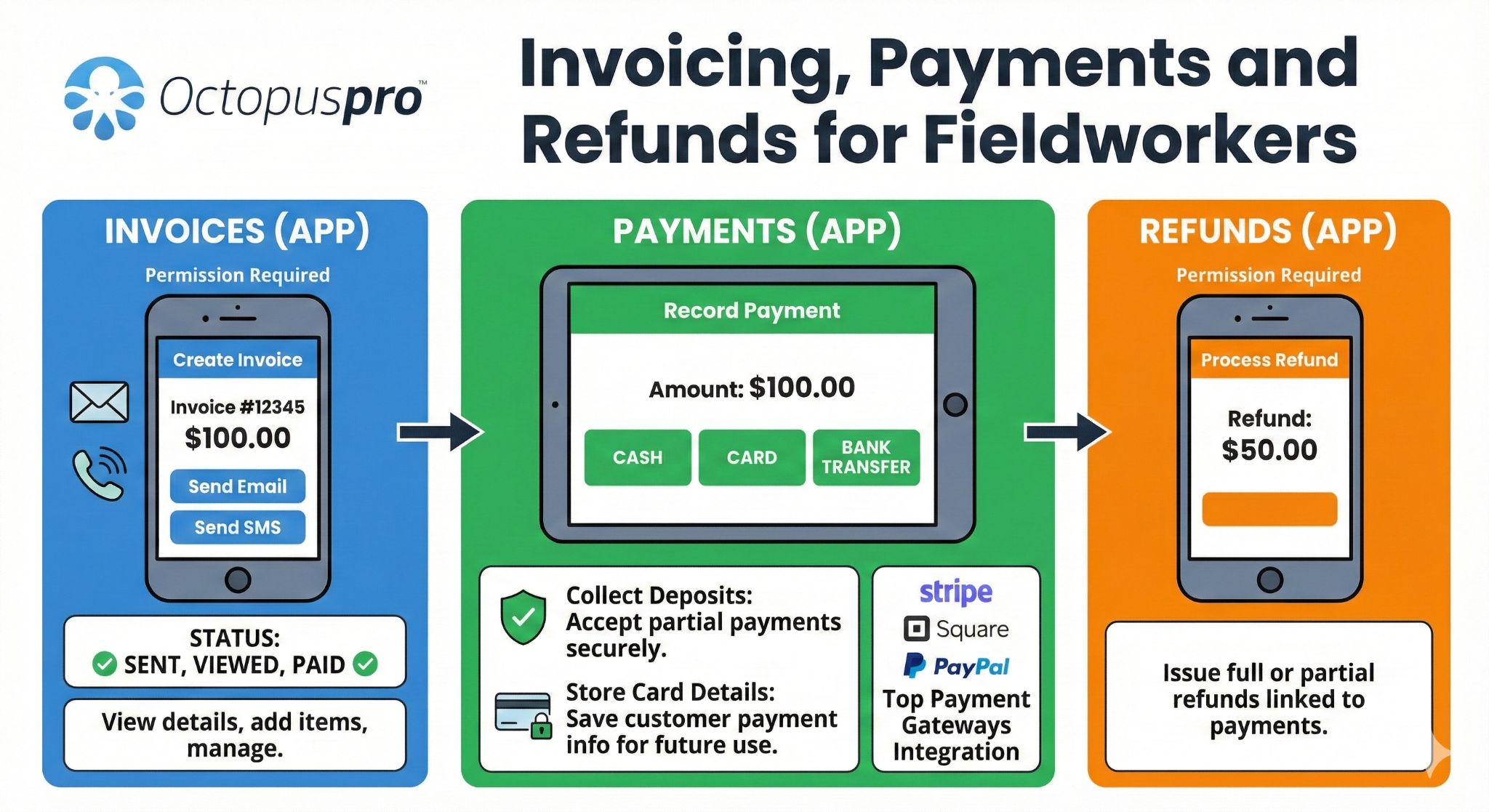
Fieldworker app payment workflow: shows how on-site invoices, payments, refunds, customer signatures and job billing actions stay connected to the booking.
Reduce friction by matching each customer journey to the right payment path.
Different services need different payment rules. A quick job may only need a payment link after completion, while a higher-value appointment may need a deposit, payment schedule, admin review or refund process.
Pay after service
Best for routine jobs where the invoice is sent once work is completed and the customer pays online from the invoice.
Deposit before booking
Best for appointments that require customer commitment, staff preparation, travel, materials or reserved time slots.
Card on file
Best when customers should confirm payment details during booking while the final amount is charged later based on your workflow.
Full payment upfront
Best for fixed-price services, classes, appointments or bookings where payment should be completed before the job is confirmed.
Partial or installment payments
Best for higher-value services where customers may pay in stages while your team tracks outstanding balances clearly.
Pre-authorisation
Best for businesses that need to verify payment capability before service delivery while keeping the final charge controlled.
Recurring payments
Best for repeat services, maintenance plans, memberships or scheduled work where predictable billing reduces manual admin.
Refund and correction workflows
Best for cancellations, duplicate payments, service adjustments or customer account corrections that need a visible audit trail.
Choose payment terms that increase commitment without adding unnecessary friction.
Use this matrix to quickly decide when each payment method makes the most sense for a service, customer type or risk level.
| Payment setup | Best for | Business benefit | Customer experience |
|---|---|---|---|
| No upfront payment Low friction |
Trusted customers, low-risk work or services invoiced after completion. | Reduces booking barriers while still keeping the job connected to the invoice and payment history. | Customer books first and pays once the invoice or payment request is sent. |
| Card on file Commitment |
Bookings where you want payment confidence without charging immediately. | Supports cancellation/no-show protection and post-service charging workflows. | Customer provides card details during booking, with the final charge handled later according to your process. |
| Fixed deposit Simple deposit |
Appointments, classes, site visits or services with a clear minimum commitment. | Secures the booking and makes deposit expectations easier for staff to explain. | Customer sees a clear upfront amount before the booking is confirmed. |
| Percentage deposit Scales with value |
Jobs where the total price changes by service size, duration, location or selected options. | Protects higher-value bookings without manually calculating every deposit. | Customer pays a deposit proportional to the quoted or booked service amount. |
| Full payment upfront Paid before service |
Fixed-price services, workshops, online bookings, packages and high-demand appointment slots. | Improves cash flow and reduces unpaid work before delivery begins. | Customer completes payment as part of checkout or confirmation. |
| Pre-authorisation Security hold |
Equipment, rental, inspection, high-risk or final-price-after-service workflows. | Verifies payment capability while keeping the final capture controlled. | Customer authorises a hold, with final payment handled after the outcome is known. |
| Partial or installment payments Staged cash flow |
Larger jobs, long-running projects, deposits plus balance payments and agreed account terms. | Keeps balances visible while reducing manual tracking of staged payments. | Customer can pay in stages with clearer records of what remains outstanding. |
| Recurring payments Repeat work |
Maintenance plans, subscriptions, repeat services and ongoing commercial customers. | Reduces repetitive invoicing and creates more predictable revenue collection. | Customer receives a consistent billing experience for ongoing services. |
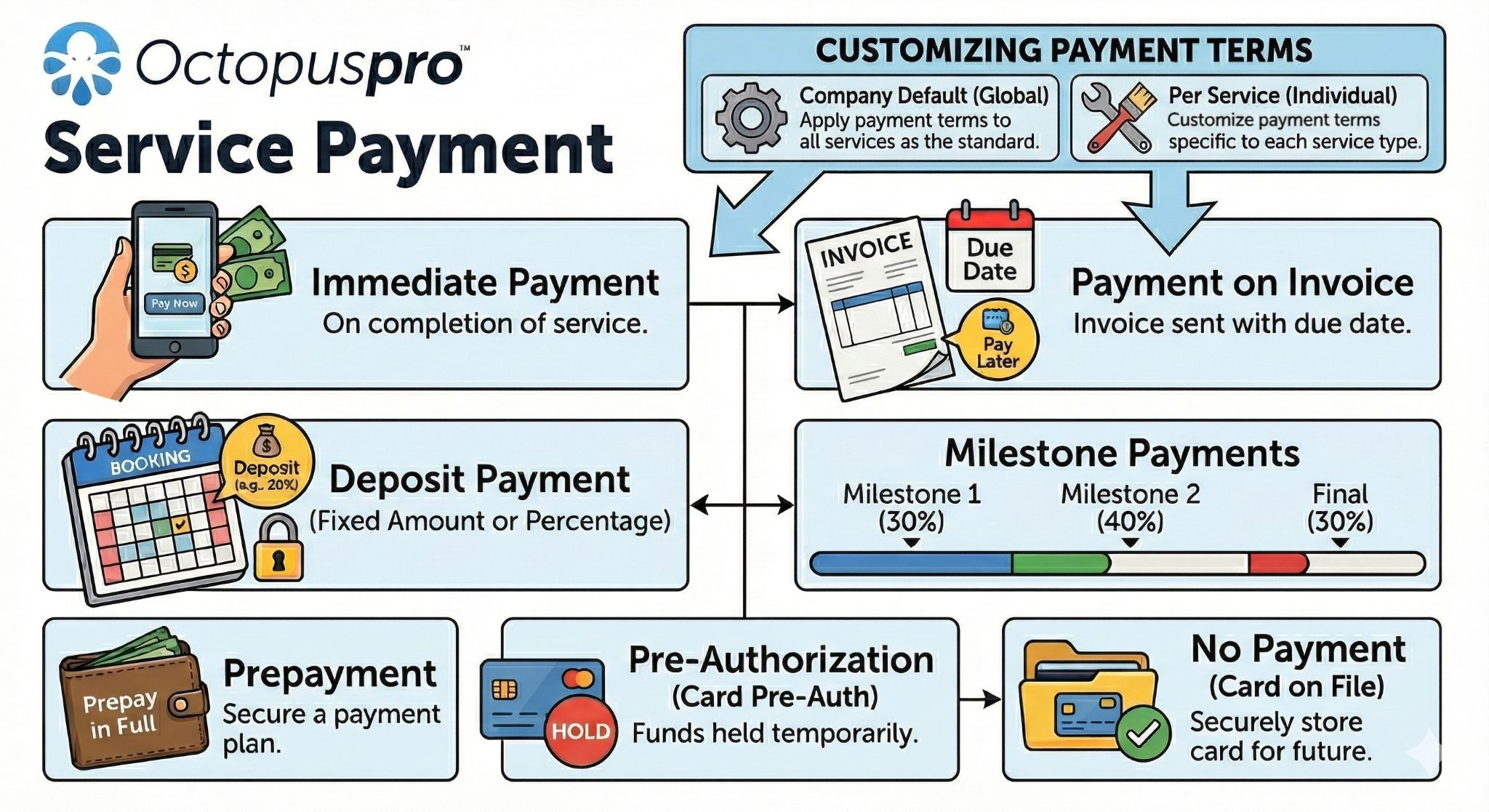
Service payment terms: visualises pay-later, deposits, full payment, pre-authorisation, card-on-file and staged payment rules by service.
Help each business choose the payment setup that matches its risk and cash-flow needs.
These examples help each business type choose the right payment workflow without repeating every setup detail.
| Business scenario | Recommended setup | Why it improves conversion and control |
|---|---|---|
| High no-show appointments | Fixed deposit, percentage deposit or card on file | Creates commitment before reserving staff time, travel or specialist resources. |
| Large quoted jobs | Deposit plus partial, milestone or progress payments | Improves cash flow while keeping the remaining balance visible and easier to collect. |
| Repeat commercial clients | Billing cycle, consolidated invoices and customer statements | Reduces invoice clutter and gives account customers a clearer balance history. |
| Bank transfer-heavy customers | Payment import, matching, approval and reconciliation | Helps staff connect deposits and transfers to the right invoices with fewer mistakes. |
| Mobile field service teams | Invoice payment links, app-based payment visibility and fieldworker payout tracking | Keeps office staff and field teams aligned around paid, unpaid and payout-ready work. |
| Refund-sensitive services | Refund approvals, reasons, references and audit trail | Protects the business from unclear refund decisions and gives customers a more professional process. |
Show each industry the payment workflow that solves its main operational problem.
This helps buyers recognise themselves quickly without adding another generic feature list.
Deposit, travel fee and on-site payment flow
Useful for cleaners, trades, repairs, inspections and mobile technicians who need travel-aware pricing, deposits, app visibility and fast invoice payment links.
Fieldworker App on-site payment and invoice workflow guide →
Card on file, cancellation windows and reminders
Helps reduce no-shows, late cancellations and unpaid balances while keeping customers informed before and after their appointment.
Deposits, milestones and proof-backed invoices
Supports quoted work, staged payments, signed approvals, products/materials, final invoice proof and controlled refund decisions.
Billing cycles, statements and purchase orders
Better for repeat customers that need consolidated invoices, PO numbers, account balances, due dates and statement-based payment follow-up.
Fieldworker earnings, split payouts and payroll checks
Connects payment collection to commissions, tips, timesheets, payout exports, bank details and role-based finance controls.
Materials, stock usage and margin protection
Captures products, parts, consumables, supplier costs, markup, tax treatment and invoice line items so fewer billable items are missed.
Reduce no-shows and secure bookings with clearer deposits.
Secure business transactions: Give customers the flexibility to pay a deposit upfront while showing clear commitment to the booking. For businesses, deposits help protect the schedule, reduce last-minute cancellations and build trust around payment expectations.
Customer commitment
A deposit is more than a payment — it confirms intent and helps reserve time, staff and resources.
Fewer cancellations
Replace uncertain appointments with more committed bookings and clearer upfront expectations.
Streamlined payment flow
Support secure card handling and easier final payment collection after the service is complete.
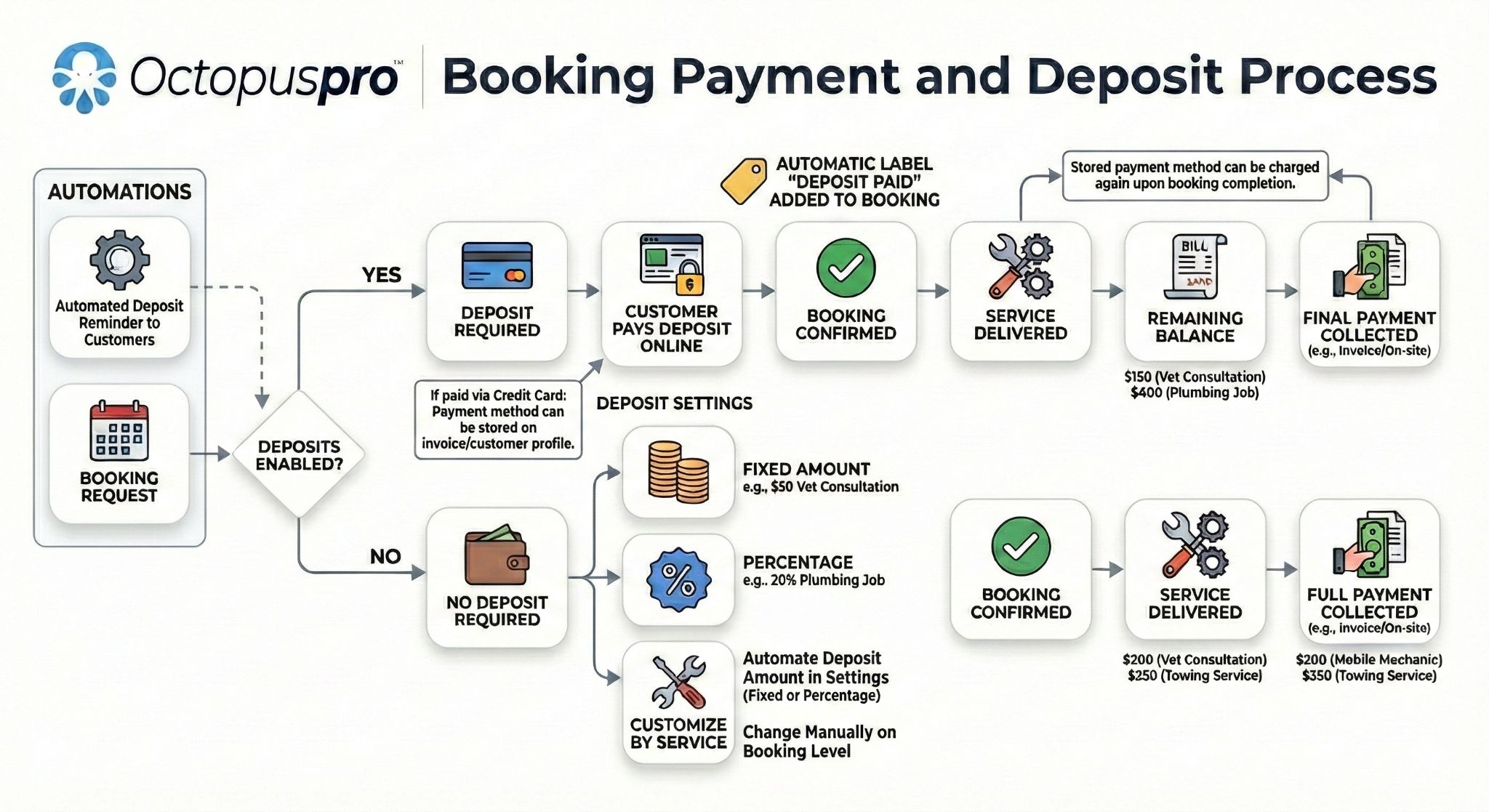
Booking payment and deposit management: supports fixed deposits, percentage deposits, deposit status, booking confirmation and payment visibility.
Secure more bookings before your team reserves time.
Use upfront deposits, payment terms and automated reminders to reduce cancellations and protect scheduled work.
Use deposit rules that match how each service industry takes bookings.
OctopusPro’s deposit feature adapts to different business models, whether deposits are standardised, manually adjusted or calculated based on the value of the booking or invoice.
Beauty care
Spas and salons can secure appointments, reserve staff time and reduce no-shows.
deposit payment management for appointment-based services guide →
Event planning
Weddings, corporate events and venues can confirm bookings before allocating resources.
Workshops and classes
Secure attendee spots and plan materials for classes such as pottery, training or marketing sessions.
Healthcare clinics
Reduce missed appointments by setting clear deposit expectations for important bookings.
Automotive services
Ensure parts, staff and workshop time are available for scheduled repairs or detailing work.
Tour and travel agencies
Collect deposits to confirm travel plans, accommodation, transport or itinerary commitments.
Flexible and customizable
Set default deposits for individual services, manually adjust deposit amounts for specific bookings or invoices, or calculate deposits based on service cost.
Elevate the booking experience
Use deposits to create a more confident booking workflow where customers understand what is required upfront and your team has clearer payment expectations.
Make payment rules easier to explain, apply and enforce.
Clear policies reduce staff mistakes and customer disputes. OctopusPro helps organise deposits, surcharges, due dates, reminders, cancellation fees, refund approvals and recurring billing around the booking and invoice workflow.
Deposits and no-show protection
Set deposit expectations so customers show commitment before your team reserves time, travel or materials.
Surcharges and transparency
Show credit card surcharge handling clearly so customers understand what they are paying and why.
Due dates and overdue reminders
Use company, customer or invoice-level payment terms to support consistent reminders and clearer payment expectations.
Tax and discount accuracy
Keep GST, VAT, sales tax, discounts and voucher codes easier to explain when the final payment amount changes.
Refund accountability
Keep refund actions visible so your team can review what was refunded, when it was processed, who approved it and why it was required.
Admin approval controls
Review sensitive, imported, offline or exception-based payment records before they affect invoice balances or reporting.
Recurring billing consistency
Use recurring payment options to reduce manual billing for repeat service plans, scheduled maintenance and ongoing customer arrangements.
Cancellation fee recovery
Set default cancellation fees and apply them to late cancellations where your business policy allows, so staff can recover lost time without manually rebuilding the invoice from scratch.
Minimum cancellation notice window
Set how close to the appointment customers can cancel or reschedule through the portal, helping reduce last-minute changes before cancellation fees, refunds or manual follow-up become necessary.
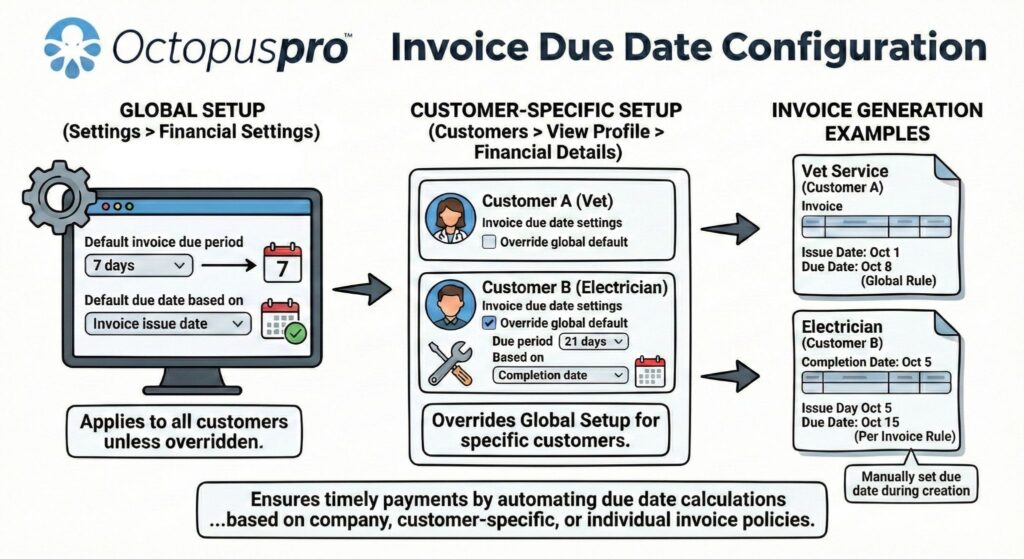
Invoice due date configuration: shows how payment terms, due-date rules and reminder timing help teams manage overdue invoices.
Recover more revenue when appointments fail or customers cancel late.
Deposits reduce risk before a booking, but some businesses also need a controlled way to recover late-cancellation, call-out, no-show or failed attendance costs after an appointment does not proceed as planned. This strengthens the policy section without repeating the deposit message.
Call-out fee protection
Add or manage call-out style charges when staff or fieldworkers attend, travel or reserve time but the job cannot proceed as expected.
No-show, late-cancel and cancellation fee support
Connect payment expectations, card-on-file workflows, deposits, cancellation fees and customer communication to a clearer revenue recovery process.
no-show, late cancellation and cancellation fee setup guide →
Clearer customer records
Keep fees, notes, invoice activity, reminders and payment status connected to the booking so the office can explain what happened.
Keep totals accurate before customers pay by applying tax, discounts and pricing rules correctly.
This adds a missing but important layer to the payment page: the final amount is not only controlled by the payment method. It can also depend on tax settings, voucher codes, service pricing rules, custom-field add-ons and quote or booking adjustments.
GST, VAT and sales tax rates
Create and apply the right tax rates so invoices, quotes and service pricing reflect the correct tax treatment for your business and region.
Tax-inclusive or tax-exclusive pricing
Display prices the way your customers expect, whether tax is built into the advertised price or added separately on quotes and invoices.
Promo codes and discount vouchers
Use voucher, promo or coupon codes for seasonal campaigns, loyalty offers, referral discounts, win-back offers or service-specific promotions.
Booking and quote adjustments
Keep taxes, discounts, selected services, products, custom-field add-ons and manual corrections connected to the final amount owed.
Reduce billing surprises by updating totals as customers choose options.
Customers are more likely to complete a booking when price changes are visible before checkout. OctopusPro can support real-time service pricing in the Customer Portal, including selected service options, quantities, priced custom fields, add-ons and other booking details that affect the final amount.
Priced service options
Let add-ons, upgrades or custom-field selections adjust the booking price before the customer reaches the payment step.
Quantity-based totals
Keep the total clearer when the customer selects quantities, extra items, materials, rooms, units, sessions or service variations.
Duration and scope clarity
Help customers understand how selected options can affect the service total, booking scope or estimated duration before they commit.
Fewer billing surprises
Reduce disputes by making the displayed amount more closely reflect the services, extras, taxes and discounts selected during booking.
Recover travel and location costs without surprising the customer.
Some jobs cost more because of distance, travel time, service area, suburb, postcode or regional pricing rules. This section keeps those price adjustments connected to quotes, bookings, invoices and payment expectations without repeating the general payment terms content.
Distance-based travel fees
Apply travel or mileage charges when a job falls outside a free travel radius, so mobile service costs are clearer before the invoice is paid.
Geo-pricing zones
Use location-based pricing rules for suburbs, regions, postcodes or service areas where labour, travel time, demand or operating costs change.
Reviewable price adjustments
Give staff clearer context when a quote, booking or invoice includes travel charges, zone pricing, minimums, add-ons, discounts or tax adjustments.
Set price expectations early so customers understand the commitment before checkout.
Payment confidence improves when customers can see starting prices, minimum booking requirements and a clear breakdown before they commit. This adds a practical trust layer beside real-time pricing, without repeating payment gateway or deposit content.
Display “From $X” starting prices
Show a minimum or starting price in the Customer Portal so customers understand the expected entry price before selecting options or requesting a booking.
Enforce service minimums
Prevent bookings from being created below the service minimum so the final amount stays commercially viable and easier for staff to explain.
Preview subtotal, tax and total
Give customers a clearer view of service charges, add-ons, discounts, tax and total amount before confirmation to reduce billing surprises and disputes.
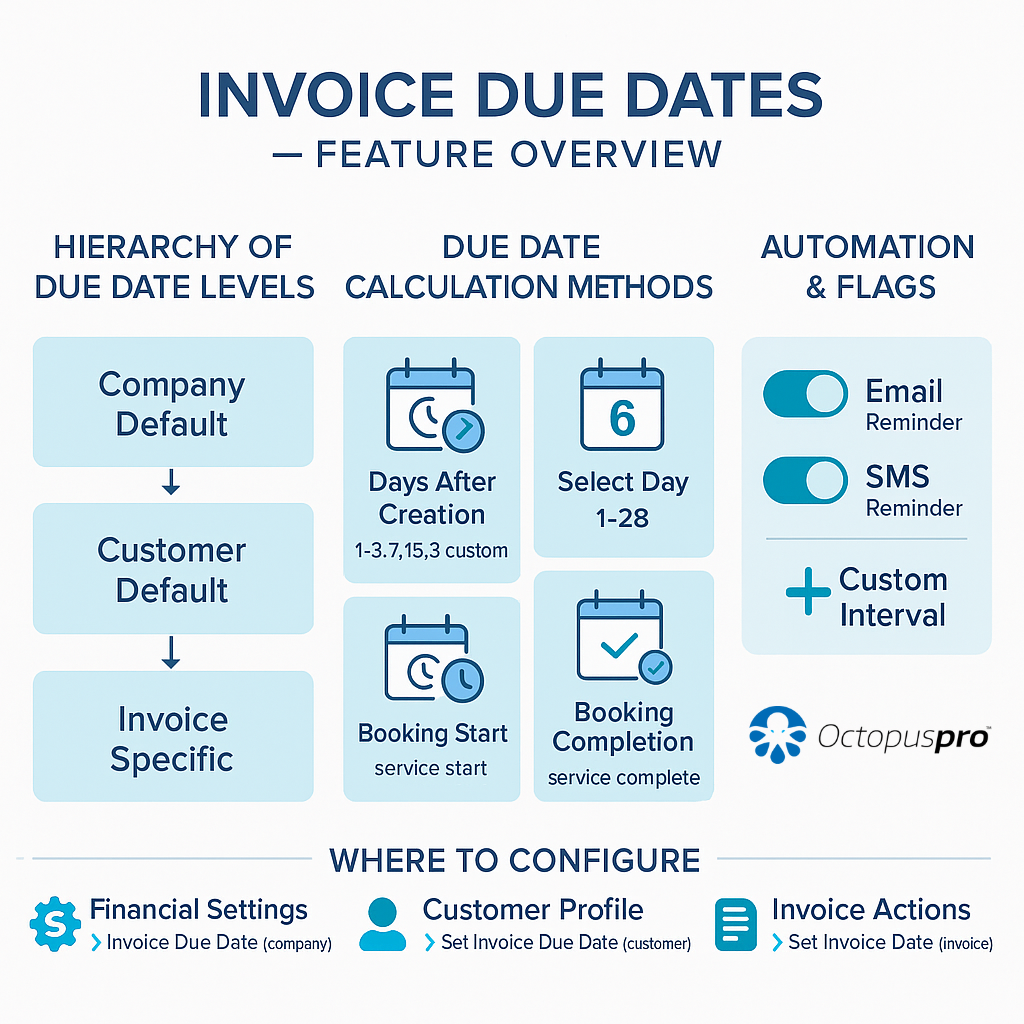
Invoice due dates overview: a supporting visual for due-date hierarchy, overdue visibility and payment reminder timing.
Protect margins by making materials and consumables visible before payment.
Payments are easier to approve when customers can see exactly what was supplied, used or added to the job. OctopusPro can connect product catalogues, materials, consumables and stock-controlled items to quotes, bookings and invoices so billable items are not missed.
Billable product catalogues
Add products, parts, materials, consumables, packaged items and service add-ons to quotes, bookings and invoices using standardised names, unit labels and pricing.
Cost, markup and margin control
Keep unit cost, markup, sale price and tax treatment connected to billable items so pricing is easier to explain and margins are protected.
Fieldworker usage capture
Let fieldworkers record the actual products or materials used during a job where enabled, helping the invoice reflect what was delivered on-site.
Inventory-aware billing
Use stock and inventory workflows to reduce missed billable items, support replenishment decisions and keep product usage aligned with job records.
Supplier and purchasing controls
Keep supplier records, purchase orders, goods received notes and replenishment activity connected to the products and materials that may later appear on quotes, bookings and invoices.
Stock thresholds and availability
Use minimum stock thresholds, stock takes, storage strategies and product availability checks to reduce billing mistakes caused by missing, unavailable or unrecorded materials.
Create extra revenue opportunities by selling vouchers during the payment journey.
Gift vouchers add a different kind of payment opportunity: customers can buy prepaid value now, send it to someone else and bring future bookings back into your service workflow.
Sell gift vouchers online
Let customers purchase gift vouchers or gift cards from the customer-facing booking flow where enabled, creating prepaid revenue before the service is booked.
Capture recipient details
Support recipient information, voucher messaging and redemption details so the gift experience feels professional and easier to redeem later.
Redeem against services
Connect voucher redemption back to service bookings so staff can track prepaid value, customer activity and payment status more clearly.
Secure repeat revenue with prepaid packages and usage-based booking credits.
Packages and bundles add a different payment model from gift vouchers. They help businesses sell a block of future sessions, visits or service credits while keeping redemption, scheduling and billing connected to the customer record.
Pre-sell future appointments
Offer prepaid or pay-as-you-go packages for repeat services such as cleaning visits, tutoring sessions, classes, maintenance plans or multi-appointment programs.
Track remaining usage
Keep package activity easier to manage by connecting purchased credits, scheduled visits and completed bookings back to the same customer workflow.
Bundle related services
Package a service and add-ons together so customers can buy a clearer offer while staff have fewer separate billing items to explain.
Support repeat revenue
Use packages to encourage repeat bookings, upfront commitment and more predictable cash flow without relying only on invoice-by-invoice collection.
Increase customer commitment by connecting payment clarity, trust and proof.
Each payment moment can either create friction or move the booking forward. OctopusPro organises the money workflow around the decisions customers and staff actually make.
Show staff the payment journey in the same order work happens.
The workflow follows the same path your customers and team experience in real life: quote, booking, deposit, invoice, payment, refund if needed, reporting and payout.
Quote accepted
Convert approved quotes into jobs without rebuilding payment details from scratch.
Booking secured
Request deposits and reduce the risk of last-minute cancellations.
Invoice sent
Email invoices with online payment links and clear payment instructions.
Payment received
Track status, confirmations, surcharges, installments and account balances.
Refund handled
Initiate refunds and keep a clear audit trail for accountability.
Payout reviewed
Manage fieldworker, contractor and service provider payment records in one place.
Give staff one clear next action for every payment scenario.
OctopusPro groups payment activity around the decisions your team needs to make each day, so staff know what to collect, confirm, review, refund or reconcile next.
booking payment tracking guide →
- Should a booking require a deposit before confirmation?
- Should the invoice be paid now, later, partially or by installment?
- Should a customer receive a reminder, confirmation or refund update?
- Should a duplicate payment, surcharge, refund or fieldworker payout be reviewed?
Collect
Online payment links, card processing, mobile checkout and payment gateway integrations.
Protect
Deposits, card capture workflows, due dates, schedules and upfront payment expectations.
Correct
Refunds, duplicate payment alerts, admin review and transparent surcharge handling.
Reconcile
Billing history, account balances, transaction reporting, import/export and accounting data connections.
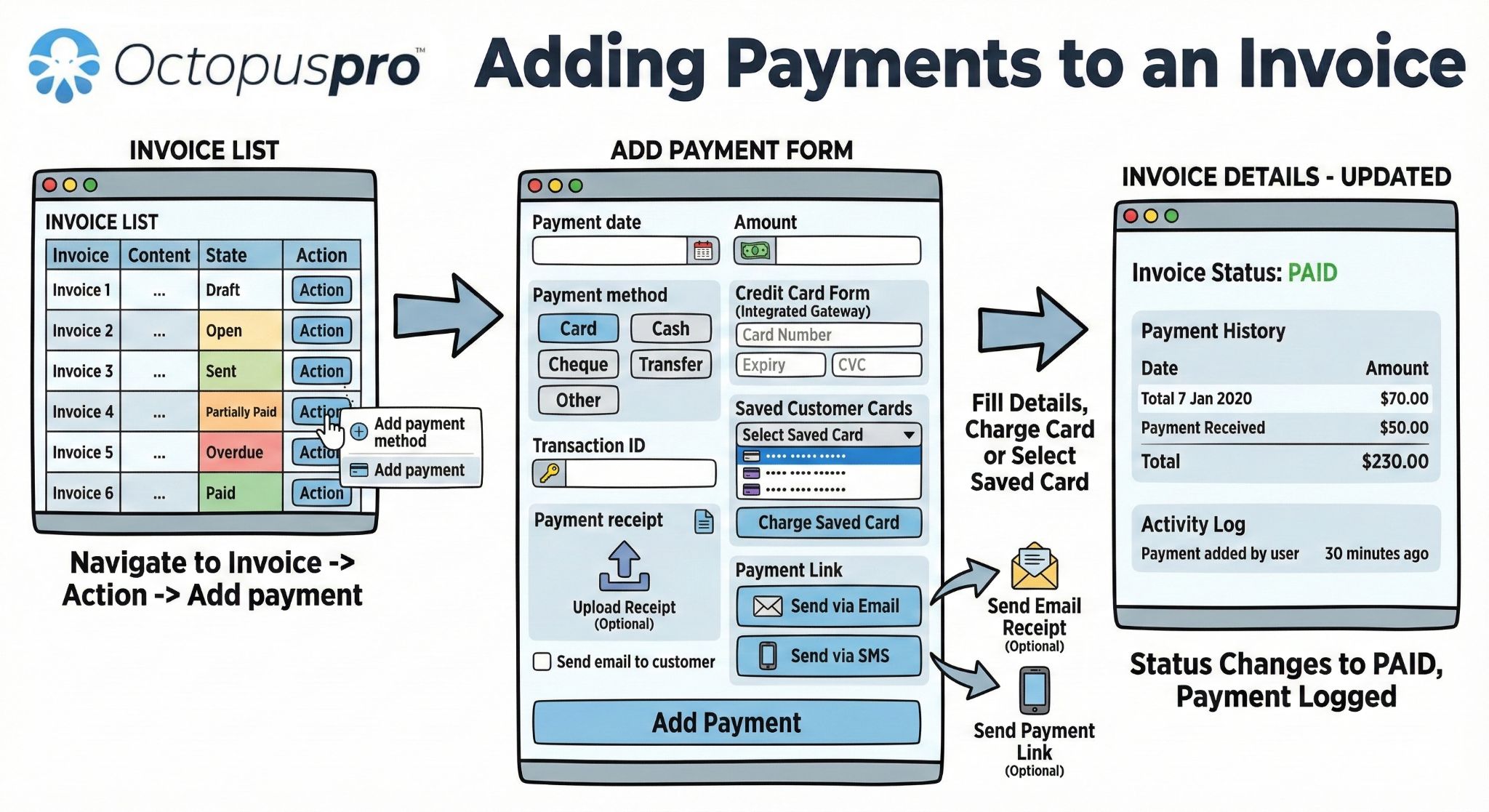
Adding payments to invoices: supports the invoice payment section by showing how card, bank transfer, cash, cheque and other payment records can be applied.
Collect payments faster and follow up less by keeping core tools in one place.
Give staff a more organised way to handle daily payment tasks, including payment status, partial payments, receipts, references, customer balances, invoice reminders and payment confirmations without relying on scattered spreadsheets or disconnected bank notes.

Effortless Payment Tracking
Ensure every payment is accounted for with automated invoice and payment management. Reduce missed invoices, manual follow-up and uncertainty around customer balances.

Batch Invoice Reminders in a Click
Stay on top of overdue payments by sending batch reminders for past-due invoices to multiple clients in one efficient workflow.

Seamless Automated Card Payments
Let clients settle bills securely after service completion through your selected payment gateway, reducing friction and improving cash flow.
Make payment requests easier to trust, open and pay.
Once a customer is ready to pay, the invoice and message quality matter. Branded documents, clear payment advice and reusable communication templates help reduce confusion and make follow-up feel more consistent.
Invoice and quote PDF branding
Use customised invoice and quote templates to present your logo, business details, payment advice, terms, footer notes and customer-facing information professionally.
Consistent payment instructions
Add clear payment advice, bank transfer instructions, due-date wording or invoice notes so customers know exactly what to do next.
Email and SMS invoice templates
Send invoice messages using reusable templates that explain the amount due, payment link, due date, next steps and supporting notes.
WhatsApp payment nudges
Where WhatsApp messaging is configured, use it as another customer-friendly follow-up channel for payment reminders, invoice links, deposit requests and billing updates.
Dynamic placeholders
Use customer, booking, quote, invoice and fieldworker placeholders to personalise payment messages without manually rewriting each one.
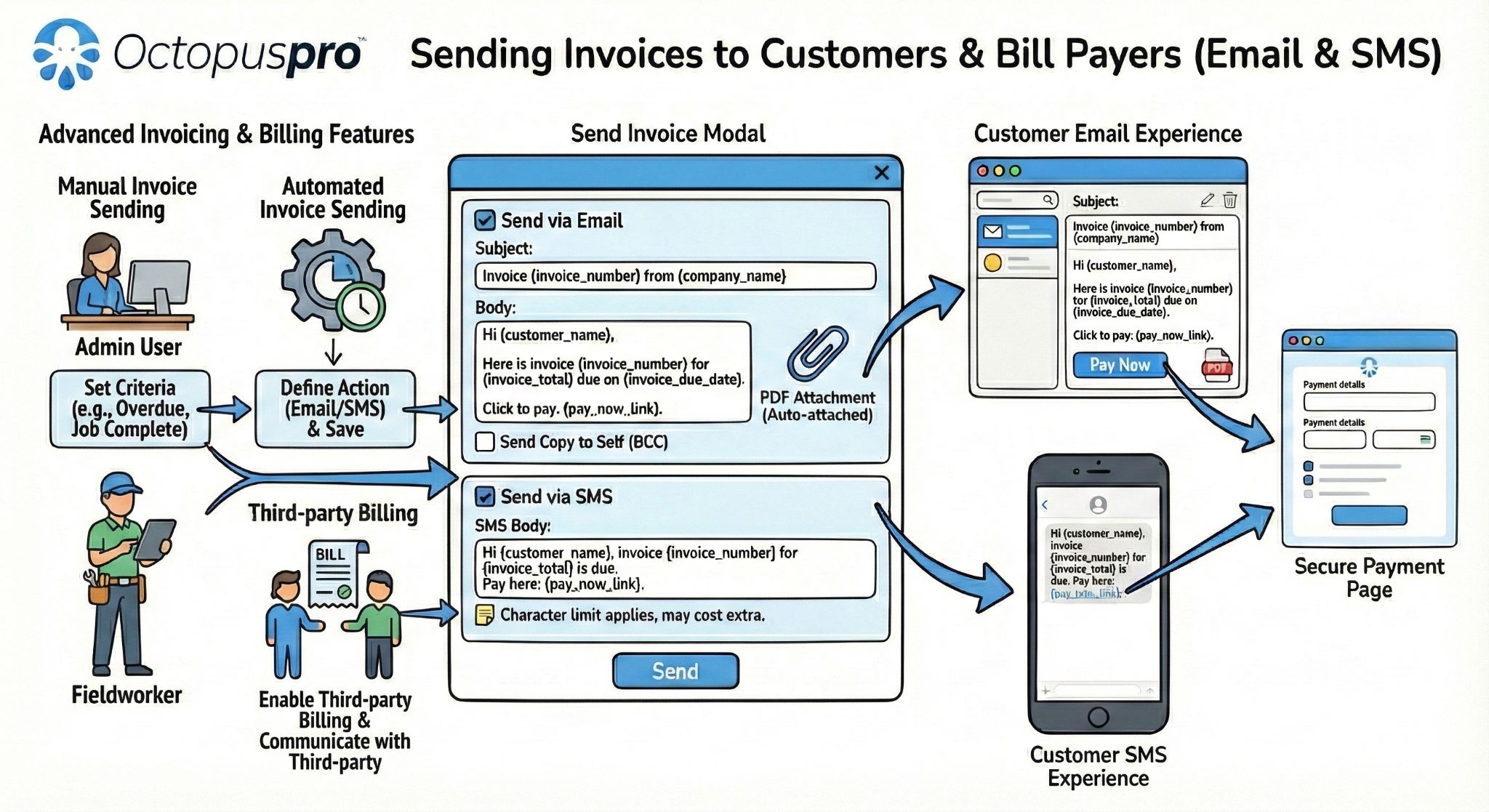
Sending invoices to customers and bill payers: supports payment request, bill payer and account-customer communication workflows.
Help finance and office teams spot what is paid, unpaid and overdue sooner.
Invoice tracking, automatic confirmations and flexible payment options help customers understand what they owe while giving staff a more complete view of what has been paid.

Insightful Invoice Overview
Monitor outstanding invoices, due dates and total amounts by status so your team always understands current financial standing.

Automated Payment Confirmation
Configure OctopusPro to automatically send payment confirmation emails, giving customers immediate reassurance after successful payment.
A World of Payment Options
Support ePayment integrations including eWay, PayPal, Square and Stripe, plus credit card payments, online bank transfer workflows and digital wallet preferences where supported by your gateway.
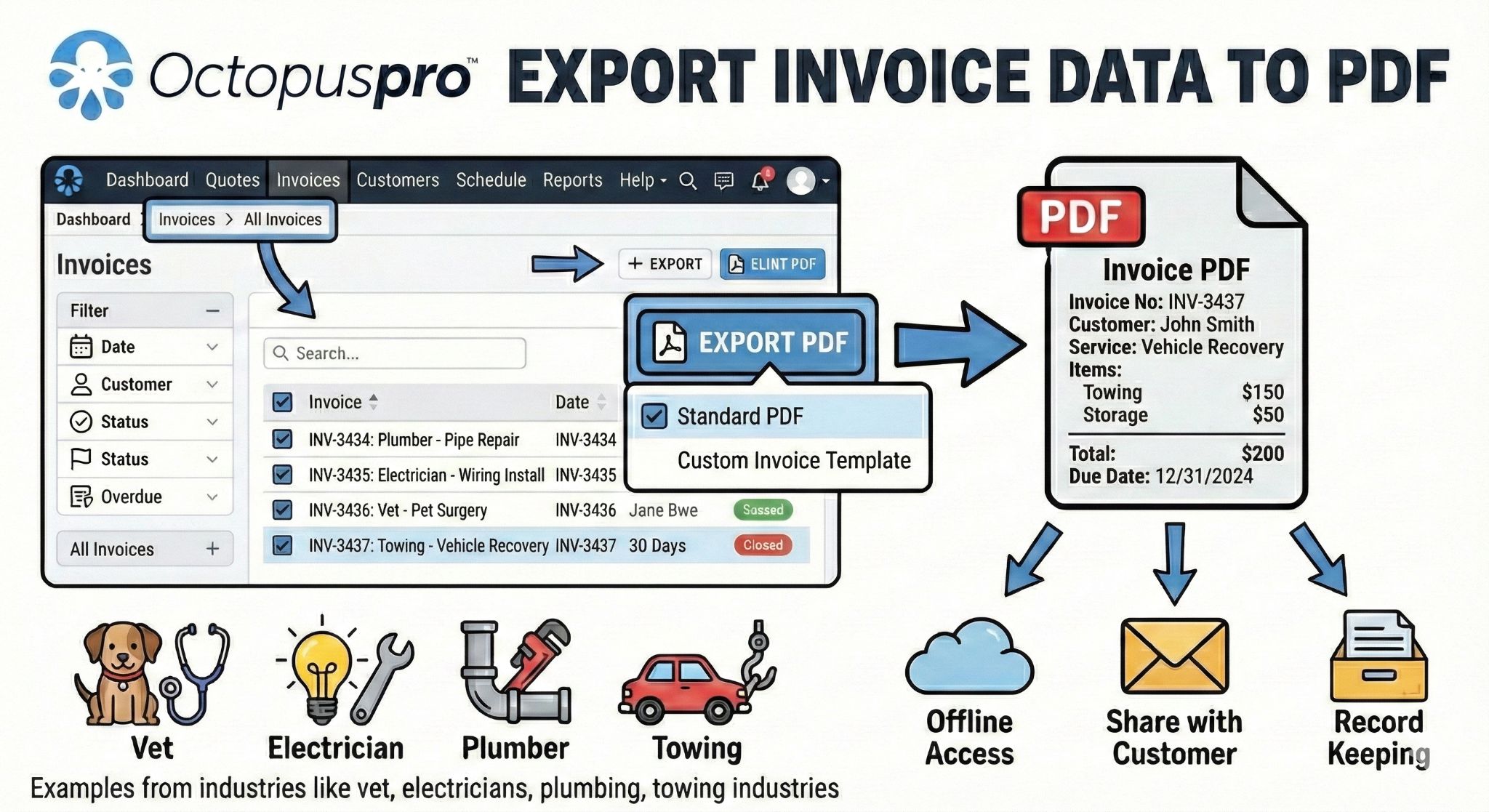
Export invoice PDF: reinforces branded invoice, PDF export and payment-document presentation controls.
Make every transaction easier to verify from customer action to finance review.
When a payment is recorded, your team needs more than the amount paid. OctopusPro payment records can include method, reference, date/time, status, who added the payment, receipts, approval context and related invoice or booking history.
Reference numbers
Use payment references to make bank transfers, card payments, external terminal payments and imported records easier to identify later.
Approval status
Separate automatically processed payments from records that still need admin or finance review before they are treated as final.
Receipt history
Email receipts for specific payments and keep the customer-facing proof connected to the invoice and account history.
Cleaner reconciliation
Give accounts teams the metadata they need to explain payment decisions, resolve disputes and connect payments to the right invoice.
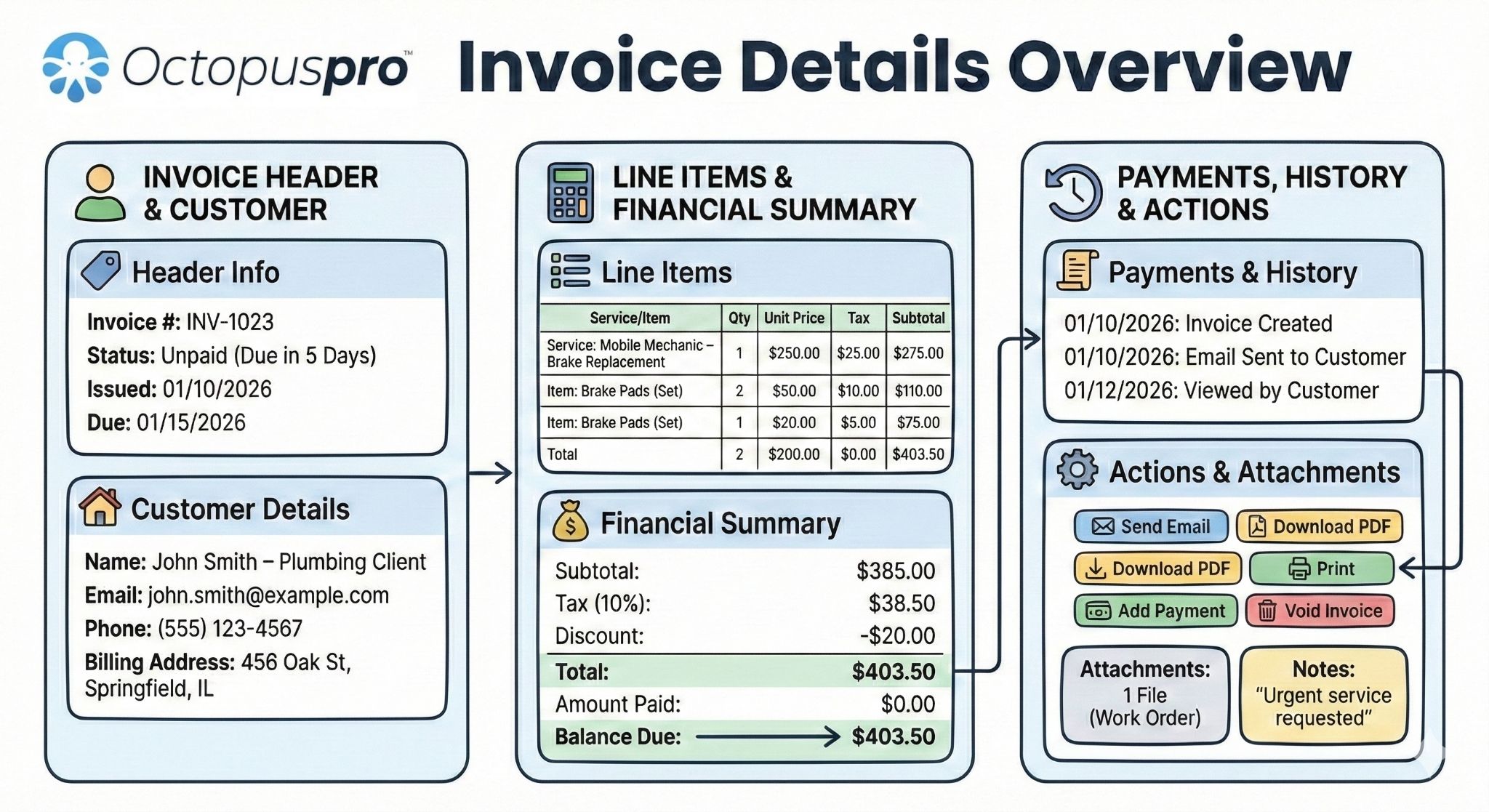
Invoice details overview: shows invoice totals, payment status, actions, records and related billing details in one place.
Give finance teams cleaner payment data for cash-flow decisions.
Once payments are collected, managers need practical reporting they can filter, export and use for reconciliation. This section adds the finance reporting layer without repeating the invoice tracking or reconciliation sections.
Payment received reports
Review payments by date range so finance teams can track cash flow, compare totals and investigate payment activity during a selected period.
Payments Received approval queue
Give finance teams a central place to review approved, rejected and not-yet-approved payment records before unverified entries affect invoice balances or reports.
Exportable records
Export payment reports for spreadsheet review, accountant handover, audit checks or deeper reconciliation outside the dashboard.
Recent invoice activity
Monitor newly created, updated, overdue or high-value invoice activity so billing changes that affect cash flow are easier to spot.
Invoice dashboard filtering
Help finance teams search, sort and filter invoices by customer, status, fieldworker, labels and other operational signals so daily payment follow-up is easier to prioritise.
Accounts receivable ageing
Use due dates and invoice ageing visibility to identify invoices that are due, overdue or becoming a cash-flow risk before they disappear into manual follow-up.
Better finance handover
Give bookkeepers and managers a cleaner record of payment dates, methods, statuses, references and related invoice activity.
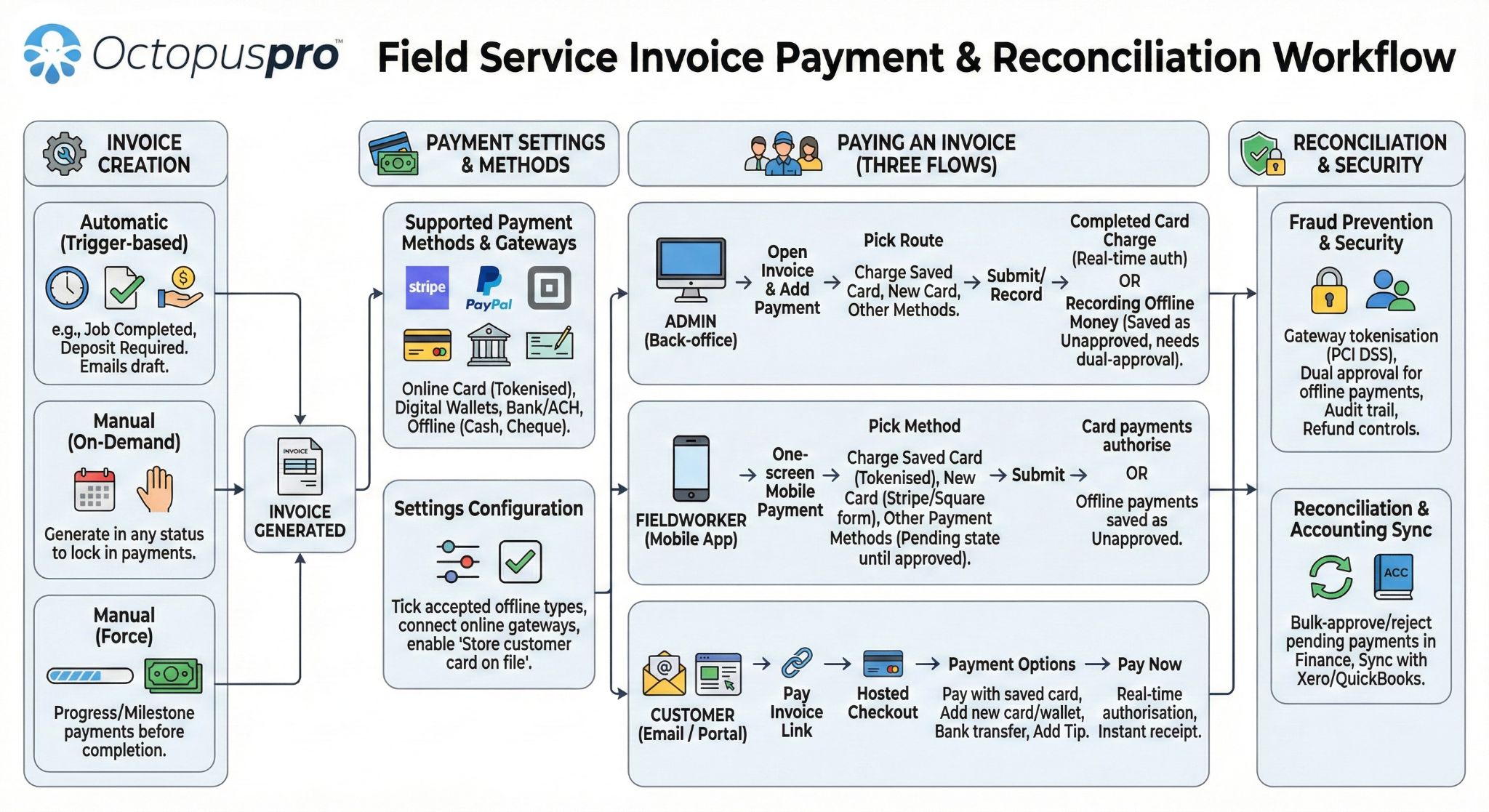
Invoice payment and reconciliation workflow: explains how invoice creation, payment collection, reconciliation, approvals and accounting-ready records fit together.
Correct invoice issues safely without weakening payment records.
Payment pages convert better when they show real office workflows, not only ideal payment collection. Add this section to explain how OctopusPro helps staff manage invoice exceptions, corrections, complaints and consolidated billing without losing visibility over the original payment record.
Correct invoice records
Support operational workflows where invoices need to be reviewed, converted back to draft, voided or adjusted before payment follow-up continues.
Manage invoice issues
Keep complaints, disputes, special notes and internal discussion linked to the invoice so payment delays have context for the office team.
Control merged invoices
Support consolidated billing scenarios where multiple bookings are combined, locked, unlocked or reviewed as part of account-customer billing.
Protect approved payment records
Use invoice edit restrictions and controlled correction workflows so paid, voided or approved-payment invoices are not changed casually after finance records already exist.
Help accounts teams approve payment faster with proof, notes and communication history.
Payment collection often slows down because the invoice is missing proof, waiting on approval or needs internal context. This supporting section keeps follow-up work connected to the invoice instead of buried in separate emails or spreadsheets.
Attach proof to invoices
Add supporting files such as photos, signed job cards, purchase orders, work orders, reports, timesheets or other documents customers need before approving payment.
Capture customer signatures
Use customer signatures, signed quotes, signed job cards or proof-of-completion records to support payment approval, reduce disputes and show that the customer acknowledged the work or terms.
Use payment follow-up labels
Apply labels such as Awaiting PO, Disputed, VIP, Insurance, Overdue or Needs Review so staff can prioritise invoice actions faster.
Keep internal discussion visible
Use comments or discussion notes to explain special payment arrangements, approval delays, customer disputes or finance-team decisions.
Pause reminders during disputes or PO delays
Pause or resume invoice notifications where follow-up should wait for a purchase order, complaint resolution, customer approval, promised payment date or internal finance review.
Review automation and communication history
Check reminder history, automation runs, email/SMS activity and customer communication logs so staff can confirm what was sent, when it happened and whether follow-up succeeded.
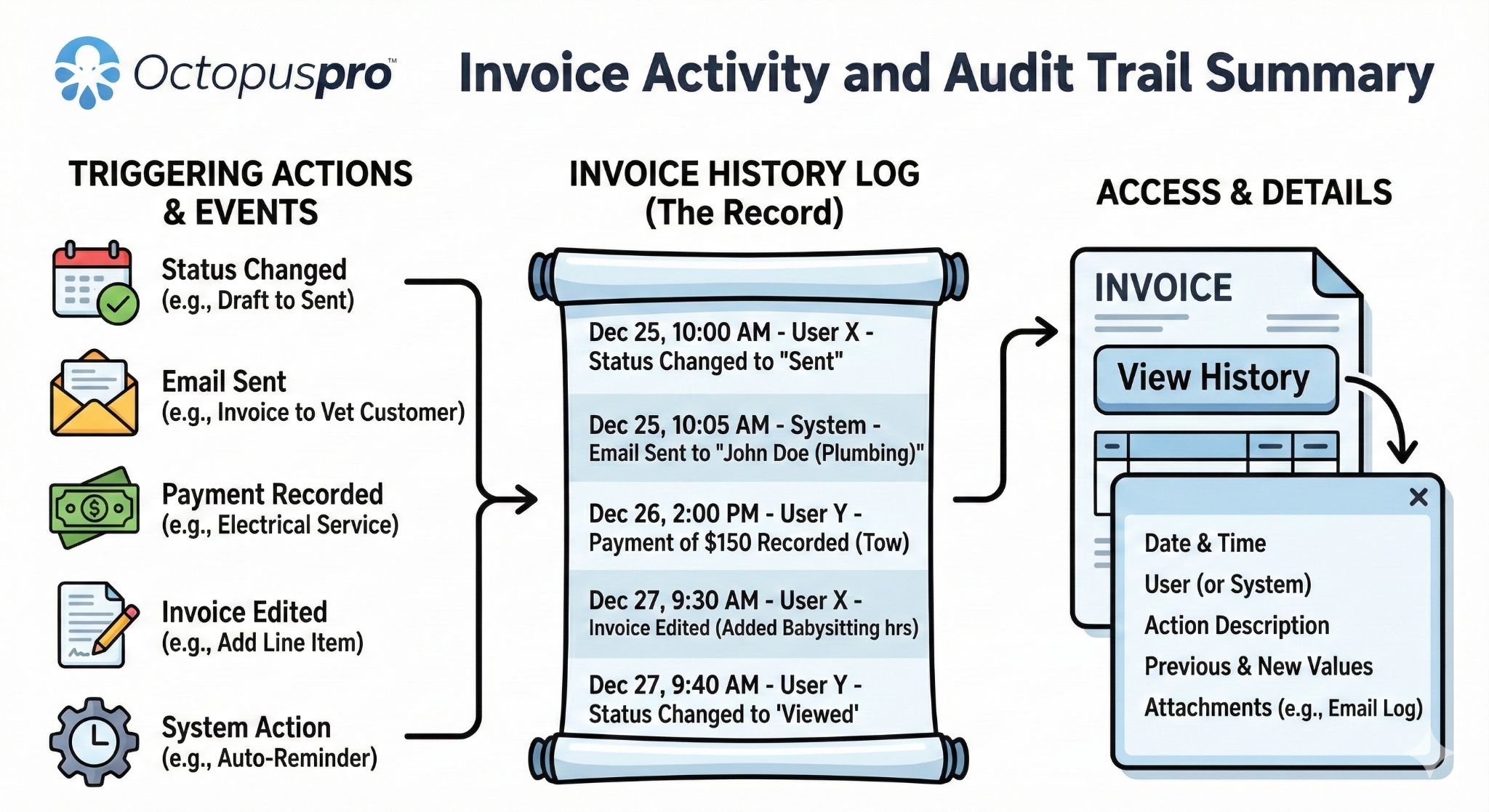
Invoice history log: supports audit history by showing how invoice activity and changes can be reviewed over time.
Turn manual follow-up into a connected payment workflow.
Set up a more reliable way to collect deposits, send invoices, process payments, manage refunds and keep payment records connected to every booking.
Resolve refunds and overpayments without losing control of the record.
Refunds should not be treated as a simple negative payment. OctopusPro helps your team separate refund recording, gateway refund processing, approval control, customer communication and financial history so mistakes are easier to prevent and review.
Add Refund
Record a refund that was handled outside OctopusPro, such as cash, bank transfer, cheque, external terminal or another payment platform.
Process Refund
For eligible online payments originally processed through a supported gateway, refund the customer while keeping the action connected to the original payment.
Review and approve
Use approval controls, reasons, references and notes so managers or finance staff can verify sensitive refund activity before it affects reporting.
Keep the record
Maintain refund history against the customer, invoice, booking and payment so the office can explain what changed and why.
Refunds require payment context
Keep refunds tied back to the approved payment, invoice, booking and customer record so staff can understand what was refunded and why.
Approval before deletion
Use refund approval and unapproval steps so sensitive refund records are reviewed before they are edited, removed or included in reporting.
One clear refund trail
Track refund reason, reference, method, amount, date, notes and staff action history to make customer questions easier to answer.
Overpayment and negative balance handling
If a customer pays more than the invoice total, staff can keep the excess visible as a negative balance, customer credit or credit-note scenario, then refund, allocate or correct it according to your accounting process.
Hassle-free Refunds
Process eligible gateway refunds or record external refunds while keeping refund amount, date, method, reason, reference and approval history connected to the customer and invoice.

Transparent Client Billing History
Stay organised with a complete billing history for each client, including invoices, payments, refunds and current account balance.

Manage Contractor and Worker Payments
Optimise how you pay contractors, subcontractors and fieldworkers using service percentages, predefined hourly rates, payout visibility and clear payment records.
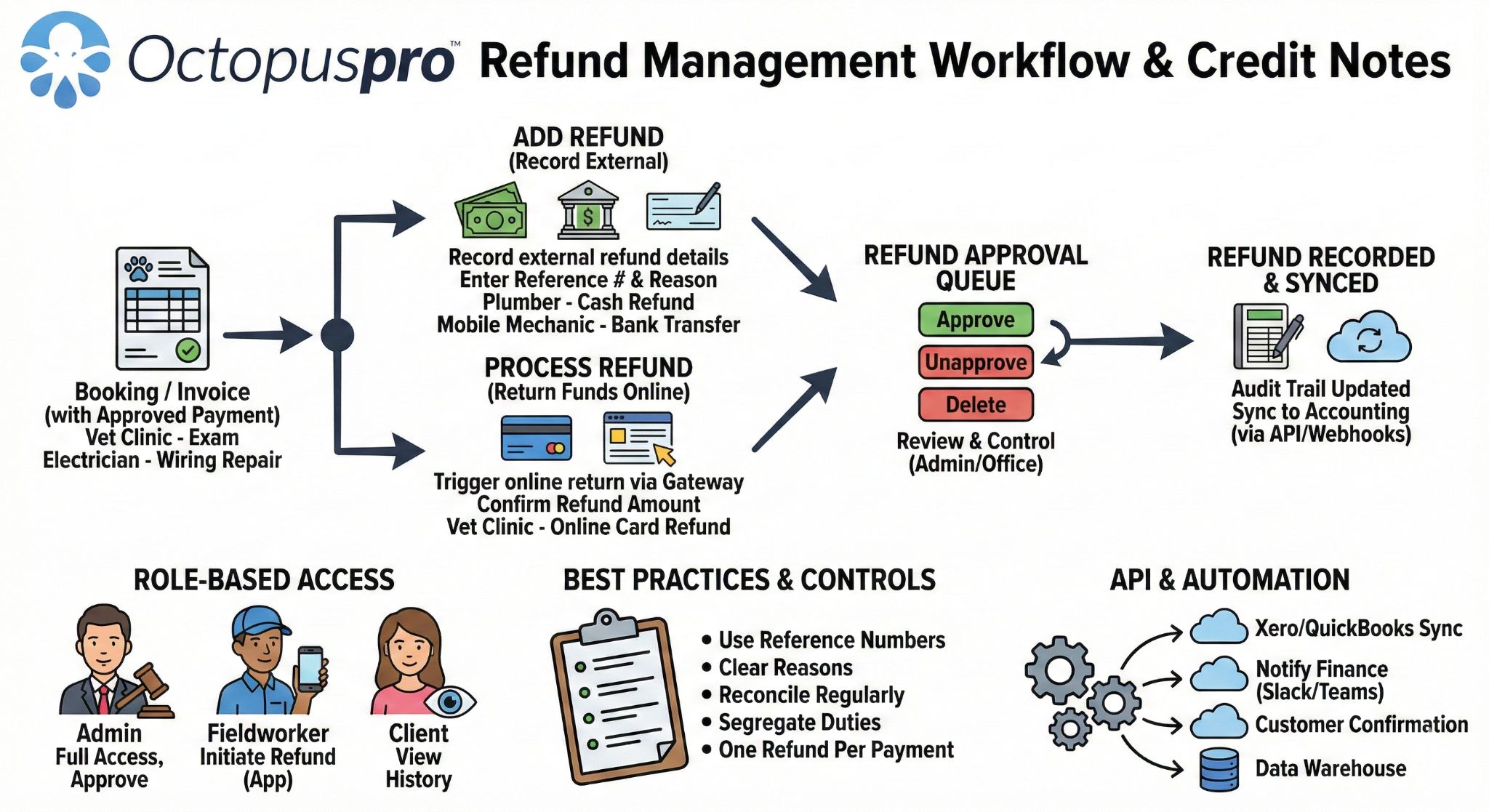
Refund management workflow: explains how refunds, approvals, credit notes, payment context and audit records work together.
Make refunds easier to approve, explain and audit.
Keep refund reasons, payment references, customer balances and approval history connected to the original booking and invoice.
Reconcile payments with less risk after money reaches the bank.
Collecting money is only part of the job. OctopusPro helps finance teams match bank transfers, review unknown payments, avoid duplicates, correct wrong allocations and keep accounting-ready records after the customer pays.
Import or sync payments
Bring in bank-transfer CSV records, gateway activity, or accounting-connected payment data so transactions can be reviewed in one workflow.
Match to the right invoice
Review references, amounts, dates, customers and possible matches before assigning a payment to an invoice or leaving it in an unknown queue.
Approve, reject or correct
Approve valid payments, reject incorrect records, reassign a payment to the correct invoice, unlink a wrong match or flag duplicate activity.
Update balances and history
Keep invoice balances, customer statements, payment receipts, refunds, account history and accounting-ready reports cleaner.
Customer statements and balances
View invoices, payments, refunds, credits, due dates and outstanding balances as part of the customer’s billing history.
Bank import and matching
Support payment reconciliation by reviewing imported bank records, references, unknown payments, duplicate transactions and payment approval status.
Accounting-ready data
Keep invoice, payment and refund records organised for export, accounting integrations and cleaner end-of-period reporting.
Receipts and confirmations
Email receipts, payment confirmations and customer-facing billing updates so customers understand what was paid and what remains outstanding.
Tips, adjustments and extras
Track tips, partial payments, adjustments and other payment-related amounts so the final booking balance remains easier to explain.
Refund and deposit visibility
Keep deposits, refunds and payment corrections visible beside the booking, invoice and customer record so exceptions are easier to explain.
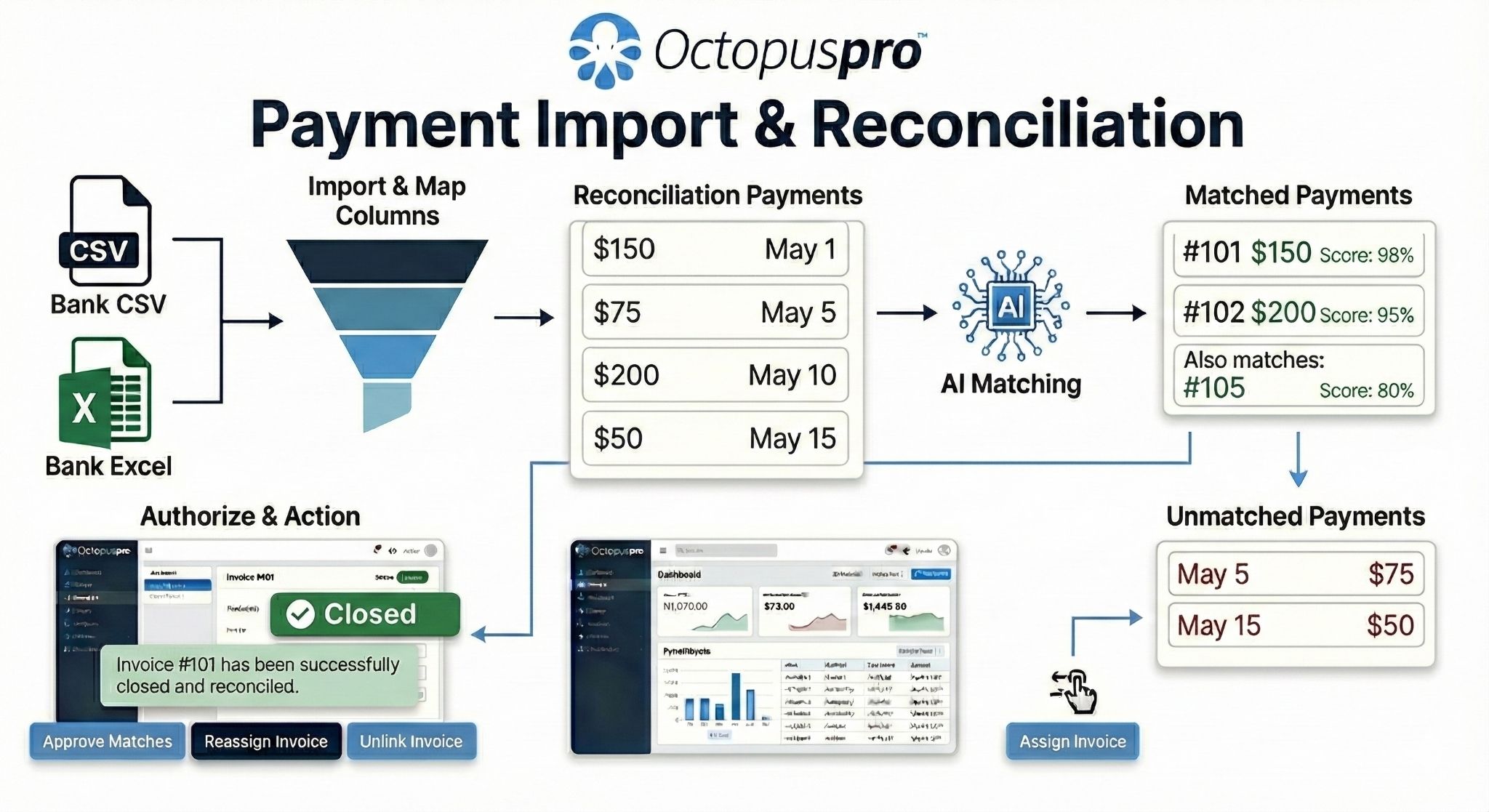
Payment import and reconciliation: shows bank import, matching, unknown payments, approval, correction and balance updates.
Make account billing easier to understand, send and collect.
Commercial clients and repeat customers often do not want a separate payment conversation for every booking. This section positions OctopusPro for businesses that need consolidated billing, customer statements and clearer account balances.
Consolidated billing cycles
Group eligible bookings into clearer daily, weekly, fortnightly, monthly or custom billing workflows so account customers receive fewer, more useful invoices.
Customer account statements
Show invoices, payments, credits, refunds, due dates and outstanding balances in one statement that helps customers understand what is owed.
Credit notes and account credits
Keep retained value visible when an overpayment, adjustment or service credit should remain on the customer account instead of being immediately refunded.
Recurring service billing
Support cleaning, maintenance, tutoring, care, commercial contracts and other repeat services where predictable billing improves cash flow.
Due dates and account terms
Use company, customer or invoice-level payment terms so commercial accounts can have the right due dates without manual reminders each time.
Customer financial timeline
Give staff a customer-profile view of quotes, bookings, invoices, payments, communications, due dates, billing cycles and account statements so billing questions are easier to answer.
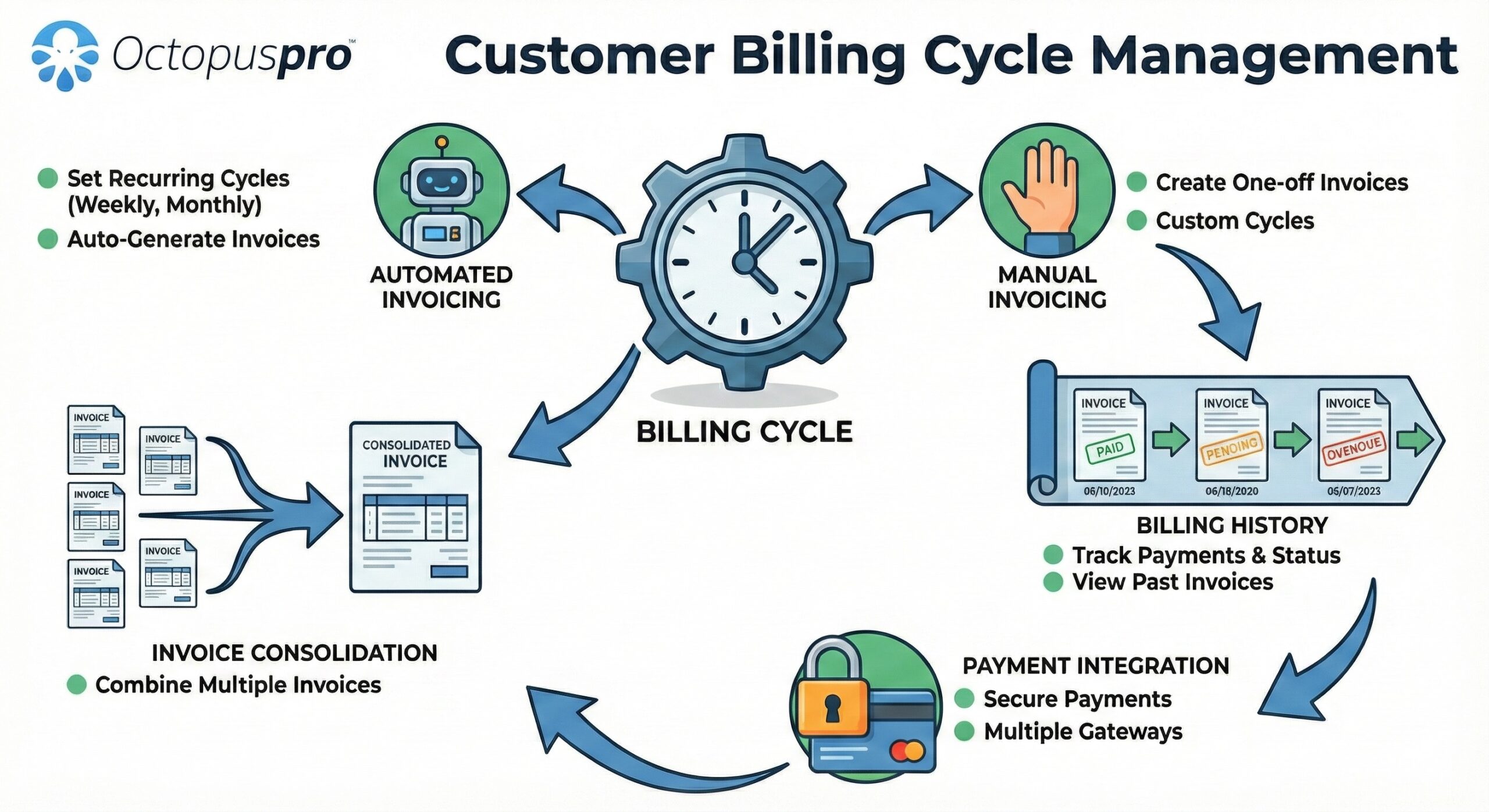
Customer billing cycles management: explains consolidated invoices, repeat customer accounts, statements, due dates and account billing workflows.
Handle commercial billing when the payer is not the service recipient.
Commercial billing often involves property managers, real estate agencies, insurers, facilities teams, corporate accounts or other organisations paying on behalf of a customer. This section makes those account workflows clearer without duplicating deposits or payment gateway content.
Third-party bill payers
Keep payer context visible for jobs where an agency, organisation, employer, insurer or property manager is responsible for the invoice instead of the service recipient.
Purchase order support
Capture PO numbers for business customers and keep them connected to quotes, bookings, invoices, customer-facing PDFs and portal records.
Account-customer workflow
Combine billing cycles, due dates, statements and invoice history so repeat commercial customers can be managed differently from casual one-off customers.
Cleaner finance handover
Help office and finance teams answer “who pays?”, “which PO applies?”, “what period is covered?” and “what is still outstanding?” faster.
Manage customers, staff and payments from connected records.
OctopusPro is an integrated online solution for managing transactions in service-based businesses of all sizes. It helps your team handle payments, deposits and refunds while keeping information connected to booking operations, customer records, staff workflows, accounting and CRM processes.
booking payment tracking guide →
- Use your system from any location with an internet connection and a browser
- Manage thousands of payments, deposits and refunds during busy periods
- Record every transaction from initial deposit to final payment or refund
- Oversee contractor and service provider account balances
- Integrate payment data with accounting and CRM systems
- Support mobile and field services including cleaning, gardening, mowing, locksmithing, pest control, solar, painting, real estate services and contractor management

Bring customer, staff and payment information together so the financial side of each job is easier to manage.
Connect what customers pay to the people who completed the work.
For many service businesses, payment management does not end when the customer pays. OctopusPro can help keep fieldworker earnings, tips, service extras and payout review connected to the job record so office teams have clearer information before paying staff, contractors or subcontractors.
Job-to-payout visibility
Connect completed jobs, service percentages, hourly rates, commissions and account balances so payout review is easier to verify.
Tips and gratuities
Support customer tips or gratuity-style amounts where relevant, while keeping them visible beside the payment and booking record.
Payout review and export
Help office teams review unpaid work, approved earnings and payout-ready amounts before processing payments externally or through connected workflows.
Fieldworker App on-site payment and invoice workflow guide →
Give service providers clearer earnings visibility and reduce payout questions.
Fieldworker payment workflows work better when the office can review payouts and fieldworkers can see the earnings information they are allowed to access. This adds the fieldworker-facing side of payout management without repeating customer payment collection.
My Earnings visibility
Let fieldworkers view earnings totals, outstanding payments and pay statement information in the app where permissions and payroll settings allow.
Outstanding payout clarity
Help fieldworkers understand which jobs are paid, unpaid, partially paid or awaiting the next payout workflow.
Service-level pay rates
Support service percentages, hourly rates, worker-specific agreements and booking-level overrides when calculating what each provider is owed.
Split payouts and exports
Support marketplace-style workflows such as Stripe Connect splits where configured, as well as bank-ready exports for bulk payout processing.
fieldworker timesheet summary and payroll validation guide →
Timesheet-to-payroll validation
Compare scheduled hours, actual attended time, breaks, approved hours and exportable timesheet data before processing fieldworker payroll or contractor payouts.
fieldworker timesheet summary and payroll validation guide →
Check-in/out time logs
Use fieldworker time logs such as on the way, arrived, started, finished and auto check-out events to support more accurate payroll review and dispute resolution.
Protect service quality before disputed work is paid out.
When a customer complaint, quality issue or dispute affects a completed job, the payment workflow should give managers time to review the issue before paying the affected fieldworker. This adds a practical governance layer to fieldworker payouts without repeating the refund workflow.
Issue logged
A complaint or issue is attached to the relevant quote, booking or invoice so the payment delay has clear operational context.
Payout withheld
The affected fieldworker payout can be held from payroll review until the issue is checked, corrected or approved for closure.
Manager review
Admins can review notes, photos, signatures, discussions and customer communication before deciding whether to release the payment.
Audit trail kept
Hold and release activity helps explain why payment was delayed, who reviewed it and when the payout became clear to process.
Turn completed work into collected revenue sooner.
Reduce late payments, prevent avoidable billing confusion and make it easier for customers to complete payment after service.
Connect payment controls to the business outcome they improve.
Use this control map to see how each capability contributes to faster collection, safer bookings, cleaner records and better payout control.
Collect
Online payment links, card payments, gateway integrations, mobile payment options and multi-currency support.
Secure
Deposits, stored card workflows, payment schedules, service-based deposit rules and upfront commitments.
Follow up
Batch reminders, due-date controls, automatic confirmations and payment status visibility.
Correct
Refund tracking, duplicate payment alerts, surcharge transparency and administrator payment review.
Reconcile
Customer billing history, transaction records, import/export, accounting integrations and fieldworker payout records.
Improve payment accuracy and customer confidence with practical safeguards.
Clear rules, transparent fees and payment review controls help your business reduce mistakes while giving customers more confidence in how they are charged.

Never Overlook a Duplicate Payment
Payment errors can be costly and time-consuming. OctopusPro helps identify duplicate payments so transactions stay accurate and easier to reconcile.
payment reconciliation and duplicate payment control guide →
Tailored Payment Schedules
Customize due dates based on individual customers or customer categories to create a more organised and personalised payment experience.

Deposit Management
Manage upfront payments with flexible deposit configurations that help secure bookings, build trust and reduce the risk of last-minute cancellations.

Credit Card Surcharge Transparency
Incorporate credit card surcharges clearly so customers can see the payment breakdown and avoid confusion around fees.

Set, Forget and Stay Consistent with Recurring Payments
Use recurring payment workflows to bill periodic services without repeated manual intervention, helping customers and teams follow a predictable schedule.

Admin Payment Review for Client Confidence
Add an office approval layer so payments can be reviewed by an administrator before processing, reducing the risk of billing discrepancies.
Give every role the payment information they need at the right time.
Payments are not just an accounting task. They affect customer confidence, office workload, fieldworker payouts and the way bookings are confirmed, completed and reconciled.
Business owners
Improve cash flow visibility, protect booked revenue with deposits and reduce the risk of missed payments or undocumented refunds.
Office and admin staff
Track invoices, reminders, balances, confirmations and refund activity from a cleaner daily workflow.
Customers
Receive clear invoices, online payment links, transparent surcharge information and timely confirmation when payment succeeds.
Fieldworkers, subcontractors and service providers
Keep service provider payment records, hourly rates, percentage-based payouts and due amounts easier to manage.
Keep payments, deposits and refunds organised around the booking.
Use one connected workflow to reduce payment delays, improve customer confidence and give your office team fewer loose ends to chase.

Keep payment activity visible to the team so invoices, deposits and refunds are easier to follow.
Reduce office admin by making payment work easier to see and follow up.
- Less time searching for payment information
- Fewer missed invoice follow-ups
- Clearer customer account balances
- More confidence when deposits, partial payments or refunds are involved
- Better visibility over fieldworker and contractor payment obligations
- More consistent communication after payments are made
Replace scattered payment admin with one controlled booking workflow.
Compare the difference between disconnected payment admin and a connected workflow where invoices, deposits, refunds, reminders and payout records stay aligned with the booking.
Payments create extra admin after every job.
- Staff manually chase unpaid invoices and unclear balances
- Deposits, installments and refunds are tracked in separate places
- Customers need more calls or emails to understand what they owe
- Fieldworker payouts become harder to verify as bookings increase
Payment activity follows the booking lifecycle.
- Invoices, reminders and payment links stay connected to customer records
- Deposits, partial payments and refunds are visible in one history
- Customers receive clearer payment instructions and confirmations
- Contractor, subcontractor and fieldworker payment records are easier to manage
Align customers, staff and fieldworkers around the same payment record.
A professional payment system should not only collect money. It should help office staff, fieldworkers, managers and customers understand what is due, what has been paid, what needs review and what records are available later.
Simple payment experience
Customers receive clear requests, online payment options, confirmations and billing history that make the process easier to trust.
Less manual follow-up
Admin staff can monitor statuses, send reminders, manage deposits and handle refunds without chasing information across separate tools.
Better financial visibility
Owners and managers can review payment history, outstanding balances, reports, imports, exports and accounting-ready activity.
Clearer payout records
Fieldworker, contractor and service provider payments can be tracked with service percentages, hourly rates and account balances.
Build a stronger payment workflow without adding more admin.
Improve cash flow, reduce admin and make payments easier for customers, office staff and fieldworkers.
Scale payments with more control, less admin and stronger cash flow.
By connecting payments to bookings, invoices, customers and fieldworker records, OctopusPro helps your business create a more reliable financial workflow.
- Unified Payment Dashboard: Centralise payment, deposit and refund information for stronger staff efficiency.
- Anywhere Access: Use your system wherever you have an internet connection and browser.
- Bulk Payment Handling: Manage large volumes of payments, deposits and refunds during peak periods.
- Dynamic Pricing Structures: Adjust pricing models based on demand, seasonality and business rules.
- Automated Fieldworker Payments: Simplify payments for contractors, fieldworkers and service providers.
- Clear Refund Policies: Manage transparent refund policies that support customer trust.
- Detailed Transaction Records: Keep records from deposit through to final payment and refund.
- Automated Invoicing: Generate and send invoices after service completion.
- Secure Payment Gateways: Connect with leading payment platforms for secure transactions.
- Custom Deposit Rules: Tailor deposit requirements by service type, duration or cost.
- Instant Payment Notifications: Receive alerts that help your team stay informed.
- Contractor and Service Provider Account Management: Track payments, balances and account activity in one place.
See how connected payments can work for your business.
Compare plans, speak with support or start a free trial to test payment, deposit, refund and reconciliation workflows.

Give mobile, field and appointment teams one payment workflow.
With OctopusPro, ensure timely and accurate payments for mobile and field services such as cleaning, gardening, mowing, locksmithing, pest control, solar installations, painting, real estate services, contractor management and many other appointment-based industries.
booking payment tracking guide →
Secure deposits, efficient payment collection and clear refund workflows create a safety net for your business while improving confidence for your customers.
Grow with payment workflows that scale across staff, customers and services.
The result is a workflow that supports growth, efficiency and profitability without adding unnecessary manual administration.

Growth
Boost financial growth by optimising payment processes, collecting deposits on time and streamlining refunds with OctopusPro.
Efficiency
Manage, track and process payments, deposits and refunds more easily, helping each staff member handle more transactions with less admin.

Profitability
Improve cash flow and customer satisfaction by keeping payment transactions, deposit collections and refunds seamless and organised.
Improve conversion by connecting payment features to visible business outcomes.
The practical outcome is faster collection, fewer missed follow-ups, cleaner customer records, stronger booking commitment and clearer operational control.
For customers
- Clearer payment expectations before they book.
- Familiar online payment options when an invoice is due.
- Confirmation and billing history that reduce uncertainty.
- Transparent surcharges, deposits, refunds and account balances.
For the business
- Less time chasing overdue invoices manually.
- More reliable deposits and booking commitment.
- Cleaner records for refunds, duplicates and partial payments.
- Better visibility over fieldworker payments and reporting.
Answer buyer questions before they become objections.
These answers address the main buyer concerns before they become objections, covering payment collection, deposits, refunds, reconciliation, customer billing, policy controls and fieldworker payouts.
Can customers pay invoices online?
Yes. Customers can pay from invoice links, Customer Portal billing areas and payment reminders when online gateway payments are enabled.
Can I require deposits or card details before a booking is confirmed?
Yes. Services can use fixed deposits, percentage deposits, full upfront payment, card-on-file, pre-authorisation or pay-later rules depending on the workflow.
Can payment terms, disclaimers and totals be shown before checkout?
Yes. Customers can review payment requirements, booking terms, cancellation conditions, service pricing, add-ons, discounts, taxes, travel fees and totals before confirming.
Can offline payments still be managed?
Yes. Cash, bank transfer, cheque, gift card, debit or external terminal payments can be recorded with references, notes, customer instructions and approval status.
Can payments be reconciled against bank transfers?
Yes. Imported and manually recorded payments can be matched, approved, rejected, reassigned, unlinked or investigated so unknown payments do not stay disconnected.
Can refunds be controlled by approvals?
Yes. Refund workflows can include recorded external refunds, eligible gateway refunds, approval controls, reasons, references, notes and audit history.
What happens when a customer overpays?
Overpayments can remain visible as an excess balance, credit or correction scenario so staff can decide whether to refund, apply credit or adjust records.
Can invoice corrections be controlled?
Yes. Paid, voided, approved-payment or accounting-synced invoices can follow controlled edit, void, draft-conversion or correction workflows.
Can customers view billing history in the portal?
Yes. Customers can review invoices, payment status, outstanding balances, billing history, saved details and payment FAQs where these options are enabled.
Can repeat or account customers be billed differently?
Yes. Billing cycles, customer statements, purchase orders, third-party bill payers, consolidated invoices and customer-specific due dates support commercial accounts.
Can discounts, vouchers, packages, products or inventory affect the invoice?
Yes. Promo codes, gift vouchers, prepaid packages, products, materials, stock usage, supplier costs, markups and taxes can all support more accurate billing.
Can travel distance or service location affect pricing?
Yes. Distance-based travel fees, mileage rules, free-radius settings and geo-pricing zones can help align the final amount with travel effort and location costs.
Can payment reminders use multiple channels?
Yes. Payment follow-up can use email, SMS and, where configured, WhatsApp-style customer communication, with logs showing what was sent and when.
Can finance permissions be restricted by role?
Yes. Businesses can separate invoice creation, payment entry, payment approval, refund approval, exports, void/delete controls and other sensitive actions by role.
Can reports help finance teams manage cash flow?
Yes. Payment reports, exports, invoice ageing, overdue invoice visibility, invoice filtering, approval queues and customer timelines help teams prioritise follow-up.
Can fieldworkers send invoices, collect payments or capture tips?
Yes. Where permissions allow, fieldworkers can send or create invoices, view billing status, record payments, capture tips and keep billing tied to the job.
Can fieldworker payouts be calculated and reviewed?
Yes. Fieldworker earnings, service-level rates, commissions, split payouts, bank export files, timesheets and check-in/out records can support payroll review.
Can signatures and documents support payment approval?
Yes. Signed quotes, customer signatures, job cards, completion proof, invoice attachments and supporting documents can reduce disputes and support approval.
Can cancellation, call-out and no-show fees be handled?
Yes. Cancellation fees, call-out fees, no-show fees and minimum cancellation notice windows can help protect reserved time and communicate policy expectations clearly.

Use connected records to understand customer payments, deposits, refunds and operational financial activity.
Streamline service bookings with connected payments, deposits and refunds.
Don’t let administrative work stop your business from getting paid on time. OctopusPro combines secure online payments, upfront deposits, payment reminders, flexible payment options, refund tracking, fieldworker payment management and transaction records into one workflow built for service businesses.
refund management and approval workflow guide →
Every booking becomes easier to confirm, invoice, collect, review and reconcile — from upfront commitment through to final settlement.
Secure bookings, collect payments and handle refunds in one connected workflow.
Give your business a more professional payment workflow that supports faster collections, clearer records and a smoother customer experience.