
Florist and Flower Delivery Scheduling Software
Run a more organised mobile flower delivery business with smarter florist or delivery driver scheduling, faster customer communication, less admin, and stronger cash flow from first enquiry to final payment.
OctopusPro helps florists and flower delivery businesses, floral delivery and event setup teams, mobile florists and delivery drivers, urgent flower delivery teams, and florist and flower delivery businesses manage the complete flower delivery workflow in one connected system. Schedule residential flower delivery jobs, flower delivery bookings, recurring flower delivery schedules, mobile flower delivery jobs, multi-site and multi-stop flower delivery jobs, online florist enquiries and photo-based floral reference quote requests, recurring flower delivery bookings, urgent flower delivery requests, and last-minute flower delivery enquiries without relying on spreadsheets or disconnected calendars.
Manage florist and delivery driver availability, customer, recipient, and delivery profiles, delivery addresses, online photo-based floral reference and delivery quote request details, flower delivery intake notes, flower delivery history, service add-ons, forms, checklists, signatures, proof of completed flower delivery or floral setup, invoices, payments, and delivery completion records from enquiry through to final payment. OctopusPro also supports Online Florist Enquiry and Flower Delivery Quote Request Management for online flower delivery bookings, customer intake calls, flower delivery intake calls, and digital follow-up workflows.
Manage every flower delivery workflow from one place
- Schedule florists and delivery drivers, flower delivery jobs, florist and delivery driver routes, mobile flower delivery jobs, and online flower delivery bookings.
- Store customer details, recipient, event, and delivery profiles, flower delivery booking notes, and flower delivery history.
- Automate confirmations, reminders, follow-ups, invoices, and payments.
- Track enquiries, quotes, recurring flower delivery schedules, job attendance, and delivery completion records.
Drive Revenue and Profitability with Better Flower Delivery Management

Florist and Flower Delivery Driver Scheduling and Rota Management
Keep your florists and delivery drivers fully utilised, reduce scheduling chaos, and run flower delivery bookings, mobile flower delivery jobs, and recipient-site or event-site flower delivery jobs from one organised calendar. Stay organised and improve flower delivery operational efficiency by managing multiple florists and delivery drivers’ schedules and flower delivery bookings from one calendar. Coordinate flower delivery jobs, flower delivery jobs, and follow-up visits while keeping customers informed and your team fully prepared.

Scheduling and Dispatch Board for Florists, Delivery Drivers, and Flower Delivery Jobs
Use OctopusPro’s scheduling and dispatch board to manage flower delivery jobs, unassigned work, and florist and delivery driver workloads from one live calendar. Drag and drop flower delivery bookings, scan flower delivery bookings in list view, match work to the right florist or delivery driver, and keep the day running without juggling spreadsheets, whiteboards, or disconnected calendars. See Calendar – Scheduling & Dispatch, Calendar List View, and Find Availability.
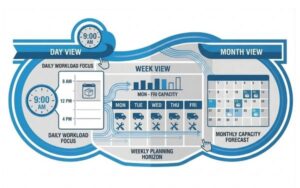
Daily, Weekly, and Monthly Flower Delivery Schedule Views
Get better visibility of workload, capacity, and bottlenecks so you can plan ahead instead of reacting at the last minute. Use flexible calendar views to plan flower delivery jobs by day, week, or month. This makes it easier to manage workload, monitor florist, delivery driver, and flower delivery job capacity, avoid scheduling conflicts, and keep your operation running on time.


Flexible Calendar Setup for Your Florist and Flower Delivery Workflow
Schedule work more efficiently, improve visibility, and organise flower delivery bookings around the way your business operates. OctopusPro’s flexible calendar setup adapts to flower delivery operations, flower delivery bookings, flower delivery visits, corporate, event, venue, and multi-site flower delivery jobs, and florist or delivery driver rosters, with calendar filters, live availability, mobile flower delivery zones, and assignment rules that help you manage work clearly and effectively.

Google and Outlook Calendar Integrations
Reduce double booking, save admin time, and keep your flower delivery team aligned with Google Calendar integration and Outlook Calendar integration. OctopusPro keeps flower delivery jobs, availability, and schedule updates in sync, improving visibility across your team and making day-to-day scheduling easier to manage.
Make Sure Every Flower Delivery Request Is Handled Quickly and Professionally
Reduce delays, improve response times, and route every flower delivery request to the right florist or delivery driver more efficiently with structured florist or delivery driver assignment and dispatch workflows. OctopusPro helps your admin team, flower delivery operations, and florists and delivery drivers coordinate work through manual and automatic assignment options, real-time progress tracking, and clearer visibility from request through to completion. This gives your flower delivery team better control over dispatch, reduces scheduling conflicts, and helps flower delivery jobs move more smoothly through the workflow.

Let Florists and Delivery Drivers Accept or Decline Flower Delivery Requests
Reduce response delays, give florists and delivery drivers more flexibility, and keep flower delivery bookings progressing without losing control over dispatch. With OctopusPro’s accept and decline flower delivery request workflows, fieldworker flower delivery job request management tools, and settings to allow florists and delivery drivers to accept or decline flower delivery requests, florists and delivery drivers can review new assignments, accept suitable work, decline flower delivery jobs that do not fit their availability or flower delivery zone, provide decline reasons, and suggest alternative times when enabled. Your flower delivery team can notify florists and delivery drivers by push, SMS, or email and quickly reassign declined work so flower delivery bookings keep progressing smoothly from dispatch to completion.

Ready to run flower delivery jobs with less admin?
Start a free trial, compare pricing, or book support to see how OctopusPro can organise florist or delivery driver schedules, flower delivery bookings, flower delivery preparation checks, quotes, invoices, and payments from one connected platform.
Start Free TrialBook SupportView Pricing

Modernise your flower delivery workflow without adding more admin.
Replace disconnected calendars, spreadsheets, message threads, and manual follow-ups with one organised system for flower delivery jobs, flower delivery preparation checks, flower delivery bookings, florist or delivery driver schedules, quotes, invoices, payments, and customer communication.
Need setup guidance?
Tell us about your flower delivery workflow.
Share how you manage florists and delivery drivers, flower delivery jobs, mobile flower delivery jobs, flower delivery packages, and payments so the OctopusPro team can help you choose the best next step.
Automatically Match the Right Florist or Delivery Driver to Each Flower Delivery Job
Improve first-job fit and service consistency, strengthen service quality, and assign flower delivery jobs more accurately from the start. OctopusPro helps you match each flower delivery job to the right florist or delivery driver using a combination of skills, service types and job types, flower delivery services offered, and eligibility, together with real-time availability, working hours, leave, time blocks, synced calendars, and map-based mobile flower delivery zones to make smarter scheduling and dispatch decisions. This is especially useful when flower delivery jobs need to be assigned based on both capability and real service coverage, including specialist work such as customer intake calls, flower delivery enquiries, online florist enquiries, recipient-site or event-site flower delivery jobs, corporate, event, venue, and multi-site flower delivery jobs, flower delivery preparation check and appointment coordination, multi-site and multi-stop flower delivery jobs, online flower delivery bookings, multi-site and multi-stop flower delivery schedules.

Flexible Booking Location Types for Florists, Mobile Flower Delivery Teams, and Online Flower Delivery Enquiries
- Mobile and Customer-Site Flower Delivery Services — ideal for recipient-site or event-site flower delivery visits, mobile flower delivery jobs, recipient-site flower delivery and event-site floral setup services, customer sites, commercial sites, managed recipient addresses and event locations, recurring floral delivery programmes, and recipient-site or event-site flower delivery bookings and other flower delivery jobs where the florist or delivery driver travels to the customer.
- Recipient Addresses and Event Locations, Delivery Addresses, and Mobile Team Coverage — ideal for saved recipient addresses and event locations, delivery addresses, commercial sites, strata properties, rental properties, and multi-site flower delivery accounts where florists and delivery drivers attend the customer site.
- Online Florist Enquiries and Photo-Based Floral Reference Quote Requests — ideal for online florist enquiries, remote flower delivery intake calls, photo-based floral reference quote requests, follow-up messages, and quote reviews, online florist enquiries and photo-based floral reference quote requests, follow-up visits and flower delivery preparation checks handled through customer-provided details, photos, phone calls, email, or online quote request forms.
Whether your flower delivery business operates from a recipient address or event location or delivery address, visits customers customer-site, supports organisations across multiple properties, or manages online quote requests, OctopusPro keeps scheduling, customer communication, reminders, calendar invites, florist or delivery driver access and recipient, event, and delivery profiles organised in one place.

Florist and Delivery Driver-Based Scheduling and Service Matching
Make flower delivery team capabilities easier to deploy, improve flower delivery job accuracy, and define more clearly which florists and delivery drivers can perform which types of work. With skills-based florist or delivery driver assignment by flower delivery services, job types, florist or delivery driver experience, and eligibility, configure flower delivery staff profiles around the flower delivery services they offer and the work they are approved to handle. This helps you assign flower delivery bookings based on job type, service format, service type, location requirements, florist or delivery driver capability, and internal requirements, and can be extended with profile data and custom fields to record things like service formats, flower delivery team sizes, flower delivery job resource options, access requirements, or other flower delivery-specific criteria.

Real-Time Florist and Delivery Driver Availability
Avoid double bookings, schedule with greater confidence, and give your flower delivery team a clearer view of who is genuinely available for new flower delivery jobs. With real-time florist and delivery driver availability, OctopusPro checks each florist or delivery driver’s working hours and live calendar availability, including unavailable periods and breaks, so flower delivery job time slots reflect actual florist and delivery driver capacity. When enabled, it only shows customers available time slots where at least one matching florist or delivery driver is available, helping you make better dispatch decisions, reduce scheduling conflicts, and keep the day running more smoothly.

Map-Based Mobile Flower Delivery Zones and Coverage Control
Prevent out-of-area flower delivery bookings, reduce wasted travel for mobile florists and delivery drivers, and assign flower delivery jobs based on real florist or delivery driver coverage. With map-based mobile flower delivery zones and coverage rules, OctopusPro lets you define precise territories, multiple service regions, and overlapping coverage where needed. This helps you match flower delivery jobs to the right florists and delivery drivers based on actual coverage, apply a default travel radius when required, and avoid flower delivery bookings outside the areas you support.

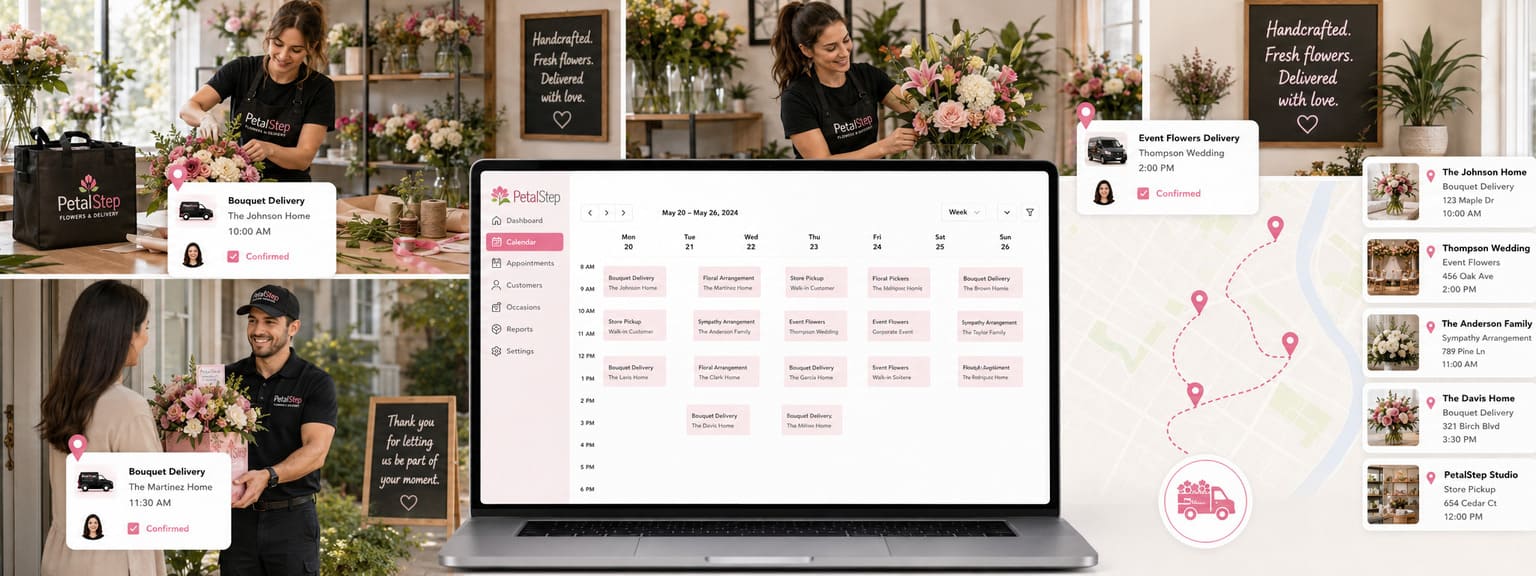
Turn more flower delivery leads into confirmed flower delivery bookings.
Capture flower delivery enquiries, respond faster, send clearer quotes, and move customers from first contact to confirmed flower delivery job without losing details across inboxes, calendars, and spreadsheets.
Start Free TrialBook SupportView Pricing
Optimise Your Florist and Flower Delivery Management Software

Customer, Recipient, and Delivery Profiles with Structured Flower Order Intake
Collect the right flower delivery booking details upfront so your team can prepare flower delivery quotes faster, understand customer requirements, property details, and flower delivery requirements more accurately, and deliver more consistent repeat service. OctopusPro stores structured customer, recipient, and delivery profiles with details such as customer name, job type, service type, flower delivery job preferences, preferred service format, flower delivery history, flower order and delivery notes, and custom fields, helping your team identify flower delivery jobs faster and manage flower delivery records more efficiently. See Customer, Recipient, and Delivery Profiles, Flower Delivery Addresses, and Related Records and Custom Fields.

Flower Delivery History and Customer Record Management
Understand customer needs faster, deliver more consistent service, and build customer trust with a complete record of every flower delivery job. With flower delivery history and record management, OctopusPro keeps previous flower delivery jobs, notes, attachments, invoices, and communication records in one place, helping your team track past work, support future flower delivery job recommendations, and provide a more transparent customer service experience.

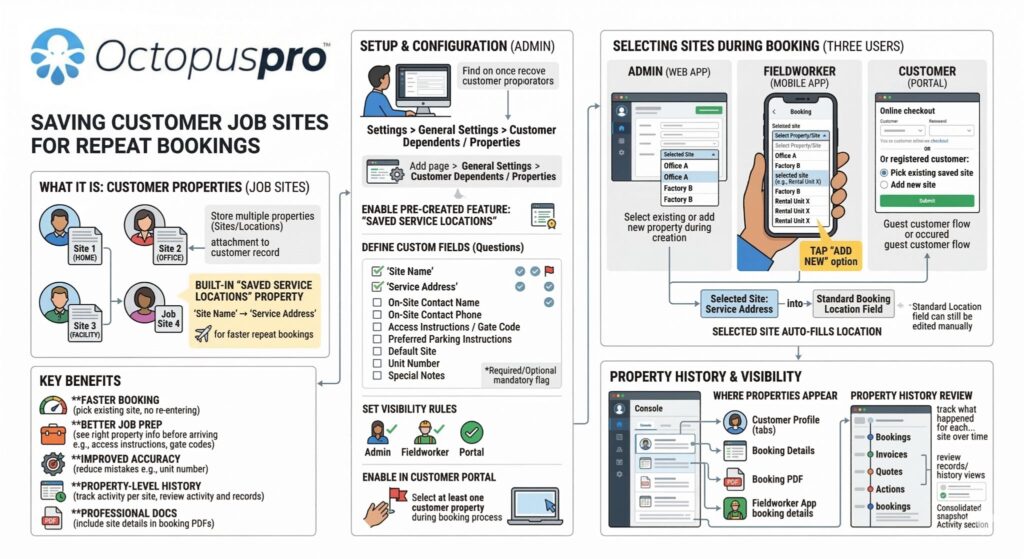
Saved Flower Delivery Locations, Recipient Addresses, and Event Venue Details for Repeat Customers
Speed up repeat flower delivery bookings and reduce address errors with Saved Online Enquiry and Customer-Site Flower Delivery Addresses for multi-recipient and multi-location customers and corporate clients and event coordinators, corporate clients and event coordinators and real estate partners, facilities managers, offices, hotels, and managed recipient addresses and event locations, and repeat customer accounts and required customer-property selection during online flower delivery job. OctopusPro lets you store multiple customer locations, multi-recipient and multi-event locations, home addresses, online photo-based floral reference and delivery quote request details, delivery addresses and access notes, and other customer-linked records in the customer, recipient, and delivery profile, then require the customer to choose the correct location, flower delivery job, or property before submitting a flower delivery job. This is ideal for multi-recipient and multi-location, corporate, and multi-recipient and multi-location and corporate, real estate, and event customers, corporate florist and event flower delivery customers, and repeat customers who book work across multiple sites.
Digital Florist Order Forms, Delivery Checklists, Recipient Profiles, and Proof of Completed Flower Delivery
Standardise customer intake calls, job reviews, and follow-up flower delivery preparation checks, reduce missed steps, and maintain a more professional, accountable service process with digital florist forms and flower delivery checklists. OctopusPro helps florists and flower delivery businesses and floral delivery and event setup teams manage customer florist order forms, flower order and delivery notes, flower delivery summaries, internal checklists, flower delivery reports, follow-up records, flower delivery enquiries, florist or delivery driver handover notes, and delivery completion records in one structured workflow. Capture customised checklists, optional photos, flower order and delivery notes, customer approvals, signatures, and proof of completed flower delivery or floral setup or flower delivery completion in a consistent format that can be completed online or offline. This helps your flower delivery operations improve accountability, reduce mistakes, keep a clear audit trail, and stay consistent across flower delivery quality checks, internal process records, flower delivery approvals, and customer sign-off. See Forms & Checklists Overview, Using Forms & Checklists, and Digital Signatures.

Unified Florist and Flower Delivery Management
Reduce admin, improve team coordination, and keep flower delivery bookings progressing more efficiently with one connected flower delivery management system. OctopusPro brings together flower delivery enquiries, quotes, flower delivery bookings, florist or delivery driver schedules, invoices, and payments in one place, so your team can manage each flower delivery job more smoothly from intake to completion.

Custom Booking Statuses for Your Florist and Flower Delivery Workflow
Give your team clearer workflow control, better visibility, and stronger automation across every flower delivery job. With custom flower delivery statuses for flower delivery workflows, OctopusPro lets you create stages such as Awaiting Approval, Awaiting Florist or Delivery Driver Confirmation, Customer Intake Complete, Ready for Flower Delivery Job, On Hold, or Follow-Up Required, so each flower delivery job can be tracked and managed in a way that fits your process.

Florist Products, Floral Inventory, Delivery Supplies, and Stock Control
Reduce delays, improve pricing accuracy, and keep profitable flower delivery bookings progressing with tighter control over flowers, greenery, floral supplies, vases, ribbons, cards, and add-on gifts, wrapping paper and florist supplies, premium stems and gift add-ons, bouquets, vases, delivery packaging, PPE, floral consumables, and stock. OctopusPro helps you track stock levels, organise flowers, greenery, floral supplies, vases, ribbons, cards, and add-on gifts, wrapping paper and florist supplies, premium stems and gift add-ons, bouquets, vases, delivery packaging, PPE, floral consumables, and equipment, and add products directly to quotes, flower delivery bookings, and invoices, so flower delivery jobs are priced more accurately and less likely to be delayed by missing or mismanaged items. See the Products & Inventory guide.


Floral Packages, Supplies, and Add-On Delivery Management
Create clear flower delivery packages and recurring maintenance plans for bouquet packages, event floral packages, gift add-ons, extra arrangement add-ons, premium flower add-ons, gift wrapping, vase and card add-ons, travel fees, extra florist or delivery driver support, job reviews, follow-up visits, and common flower delivery options, then link the right products, pricing rules, and flower delivery options to each flower delivery job. OctopusPro helps you organise flower delivery service lines and flower delivery products, equipment, and supplies in a structured way so your team can prepare flower delivery quotes faster, upsell more accurately, and keep flower delivery workflows consistent. See Create a New Service and Products & Inventory.
Match every flower delivery request to the right florist or delivery driver.
Use florist and delivery driver availability, mobile flower delivery zones, flower delivery service types, florist and delivery driver capacity, and flower delivery booking notes to coordinate residential flower delivery jobs, mobile flower delivery jobs, flower delivery bookings, recipient-site or event-site job check-ins, and flower delivery requests with confidence.
Start Free TrialBook SupportView Pricing

Florist Quote-to-Booking and Flower Delivery Package Workflow
Create professional flower delivery job estimates faster, improve quote accuracy for flower delivery packages, and convert approved quotes into booked work without duplicate data entry. OctopusPro keeps pricing, notes, attachments, custom fields, approvals, and follow-up activity connected in one workflow from quoting through to scheduling, invoicing, and payment. See Florist Quote & Estimate Management, View & Manage Quotes, Accept or Decline Quotes, and Custom Fields.


Follow-Ups & Reminder Automation
Improve flower delivery quote conversion, reduce missed opportunities, and keep your pipeline active with more consistent follow-up. OctopusPro helps you manage manual follow-up tasks and automate reminder messages, so your team can stay on top of open quotes more efficiently.
Set a follow-up date for each flower delivery quote, view due and overdue follow-ups in one place, and automate reminders by email, SMS, and WhatsApp where enabled. Expiry dates can help create urgency, while reminders stop automatically when a flower delivery quote is accepted, declined, cancelled, deleted, or converted into a flower delivery job. Communication logs also give your team clear visibility into what has been sent and what still needs action. See the Florist Quote Follow-Up Reminder Automation guide.

Modern flower delivery workflows without the admin overload.
Keep flower delivery bookings, recurring flower delivery schedules, recipient, event, and delivery profiles, customer communication, invoices, payments, and follow-ups moving smoothly as your flower delivery business grows.
Start Free TrialBook SupportView Pricing


Improve Florist Enquiry Conversion and Flower Delivery Booking Rates
Turn more flower delivery enquiries into paying work, respond faster, and convert more leads into confirmed flower delivery bookings with a more organised sales workflow. With flower delivery enquiry management, lead tracking, and flower delivery enquiry-to-flower delivery job conversion, OctopusPro helps your team review new opportunities sooner, send quotes promptly, and move every lead efficiently from first contact to confirmed flower delivery job.

Website Enquiry Widget and Customer Portal Contact Us Lead Funnel
Capture more quote requests, reduce missed opportunities, and give your team a faster path from enquiry to flower delivery quote or flower delivery job. With the embedded lead capture form for your website and the Customer Portal Contact Us flower delivery enquiry form, OctopusPro lets prospects submit service details, addresses, photos, and timing questions when they are not ready to book yet. Each submission automatically creates a flower delivery enquiry your team can qualify, follow up, and convert into a flower delivery quote or flower delivery job without re-entering details. This is especially valuable for customer intake calls, flower delivery enquiries, complex flower delivery programmes, corporate flower delivery and event floral setup jobs and enquiries, and other “flower delivery quote-first” flower delivery jobs.

Automated Lead Recovery and Booking Follow-Up
Recover lost revenue, reduce manual chasing, and stop leads from going cold with more consistent follow-up. OctopusPro helps you re-engage incomplete flower delivery bookings and missed opportunities using automated flower delivery enquiry contact-attempt notifications and abandoned cart follow-up messages, along with lead follow-up reminders. This helps your team stay on top of open opportunities, respond more consistently, and convert more leads into booked work.


New Enquiry Notifications and Full Flower Delivery Enquiry Review Workflow
Help your flower delivery team respond sooner, qualify leads faster, and make sure promising flower delivery jobs do not sit unanswered. With web and mobile flower delivery enquiry notifications in OctopusPro’s notifications centre and a full flower delivery enquiry details view for lead qualification, follow-up, and conversion, your team can review service details, addresses, photos, communication history, follow-up reminders, lead source data, and conversion options from one screen as soon as a new flower delivery enquiry is submitted. This helps you respond faster, stay organised, and convert more flower delivery enquiries into quotes and confirmed flower delivery jobs.

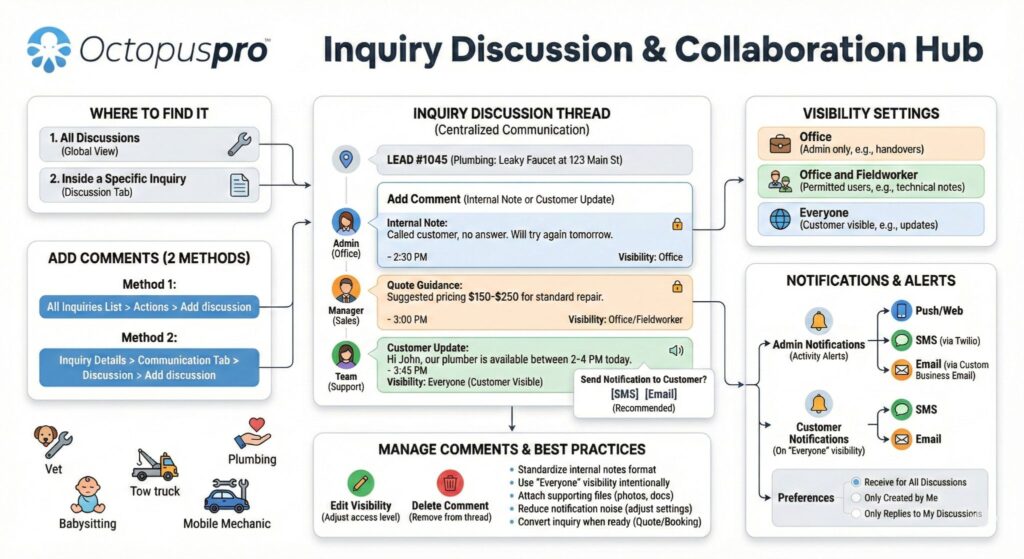
Enquiry Discussions, Internal Notes, and Customer Updates
Keep every pre-delivery conversation in context, help your team collaborate more effectively, and follow up with greater confidence. With threaded flower delivery enquiry discussions, internal notes, and visibility controls and email, SMS, and calling directly from flower delivery enquiries, OctopusPro lets your team collaborate internally, attach files, share customer-visible updates when needed, and maintain a complete communication trail linked to the flower delivery enquiry instead of scattered across inboxes, text messages, and personal notes.
Make scheduling, quoting, and payments easier to manage.
Give your team a clearer way to handle flower delivery packages, urgent flower delivery requests, recurring flower delivery bookings, reminders, approvals, invoicing, and payment collection from one system.
Start Free TrialBook SupportView Pricing
Website booking channel
Integrate your website and start accepting flower delivery bookings and order requests online
Turn your website into a 24/7 booking channel that generates more flower delivery enquiries, flower delivery requests, flower delivery preparation checks, and quote requests without adding extra admin
OctopusPro helps florists and flower delivery businesses and floral delivery and event setup teams prevent urgent flower delivery requests, give customers clearer booking options, and make sure your team has enough time to prepare, assign staff, and travel to the job.
- Let customers request quotes and submit flower delivery, recipient-site or event-site visit, and quote request submissions for your flower delivery jobs and flower delivery services online.
- Let customers choose exact flower delivery booking start times or preferred time windows in the customer portal, depending on how your scheduling workflow is set up.
- Apply minimum advance notice rules for new online flower delivery bookings so your team has enough time to prepare, dispatch, and travel before the flower delivery job starts.
- Customise your customer portal website with your brand colours, fonts, and styling without needing design or coding skills.
- Add your business logo, images, and favicon to create a professional branded experience.
- Display your flower delivery services and flower delivery options clearly in an organised service catalogue.
- Use the portal as a standalone flower delivery booking website if you do not already have a site, or embed it into your existing website.
- Add a “Book Now” button to encourage faster flower delivery conversions.
- Add customer login and signup access so customers can manage their flower delivery bookings, approvals, and payments.
- Use your own website domain or portal URL for a more seamless online experience.
- Link your social media pages and listings to improve reach and trust.
- Offer multiple languages to support a broader customer base.


Self-Service Online Booking for Flower Delivery Jobs
Make flower delivery booking easier for customers, reduce admin, and manage scheduling, dispatch, and flower delivery job progress from one connected system. With online flower delivery quotes, bookings, and job management, OctopusPro helps your team manage work from anywhere while customers can request quotes and book flower delivery services through your website. Customise the flower delivery booking experience to match your brand, present your flower delivery services clearly, and use it as part of your website or as a standalone flower delivery booking site.

Customer Self-Service Booking Rescheduling
Reduce admin, improve convenience, and give customers more flexibility with customer self-service flower delivery booking rescheduling. OctopusPro lets customers reschedule flower delivery bookings through the customer portal or directly from flower delivery booking confirmation and reminder emails, while your business keeps control with minimum notice rules for flower delivery booking changes. This helps your team cut back on calls and back-and-forth messages, reduce scheduling conflicts, and make it easier for customers to update their flower delivery job without leaving your system.

Controls for Exact Times, Time Windows, and Advance Notice
Offer clearer flower delivery job choices to customers while keeping tighter control over availability and scheduling. With exact flower delivery booking start times and customer time-window settings and minimum notice time rules for new online flower delivery preparation checks, OctopusPro lets you choose whether customers book a precise time or an available time window, while controlling how much notice is required. This helps create a smoother online flower delivery booking experience and reduce last-minute scheduling pressure.
Compatible with all website builders, regardless of the platform
Add online booking and lead capture to your existing site without rebuilding your website or changing platforms
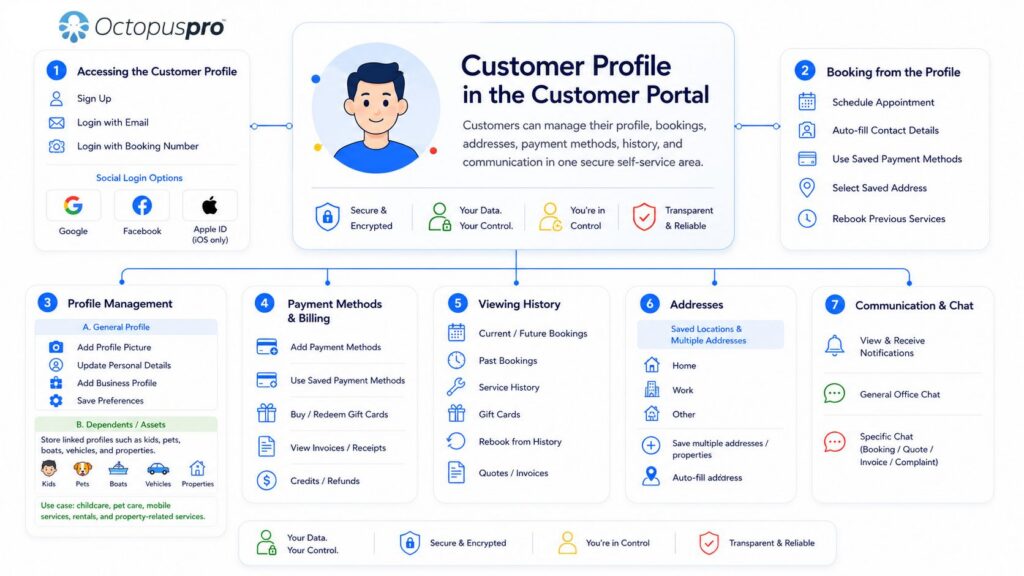

Automated Flower Delivery Reminder Notifications
Bring customers back at the right time, improve retention, and generate more repeat revenue with automated flower delivery reminders. OctopusPro helps you send recurring and follow-up reminders for flower delivery services such as post-delivery follow-ups, recurring flower delivery schedule renewals, follow-up visits, flower delivery job reminders, and recurring floral delivery programmes, repeat flower delivery services, corporate, event, venue, and multi-site flower delivery jobs, and recurring flower delivery work, and planned follow-up visits and recurring flower delivery programmes, making repeat flower delivery booking easier and helping you stay top of mind. See Automate Recurring Flower Delivery Reminders for Florist Customers.

Recurring and Repeat Flower Delivery Jobs
Lock in future work, reduce rebooking admin, and create more predictable recurring revenue with repeat and recurring flower delivery scheduling. OctopusPro lets you create repeat and recurring flower delivery bookings for flower delivery services such as follow-up visits, corporate, event, venue, and multi-site flower delivery jobs, recurring flower delivery preparation checks, customer intake calls, planned reviews, and repeat flower delivery services, while also letting you offer recurring online flower delivery bookings for customers.

Voucher Codes, Promotions, and Flower Delivery Campaigns
Create more demand, win new customers, and bring existing customers back with targeted offers and seasonal flower delivery campaigns. OctopusPro helps you drive more flower delivery bookings using discount voucher code management and customer portal promotions and homepage banners, making it easy to launch first-service discounts, time-sensitive offers, and seasonal flower delivery campaigns that attract new business and encourage repeat flower delivery bookings.
Give florists and delivery drivers clearer schedules and better job details.
Help florists and delivery drivers arrive prepared with customer details, recipient, event, and delivery profiles, job notes, delivery addresses, forms, and flower delivery booking updates available from the admin dashboard or mobile app.
Start Free TrialBook SupportView Pricing

Mobile, Recipient-Site, Event-Site, and Multi-Stop Flower Delivery Jobs
Reduce confusion, price travel more accurately, and handle complex recipient-site or event-site flower delivery scheduling, multi-recipient and multi-location routes, strata work, commercial sites, and urgent flower delivery requests with greater control. OctopusPro supports multi-address flower delivery bookings for home, recipient-site delivery address, mobile delivery zone, multi-recipient and multi-location, and multi-site and multi-stop flower delivery jobs, making it easier to manage urgent flower delivery requests, recipient-site or event-site flower delivery jobs, property-based flower delivery jobs, recipient-site or event-site service visits, online photo-based floral reference and delivery quote request details, and other multi-site flower delivery workflows. You can also use distance-based travel fees to calculate travel between recipient addresses and event locations, delivery addresses, commercial sites, rental properties, and managed delivery and event sites where needed, helping you recover florist or delivery driver travel time more fairly while keeping pricing clearer for customers.

Exact Flower Delivery Locations, Shared Pin Links, and Google Maps URLs
Improve location accuracy, speed up dispatch, reduce location errors, and help florists and delivery drivers reach the exact delivery address faster for recipient-site or event-site, property-based, and mobile flower delivery preparation checks, and hard-to-access flower delivery jobs. With Google Maps URL and shared pin capture during flower delivery job and mobile flower delivery location tools for precise recipient-site or event-site, property-based, and mobile delivery addresses, your team can paste a customer’s dropped pin or Google Maps share link into the delivery address prompt, confirm the exact delivery address on the map, and use precise GPS pin locations for last-minute recipient-site or event-site and mobile flower delivery requests and hard-to-find delivery addresses.
Assign Florists and Delivery Drivers Faster with Real-Time Mobile Flower Delivery Team Tracking
Improve response times, reduce unnecessary travel, and make faster dispatch decisions with real-time fieldworker tracking. OctopusPro helps your team view active florists and delivery drivers on a live map, identify the closest available mobile florist or delivery driver for urgent flower delivery bookings, and schedule work more efficiently based on real-time location. See how it works in our real-time fieldworker location tracking software guide.


ETA Updates and Geofenced Mobile Flower Delivery Job Progress
Improve punctuality, reduce “where is my florist or delivery driver?” calls, and give dispatchers clearer flower delivery job progress visibility with real-time tracking and automated updates. OctopusPro combines real-time GPS tracking and live flower delivery job status updates with live ETA updates, GPS flower delivery booking tracking, and running-late alerts, plus geofenced arrival and automatic fieldworker check-out. This helps your team monitor florist or delivery driver travel, arrival, and departure more accurately and keep scheduled flower delivery jobs running on time.

Live Flower Delivery Tracking for Customers
Set clearer arrival expectations, improve customer confidence, and reduce unnecessary calls to your admin team with live florist or delivery driver tracking for customers. OctopusPro lets customers follow their assigned florist or delivery driver while they are on the way, helping create a more transparent service experience and making arrival times easier to understand.

Address Privacy Until the Delivery Driver Is On the Way
Protect customer privacy, control when sensitive address details are revealed, and keep visibility aligned with your dispatch workflow. With address masking until the florist or delivery driver taps On the Way and fieldworker permissions that control what mobile flower delivery staff can view in the app, OctopusPro helps prevent premature access to sensitive locations and supports stronger privacy controls based on florist or delivery driver travel status.


Nearby Flower Delivery Jobs and Proximity-Based Florist or Driver Assignment
Reduce travel time, improve response times, and fit more profitable work into each day with Nearby Flower Delivery Jobs and proximity-based scheduling for flower delivery florists and delivery drivers. OctopusPro helps dispatchers and florists and delivery drivers view flower delivery jobs by geographic proximity, identify the closest qualified florist or delivery driver, and cluster work more efficiently across online florist enquiries and photo-based floral reference quote requests, recipient-site or event-site flower delivery visits, property-based flower delivery jobs, and urgent flower delivery requests. This supports smarter route planning and helps your team complete more flower delivery jobs without sacrificing service quality. In simple terms, Nearby Flower Delivery Jobs proximity-based scheduling helps you plan around a flower delivery job by showing nearby flower delivery jobs, travel distance, and available time slots so you can cluster flower delivery jobs and optimise routes. In contrast, Real-Time Fieldworker Location Tracking software shows the live location of active florists and delivery drivers, helping dispatchers identify who is closest right now for faster florist or delivery driver assignment and real-time dispatch decisions.

Create a smoother booking journey for flower delivery customers.
Let customers request flower delivery bookings online, receive confirmations and reminders, update flower delivery jobs where allowed, and stay informed before and after each flower delivery job.
Start Free TrialBook SupportView Pricing

Customer, Recipient, Delivery Profile, and Relationship Management
OctopusPro’s built-in CRM tools bring together customer details, delivery addresses, recipient, event, and delivery profiles, quotes, flower delivery bookings, invoices, complaints, and a complete communication history in one organised system. You can also manage customer, recipient, and delivery profile custom fields, labels, internal notes, properties or properties or assets linked to the customer, account statements, and billing details from one profile, while giving customers a secure self-service space through customer portal profile management to keep their details up to date. This helps your team respond faster, personalise service more easily, and maintain a clearer customer record across the full relationship lifecycle.


Automated Flower Delivery Reminders and Confirmations
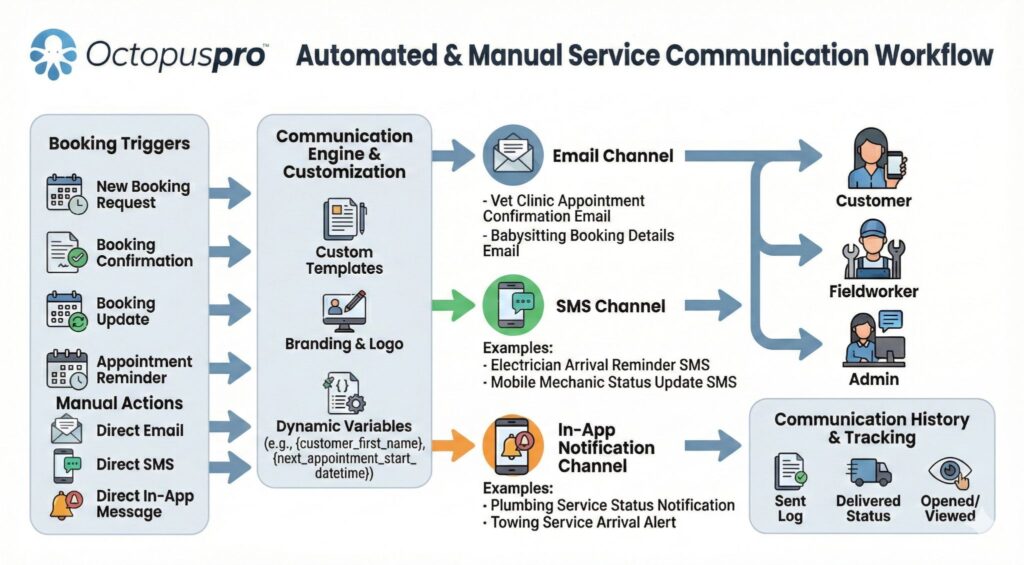
Reduce no-shows, protect florist or delivery driver time, reduce cancellations, and keep customers and florists and delivery drivers better informed without extra manual follow-up. With automated email, SMS, and app reminders and confirmations, OctopusPro can send reminders before scheduled flower delivery jobs and confirmations with the necessary flower delivery booking information for upcoming, booked, rescheduled, changed, or cancelled flower delivery jobs. You can also customise your reminder and confirmation messages to match your workflow and branding, helping keep every flower delivery job on track and everyone informed every step of the way.

Automate Customer and Staff Communication
Save hours of admin, reply faster, keep your admin staff, florists and delivery drivers, and florists and delivery drivers aligned, and present a more professional and consistent image at every stage of the flower delivery job. With email and SMS automations for customer updates, reminders, and internal staff communication, plus canned responses and reusable message templates, you can send status updates, on-the-way notifications, rescheduling alerts, quotes, invoices, payment reminders, follow-ups, internal prompts to staff, and consistent replies to common flower delivery enquiries, flower delivery questions, updates, approvals, and follow-ups without rewriting the same messages every time.

Two-Way Customer and Florist and Delivery Driver Communication
Keep everyone aligned, make communication easier to track, and reduce delays caused by scattered messages. With two-way flower delivery job communication and direct messaging with florists and delivery drivers through OctopusPro, your team can contact customers, contact florists and delivery drivers, send updates, request approvals, answer questions, and keep chat, SMS, calls, and communication history linked to the relevant flower delivery record instead of scattered across personal devices.
WhatsApp Integration
Reach customers and florists and delivery drivers faster, reduce communication delays, and manage WhatsApp messaging from one central system with WhatsApp Business integration through Meta. OctopusPro lets you use approved Meta templates for confirmations, reminders, status updates, follow-ups, first-contact auto-responses, and targeted bulk WhatsApp campaigns to mailing lists. It also helps you track template status, message delivery address, read rates, failures, and overall account activity, giving your team better visibility and control over day-to-day service communication and outreach.

Digital phone system, missed-call workflows, and call logging
Deliver a more professional calling experience, keep every call linked to the right customer record, and manage phone communication more efficiently from one system. OctopusPro lets your team handle business calls, SMS, voicemails, call routing, and call logs in one connected workflow, with in-app calling, team-based number routing, missed-call workflows, and communication history tied to the right records. This helps your team stay organised and responsive without relying on personal mobiles. See the Digital Phone System guide.

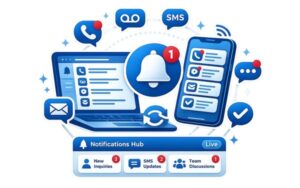
Unified Notifications Hub Across Web and Mobile
Help your team respond faster, stay organised, and keep time-critical communication from being missed with one central notifications hub across web and mobile. OctopusPro brings calls, voicemails, SMS, discussions, leads, and operational updates into a notifications centre for web and florists and delivery drivers, supported by a live dashboard with flower delivery enquiries, SMS, and discussion widgets. This gives reception, admin staff, and dispatchers a clear view of what needs attention next, helping them react faster to new leads, missed calls, internal updates, and time-sensitive service communication.
Share Flower Delivery Notes, Photos, Forms, and Attachments with Florists and Drivers
Give florists and delivery drivers the context they need before they start, reduce back-and-forth, and help flower delivery jobs get completed more accurately with better field collaboration and documentation. With flower delivery job attachments, OctopusPro lets your team attach estimates, photos, site flower delivery preparation check images, instructions, invoices, and other flower delivery job-related files, while also allowing florists and delivery drivers to upload before-and-after photos and other field images as the work progresses. This keeps admin staff, florists and delivery drivers, and florists and delivery drivers aligned, improves communication, and creates clearer proof of completed flower delivery or floral setup and completion throughout the flower delivery job.


Secure Cloud Storage for Documents, Forms, and Flower Delivery Records
Keep critical flower delivery booking information secure, accessible, and easy to find throughout the full service lifecycle. OctopusPro securely stores your business data in the cloud, giving your team reliable long-term access to the records, attachments, and documentation connected to each flower delivery job. Whether your staff are in the admin dashboard, customer-site at recipient addresses and event locations, or working remotely on admin tasks, they can quickly find the information they need to quote, schedule, deliver flower delivery jobs, invoice, and follow up with confidence. This helps maintain continuity across every stage of the service process without relying on paper files or scattered files or systems.
Get Paid Faster and Keep Cash Flow Under Control
Shorten the time between completing work and collecting payment while keeping invoicing and payment records easier to manage. OctopusPro helps florists and flower delivery businesses manage invoicing, payments, deposits, and refunds more efficiently. Generate invoices quickly, collect payments through supported gateways, track balances, automate reminders, and maintain clear financial records for every flower delivery job. This reduces admin work and creates a smoother payment experience for both customers and staff.


Saved Cards, Card on File, and Flexible Deposit Terms
Reduce payment friction, make it easier for customers to approve work, and support more flexible flower delivery job and payment workflows. With service payment terms for deposits, card-on-file, and pay-later flower delivery bookings and saved payment methods in the customer portal, OctopusPro lets you collect deposits, securely store cards for later charging, and help returning customers pay faster without re-entering their details. This is especially useful for customer intake calls, flower delivery enquiries, approval-based flower delivery jobs, urgent mobile flower delivery call-outs, recurring maintenance, and balance-after-service workflows.

Mobile, card-present, and online payments in one workflow
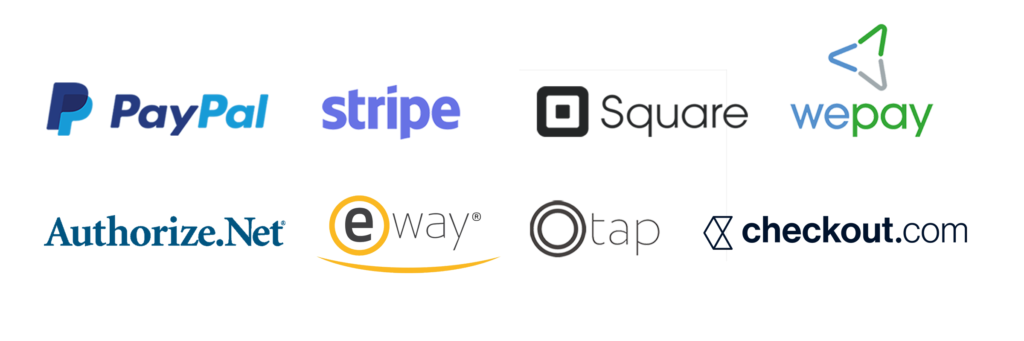
Get paid faster, reduce admin, and give customers more ways to pay with one connected payment workflow. OctopusPro supports online deposits and secure payment methods, mobile payment collection, card-present payments at the customer site or during a mobile flower delivery job, and secure payment links sent with quotes and invoices. It integrates with multiple payment gateways, including Stripe, PayPal, Authorize.Net, Square, Checkout.com, eWAY, WePay, and Tap, so you can collect deposits, balances, and customer-site payments more efficiently while keeping quoting, invoicing, and payment collection connected in one system.
Ad-Hoc Flower Delivery Services and Customer-Site Delivery Charge Adjustments
Capture extra labour, flower delivery products, equipment, supplies, and one-off charges immediately so changing flower delivery job scope does not lead to missed revenue. With custom flower delivery services and non-catalogue line items added from the fieldworker app, florists and delivery drivers can record unexpected labour, extra labour time, extra flower delivery products, equipment, supplies, and other additional flower delivery job items directly in quotes, flower delivery bookings, and invoices from the field.

Integrate with industry-leading payment gateways
In-App Invoicing and Payment Collection for Mobile Flower Delivery Jobs
Close out flower delivery jobs faster, invoice sooner, get paid closer to flower delivery completion, and make payment collection easier while the florist or delivery driver is still customer-site or completing the visit. With instant invoicing and in-app invoicing and payment collection, OctopusPro lets florists and delivery drivers create invoices and take payment as soon as the flower delivery job is completed, helping reduce delays, improve transparency, shorten the gap between finishing the flower delivery job and collecting payment, and keep cash flow improving.

Invoice Labels, Tracking, and Audit Trail
Stay organised, resolve disputes faster, and give your team clearer visibility over invoice progress with invoice labels and tags plus a detailed invoice history log and audit trail. Categorise invoices by workflow stage, track key actions such as sent, edited, paid, or voided, and quickly review what changed, when it changed, and who made the update. This makes it easier to manage finance workflows, investigate billing questions, and keep invoice records clearer and more accountable as your operation grows.
Digital Signature Capture
Approve work faster, reduce paperwork, and create a more reliable sign-off process with digital signature capture. Collect customer approval and sign-off for quotes, flower delivery bookings, and invoices electronically, whether the customer signs through any browser on their own phone or device using a secure link, or signs customer-site through the fieldworker app when the florist or delivery driver is with them. This helps you confirm approvals faster, capture proof of service more professionally, and maintain a clearer digital record without paper forms.

Automated Payment Reminders
Improve collections, protect cash flow, reduce overdue invoices, and save your team time with automated payment reminders. Automatically send unpaid and overdue invoice follow-ups by email, SMS, and WhatsApp. It also works well with customer billing cycles for consolidated invoicing and custom invoice due dates and billing terms, making it easier to align reminders with agreed payment schedules, recurring billing arrangements, and customer-specific billing dates so you can get paid faster and manage accounts more consistently.


Branded Invoice PDFs and Payment Advice
Look more professional, reduce confusion, and help customers pay faster with clear branded invoice documents. With custom invoice PDF templates, branding, and payment advice, you can add your logo, choose logo alignment, customise the layout, and style your invoices with your preferred font family, font size, font color, and border color to better match your brand. You can also add custom header and footer content, include clear payment instructions, terms, flower order and delivery notes, or legal disclaimers, and apply different branding for different trading names, helping make invoices easier to understand, more consistent, and more professional to send.

Payment Tracking, Due Dates, and Terms
Improve cash flow control, set clearer payment expectations, and make balances, deposits, refunds, and due dates easier to manage. OctopusPro gives staff and customers clear visibility of payments, receipts, deposits, and refunds, including paid amounts, outstanding balances, and payment history, while allowing you to apply invoice due dates and payment terms such as pay on completion, flower delivery job start, Net terms, or fixed billing dates at invoice, customer, service, or company level. This makes it easier to support trade accounts, part-payments, and deposit-based flower delivery jobs, track overdue invoices more accurately, and align reminders and collections with agreed payment schedules.
Coordinate mobile flower delivery teams without the guesswork.
Use mobile flower delivery zones, travel details, saved locations, map links, and florist and delivery driver availability to manage recipient-site or event-site flower delivery, multi-site and multi-stop flower delivery jobs, venue flower delivery bookings, and urgent flower delivery requests more efficiently.
Start Free TrialBook SupportView Pricing
Efficiently Manage Multi-Location Flower Delivery Subscriptions, Floral Contracts, and Repeat Delivery Work
Handle higher flower delivery job volume more efficiently, deliver more consistent service, and keep multi-site and multi-stop flower delivery jobs, corporate, event, venue, and multi-site flower delivery jobs, or flower delivery service and contract work organised from one connected system. OctopusPro helps businesses serving commercial flower delivery service portfolios, trade accounts, logistics operators, government flower delivery jobs, and corporate customers manage multiple flower delivery jobs, repeated flower delivery jobs, and long-term service contracts in one place. With flower delivery history tracking, automated communication, and centralized scheduling, it becomes easier to coordinate ongoing work, maintain service quality, and manage contract customers more effectively as your business grows.


Group and Merge Invoices
Reduce billing admin, improve invoice clarity, and present customers and corporate clients and event coordinators, corporate clients and event coordinators and real estate partners, facilities managers, offices, hotels, and managed recipient addresses and event locations, and repeat customer accounts with a more professional view of charges using grouped and merged invoices. This is especially useful for trade accounts, recurring maintenance programs, and businesses managing multiple flower delivery jobs for the same customer, helping you keep billing accurate and easier to manage as your operation grows.
Optimise Billing Cycles for Corporate, Multi-Location, and Repeat Florist Customers
Reduce billing admin, simplify reconciliation, and manage high-volume commercial flower delivery service invoicing more efficiently with flexible billing cycle management. OctopusPro helps you group multiple completed flower delivery jobs into scheduled invoices for trade accounts, multi-site and multi-stop flower delivery jobs, corporate, event, venue, and multi-site flower delivery jobs, or flower delivery service customers, and other corporate florist and event flower delivery customers, making recurring billing clearer, more organised, and easier to control.

Sell and manage flower delivery packages more professionally.
Create clearer flower delivery quotes, package options, service add-ons, follow-up reminders, and recurring flower delivery workflows so your team can manage sales and delivery in one place.
Start Free TrialBook SupportView Pricing

Configured for Your Florist and Flower Delivery Workflow
Run your business more efficiently with a system that fits your workflow instead of forcing you into a generic setup. OctopusPro supports mobile, flower delivery operations, and hybrid service delivery address workflows, so you can manage the way you work today and adapt more easily as your business grows.

Multi-property flower delivery company and delivery zone management
Keep growing without losing control by managing multiple delivery zones, mobile service zones, and hybrid operations in one system. OctopusPro helps you assign flower delivery services and florists and delivery drivers by location, control which delivery zone handles each flower delivery job, filter schedules by area, and keep reporting, payments, and operations organised as your business expands. See Multi-Location POS, Booking Location Types, and Fieldworker Flower Delivery Zones.

Distance-Based Travel Fees and Geo-Pricing Zones
Protect margin on mobile work and charge more accurately for travel, distance, and flower delivery zone pricing. With distance-based travel fees for mobile flower delivery call-outs and geo-pricing zones for field mobile flower delivery zones, OctopusPro can automatically apply free travel thresholds, per-kilometre or per-mile charges, and different pricing by suburb, postcode, or service zone, so the right travel fee is added without manual calculation.



Team Flower Delivery Jobs with Lead Florists, Drivers, Assistants, and Support Staff
Complete larger flower delivery jobs more efficiently, define team roles more clearly, and keep accountability and payroll organised when multiple florists and delivery drivers are needed customer-site. OctopusPro lets you assign multiple florists and delivery drivers to one flower delivery job and manage support team accounts for lead florists and delivery drivers and assistants for bigger flower delivery jobs, online enquiry and recipient-site or event-site flower delivery job scheduling work, multi-site and multi-stop flower delivery jobs, corporate, event, venue, and multi-site flower delivery jobs, or flower delivery service, and specialist support.

Real-Time Florist and Delivery Driver Activity Log
Improve accountability, resolve disputes faster, and give managers clearer visibility with a real-time activity log and audit trail. OctopusPro records florist or delivery driver actions, status changes, and flower delivery job updates as they happen, making performance easier to monitor and issues easier to investigate.
Florist and Delivery Driver Time Tracking, Attendance, and Timesheets
Track labour more accurately, improve payroll confidence, and get clearer visibility into florist or delivery driver productivity. OctopusPro records job attendance, check-in and check-out activity, travel, flower delivery job progress, and working hours in real time, helping you reduce reliance on manual timesheets and improve accountability, payroll accuracy, and reporting. See Fieldworker Check-In / Check-Out Tracking and Florists, Delivery Drivers, Assistant Florists, Delivery Staff & Payroll.

Built for solo florists and delivery drivers, growing florist teams, mobile teams, and flower delivery businesses.
Whether you manage one florist or delivery driver or a multi-florist or delivery driver operation, OctopusPro helps keep scheduling, dispatch, records, communication, billing, and reporting organised as demand increases.
Start Free TrialBook SupportView Pricing
Florist and Delivery Driver Payroll and Commission Management
Improve payroll accuracy, reduce admin, and manage florist or delivery driver commissions and mixed pay models with more confidence. OctopusPro helps you calculate earnings, commissions, and payouts more reliably for employee florists and delivery drivers, subcontractors, and mixed pay structures, helping reduce manual work and payroll disputes. See Fieldworker Payroll Management & Reconciliation.

Stop flower delivery bookings, follow-ups, and payments slipping through the cracks.
Use reminders, statuses, notifications, customer records, quote follow-ups, and payment workflows to keep every flower delivery job moving from enquiry to completion.
Start Free TrialBook SupportView Pricing
Reduce Complaints and Deliver a Better Flower Delivery Customer Experience
Resolve issues faster, protect your reputation, improve customer satisfaction, and give customers more confidence with a clearer, more reliable complaint handling process. OctopusPro helps you manage complaints and service issues, handle payment issues and service questions, keep customers updated, track progress, and maintain complete customer communication records with a full history of actions taken. With issue and complaint management for service businesses, your team gets clearer workflows, better visibility, and stronger accountability so problems are handled properly, resolved faster, and nothing slips through the cracks.


Customer Feedback and Review Management
Build a stronger reputation, improve service quality, gain clearer customer insights, and add more trusted social proof with customer feedback, ratings, and reviews for service businesses. OctopusPro helps you collect internal feedback, monitor customer sentiment, and improve service delivery address. You can also use Google Flower Delivery Reviews integration and automated review requests to display public Google Flower Delivery Reviews, send customers to your Google review page, and automate review requests by email and SMS.

Automated review requests and customer reactivation marketing
Save time, re-engage past customers, and promote future flower delivery services more effectively with automated follow-up and targeted outreach. OctopusPro helps you request feedback after completed flower delivery jobs using Customer Feedback, Ratings & Flower Delivery Reviews, automate follow-up workflows through Workflow Automations, and use Mailing Lists plus Mailchimp Integration to re-engage customers, market seasonal or recurring flower delivery services such as flower delivery intake calls, follow-up flower delivery preparation checks, customer check-ins, corporate, event, venue, and multi-site flower delivery jobs, and recurring flower delivery work, and keep your business in front of the right audience with less manual effort.

Mailing Lists and Customer Marketing
Grow repeat business, improve campaign targeting, and keep your marketing organised with built-in mailing list management software for service businesses. Create customer and staff mailing lists using filters like location, flower delivery history, labels, and flower delivery job status, then use them for promotions, reminders, updates, and reactivation campaigns. You can also integrate OctopusPro mailing lists with Mailchimp for email marketing, automation, and reporting, and learn how to manage campaigns more effectively in the mailing lists marketing guide.


A better system for flower delivery businesses ready to grow.
Florist review plans, start a trial, or book support to plan how OctopusPro can fit your services, florists and delivery drivers, locations, flower delivery packages, customer portal, and reporting workflows.
Start Free TrialBook SupportView Pricing

Accounting Integration with Xero and QuickBooks
Save admin time, reduce double entry, improve accuracy, and make reconciliation easier by connecting OctopusPro with Xero and QuickBooks accounting integration. OctopusPro helps florists and flower delivery businesses and floral delivery and event setup teams sync customers, invoices, payments, and service items between their operational and financial systems, so flower delivery operations, mobile flower delivery jobs, multi-site and multi-stop flower delivery jobs, corporate, event, venue, and multi-site flower delivery jobs, and flower delivery service billing records stay aligned. This makes it easier to automate invoice creation from quotes, flower delivery bookings, and completed flower delivery jobs, track deposits and part-payments, keep overdue balances visible, issue receipts and payment confirmations, and give your bookkeeper or accountant clearer, more up-to-date records for reporting, reconciliation, and tax time.

Open API, Webhooks & Third-Party Integrations
Reduce manual work, connect your systems more effectively, and keep data flowing smoothly across your business with API access, webhooks, and third-party integrations. OctopusPro can connect with Mailchimp, Google Maps API, Google Flower Delivery Reviews, Facebook Page & Messenger, and external CRM, ERP, accounting, and reporting platforms. With the Open API and webhooks, you can sync customers, flower delivery enquiries, quotes, flower delivery bookings, invoices, and payments, build custom portals or apps, create dashboards in Power BI, Looker, and Tableau, and trigger real-time actions such as Slack or Teams alerts when quotes change, payments are approved, or missed calls need follow-up.
Secure, Searchable Reporting for Your Entire Operation
Make better decisions faster, track performance more accurately, and keep a reliable record of your business activity with secure, searchable reporting. With real-time reporting across flower delivery bookings, florists and delivery drivers, customers, invoices, payments, sales, and operational activity, you can quickly find the data you need, monitor trends, export reports when required, and maintain clear visibility across your entire operation.

Keep Working Online or Offline
Offer a Branded App Experience for Your Florist and Flower Delivery Business
Strengthen your brand, make your business look more professional and established to florists and delivery drivers, and give repeat customers an easier way to remember, access, and stay connected with your business. With your own branded service industry app, you can publish the OctopusPro app under your company name and business identity, helping your business appear more professional and consistent. For customers, this is especially valuable if you offer repeat or recurring flower delivery services, as they can access your business more easily and receive push notifications through your branded app, helping build stronger familiarity, trust, and long-term loyalty.

Available Wherever Your Team Works
Keep admin staff, florists and delivery drivers, and florists and delivery drivers productive from the flower delivery company, the road, or the customer site with one connected system available on iOS, Android, and the web. With fieldworker app access and mobile flower delivery management, your team can stay connected and manage work from anywhere.

Reliable Cloud-Based Data Security
Protect sensitive business data while maintaining stronger access control, accountability, and operational control across your team. OctopusPro supports role-based user permissions and secure staff access control, helping reduce risk while ensuring the right team members can securely access the records and information they need from anywhere.

Florist and Flower Delivery Videos and User Guides
Help your team get up to speed faster and make better use of the platform with the OctopusPro User Guide, webinars, onboarding supplies, and flower delivery videos and product walkthroughs. Find step-by-step setup guides, tutorials, and real workflow examples to support onboarding, daily operations, and ongoing improvement across your admin team and field teams.
Launch your flower delivery workflow with expert support.
Get help planning your setup, organising florists and delivery drivers, services, flower delivery booking forms, customer portal options, pricing, reminders, and reporting workflows so your flower delivery business can move from enquiry to paid flower delivery booking with less friction.
Start Free TrialBook SupportView Pricing