
Automotive & Roadside Service Management Software
Software for repair workshops, mobile mechanics, roadside teams, towing operators, tyre services and specialist vehicle-care businesses. Manage enquiries, quotes, bookings, dispatch, vehicle records, digital job cards, payments and reporting from one connected platform.
Whether you manage a repair workshop, mobile mechanic team, roadside assistance operation, towing fleet, tyre service, detailing business or another specialist vehicle-care company, OctopusPro gives every role a clearer way to manage the complete service lifecycle.
Choose software built around your automotive or roadside service model.
Explore the OctopusPro solution that best matches your repair, mobile, roadside, towing, tyre, fleet, detailing or specialist vehicle-care operation. Each dedicated page focuses on the booking, dispatch, vehicle, job and billing workflows that matter for that industry.
Core operating layer every automotive and roadside business needs
Mechanic Workshop Management Software for Auto Repair Shops and Mobile Mechanics
Repair bookings, estimates, technician schedules, digital job cards, service history, parts, invoices and repeat maintenance.
For repair shops, garages, mobile mechanics and hybrid automotive repair teams.
- Customer and vehicle records
- Diagnostic intake questions
- Quote and approval workflow
- Technician scheduling and dispatch
- Digital job cards and inspection notes
- Parts, labour and mobile payment billing
- Service reminders and repeat maintenance
- Workshop, mobile and hybrid service locations
Car Wash and Auto Detailing Booking Software
Book detailing packages, manage add-ons, recurring washes, customer vehicles, photos, deposits and mobile or fixed-location jobs.
For mobile detailers, fixed wash sites, ceramic coating providers and detailing crews.
- Service packages, bundles and add-ons
- Vehicle size and condition pricing
- Mobile, fixed-site and customer-location bookings
- Before-and-after photo proof
- Recurring wash and maintenance schedules
- Deposits, online payments and tips
- Review requests and customer follow-up
- Crew assignment and service checklists
Roadside Assistance Dispatch and Job Management Software
Capture urgent breakdown requests, exact map pins, service areas, availability, live technician updates, mobile payments and job outcomes.
For mobile roadside teams handling flat batteries, lockouts, jump starts and urgent call-outs.
- Emergency job intake
- Shared pin and exact GPS capture
- Nearest technician dispatch
- On-the-way and arrived status updates
- Mobile app job notes
- Customer SMS and email updates
- Mobile payment collection
- Service area and availability control
Tow Truck Dispatch and Towing Management Software
Handle urgent requests, pickup/drop-off locations, driver dispatch, GPS updates, proof of service, billing and fleet/client accounts.
For towing operators, recovery businesses, depot teams and account-based roadside fleets.
- Urgent request intake
- Pickup and drop-off location capture
- Driver and tow truck dispatch
- GPS tracking and ETA visibility
- Proof of service and photos
- Customer notifications and status updates
- Callout, after-hours and no-show fees
- Fleet, insurer and account billing
Mobile Tyre Replacement Booking and Dispatch Software
Capture tyre size, vehicle details, service location, van dispatch, product stock, mobile payments and completion proof.
For mobile tyre fitting, emergency tyre replacement, wheel services and roadside tyre teams.
- Tyre size and vehicle details
- Product and stock availability
- Mobile van dispatch
- Service area and availability rules
- Urgent location pins for roadside jobs
- Technician status updates
- Mobile payment collection
- Completion proof and job history
Scratch and Bumper Repair Scheduling Software
Collect damage photos, quote repairs, manage approvals, assign mobile technicians, record materials and invoice completed work.
For mobile paint repair, bumper repair, smart repair and cosmetic vehicle repair providers.
- Photo-based repair requests
- Damage type and severity fields
- Quote approval workflow
- Technician skill matching
- Repair checklist and notes
- Before-and-after photos
- Parts, materials and labour billing
- Follow-up and review requests
Truck Wash and Fleet Cleaning Management Software
Manage fleets, route runs, vehicle counts, recurring schedules, crew assignments, photos, account billing and service reporting.
For fleet washing, heavy vehicle cleaning, depot services and recurring commercial accounts.
- Fleet client and site records
- Multiple vehicle profiles per account
- Recurring route and depot schedules
- Crew dispatch and completion tracking
- Site access notes and safety instructions
- Photo completion proof
- Consolidated and billing-cycle invoicing
- Fleet performance and revenue reporting
RV Wash and Detailing Scheduling Software
Book by RV size, location and package, manage mobile crews, add-ons, recurring service, photos, deposits and customer reminders.
For RV, caravan, motorhome and camper detailing at customer locations, parks or depots.
- RV size and condition capture
- Location and access notes
- Interior and exterior package pricing
- Add-ons and consumables
- Mobile crew scheduling
- Photo proof and checklists
- Repeat service reminders
- Deposits and online payments
Motorcycle Detailing Booking and Job Management Software
Capture bike details, package options, paint/finish notes, before-and-after photos, mobile locations and product usage.
For motorcycle detailing, bike cleaning, polishing, restoration and mobile motorbike care.
- Motorcycle profile records
- Paint, chrome and finish condition notes
- Detailing checklist templates
- Package and add-on pricing
- Product and consumable tracking
- Photo proof and quality control
- Customer reminders and rebooking
- Mobile service location capture
Mobile Boat and Yacht Detailing Management Software
Track vessel details, marina/berth locations, service packages, access notes, photos, recurring cleans and invoice billing.
For boat washing, yacht detailing, marina services and mobile marine cleaning teams.
- Boat and vessel records
- Marina, berth and access details
- Package and vessel-size pricing
- Recurring maintenance schedules
- Crew and equipment assignment
- Photos and quality checks
- Deposits, invoices and payments
- Customer reminders and rebooking
From enquiry or urgent service request to completion, payment and repeat work
OctopusPro connects customer-facing, workshop, mobile, roadside, dispatch and accounts workflows that are often split across paper job cards, spreadsheets, calendars, messaging apps and disconnected payment tools.
Capture enquiry details
Collect customer, vehicle, fault, location, preferred time, photos and quote-request details from phone, admin, website or portal enquiries.
Create estimates and approvals
Build structured quotes, include labour, parts, add-ons and terms, send to customers and convert approved work into bookings.
Schedule technicians
Assign workshop staff, mobile mechanics, detailers, tow drivers or roadside technicians by availability, service area, skill and location.
Complete digital job cards
Technicians update job progress, add notes, upload photos, complete forms/checklists, record products used and collect signatures.
Invoice and take payment
Generate invoices, record deposits, take card or other payments, manage refunds and keep billing connected to each job.
Retain customers
Send service reminders, rebooking prompts, review requests and repeat maintenance communications to keep customers coming back.
Everything automotive and roadside businesses need to manage work professionally
The main capabilities are grouped into a clearer feature system so visitors can understand how OctopusPro connects enquiries, urgent requests, estimates, bookings, dispatch, vehicles, technicians, payments and repeat service.
Customer and vehicle CRM
Store customers, fleet clients, communication history, service history and reusable vehicle/asset records including make, model, registration, VIN and notes.
Quotes, estimates and approvals
Create repair estimates, send quotes, follow up approvals, convert approved work into bookings and keep the full estimate history attached to the job.
Booking and workshop scheduling
Manage appointments, repair bays, mobile service jobs, repeat bookings, technician availability, booking statuses and customer confirmations.
Dispatch, GPS and exact service locations
Assign technicians by availability, service area and location, capture exact map pins, manage multi-address jobs and support mobile service navigation.
Digital job cards, forms and photos
Replace paper job cards with digital forms, checklists, inspection notes, before-and-after photos, completion evidence and signatures.
Parts, products, tyres and add-ons
Track products, parts, tyres, fluids, consumables, coatings, accessories, packages and add-ons used during quotes, jobs and invoices.
Invoices, deposits and payments
Create invoices, collect deposits, record payments, process refunds, support customer billing cycles and keep job financials connected.
Customer portal and self-service
Let customers request quotes, book, approve, pay, upload files, view bookings, manage profile details and repeat previous services online.
Reminders and communication
Send confirmations, reminders, job updates, follow-ups, service reminders and communication history across bookings, quotes and customer accounts.
Reports, permissions and integrations
Monitor bookings, estimates, payments, technicians, lead sources, service performance, permissions, integrations and operational activity.
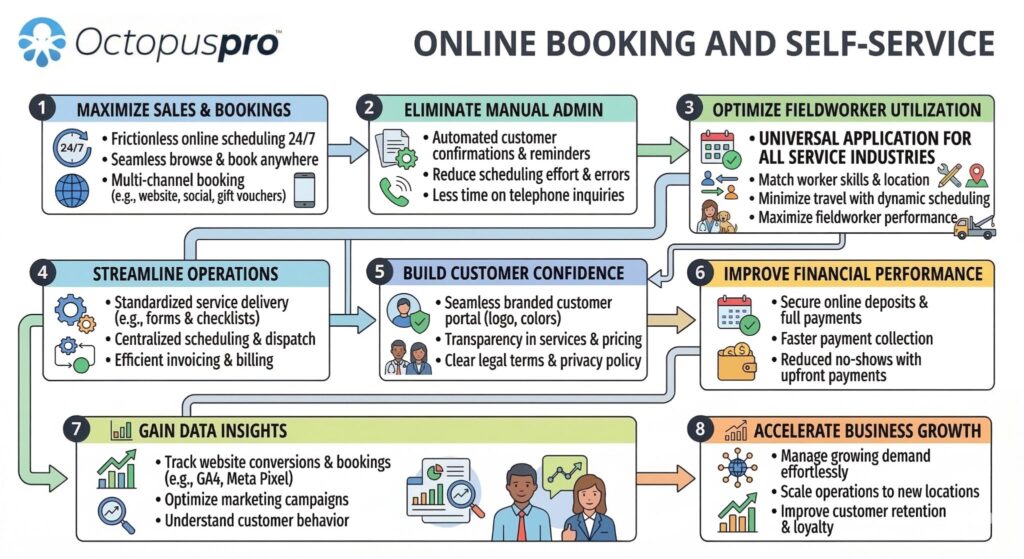
Customer self-service, quote requests, booking requests, payments and repeat bookings in one branded workflow.
Support fixed-location jobs, mobile service calls and fleet work from the same system
OctopusPro can support booking-location types for customers who come to your workshop, mobile technicians who go to the customer, remote/admin tasks, or hybrid operations that use all three.
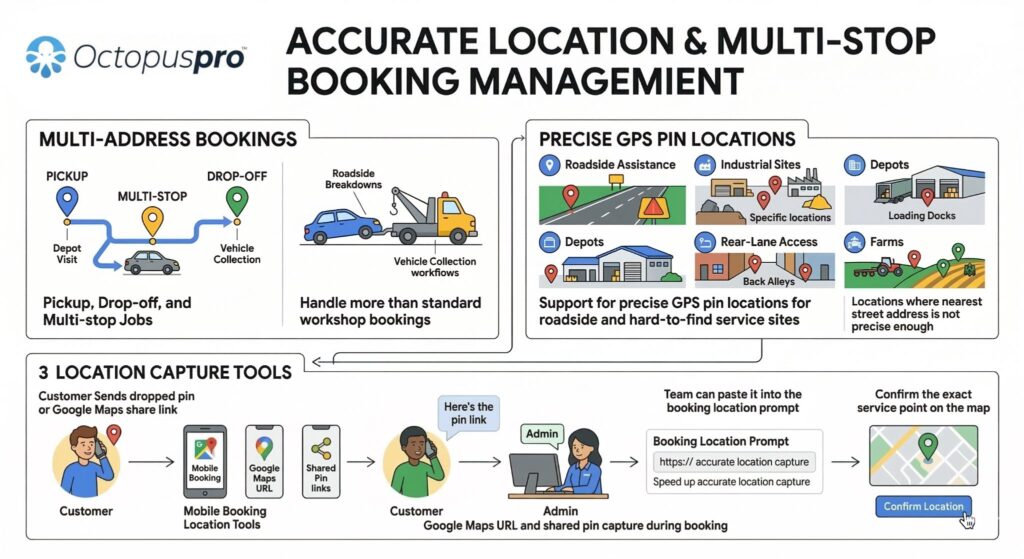
Use exact service locations, shared map pins and multi-address workflows to improve dispatch accuracy.
Move from scattered admin to a connected automotive and roadside operating system
The biggest improvement is not simply online booking. It is keeping every customer, vehicle, service request, technician, dispatcher, product, approval, invoice and payment connected.
| Area | Manual process | OctopusPro workflow |
|---|---|---|
| Enquiries and quote requests | Scattered notes, missed follow-ups and inconsistent intake questions. | Structured lead capture, quote requests, custom fields, attachments and estimate follow-up. |
| Scheduling and dispatch | Manual calendar checks and unclear technician availability. | Availability-aware booking, job assignment, service areas, GPS tracking and mobile app updates. |
| Job documentation | Paper job cards, missing photos and inconsistent completion notes. | Digital forms, checklists, signatures, photos, job activity and connected service history. |
| Billing and reporting | Invoices, payments, parts and job performance tracked separately. | Invoices, deposits, payments, refunds, products, customer statements and live reports connected to each job. |
Give managers, service advisors and customers clearer job progress
Technicians can work from the fieldworker app, update job statuses, navigate to service locations, add notes, upload photos and keep the office informed without constant phone calls.
For the front desk
See job status, technician allocation, customer communication, quote approvals and payments in one place.
For technicians
Access job details, service locations, customer notes, checklists, product usage and completion steps from the mobile app.
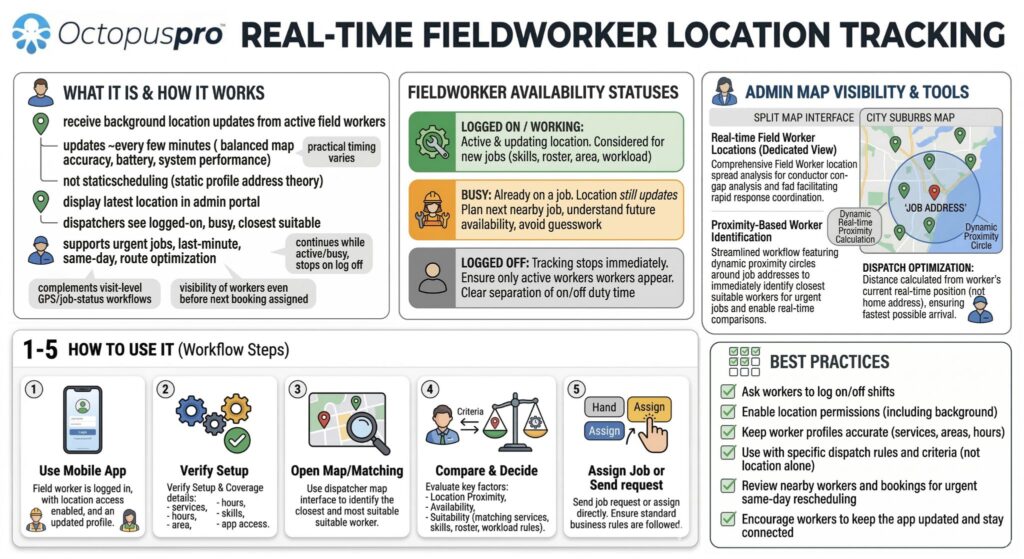
Track job progress and field activity without wasting time on manual status calls.
Automotive & Roadside Service Management Software FAQs
Quick answers for garages, mobile mechanics, detailing teams, towing operators, roadside assistance providers, tyre services and fleet maintenance teams.
Can OctopusPro manage repair workshops, garages and mobile mechanics?
Yes. Repair businesses can manage enquiries, diagnostic details, estimates, approvals, workshop or mobile bookings, technician schedules, digital job cards, vehicle history, parts, invoices, payments and service reminders from one platform.
How does OctopusPro support roadside assistance teams?
Roadside teams can capture urgent requests, exact breakdown locations and service requirements, then assign eligible technicians by availability, service area and skills. Fieldworkers can receive job details, update progress, record outcomes and take payments from the road.
Can towing and vehicle-recovery operators manage pickup and drop-off jobs?
Yes. Towing operators can record pickup and destination addresses, vehicle and access details, assign drivers, track job statuses, upload proof of service, manage account customers and connect completed jobs with invoicing and payment workflows.
Does OctopusPro work for mobile tyre fitting and replacement services?
Yes. Tyre businesses can collect vehicle and tyre details, manage service locations, technician or van availability, tyre products and stock, quotes, bookings, mobile payments, completion photos and future replacement reminders.
Can car wash and auto detailing businesses manage packages and add-ons?
Yes. Detailers can configure wash and detailing packages, optional add-ons, vehicle-size pricing, deposits, recurring services, mobile or fixed-location appointments, before-and-after photos, customer updates and payments.
Can scratch, bumper and mobile paint-repair teams quote from customer photos?
Yes. Customers can submit damage photos, vehicle details and repair requirements through enquiry and portal forms. Staff can prepare quotes, obtain approval, schedule technicians, record materials and photos, and invoice the completed repair.
How can truck-wash and fleet-cleaning businesses manage recurring work?
Fleet-cleaning teams can store fleet and vehicle records, schedule recurring route-based services, assign crews, record vehicle counts and service proof, consolidate account billing and report on completed work across customer sites.
Can OctopusPro manage RV and caravan wash or detailing services?
Yes. RV and caravan businesses can price services by vehicle type or size, collect access and location details, schedule mobile crews, manage packages and add-ons, upload service photos, take deposits and automate repeat-care reminders.
Does the platform support motorcycle detailing businesses?
Yes. Motorcycle detailers can capture bike details, finishes and condition notes, offer service packages and coatings, schedule studio or mobile jobs, record products used, upload before-and-after photos and collect payment.
Can boat and yacht detailing teams manage marina and berth locations?
Yes. Marine-detailing businesses can store vessel details, marina or berth locations, access instructions, service packages and recurring schedules, then assign mobile teams, document work with photos and manage customer or account billing.
Ready to run your automotive or roadside business from one connected system?
Start with your most common services, intake questions, vehicle records, service areas, team schedules and payment workflow, then expand OctopusPro across workshops, mobile teams, roadside operations, fleet accounts and repeat service.