
Field Service Documentation & Job History Software
Replace paper job sheets with searchable digital job records. Keep work order history, customer and asset service history, jobsite photos, field service reports, technician activity, forms, signatures, invoices, payments and a complete audit trail together—so your team can prove work, resolve disputes and prepare for every return visit.
 Click to enlarge
Replace paper job sheets, scattered messages and disconnected folders
Use OctopusPro as digital job sheet software, a searchable work order archive and a connected field service documentation system. Preserve the operational context, evidence, decisions and financial activity your team may need for delivery, job completion reports, invoicing, warranty work, compliance, disputes or repeat service.
Search job records instantly
Find the correct digital work order by reference and review the customer, site, services, schedule, assignees, technician notes, files and current job status in one place.
Standardise digital job sheets
Use electronic job sheets, structured forms, checklists, custom fields, jobsite photos and digital signatures instead of relying on paper, memory or inconsistent free-text updates.
Protect the business with proof
Use proof of work, proof of service, time-stamped photo documentation, customer sign-off, communication logs and audit-ready records to answer questions and reduce disputes.
Build customer & asset history
Keep customer service history, asset service history and equipment maintenance history connected to the correct property, vehicle, pet, dependent, room, site or serviceable item.
Keep every operational detail attached to the work it belongs to
OctopusPro connects the electronic job sheet, digital work order, field service report and job history created before, during and after service, helping office teams and fieldworkers work from the same searchable record.
Digital job sheets & work order details
Store the job reference, work order status, creation date, service lines, scheduled visits, assigned technicians, service address, pricing and operational notes in a paperless job record.
Customer, site & asset service history
Link every work order to the correct customer, property, vehicle, pet, child, equipment item, room or site so customer history, equipment history and repeat-service context stay together.
Technician notes, custom fields & instructions
Capture technician notes, site access, measurements, model and serial numbers, risks, materials, work performed, scope details and other service-specific information.
Jobsite photo documentation & attachments
Keep before-and-after photos, progress images, damage evidence, plans, permits, receipts, specifications and supporting files in a searchable jobsite documentation record.
Digital service forms, checklists & signatures
Collect inspections, risk assessments, safety steps, QA checks, work completion details, customer acknowledgements and digital sign-off at the right job stage.
Communication logs & technician activity
Keep job-specific discussions, email, SMS, calls and fieldworker activity easier to review instead of losing the technician activity log across separate channels.
Service reports, invoices, payments & refunds
Connect the field service report, work summary, invoice actions, payment records, deposits, balances and refunds so operations and finance share the same job-completion context.
Job audit trail, status history & issue records
Track service issues and review a chronological job audit trail containing status changes, edits, reschedules, assignments, activity history and financial milestones.
See what was booked, who handled it and what happened next
Use the Booking Details page as a searchable job record, digital work order and service-report workspace. Review the schedule, assigned technicians, customer and site, pricing, attachments, forms, communication, work performed, financial activity, issues and work order history together.
Scope and schedule
Keep the booked services, appointment times, location and operational instructions visible together.
People and progress
Review assigned fieldworkers, status milestones, attendance and job progress without chasing separate updates.
Evidence and forms
Access notes, labels, custom fields, photos, files, checklists, forms and customer context from the same record.
Financial follow-through
Move from completion to invoicing, payment, refunds and follow-up without rebuilding the job elsewhere.
Follow work from creation through completion, payment and repeat service
Real-time job status updates, technician activity, work performed logs, photos, forms and financial events add to the same work order history instead of creating disconnected paperwork and messages.
Job created
Record the customer, service, location, source, scope, pricing and initial instructions.
Scheduled & assigned
Add appointment times, fieldworkers, confirmations, job requests and assignment outcomes.
Prepared
Share notes, documents, site photos, access details, forms and customer-provided information.
Delivered & documented
Capture On My Way, Arrived, Started and Finished statuses, check-in/out, work performed logs, jobsite photos, forms and signatures.
Billed & paid
Keep invoice creation, payment activity, balances and refunds connected to the work.
Reported & repeated
Use service reports, job history, issues, feedback, asset maintenance history and next-service reminders to support future work.
Turn real-time field updates into searchable job history
Field activity should not disappear in phone calls or separate tracking tools. OctopusPro connects live job updates, timestamped status milestones, fieldworker context and GPS-supported activity to the booking so the office has a clearer service timeline and technicians have better information for every handover.
 Click to enlarge
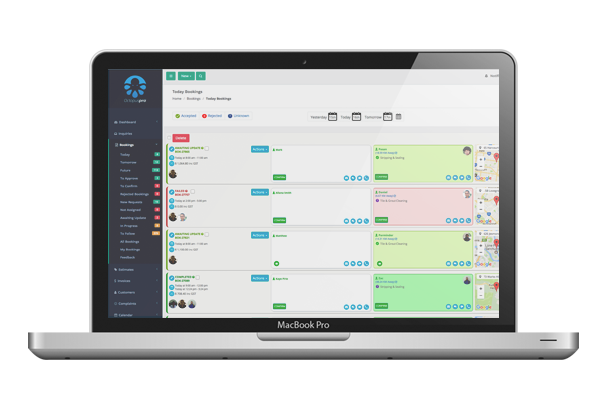
Live job updates and work performed logs
Keep office users informed as fieldworkers update the job, add notes and evidence, complete workflow steps and record work performed. Those updates become part of the booking activity and technician activity log.
 Click to enlarge
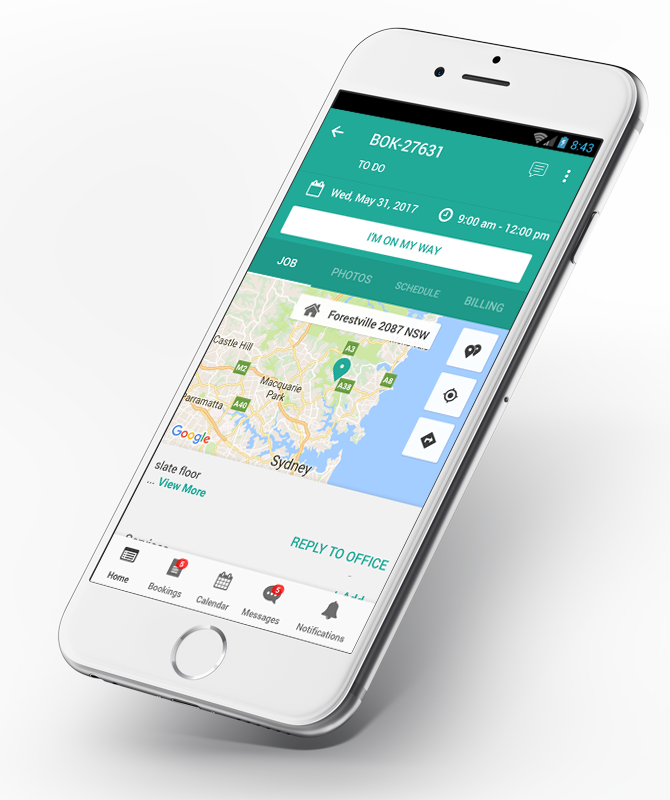
On My Way, arrival and completion milestones
Record On My Way, Arrived, Started and Finished updates with timestamps and, when enabled, booking-level GPS context. This creates a clearer service timeline, ETA history, job status history and proof of attendance.
 Click to enlarge
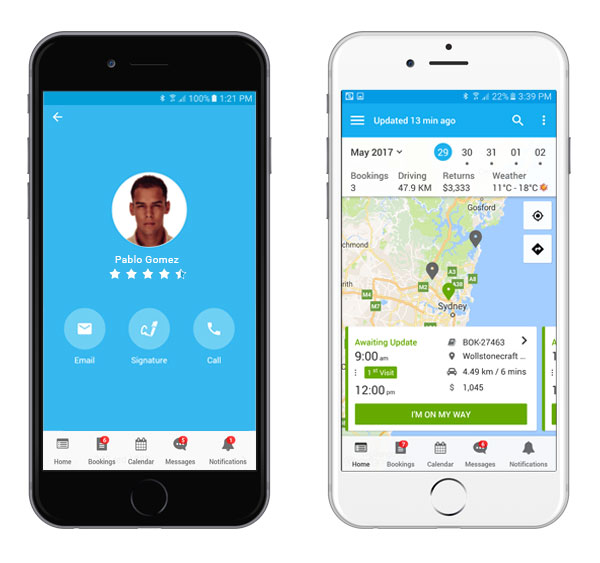
Technician profile, assignment and GPS context
Connect the assigned fieldworker, profile, job status, attendance and permitted location context to the work order. Managers can investigate activity without confusing one technician, visit or customer site with another.
Build service history around the actual thing your team services
A customer may have several homes, vehicles, pets, children, rooms, sites, appliances or equipment items. Save those related records once, select the correct one on each digital work order and build customer service history, asset service history and equipment maintenance history that technicians can review before the next visit.
 Click to enlarge
Reuse saved records
Keep repeatable customer, property, vehicle, dependent, room, site, appliance or equipment details ready for future jobs.
Confirm the correct asset
Help fieldworkers verify the correct person, property, vehicle, equipment item or service location before work begins.
Review connected history
See related bookings, quotes, invoices, communication and activity over time instead of searching across disconnected files.
Support repeat workflows
Give maintenance, warranty, inspection and repeat-service teams clearer context for the next visit.
Capture jobsite documentation, proof of work and customer sign-off
Create audit-ready documentation with controlled ways for fieldworkers, office staff and customers to add jobsite photos, service forms, checklists, completion notes, attachments and digital signatures to the final job record.
 Click to enlarge
Jobsite photo documentation & visual proof
Use job site photo tracking to upload images and documents, associate evidence with the relevant service, label when it was captured and add comments for context. Custom photo tags can organise before-service, damage-found, progress, compliance and after-service proof of work.
 Click to enlarge
Digital service forms, checklists & completion reports
Display the right electronic form at booking creation, check-in, work in progress, status change, check-out or customer feedback. Collect work performed, selections, dates, photos, attachments, signatures and mandatory acknowledgements for consistent job completion reports.
Review who changed what, when it changed and which record was affected
Booking History provides a chronological, read-only job audit trail for key booking events. Pair it with booking activity, customer history, communication logs, technician activity and issue records when you need change history, audit-ready documentation, compliance evidence or a broader investigation.
 Click to enlarge
Lifecycle events
Creation, scheduling, rescheduling, status updates and cancellations.
Operational changes
Assignments, internal notes, important edits and workflow updates.
Financial milestones
Invoice actions, payments, balances and refunds where enabled.
Issue and dispute context
Investigate unexpected changes, complaints and service questions with the relevant record in view.
Keep decisions and follow-up connected to the job—not buried in inboxes
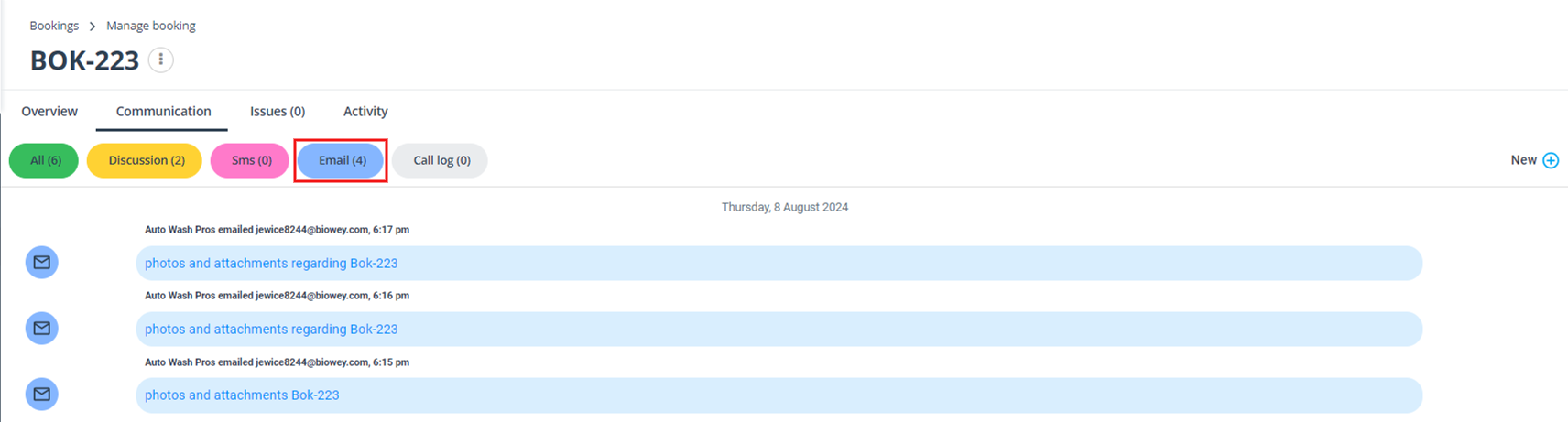
Use booking discussions for job-specific collaboration, review email, SMS and call logs, and connect fieldworker activity, service issues or complaints to the affected work order for a clearer technician activity history and structured follow-up.
 Click to enlarge
Record-specific discussions
Share text, photos, PDFs and operational updates without separating the conversation from the job.
Communication history
Review email, SMS, discussions and call activity available from the booking or customer context.
Structured issue follow-up
Log an owner, category, status, follow-up date and linked booking for service issues or complaints.
Clearer handovers
Keep evidence, decisions and corrective actions accessible for service recovery and quality control.
Turn the live booking into a professional work-order record
Open searchable job records by reference, review the full work order history and export a booking PDF as a digital job sheet, field service report, job completion report or printable service record for customers, staff, subcontractors, site contacts, compliance files or internal archives.
Export and retrieve records
Create a work order or booking confirmation containing the booking reference, customer, services, schedule, notes and selected payment information.
Use the booking list or global search to open the correct record by booking reference and review its complete operational context.
Collect customer-supplied evidence
Allow customers to upload supporting PDFs and documents through the Customer Portal when plans, permits, approvals or specifications are required.
Collect images during online booking or request more later so office staff and fieldworkers understand scope and site conditions before attending.
Control access and self-service
Control who can view or change sensitive job, customer, financial and workflow information using user roles and fieldworker permissions.
Let customers manage permitted booking, profile, attachment, quote and invoice actions through the branded self-service portal.
Common questions about digital job sheets, documentation and work order history
What is field service documentation software?
Field service documentation software keeps the information created throughout a service job connected to the same searchable record. It can combine digital job sheets, work orders, technician notes, jobsite photos, service forms, signatures, communication, invoices, payments, issues, service reports and change history.
Can OctopusPro replace paper job sheets and electronic job sheet apps?
Yes. A booking can act as a connected digital job sheet and work order containing the reference and status, customer, site or asset, scheduled appointments, assigned fieldworkers, services, pricing, notes, attachments, forms, checklists, signatures, communication, invoices, payments, issues and activity history. Visibility depends on enabled modules and permissions.
Can fieldworkers create proof of work and job completion records?
Fieldworkers can use the app to review assigned work, update job status, record work performed, add technician notes, upload jobsite photos or files, complete forms and checklists, collect signatures and create proof of work or proof of service from the field where enabled and permitted.
Can records be linked to properties, vehicles or other assets?
Yes. Customer Properties can represent properties, vehicles, pets, children, equipment, appliances, rooms, sites, bill payers and other repeatable records. The relevant record can be selected on a booking so its service history is easier to review later.
Does OctopusPro keep work order history and a job audit trail?
Yes. Booking History provides a chronological, read-only job audit trail for key booking events. Depending on the workflow, it can include creation, schedule and status changes, assignment updates, operational edits and financial milestones. Broader work order history can also be reviewed through customer, user, fieldworker and communication activity logs.
Can customers upload photos and documents to a job?
Yes, when the relevant Customer Portal settings are enabled. Customers can be asked to upload photos during online booking and can upload supporting PDFs or documents to an existing booking through the portal.
Can I export a field service report or job completion report?
Yes. A booking can be exported as a PDF work order, digital job sheet, booking confirmation or field service report. Depending on the template and settings, it can include the job reference, customer, site, services, schedule, notes, work details and selected payment information.
Is this job sheet, work order history or field service documentation software?
These terms overlap. Business owners may search for job sheet software, a digital job sheet app, electronic job sheet software, digital work order software, field service report software, job history tracking software, work order history software, proof of service software or field service documentation software. This page focuses on the complete operational record and evidence for each job; Field Service CRM covers the broader customer relationship across enquiries, quotes, bookings, invoices, communication, properties, feedback and retention.
Give every job a searchable record your team can trust
Start with a digital work order, add the proof, technician updates and service-report details your workflow needs, and keep searchable job history ready for invoicing, compliance, support, repeat work and operational review.